1. 서론
The Metzler VDM10 2.0 Horizon is an advanced modular video intercom system designed for both single and multi-family buildings, supporting up to 500 units. It integrates a high-resolution 4-inch IPS display with a Full HD camera, offering secure and convenient access control through various methods.
주요 특징은 다음과 같습니다.
- High-Resolution IPS Display: A 4-inch IPS touchscreen display (IP65, IK08 rated) with an intuitive user interface, activating automatically upon approach.
- 다양한 접근 방법: Supports door opening via RFID cards, customizable PIN codes, and a dedicated smartphone application.
- Full HD Camera with Night Vision: Features a 2 MP ultra-wide-angle camera for clear video, enhanced with infrared night vision for low-light conditions.
- 스마트폰 앱 통합: Provides live video streaming and remote door opening capabilities through a free smartphone app, developed in collaboration with Hikvision. No subscription fees for core functionalities, updates, or data storage.
2. 설정 및 설치
Proper installation is crucial for the optimal performance and security of your Metzler VDM10 2.0 system. It is highly recommended that installation be performed by a qualified professional.
2.1 컴포넌트 오버view
The system typically consists of an outdoor station (the video intercom unit) and optional indoor monitor units. Ensure all components are present before beginning installation.
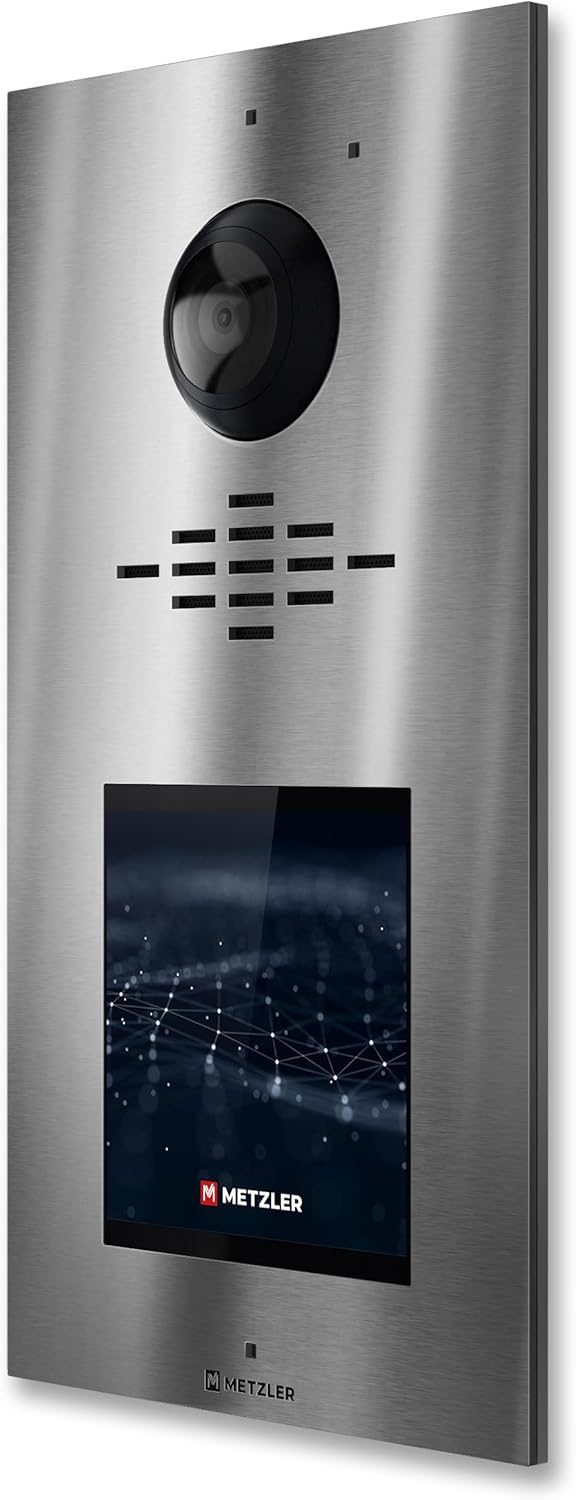
그림 1: 전면 view of the Metzler VDM10 2.0 outdoor station. This image displays the stainless steel finish, the central camera lens, the speaker and microphone grilles, and the integrated 4-inch IPS touchscreen display at the bottom.
2.2 장착 고려 사항
The outdoor station should be mounted at an appropriate height to ensure the camera captures visitors effectively. Consider the typical height of adults and children who will use the intercom.
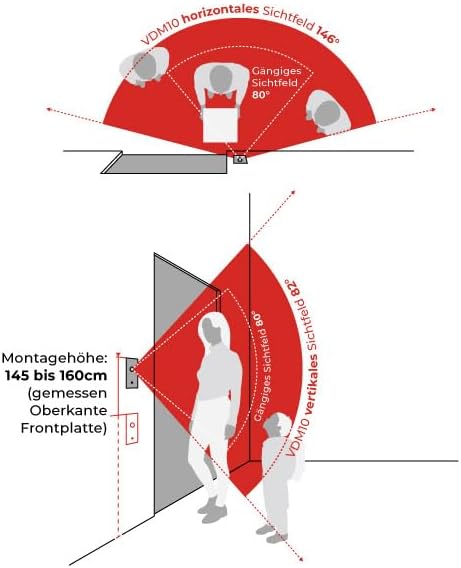
Figure 2: Mounting height and camera field of view. This diagram illustrates the recommended installation height for the VDM10, typically between 145 cm and 160 cm (measured to the top edge of the front plate), and demonstrates the wide 146° horizontal and 82° vertical camera view각도를 나타냅니다.
Ensure the mounting location is secure and protected from direct heavy rain or extreme weather conditions, even though the unit is IP65 rated.
2.3 배선 (2선식 시스템)
The VDM10 2.0 operates as a 2-wire system, simplifying installation. Connect the power and data lines according to the wiring diagram provided in the full installation guide (not included here). Proper polarity and secure connections are essential.
- 전원 공급 장치: Connect to a compatible power source as specified in the detailed electrical requirements.
- 데이터 연결: Establish communication with indoor monitors and network components.
- Door Lock Integration: Connect to your electronic door lock system for remote access control.
After physical installation, configure the system via the touchscreen interface and the smartphone app. This includes setting up user accounts, RFID cards, PIN codes, and network connectivity.
3. 사용 설명서
The Metzler VDM10 2.0 offers multiple ways to interact with visitors and manage access.
3.1 Visitor Interaction
- 통화 시작: Visitors can use the intuitive touchscreen display to select a recipient (e.g., apartment number) and initiate a video call. The display activates automatically when a person approaches.
- 양방향 커뮤니케이션: Once a call is established, residents can communicate with the visitor via an indoor monitor or the smartphone app.
- View라이브 비디오: The 2 MP HD camera provides a live video feed to the indoor monitor and smartphone app, allowing residents to see who is at the door.
3.2 접근 통제
The system supports various secure methods for granting access:
- RFID 카드: Present a pre-programmed RFID card to the integrated reader on the outdoor station to unlock the door.
- PIN 코드: Enter a unique PIN code on the touchscreen keypad. PIN codes can be assigned individually for different users or access points.
- 스마트폰 앱: Use the Metzler smartphone application to remotely unlock the door from anywhere with an internet connection.
- 실내 모니터: Unlock the door directly from an indoor monitor unit during a call or independently.
3.3 스마트폰 앱 사용
Download the official Metzler app from your device's app store. Follow the in-app instructions to pair your smartphone with the VDM10 2.0 system. The app allows you to:
- Receive video calls from the intercom.
- View 카메라에서 라이브 비디오 피드.
- Remotely unlock the door.
- Manage system settings and user access (for administrators).

Figure 3: Metzler VDM10 2.0 installed. This image shows the video intercom unit mounted on a wall, highlighting its modern stainless steel aesthetic and how it integrates into a building's exterior.
4. 유지관리
Regular maintenance ensures the longevity and optimal performance of your Metzler VDM10 2.0 system.
4.1 청소
- 외부: Wipe the stainless steel surface and display with a soft, damp cloth. Avoid abrasive cleaners or solvents that could damage the finish or screen.
- 카메라 렌즈: Gently clean the camera lens with a microfiber cloth to ensure clear video quality. Do not use harsh chemicals.
4.2 소프트웨어 업데이트
The system receives free software updates. Ensure your system is connected to the internet to receive these updates automatically or manually check for them via the system settings or smartphone app. Updates often include performance improvements, new features, and security enhancements.
4.3 정기점검
- 모든 배선 연결부의 안전성과 무결성을 주기적으로 점검하십시오.
- Test the intercom's calling, video, and door-opening functions regularly.
- Ensure the RFID reader and PIN pad are responsive.
5. 문제 해결
If you encounter issues with your Metzler VDM10 2.0, refer to the following common troubleshooting steps:
5.1 No Power / System Unresponsive
- 전원 공급 장치 확인: Ensure the system is receiving power and all power connections are secure.
- 회로 차단기: Verify that the circuit breaker supplying power to the intercom has not tripped.
5.2 영상이 없거나 영상 화질이 나쁨
- Clean Camera Lens: 유지 관리 섹션에 설명된 대로 카메라 렌즈를 부드럽게 닦으십시오.
- 연결 확인: Ensure all video signal cables are securely connected.
- 네트워크 연결성: For app-based viewing, verify your internet connection and the intercom's network status.
5.3 Door Not Unlocking
- Check Door Lock Wiring: Ensure the wiring to the electronic door lock is correct and secure.
- Valid Credentials: Verify that the RFID card or PIN code used is valid and correctly programmed.
- 앱 연결: If using the app, confirm it is connected to the intercom system.
5.4 Cannot Connect to Smartphone App
- 인터넷 연결: Ensure both your smartphone and the intercom system have a stable internet connection.
- 앱 버전: 앱이 최신 버전으로 업데이트되었는지 확인하세요.
- 장치 재페어링: Try removing and re-pairing the intercom system within the app settings.
For persistent issues, consult the full product manual or contact Metzler customer support.
6. 사양
| 특징 | 세부 사항 |
|---|---|
| 상표 | 메츨러 |
| 제조업체 | 메츨러 GmbH |
| 모델 | VDM10 2.0 Horizon |
| 색상 | 스테인리스 스틸 |
| 배선 | 2선식 시스템 |
| 표시하다 | 4인치 IPS 터치스크린 |
| 카메라 | 2 MP Full HD, Ultra-wide-angle, Infrared Night Vision |
| 접근 제어 | RFID Reader, PIN Code, Smartphone App |
| 내구성 등급 | IP65, IK08 |
| 지원되는 단위 | 1~500개 단위 |
7. 보증 및 지원
For warranty information, please refer to the documentation included with your purchase or visit the official Metzler website. Metzler GmbH provides customer support for their products.
If you require technical assistance or have questions regarding your VDM10 2.0 system, please contact Metzler customer service through their official channels. Ensure you have your product model and purchase details available when contacting support.


