소개
The ToughTested MOAB 65 is a high-capacity, rugged portable charger designed to provide reliable power for laptops, smartphones, and other USB-powered devices. With its 40,000mAh battery and advanced fast-charging capabilities, it is an ideal companion for outdoor adventures, remote work, and extended travel. This manual provides essential information for the safe and efficient use of your MOAB 65 portable charger.
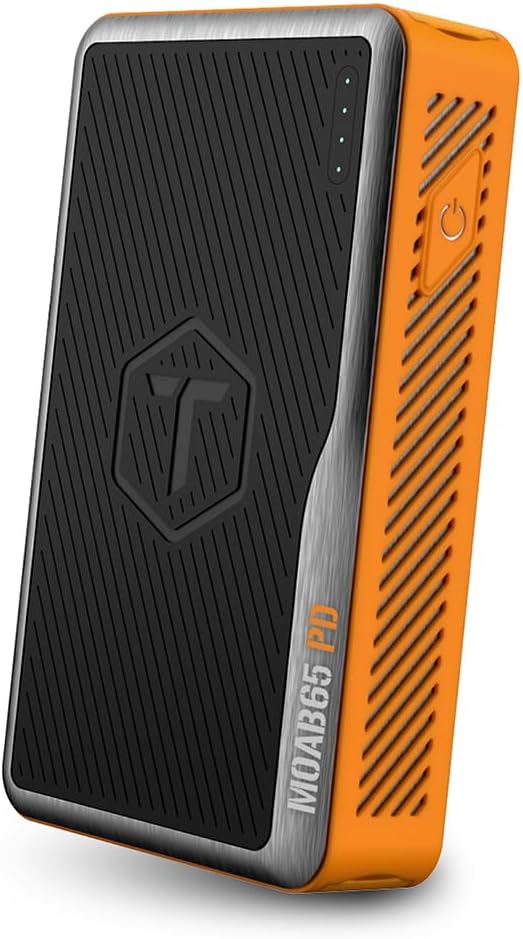
Image: The ToughTested MOAB 65 Portable Charger, showcasing its rugged design and power indicator lights.
안전 정보
부상이나 손상을 방지하기 위해 본 제품을 사용하기 전에 모든 안전 경고 및 사용 설명서를 읽어 주십시오.
- 모바일 기기를 극한의 온도(60°C/140°F 이상 또는 -10°C/14°F 이하)에 노출시키지 마세요.
- 기기를 분해, 개조 또는 수리하려고 시도하지 마십시오. 이는 보증을 무효화하고 기기 손상을 초래할 수 있습니다.
- Keep away from water and liquids. While the MOAB 65 is IP64 rated for dust and water resistance, it is not designed for submersion.
- 기기를 떨어뜨리거나 심한 충격을 주지 마십시오.
- 인증된 충전 케이블과 어댑터만 사용하세요.
- 어린이의 손이 닿지 않는 곳에 보관하세요.
- 보조 배터리는 지역 규정에 따라 책임감 있게 폐기하십시오. 일반 생활 쓰레기로 버리지 마십시오.
패키지 내용
패키지에 모든 품목이 들어 있는지 확인하세요.
- ToughTested MOAB 65 Portable Charger
- Heavy-duty USB-C to USB-C Power Delivery PET Cable
- 사용 설명서 (본 문서)
Image: The included heavy-duty USB-C to USB-C Power Delivery PET cable.
제품 끝view
Familiarize yourself with the components of your MOAB 65 portable charger.
| 요소 | 설명 |
|---|---|
| 전원 버튼 | 보조 배터리를 작동시키고 배터리 잔량을 확인합니다. |
| LED 전원 표시등 | 배터리 잔량을 표시합니다. |
| USB-C PD (Input/Output) Port | 65W Power Delivery for charging laptops and rapid charging of the power bank itself. |
| USB-C PD (Output) Port | 20W Power Delivery for fast charging smartphones and other compatible devices. |
| USB-A QC 3.0 포트 | Quick Charge 3.0 output for fast charging non-Type C devices. |
| Sealed Port Covers | Protects ports from dust and water, maintaining IP64 rating. |

이미지: 측면 view of the MOAB 65 showing the USB-A and USB-C output ports with their protective covers.
설정
Charging the MOAB 65 Portable Charger
Before first use, fully charge your MOAB 65. It is recommended to use a 65W USB-C PD wall charger (not included) for the fastest charging time.
- Open the sealed port cover for the USB-C PD (Input/Output) port.
- Connect the included USB-C to USB-C cable to the USB-C PD (Input/Output) port on the MOAB 65.
- Connect the other end of the cable to a compatible USB-C PD wall charger.
- The LED power indicators will illuminate and blink to show charging progress. All four LEDs will be solid when fully charged.
A full charge can take several hours depending on the power of your wall charger.
작동 지침
배터리 수준 확인
전원 버튼을 한 번 눌러 배터리 잔량을 확인하세요. LED 표시등이 켜집니다.
- 4개 LED: 75-100%
- 3개 LED: 50-75%
- 2개 LED: 25-50%
- LED 표시등 1개: 0~25% (곧 충전하세요)
충전 장치
The MOAB 65 features multiple output ports for versatile charging.
- For Laptops (USB-C PD 65W):
Open the sealed port cover for the USB-C PD (Input/Output) port. Connect your laptop's USB-C charging cable to this port and to your laptop. The MOAB 65 will automatically begin charging.

Image: The MOAB 65 connected to a laptop via its USB-C PD port, demonstrating laptop charging capability.

Image: Visual representation highlighting the 65W USB-C Power Delivery input/output for laptops.
- For Smartphones & Tablets (USB-C PD 20W or USB-A QC 3.0):
Open the sealed port cover for the desired output port (USB-C or USB-A). Connect your device's charging cable to the MOAB 65 and to your device. The Instasense Processor will automatically detect your device and deliver optimal charging power.
Image: Close-up of the MOAB 65's output ports, including the 20W USB-C PD and QC3 USB-A, designed for fast phone charging.
- 동시 충전:
You can charge multiple devices simultaneously using the available output ports. The MOAB 65 will intelligently distribute power.

Image: Two MOAB 65 units shown side-by-side, illustrating the capability to fast charge laptops and phones concurrently.
Note: For optimal fast charging, ensure your device and cable support Power Delivery (PD) or Quick Charge (QC) technology.
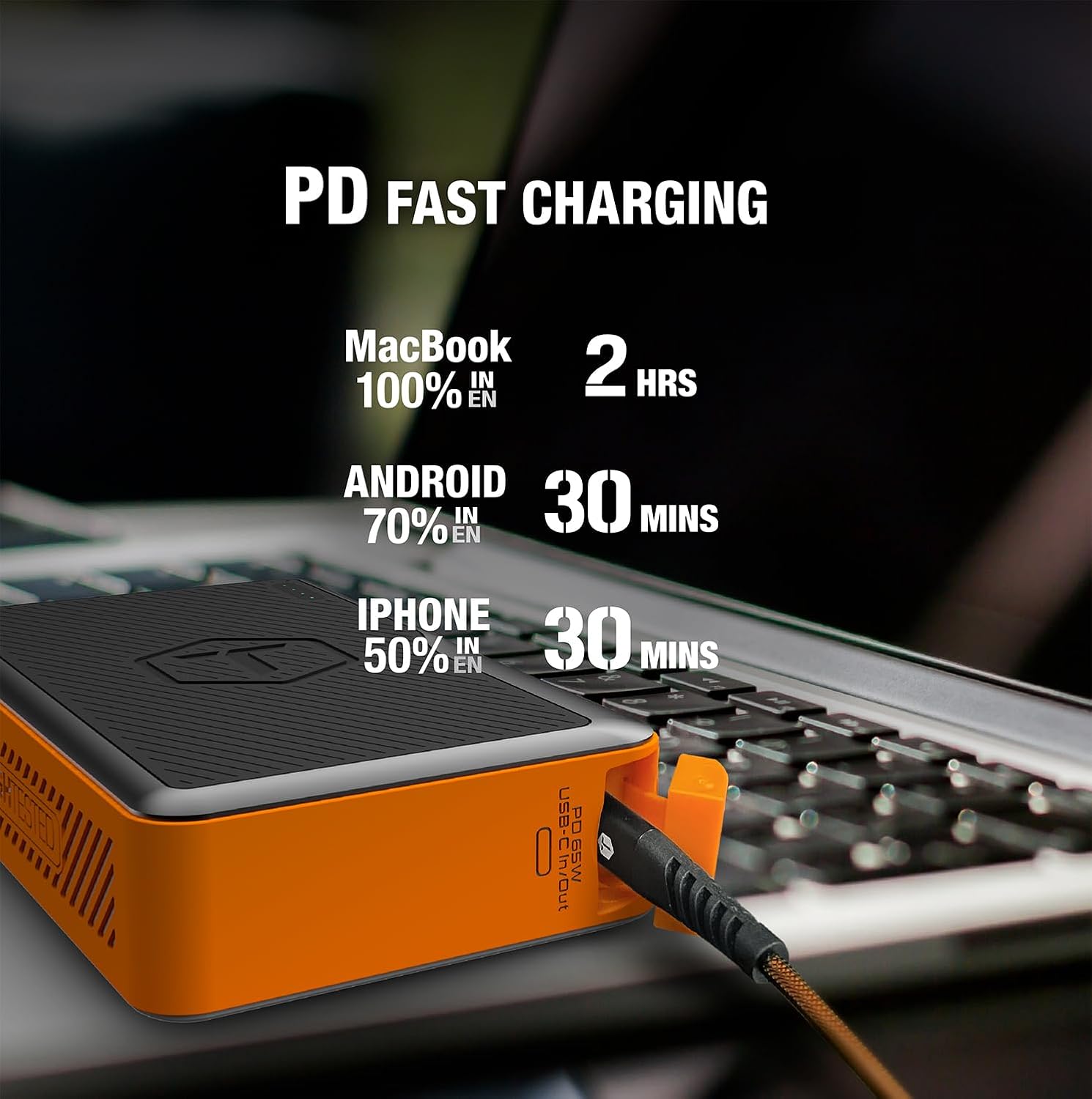
Image: Infographic detailing fast charging times for various devices: MacBook 100% in 2 hours, Android 70% in 30 minutes, iPhone 50% in 30 minutes.
유지
- 청소: Wipe the exterior with a soft, dry cloth. Do not use harsh chemicals or abrasive materials. Ensure port covers are closed before cleaning.
- 저장: Store the power bank in a cool, dry place away from direct sunlight and extreme temperatures. For long-term storage, charge the power bank to about 50-75% every 3-6 months to maintain battery health.
- 포트 커버: Always ensure the sealed port covers are securely closed when not in use, especially in dusty or wet environments, to maintain the IP64 rating.

Image: The MOAB 65 with water droplets on its surface, illustrating its IP64 weatherproof and dustproof capabilities.
문제 해결
| 문제 | 가능한 원인 | 해결책 |
|---|---|---|
| 보조 배터리가 충전되지 않음 | 케이블 또는 어댑터 문제; 보조 배터리 완전 방전; 포트 불량. | Try a different USB-C cable and wall adapter. Ensure the adapter is powerful enough (e.g., 65W PD). Allow a few minutes for a deeply discharged unit to respond. |
| 보조 배터리에서 장치가 충전되지 않음 | Power bank low on charge; incorrect cable; device not compatible; power bank in standby. | Check power bank battery level. Ensure cable is securely connected and functional. Try a different port. Press the power button to activate output. |
| 느린 충전 | Cable not supporting fast charge; device not supporting fast charge; multiple devices connected. | Use a certified PD/QC compatible cable. Ensure your device supports fast charging. Disconnect other devices if faster charging is needed for one specific device. |
| LED 표시기가 작동하지 않음 | Minor software glitch; internal issue. | Try fully discharging and then recharging the power bank. If the issue persists, contact customer support. |
명세서
| 특징 | 세부 사항 |
|---|---|
| 모델 | MOAB 65 |
| 배터리 용량 | 40,000mAh(142Wh) |
| USB-C PD (Input/Output) | 65W 전력 공급 |
| USB-C PD (Output) | 20W 전력 공급 |
| USB-A(출력) | 퀵차지 3.0 |
| 치수 | 7 x 4 x 1.5 인치 |
| 무게 | 1.8파운드 |
| IP 등급 | IP64 (Dustproof & Water Resistant) |
| 배터리 유형 | 리튬 이온 |
| 색상 | 블랙 / 오렌지 |
보증 및 지원
The ToughTested MOAB 65 Portable Charger comes with a 5년 보증, ensuring reliability and peace of mind. This warranty covers defects in materials and workmanship under normal use.
For warranty claims, technical support, or any questions regarding your MOAB 65, please contact ToughTested customer service:
- Web대지: Visit the official ToughTested web지원 리소스와 연락처 정보를 제공하는 사이트입니다. www.toughtested.com
- 이메일: Refer to the ToughTested web최신 지원 이메일 주소는 사이트에서 확인하세요.
- 핸드폰: Refer to the ToughTested web최신 고객 지원 전화번호는 해당 사이트에서 확인하세요.
Please have your product model (MOAB 65) and proof of purchase ready when contacting support.

Image: ToughTested "Built for Every Adventure" logo, emphasizing the brand's commitment to durability.


