Muse M-980 BT 무선 블루투스 스피커 사용 설명서
Model: M-980 BT
소개
The Muse M-980 BT is a powerful and portable wireless Bluetooth speaker designed to deliver high-quality audio with vibrant LED lighting. Featuring 300W output, IPX6 water resistance, and over 10 hours of music playback, it's perfect for various environments. This manual provides detailed instructions on how to set up, operate, and maintain your speaker, ensuring you get the most out of its features.
중요한 안전 정보
- 제품을 사용하기 전에 이 지침을 주의 깊게 읽으십시오.
- 이 설명서를 향후 참고용으로 보관하세요.
- 스피커를 극한의 온도, 습도 또는 직사광선에 노출시키지 마세요.
- Do not immerse the speaker in water, despite its IPX6 rating. IPX6 protects against strong water jets, not submersion.
- 충전 시에는 제공된 전원 케이블만 사용하십시오.
- 스피커를 분해하거나 개조하려고 하지 마세요.
- 어린이의 손이 닿지 않는 곳에 보관하세요.
- 작동 시 적절한 환기를 확보하십시오.
패키지 내용
아래 나열된 모든 품목이 패키지에 포함되어 있는지 확인하세요.
- Muse M-980 BT Wireless Bluetooth Speaker
- 전원 케이블
- USB-C 충전 케이블
- 보조 입력 케이블
- 사용 설명서(본 문서)
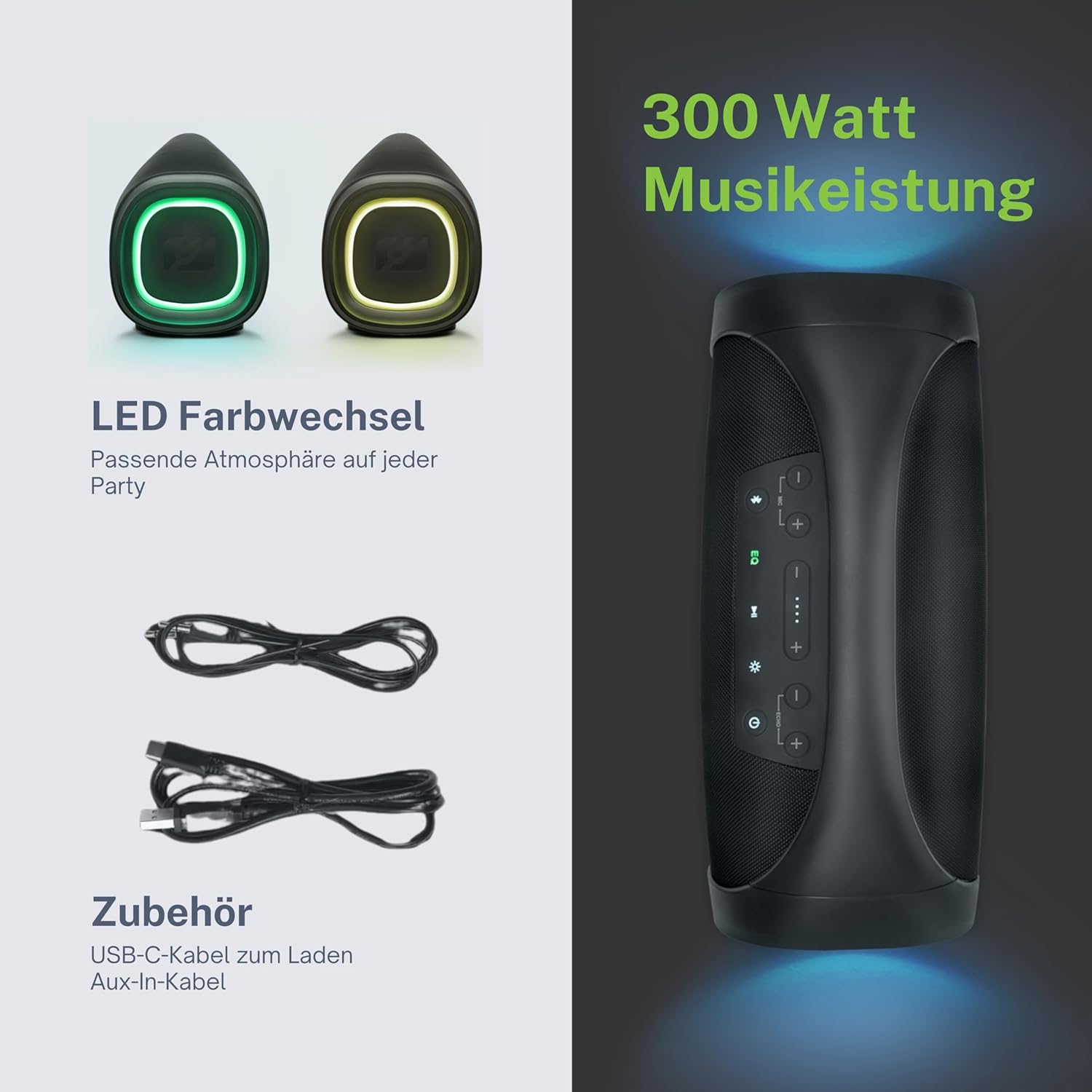
제품 끝view
Familiarize yourself with the various parts and controls of your Muse M-980 BT speaker.


제어판
The top panel of the speaker features various buttons for controlling playback, volume, and other functions:
- 전원 버튼: 스피커를 켜거나 끄려면 길게 누르세요.
- 블루투스 버튼: 블루투스 페어링 모드로 들어가려면 누르세요.
- EQ 버튼: Adjust equalization settings (Bass/Treble).
- 볼륨 크게 / 작게 버튼 : 볼륨을 높이거나 낮추세요.
- 재생/일시 정지 버튼: 오디오 재생을 제어합니다.
- 라이트 모드 버튼: Cycle through different LED light modes.
포트 및 입력
- USB-C 충전 포트: 스피커의 내장 배터리를 충전합니다.
- USB 포트: MP3 재생을 위해 fileUSB 드라이브에서 s.
- 보조 입력: 3.5mm 오디오 케이블을 통해 외부 오디오 장치를 연결합니다.
- Microphone Jacks (x2): 노래방이나 방송용으로 마이크를 연결하세요.
설정
스피커 충전하기
Before first use, fully charge the speaker. Connect the provided USB-C charging cable to the speaker's USB-C port and the other end to a suitable USB power adapter (not included) or a computer's USB port. The battery indicator display will show the charging status. A full charge provides over 10 hours of music playback.
전원 켜기/끄기
를 누르고 계세요 전원 버튼 on the top panel for a few seconds to turn the speaker on. You will hear an audible prompt. To turn off, press and hold the 전원 버튼 다시.
작동 지침
블루투스 연결
- Turn on the Muse M-980 BT speaker. It will automatically enter Bluetooth pairing mode, indicated by a flashing Bluetooth indicator light.
- 모바일 기기(스마트폰, 태블릿, 컴퓨터)에서 Bluetooth를 활성화하고 사용 가능한 기기를 검색하세요.
- Select "M-980 BT" from the list of devices.
- 연결되면 Bluetooth 표시등이 켜지고 확인음이 들립니다.
- 이제 스피커를 통해 기기의 오디오를 재생할 수 있습니다.
AUX 입력 모드
블루투스 기능이 없는 기기에서 오디오를 재생하려면 AUX 입력 단자를 사용하세요.
- Connect one end of the 3.5mm Aux-In cable to the AUX port on the speaker.
- 케이블의 다른 쪽 끝을 외부 장치의 헤드폰 잭이나 오디오 출력에 연결합니다.
- The speaker will automatically switch to AUX mode, or you may need to press a mode button (if available).
- 연결된 기기 또는 스피커의 컨트롤을 사용하여 재생 및 볼륨을 제어하세요.
USB 재생
The speaker supports playing MP3 audio files directly from a USB flash drive:
- MP3가 포함된 USB 플래시 드라이브 삽입 file스피커의 USB 포트에 꽂으세요.
- The speaker will automatically detect the USB drive and begin playing the audio files.
- Use the speaker's playback controls (Play/Pause, Next/Previous) to manage your music.
마이크 사용
The Muse M-980 BT features two microphone jacks for karaoke or public speaking:
- Connect your microphones (not included) to the MIC 1 and/or MIC 2 jacks.
- Adjust the microphone volume using the dedicated controls on the speaker (if available, or through main volume).
- Ensure the main volume of the speaker is set to a comfortable level.
LED 조명 모드
The speaker features dynamic LED lights that enhance your listening experience:
- 를 누르세요 라이트 모드 버튼 to cycle through various pre-set lighting effects and colors.
- Press the button repeatedly to find your preferred light show.
스테레오 페어링(TWS)
You can pair two Muse M-980 BT speakers together for a true wireless stereo experience:
- 두 스피커 모두 전원이 켜져 있고 Bluetooth 장치에 연결되어 있지 않은지 확인하세요.
- On one speaker (this will be the primary speaker), press and hold the Bluetooth button until you hear a specific pairing tone.
- The two speakers will automatically connect to each other. Once connected, the primary speaker's Bluetooth indicator will flash slowly, and the secondary speaker's will be solid.
- Now, connect your mobile device to the primary speaker via Bluetooth as described in the "Bluetooth Connection" section.
- 이제 두 스피커를 통해 오디오가 스테레오로 재생됩니다.
저음 및 고음 조정
사용하세요 EQ 버튼 on the control panel to adjust the bass and treble levels to suit your audio preference.
유지
청소
Wipe the speaker with a soft, dry cloth. Do not use abrasive cleaners, waxes, or solvents. Ensure all ports are dry before charging or connecting devices.
저장
장시간 사용하지 않을 경우, 직사광선과 극한의 온도를 피해 서늘하고 건조한 곳에 보관하세요. 배터리 수명을 유지하려면 최소 3개월에 한 번씩 충전하는 것이 좋습니다.
문제 해결
| 문제 | 가능한 원인 | 해결책 |
|---|---|---|
| 스피커가 켜지지 않습니다. | 배터리가 소진되었습니다. | 제공된 USB-C 케이블을 사용하여 스피커를 충전하세요. |
| 소리가 나지 않습니다. | 볼륨이 너무 낮거나 음소거 상태입니다. 입력 모드가 잘못되었습니다. | Increase volume on both the speaker and the connected device. Ensure the correct input mode (Bluetooth, AUX, USB) is selected. |
| 블루투스 연결에 실패했습니다. | 스피커가 페어링 모드에 있지 않습니다. 기기가 너무 멀리 떨어져 있습니다. 간섭이 발생합니다. | Ensure speaker is in pairing mode. Move device closer to speaker. Turn off other Bluetooth devices. Forget "M-980 BT" on your device and re-pair. |
| 사운드 왜곡. | Volume too high. Audio source quality. | 볼륨을 낮추세요. 다른 오디오 소스를 사용해 보세요. file. Adjust EQ settings. |
| LED 조명이 작동하지 않습니다. | 조명 모드가 꺼져 있거나 오작동 중입니다. | Press the Light Mode Button to activate or cycle through modes. If issue persists, contact support. |
명세서
| 모델명 | M-980BT |
| 모델 번호 | 322950 |
| 출력 전력 | 300 와트 |
| 연결 기술 | 블루투스, USB, AUX |
| 배터리 수명 | 최대 10시간 |
| 방수성 | IPX6(방수) |
| 치수(길이 x 너비 x 높이) | 49.54 x 20.4 x 27.28cm(19.5 x 8.0 x 10.7인치) |
| 무게 | 5.02킬로그램(11.07파운드) |
| 색상 | 검은색 |
| 재료 | 플라스틱 또는 고무 |

보증 및 지원
Your Muse M-980 BT speaker comes with a limited warranty. Please refer to the warranty card included in your package for specific terms and conditions. For technical support, troubleshooting assistance, or warranty claims, please contact Muse customer service through their official web구매 시 제공된 사이트 또는 연락처 정보.
For the latest information and support, visit the official MUSE web대지: www.muse-europe.com


