소개
This manual provides comprehensive instructions for the setup, operation, and maintenance of your new HUAYU RM-L1678 remote control. This remote is designed for use with various AQUOS LCD LED Smart TV models, including GB234WJSA, GB346WJSA, GA455WJSA, GB139WJSA, and G8275WJSA. Please read this manual carefully to ensure proper use and to maximize the lifespan of your device.
1. 설정
1.1 배터리 설치
리모컨에는 AAA 배터리 두 개가 필요합니다(별매). 다음 단계에 따라 설치하세요.
- 리모콘 뒷면에서 배터리함을 찾으세요.
- 배터리 덮개를 아래로 밀거나 걸쇠를 누르고 들어올려 엽니다.
- AAA 배터리 2개를 넣으세요. 양극(+)과 음극(-) 단자가 배터리함 안쪽의 그림과 일치하는지 확인하세요.
- 배터리 덮개를 제자리에 밀어 넣어 딸깍 소리가 날 때까지 밀어 넣습니다.

이미지: 뒤로 view of the remote control with the battery compartment open, illustrating correct battery placement.
1.2 초기 사용
This remote control uses infrared technology and typically does not require programming for compatible AQUOS LCD LED Smart TVs. Simply point the remote towards your TV and press the Power button to test functionality. If the TV does not respond, ensure batteries are correctly installed and the remote has a clear line of sight to the TV's IR receiver.
2. 사용 설명서
The HUAYU RM-L1678 remote control features standard buttons for TV operation. Below is a general guide to common button functions:
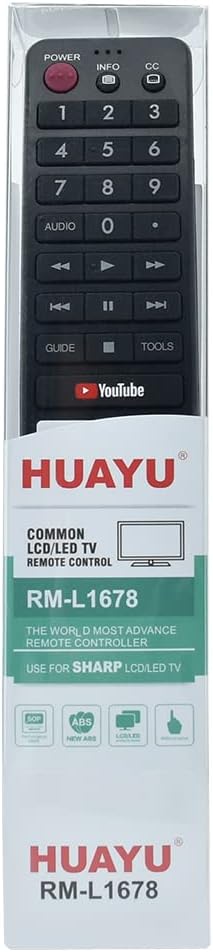
이미지: 앞면 view 리모컨의 버튼 배치도를 강조해서 보여줍니다.
- 전원 버튼: TV를 켜거나 끕니다.
- 숫자 버튼(0-9): TV 채널을 직접 선택하세요.
- 볼륨 높이기/낮추기: TV의 볼륨을 조절합니다.
- 채널 위/아래: TV 채널을 순차적으로 변경합니다.
- 음소거 버튼: TV 소리를 음소거하거나 음소거 해제합니다.
- 입력/소스 버튼: 다양한 입력 소스(HDMI, AV 등) 간 전환 기능을 제공합니다.
- 탐색 버튼(위, 아래, 왼쪽, 오른쪽, 확인): 메뉴를 탐색하고 선택 사항을 확인하는 데 사용됩니다.
- 뒤로/종료 버튼: 이전 메뉴로 돌아가거나 현재 메뉴를 종료합니다.
- Smart TV/App Buttons: Dedicated buttons for accessing smart TV features or specific applications like YouTube (if present and supported by your TV model).
Note: Specific button functionalities may vary slightly depending on your AQUOS TV model. Refer to your TV's user manual for detailed information on advanced features.
3. 유지관리
3.1 청소
To keep your remote control clean and functional:
- 부드럽고 마른 천으로 표면을 닦습니다.
- 잘 지워지지 않는 더러움에는 가볍게 damp천에 물이나 순하고 연마성이 없는 세척제를 묻혀 닦아주세요. 세척제를 리모컨에 직접 뿌리지 마세요.
- 강한 화학 물질, 용제 또는 연마 세척 패드는 리모컨의 마감이나 내부 구성 요소를 손상시킬 수 있으므로 사용하지 마십시오.
3.2 배터리 교체
리모컨의 반응이 느려지거나 작동이 멈추면 배터리를 교체하십시오. 항상 두 개의 배터리를 새 AAA 배터리로 동시에 교체하십시오. 오래된 배터리와 새 배터리를 혼용하거나 종류가 다른 배터리를 사용하지 마십시오.
3.3 보관
Store the remote control in a cool, dry place away from direct sunlight and extreme temperatures. If the remote will not be used for an extended period, remove the batteries to prevent leakage and potential damage.
4. 문제 해결
| 문제 | 가능한 원인 | 해결책 |
|---|---|---|
| 리모컨이 작동하지 않습니다 | 배터리가 방전되었거나 잘못 설치되었습니다. | 배터리를 새 배터리로 교체하고 극성이 올바른지 확인하세요. |
| 원격 응답 없음 | Obstruction between remote and TV's IR sensor; remote too far from TV. | Ensure a clear line of sight to the TV. Move closer to the TV. |
| Certain buttons not functioning | Dirt or debris under buttons; remote damage. | Clean the remote surface. If damage is suspected, consider replacement. |
| TV not responding to specific smart features | TV model does not support the feature; TV software issue. | Verify your TV model's compatibility with the feature. Consult your TV's manual or manufacturer support. |
5. 사양
- 모델 번호: RM-L1678
- 호환성: AQUOS LCD LED Smart TVs (e.g., GB234WJSA, GB346WJSA, GA455WJSA, GB139WJSA, G8275WJSA)
- 무선 연결: 적외선 (IR)
- 전원: AAA 배터리 2개(포함되지 않음)
- 채널: 1
- 제조업체 참조: 1005004724793564 회계연도
- ASIN: B0CTMTG93T
6. 보증 및 지원
이 제품에는 다음이 포함되어 있습니다. 12개월 보증 구매일로부터. 본 보증은 제조상의 결함에 대한 보증이며, 정상적인 사용 환경에서 제품이 의도한 대로 작동하는지 확인합니다.
If you encounter any issues with your product, such as receiving a damaged or incorrect item, please do not hesitate to contact us. We are committed to providing support and will respond to your inquiries within 24 hours.
For support, please refer to the seller's contact information on the purchase platform.


