소개
This manual provides detailed instructions for the setup, operation, and maintenance of your DOOGEE T10E Portable Tablet Keyboard. Please read this manual carefully before using the product to ensure proper functionality and longevity.
The DOOGEE T10E is a versatile Bluetooth keyboard designed to enhance your tablet experience, offering a comfortable typing solution and a protective case. It features a multi-touch trackpad and supports various shortcut modes for increased productivity.
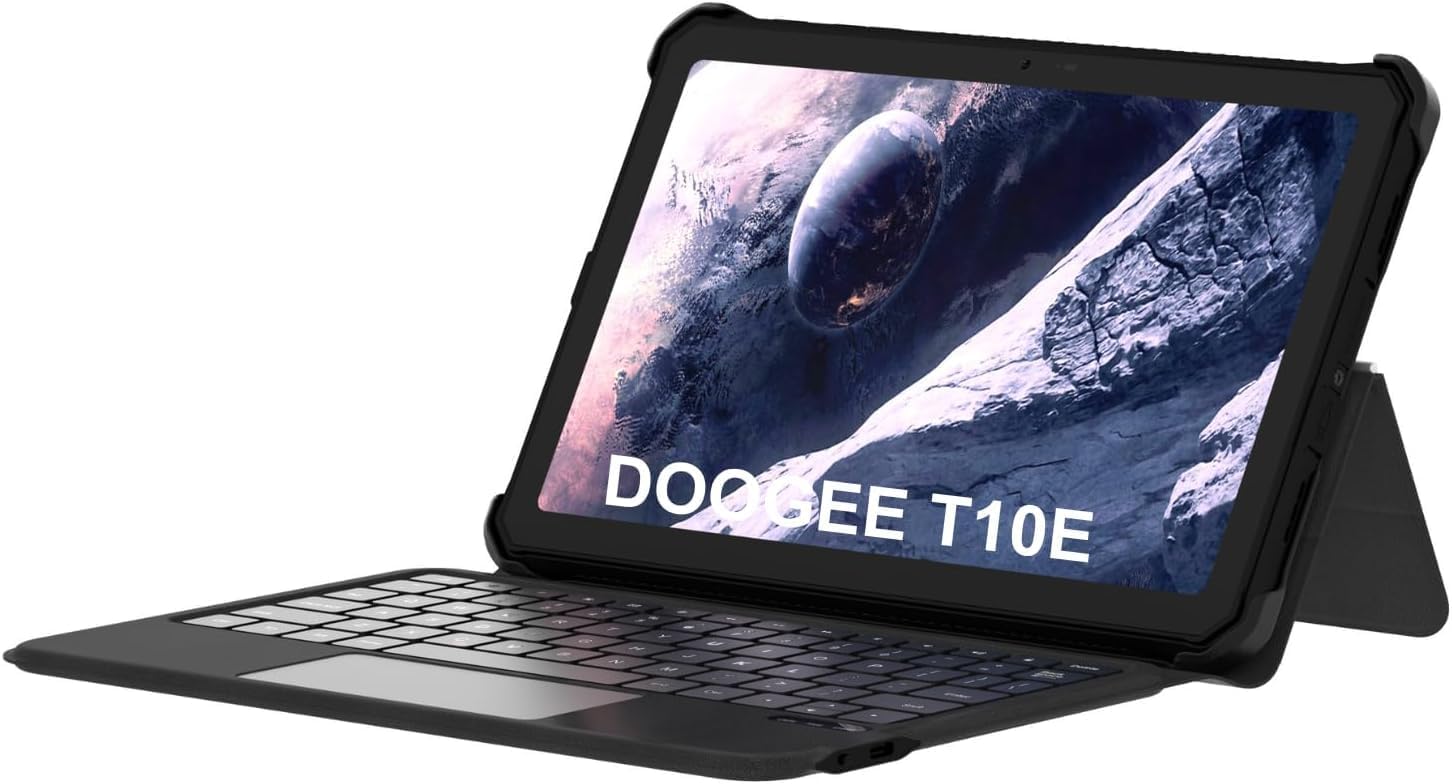
Image: The DOOGEE T10E Portable Tablet Keyboard with a tablet inserted, showcasing its laptop-like form factor.
패키지 내용
패키지에 모든 품목이 들어 있는지 확인하세요.
- DOOGEE T10E Portable Tablet Keyboard
- USB 케이블(충전용)
- 사용 설명서 (본 문서)
설치 지침
1. 키보드 충전
Before initial use, fully charge the keyboard. Connect the provided USB cable to the keyboard's charging port and the other end to a USB power adapter (not included) or a computer's USB port.
The charging indicator light will typically show red while charging and turn off or change color when fully charged. A full charge ensures extended usage time.
2. Attaching Your Tablet to the Case
The keyboard comes integrated with a protective case. Carefully align your tablet with the case's frame and gently press it into place, ensuring all edges are securely fitted. The case is designed to protect your tablet from scratches and bumps.

Image: The DOOGEE T10E keyboard case, showing the tablet slot and the detachable keyboard.
3. 블루투스 페어링
To connect the keyboard to your tablet via Bluetooth:
- Ensure the keyboard is powered on and fully charged. Look for a power switch, usually on the side or back of the keyboard.
- Activate Bluetooth on your tablet. Navigate to your tablet's 설정 > 블루투스.
- 키보드에서 다음을 누르세요. 연결하다 or 편성 button (often indicated by a Bluetooth icon or a specific function key combination, e.g., Fn + C). The Bluetooth indicator light on the keyboard will start blinking, indicating it's in pairing mode.
- On your tablet, search for available Bluetooth devices. You should see "DOOGEE T10E Keyboard" or a similar name appear in the list.
- Select the keyboard from the list to initiate pairing. Your tablet may display a pairing code; type this code on the keyboard and press 입력하다.
- Once paired, the Bluetooth indicator light on the keyboard will stop blinking and remain solid, or turn off. Your tablet will confirm the connection.

Image: The DOOGEE T10E keyboard case highlighting Bluetooth LE Pairing, Multi-touch Trackpad, and Multi Shortcut Modes.
작동 지침
1. 기본 키보드 기능
The DOOGEE T10E features a standard QWERTY layout with 64 keys, providing a comfortable typing experience. All standard alphanumeric keys, symbols, and function keys (F1-F12) are available.
- 기능 키(Fn): 많은 키에는 키를 누르고 있으면 사용할 수 있는 보조 기능이 있습니다. Fn key and pressing the desired function key (e.g., volume control, media playback, screen brightness). Refer to the keycap legends for specific functions.
- Caps Lock : 를 누르세요 캡스락 key to toggle uppercase letters. An indicator light may illuminate when Caps Lock is active.
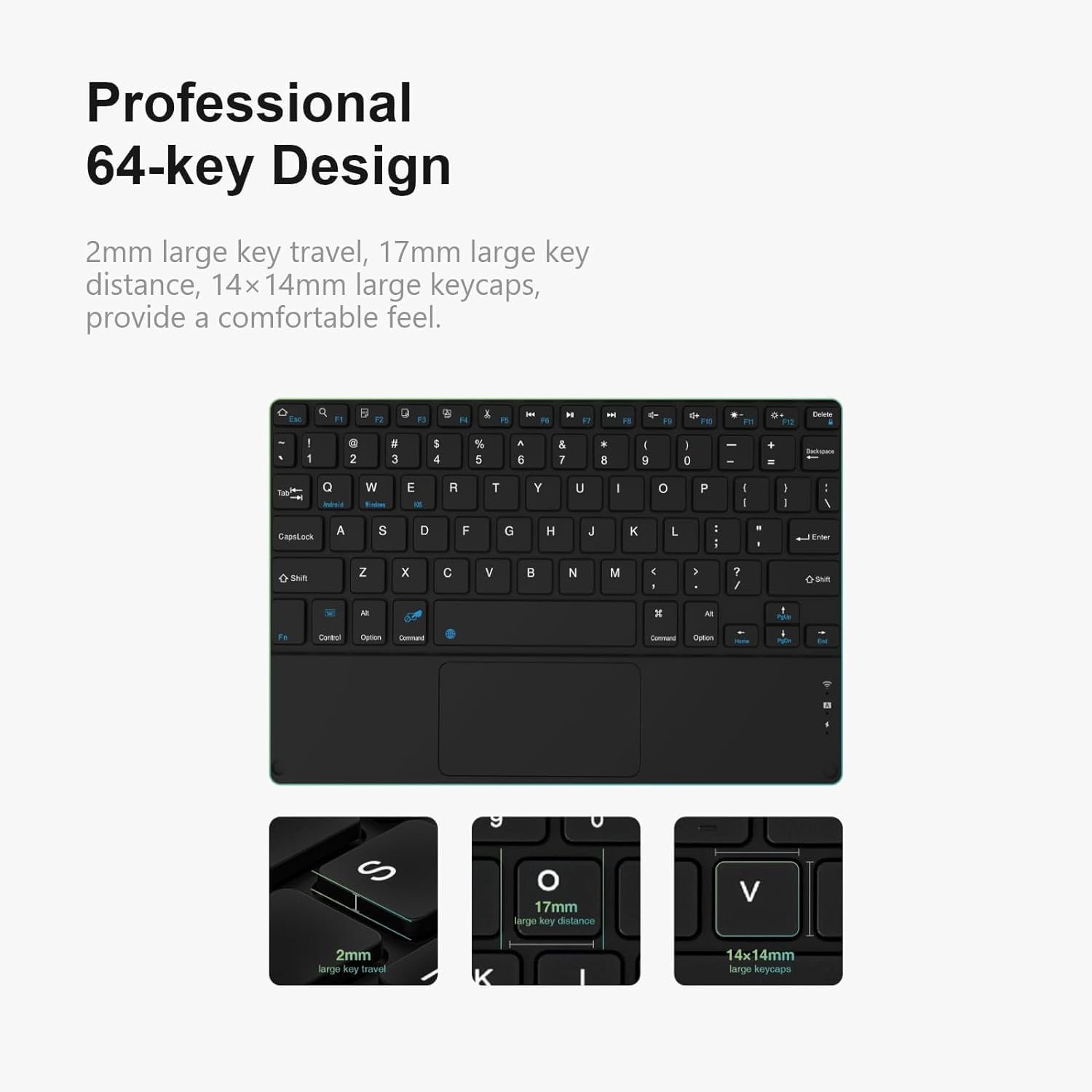
이미지: 상세 view of the DOOGEE T10E keyboard's 64-key layout, showing key travel, key distance, and keycap size.
2. 터치패드 사용법
The integrated multi-touch trackpad (approximately 3772mm²) allows for intuitive navigation and control of your tablet. It supports various gestures:
- 단일 손가락 탭: 왼쪽 클릭과 같은 기능을 합니다.
- 두 손가락 탭: Functions as a right-click (context menu).
- 싱글 핑거 드래그: 커서를 이동합니다.
- 두 손가락 스크롤: Scrolls up or down on web 페이지 또는 문서.
- 확대/축소하려면 핀치하세요: 두 손가락을 사용하여 확대하거나 축소하여 확대합니다.
- 스와이프 제스처: Depending on your tablet's operating system, additional multi-finger swipe gestures may be supported for app switching or other functions.

Image: The DOOGEE T10E keyboard's large touchpad, illustrating various touch gestures for full screen control.
3. Multi Shortcut Modes
The keyboard supports various shortcut modes to enhance productivity. These shortcuts often involve combinations of the Fn key with other keys, or specific key combinations for common operating system functions. Consult your tablet's operating system documentation for a full list of supported keyboard shortcuts.
유지
Proper maintenance ensures the longevity and performance of your DOOGEE T10E keyboard.
- 청소: 부드럽고 털이 없는 천을 살짝 사용하세요.ampened with water or a mild cleaning solution to wipe the keyboard and case surfaces. Avoid harsh chemicals, abrasive cleaners, or excessive moisture.
- 먼지 제거: 압축 공기를 사용하여 키 사이의 먼지와 이물질을 제거합니다.
- 저장: When not in use, store the keyboard in a cool, dry place away from direct sunlight and extreme temperatures. Ensure the tablet is securely in the case to protect both devices.
- 충전 중: Recharge the keyboard regularly, even if not used frequently, to maintain battery health.
문제 해결
If you encounter issues with your DOOGEE T10E keyboard, refer to the following common problems and solutions:
- 키보드가 Bluetooth를 통해 연결되지 않음:
- 키보드의 전원이 켜져 있고 완전히 충전되어 있는지 확인하세요.
- 태블릿에서 블루투스가 켜져 있는지 확인하세요.
- Place the keyboard and tablet within close proximity (within 10 meters).
- Try unpairing the keyboard from your tablet's Bluetooth settings and then re-pairing it.
- 태블릿과 키보드를 모두 재시작하세요.
- Keys are not responding:
- 키보드가 블루투스로 연결되어 있는지 확인하세요.
- 키보드가 충분히 충전되었는지 확인하세요.
- 키보드와 태블릿을 재시작하세요.
- Touchpad is not working:
- Verify the keyboard is connected.
- 터치패드가 실수로 비활성화되지 않았는지 확인하십시오 (일부 키보드에는 터치패드를 켜고 끄는 기능 키가 있습니다).
- Clean the touchpad surface to remove any obstructions.
- 짧은 배터리 수명:
- 키보드를 사용하기 전에 완전히 충전되었는지 확인하십시오.
- Reduce backlight usage if applicable (this model does not specify backlight, but it's a general tip).
- 사용하지 않을 때는 키보드를 끄세요.
명세서
| 특징 | 세부 사항 |
|---|---|
| 상표 | 두기 |
| 모델 | T10E |
| 호환 장치 | 노트북, 스마트 TV, 스마트폰, 태블릿 |
| 키보드 설명 | 독립형 |
| 스타일 | 현대의 |
| 재료 | 아크릴로 니트릴 부타디엔 스티렌 |
| 포함된 구성 요소 | USB 케이블 |
| 전원 | 강화 된 USB |
| 스위치 유형 | 막 |
| 키보드 레이아웃 | 쿼티 |
| 품목 무게 | 1.37파운드(0.62kg) |
| 패키지 크기 | 11.3 x 7.44 x 1.18인치(28.7 x 18.9 x 3cm) |
보증 및 지원
For warranty information and technical support, please refer to the warranty card included with your product or contact DOOGEE customer service directly. You can typically find contact details on the official DOOGEE web사이트나 소매업체를 통해 구매하세요.
보증 청구를 위해 구매 증빙서류로 구매 영수증을 보관하세요.


