1. 서론
The HIKMICRO ECO-V Handheld Thermography Camera is a versatile thermal imaging device designed for various professional applications. It offers thermal, bi-spectrum image fusion, and visible light modes to meet diverse business needs. This manual provides essential information for the safe and effective operation of your ECO-V camera.
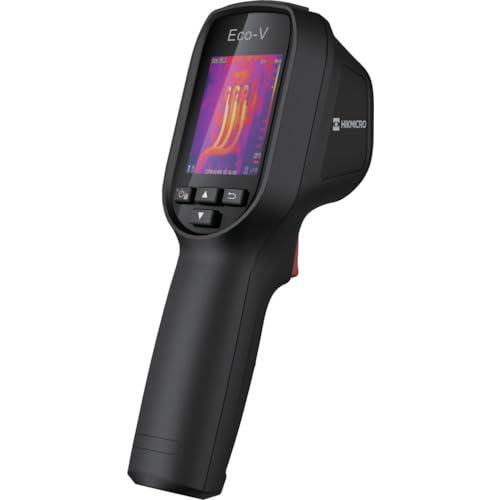
Figure 1: HIKMICRO ECO-V Handheld Thermography Camera
2. 안전 정보
본 제품을 사용하기 전에 모든 안전 경고 및 지침을 읽고 이해하십시오. 지침을 따르지 않을 경우 감전, 화재 또는 심각한 부상이 발생할 수 있습니다.
일반 안전 예방 조치
- 가연성 액체, 가스 또는 먼지가 있는 곳 등 폭발 위험이 있는 환경에서는 장치를 작동하지 마세요.
- 장치를 물과 기타 액체에서 멀리하세요.
- 장치를 열거나 개조하지 마십시오. 모든 정비는 자격을 갖춘 기술자에게 맡기십시오.
- Use only HIKMICRO-approved accessories.
- Avoid direct exposure of the thermal lens to strong light sources (e.g., sun, laser) as this may damage the detector.
배터리 안전
- The device contains a built-in Lithium-ion battery. Do not expose the battery to excessive heat, direct sunlight, or fire.
- 배터리를 뚫거나, 열거나, 분해하지 마십시오.
- Charge the battery only with the provided USB cable and a compatible power adapter.
- 현지 규정에 따라 배터리를 폐기하십시오.
3. 패키지 내용
The HIKMICRO ECO-V package includes the following items:
- HIKMICRO Handheld Thermography Camera ECO-V
- USB Type-C 케이블
- 빠른 시작 가이드 (명시적으로 언급되지는 않았지만 기본적으로 제공되는 가이드)
- Calibration Certificate (not explicitly mentioned but standard)
Video 3.1: Unboxing the HIKMICRO M-Series (similar to ECO-V, showing typical package contents and device appearance).
4. 디바이스 오버view
Familiarize yourself with the physical components and interface of your HIKMICRO ECO-V camera.
외관 및 인터페이스
The ECO-V features a compact, ergonomic design for comfortable handheld use. Key components include the thermal lens, optical lens, laser indicator, white light, trigger button, navigation buttons, and a 2.4-inch display.
Video 4.1: This video demonstrates the physical appearance and interface of a HIKMICRO M-Series camera, which shares similar design elements and interface components with the ECO-V.
5. 설정
5.1 장치 충전
Before initial use, fully charge the device's built-in Lithium-ion battery.
- 제공된 USB Type-C 케이블을 기기의 USB 포트에 연결하십시오.
- Connect the other end of the USB cable to a compatible power adapter (5V2A recommended) and plug it into a power outlet.
- The charging indicator will show red during charging and turn green when fully charged.
Video 5.1: This HIKMICRO ECO operation video demonstrates the charging process for the device.
5.2 전원 켜기/끄기
To power on the device, press and hold the power button for more than 6 seconds. To power off, press and hold the power button again until the device shuts down.
Video 5.2: This HIKMICRO ECO operation video demonstrates how to power on the device.
6. 사용 설명서
This section covers the basic and advanced operational features of your ECO-V camera.
6.1 Image Capture and Display
To capture a thermal image, aim the camera at the target and press the trigger button. The captured image will be saved to the internal EMMC storage. To view saved images, navigate to the 'Albums' section in the menu.
Video 6.1: This HIKMICRO ECO operation video demonstrates image capture and viewing saved snapshots.
6.2 측정 도구
The ECO-V provides various measurement tools to analyze thermal images:
- 핫스팟: Automatically identifies and displays the highest temperature point.
- 냉점: Automatically identifies and displays the lowest temperature point.
- 센터 스팟: 화면 중앙에 온도가 표시됩니다.
Video 6.2: This HIKMICRO ECO operation video demonstrates the use of measurement tools like hot, cold, and center spots.
6.3 SuperIR 이미지 향상
SuperIR technology enhances the thermal image resolution, providing more detail for analysis. You can enable or disable this feature in the settings menu.
Video 6.3: This HIKMICRO ECO operation video demonstrates how to enable and use the SuperIR image enhancement feature.
6.4가지 이미지 모드
The ECO-V supports multiple image modes for different inspection needs:
- 열의: 열화상 이미지만 표시합니다.
- 퓨전: Blends the thermal and visible light images for enhanced detail.
- PIP(Picture-in-Picture): Overlays a smaller thermal image on a visible light image.
- 광학: Displays only the visible light image.
Video 6.4: This HIKMICRO B10S product video demonstrates switching between different image modes, including Thermal, Fusion, PIP, and Optical.
6.5 Parallax Correction
When using fusion modes, adjust the parallax correction based on the distance to the target to ensure accurate alignment between thermal and visible images.
Video 6.5: This HIKMICRO B10S product video demonstrates how to adjust parallax correction for accurate image fusion.
6.6 Palette Adjustment
Select from various color palettes (e.g., White Hot, Black Hot, Rainbow, Ironbow) to visualize temperature differences more effectively. This can be adjusted in the settings menu.
Video 6.6: This HIKMICRO B10S product video demonstrates how to adjust color palettes.
6.7 방사율 및 거리 설정
For accurate temperature measurements, it is crucial to set the correct emissivity value for the target material and the distance to the target. Refer to the general emissivity reference table in the specifications section.
Video 6.7: This HIKMICRO ECO operation video demonstrates setting emissivity and distance for accurate temperature readings.
6.8 레이저 포인터
The built-in laser pointer helps to precisely identify the measurement target. It can be enabled or disabled in the settings menu.
Video 6.8: This HIKMICRO ECO operation video demonstrates how to enable and use the laser pointer.
6.9 고온 경보
Set a high temperature alarm threshold to be notified when temperatures exceed a predefined limit. This feature is useful for identifying potential overheating issues.
Video 6.9: This HIKMICRO B10S product video demonstrates how to set a high temperature alarm.
6.10 Hotspot Connection
The ECO-V can connect to a mobile device via Wi-Fi hotspot for live viewing and data transfer. Enable the Wi-Fi hotspot function in the device settings and connect your mobile device.
Video 6.10: This HIKMICRO M-Series video demonstrates how to establish a hotspot connection with a mobile device.
6.11 하이크마이크로 Viewer App Connection
HIKMICRO를 다운로드하세요 Viewer app on your mobile device to access live view, manage images and videos, and generate reports. Connect the device to your phone via Wi-Fi.
Video 6.11: This HIKMICRO Pocket series video demonstrates connecting the device to the HIKMICRO Viewer app for various functions.
7. 유지관리
7.1 청소
- 부드러운 천으로 기기 본체를 닦아주세요.amp 천. 연마성 세척제나 용매를 사용하지 마십시오.
- Gently clean the lenses with a lens cleaning cloth. Avoid touching the lens surface with bare hands.
7.2 보관
- 기기를 서늘하고 건조한 곳에 보관하고, 직사광선과 극한의 온도를 피하세요.
- 장기간 보관할 경우 배터리를 부분적으로 충전(약 50%)하고 몇 달에 한 번씩 완전히 충전하여 배터리 수명을 유지하십시오.
8. 문제 해결
If you encounter issues with your HIKMICRO ECO-V, refer to the following common problems and solutions:
| 문제 | 가능한 원인 | 해결책 |
|---|---|---|
| 장치 전원이 켜지지 않음 | 배터리 부족; 기기 고장 | Charge the battery; Contact support |
| 부정확한 온도 판독값 | Incorrect emissivity/distance settings; Dirty lens | Adjust emissivity/distance; Clean the lens |
| Cannot connect to Wi-Fi hotspot | Incorrect password; Hotspot not enabled | Verify password; Enable hotspot in settings |
9. 사양
Detailed technical specifications for the HIKMICRO ECO-V camera:
| 특징 | 사양 |
|---|---|
| 모델 | 에코-V |
| 측정 온도 범위 | -20°C ~ 550°C |
| Minimum Temperature Display | 0.1도 |
| 분야 View (시야) | 50° × 50° |
| 공간 해상도(IFOV) | 8.89 밀리라드 |
| 작동 온도 범위 | -10°C ~ 50°C |
| 보관 온도 범위 | -40°C ~ 70°C |
| 디스플레이 크기 | 2.4인치 |
| 전원 | 내장 리튬 이온 배터리 |
| 배터리 작동 시간 | 8시간 |
| 와이파이 | 사용할 수 없음 |
| 보호 수준 | IP54 |
| 인터페이스 | USB 타입-C |
| 픽셀 피치 | 12μm |
| Measuring Wavelength | 7.5-14μm |
| NETD | < 40mK(@ 25°C, F#=1.0) |
| 초점거리 | 1.35mm (XNUMXmm) |
| 구멍 | F1.0 |
| 최소 초점 거리 | 0.1m(0.33피트) |
| 프레임 속도 | 25Hz |
| 초점 시스템 | 초점 없음 |
| 기록 매체 | EMMC (4GB) |
| 이미지 저장 용량 | 30,000개의 이미지 |
| 영상 File 체재 | BMP (includes measurement data) |
| 열화상 해상도 | 96×96 (9,216 pixels) |
| 가시광선 이미지 해상도 | 640×480 |
| 정확성 | ±2°C or ±2% (whichever is greater), when ambient temperature is 15°C to 35°C and target temperature is 0°C or above. |
| 재료 | 폴리카보네이트, ABS수지 |
| 무게 | 360g |
General Emissivity Reference
| 재료 | Emissivity |
|---|---|
| 인간의 피부 | 0.98 |
| 인쇄 회로 기판 | 0.91 |
| 시멘트 콘크리트 | 0.95 |
| 도예 | 0.92 |
| 고무 | 0.95 |
| 페인트 | 0.93 |
| 목재 | 0.85 |
| 벽돌 | 0.96 |
| 모래 | 0.90 |
| 토양 | 0.92 |
| 면 | 0.98 |
| 판지 | 0.90 |
| 백 | 0.96 |
| 물 | 0.96 |
10. 보증 및 지원
HIKMICRO products are covered by a limited warranty. For detailed warranty terms and conditions, please refer to the official HIKMICRO web사이트를 방문하거나 현지 유통업체에 문의하세요.
고객 지원
If you require technical assistance, troubleshooting, or have questions about your ECO-V camera, please contact HIKMICRO customer support through their official web사이트 또는 제품 포장에 제공된 연락처 정보를 참조하세요.