1. 서론
The ZEBRONICS Riser Party DJ Speaker is designed to deliver a powerful audio experience with versatile connectivity and entertainment features. This manual provides detailed instructions for setting up, operating, and maintaining your speaker to ensure optimal performance.
2. 패키지 내용
다음 항목에 대한 상자를 체크해 주세요.
- 1 x ZEBRONICS Riser Party DJ Speaker
- 1 x 원격 제어
- 2 x 무선 UHF 마이크
- 1 x 전원 케이블

Image: ZEBRONICS Riser Party DJ Speaker with included accessories.
3. 제품 오버view
3.1 상단 패널 컨트롤
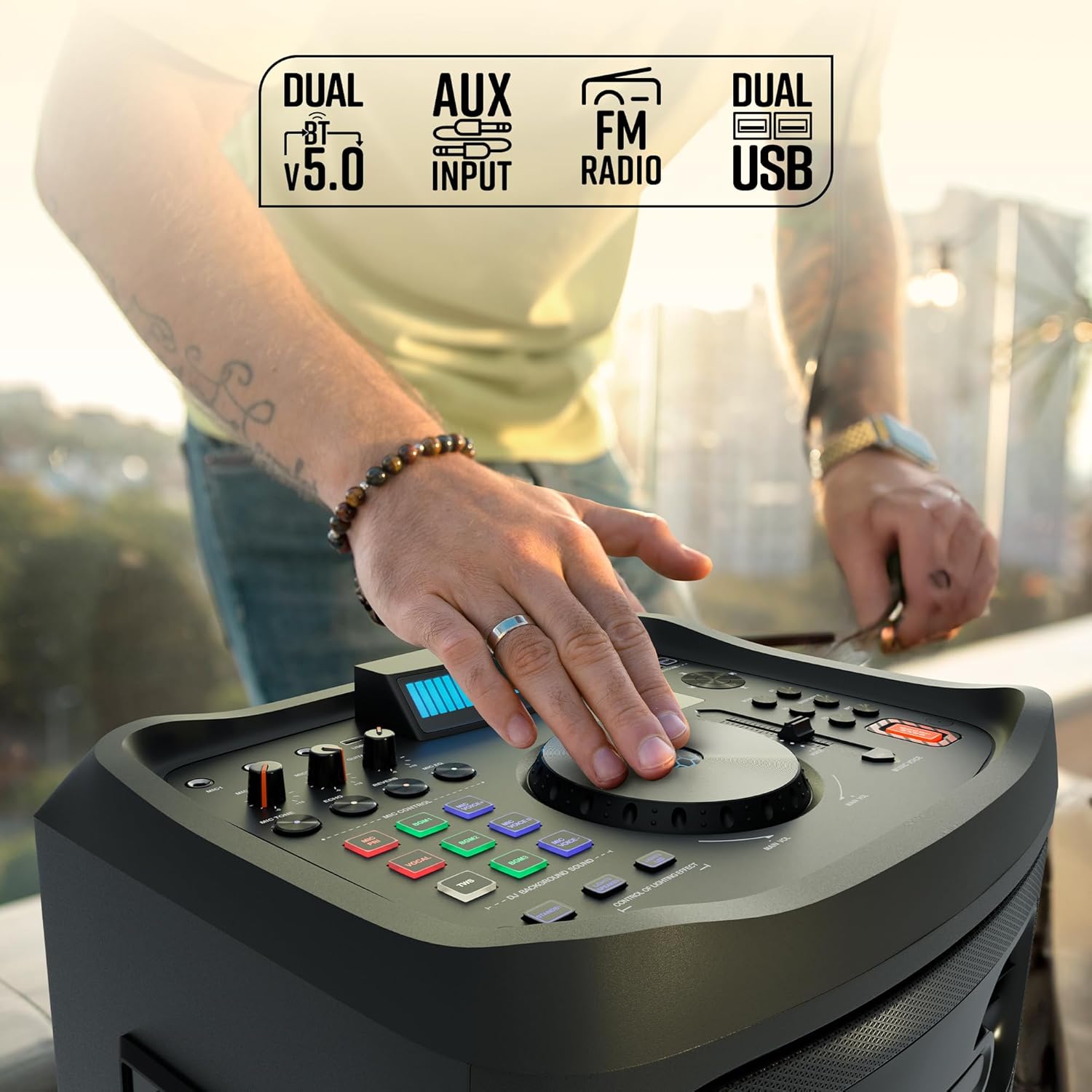
이미지: 상세 view of the speaker's top control panel.
The top panel features various controls for audio adjustment, input selection, and special functions:
- 메인 볼륨 노브: 전체 스피커 볼륨을 조절합니다.
- Microphone Volume Knobs (MIC1, MIC2): Controls the volume for each connected microphone.
- 기타 볼륨 노브: Adjusts the volume for the connected guitar.
- Echo/Reverb/Mic Tone Knobs: Fine-tune microphone effects.
- 모드 버튼: Cycles through input sources (Bluetooth, USB, AUX, FM, HDMI ARC).
- 저음/고음 컨트롤: Adjusts low and high frequencies.
- EQ 버튼: 사전 설정된 이퀄라이저 모드를 선택합니다.
- 미디어 제어 버튼: Play/Pause, Skip Track, Repeat.
- DJ BGM Effects: Buttons for activating various DJ background sound effects.
- LED 디스플레이: Shows current mode, track information, and other settings.
- 조명 제어: Buttons to manage the speaker's LED lighting effects.
- 베이스 부스트 버튼: 저주파 출력을 향상시킵니다.
- Music Pitch Control: Adjusts the pitch of the music playback.
- Mic Pitch Control: Adjusts the pitch of the microphone input.
3.2 후면 패널 연결

Image: Rear panel connections of the speaker.
The rear panel provides essential connection ports:
- 전원 입력: 전원 케이블을 콘센트에 연결합니다.
- USB 포트(x2): USB 드라이브 재생 및 충전용입니다.
- 보조 입력: 외부 오디오 장치를 연결하기 위한 3.5mm 잭입니다.
- HDMI(ARC) 포트: For connecting to compatible TVs or audio systems.
- 기타 입력: 기타 연결용 6.3mm 잭.
- MIC Inputs (x2): 6.3mm jacks for wired microphones (in addition to wireless mics).
4. 설정
4.1 전원 연결
- Connect the provided power cable to the Power Input port on the rear of the speaker.
- 전원 케이블의 다른 쪽 끝을 일반 전기 콘센트에 꽂으세요.
- Ensure the power switch on the speaker is in the 'OFF' position before connecting to power.
4.2 초기 배치
Place the speaker on a stable, flat surface. For optimal sound dispersion, position it in an open area, away from walls or corners that might obstruct audio. The speaker is designed for floor standing use.
5. 사용 설명서
5.1 전원 켜기/끄기
To power on the speaker, flip the power switch located on the rear panel to the 'ON' position. The LED display will illuminate. To power off, flip the switch back to 'OFF'.
5.2 블루투스 연결
- Turn on the speaker. The default mode is usually Bluetooth. If not, press the 'Mode' button until 'BT' appears on the LED display.
- 모바일 기기에서 블루투스를 활성화하고 사용 가능한 기기를 검색하세요.
- Select 'ZEBRONICS Riser' from the list of devices.
- Once paired, the speaker will indicate a successful connection, and you can play audio from your device.
5.3 USB 재생
- MP3 오디오가 포함된 USB 플래시 드라이브를 삽입하세요 fileUSB 포트 중 하나에 꽂으세요.
- Press the 'Mode' button until 'USB' appears on the LED display.
- 스피커가 자동으로 오디오 재생을 시작합니다. files from the USB drive. Use the media control buttons to navigate tracks.
5.4 AUX 입력
- Connect an external audio device (e.g., smartphone, MP3 player) to the AUX input port using a 3.5mm audio cable.
- Press the 'Mode' button until 'AUX' appears on the LED display.
- 연결된 장치에서 오디오를 재생합니다.
5.5 FM 라디오
- Press the 'Mode' button until 'FM' appears on the LED display.
- Use the media control buttons to scan for and select FM radio stations.
5.6 HDMI ARC 연결
- Connect an HDMI cable from the HDMI ARC port on the speaker to the HDMI ARC port on your television.
- Press the 'Mode' button until 'HDMI ARC' appears on the LED display.
- Ensure your TV's audio output settings are configured for HDMI ARC.
5.7 기타 입력
- Connect your guitar to the 'Guitar Input' 6.3mm jack on the rear panel.
- Adjust the 'Guitar Vol' knob on the top panel to control the guitar's volume.
5.8 Microphone Input and Karaoke

이미지: 이상view of microphone and karaoke features.
- 무선 마이크: Insert batteries into the provided UHF wireless microphones. Turn them on. They will automatically connect to the speaker.
- 유선 마이크: Connect wired microphones to the 'MIC1' or 'MIC2' 6.3mm jacks.
- Adjust the 'MIC1 Vol' and 'MIC2 Vol' knobs to control microphone volume.
- Use the 'Echo', 'Reverb', and 'Mic Tone' knobs to add effects to your vocals.
- The 'Instant Karaoke Maker' function allows you to sing along to music.
- Utilize the 'Mic Pitch Control' for vocal adjustments.
5.9 TWS(True Wireless Stereo) 기능

Image: Two speakers demonstrating the TWS function for stereo sound.
To connect two Zeb-Riser speakers for a true wireless stereo experience:
- 두 스피커 모두 전원이 켜져 있고 블루투스 모드인지 확인하되, 아직 어떤 기기와도 페어링되지 않은 상태인지 확인하십시오.
- On one of the speakers (this will be the primary speaker), press and hold the 'TWS' button.
- The primary speaker will search for the secondary speaker and connect automatically.
- Once connected, the LED display will indicate TWS mode. You can now pair your mobile device to the primary speaker via Bluetooth, and audio will play in stereo through both units.
5.10 DJ 효과
The speaker includes 3 DJ BGM (Background Music) Effects. Press the corresponding buttons on the top panel to activate these effects during playback.
5.11 LED Light Controls

Image: LED display and light control section.
The speaker features dynamic LED lights. Use the 'Lights Speaker' and 'Lights LED' controls on the top panel to customize or turn off the lighting effects.
5.12 오디오 조정
Use the 'Bass/Treble' knobs to adjust the low and high frequencies of the audio output. The 'EQ' button allows you to cycle through various preset equalizer modes to suit different music genres.
6. 유지관리
스피커의 수명과 최적의 성능을 보장하려면:
- 스피커 외부를 부드럽고 마른 천으로 닦으십시오. 연마성 세제나 용제 사용은 피하십시오.
- Keep the speaker away from direct sunlight, excessive heat, dust, and moisture.
- Do not block the ventilation openings on the speaker.
- 장시간 사용하지 않을 때는 스피커를 시원하고 건조한 곳에 보관하세요.
7. 문제 해결
| 문제 | 가능한 원인 | 해결책 |
|---|---|---|
| 전원이 없습니다 | 전원 케이블이 연결되지 않았습니다. 전원 스위치가 꺼져 있습니다. 전원 콘센트가 고장났습니다. | Ensure power cable is securely connected; Turn power switch ON; Test power outlet with another device. |
| 소리가 나지 않습니다 | Volume too low; Incorrect input mode; Device not playing audio; Cables loose. | Increase volume; Select correct input mode; Check audio playback on source device; Secure all audio cables. |
| 블루투스가 연결되지 않습니다 | 스피커가 페어링 모드가 아닙니다. 기기의 Bluetooth가 꺼져 있습니다. 스피커가 이미 다른 기기에 연결되어 있습니다. | Ensure speaker is in BT mode; Turn device Bluetooth on/off; Disconnect from other devices and try again. |
| 마이크가 작동하지 않습니다 | Mic volume low; Batteries dead (wireless mic); Mic not connected (wired mic); Faulty mic. | Increase mic volume; Replace batteries; Ensure wired mic is fully inserted; Test with another mic if possible. |
| 음향 왜곡 | Volume too high; Source audio quality poor; Speaker placed too close to interference. | Reduce volume; Use high-quality audio source; Relocate speaker away from electronic devices. |
8. 사양
| 특징 | 세부 사항 |
|---|---|
| 모델명 | Zeb-Riser |
| 출력 전력(RMS) | 210와트 |
| 드라이버 크기 | 25.4cm (Full-range), 7.62cm (Tweeter) |
| 연결성 | Dual BT v5.0, USB x 2, FM, AUX, HDMI (ARC) |
| 입력 | Guitar Input, Dual 6.3mm MIC Input |
| 마이크 | Dual Wireless UHF Mic |
| 특별 기능 | Instant Karaoke Maker, TWS Function, 3x DJ BGM Effects, Colorful LED lights, Dynamic Visualizer, 3D EQ, 12x Music Pitch Control, 24x Mic Pitch Control, Bass Boost |
| 장착 유형 | 플로어 스탠딩 |
| 전원 | 코드식 전기 |
| 품목 무게 | 12.5kg |
| 제품 크기(LxWxH) | 38.3 x 46 x 73cm |
9. 보증 및 지원
This product comes with a standard manufacturer's warranty. For detailed warranty information, service, or technical support, please refer to the warranty card included in your package or visit the official ZEBRONICS web대지. 보증 청구를 위해 구매 영수증을 보관하십시오.


