1. 서론
This manual provides detailed instructions for the installation, operation, and maintenance of your TAFFIO TXH6701-4 Android Head Unit. This device integrates advanced navigation, communication, and entertainment features into your Porsche Macan, enhancing your driving experience.
2. 제품 오버view
The TAFFIO TXH6701-4 is a 12.3-inch touchscreen Android head unit designed to seamlessly integrate with Porsche Macan vehicles equipped with PCM 4.0. It offers a high-resolution display and a comprehensive suite of features.
주요 특징:
- 1920 x 720 Full HD Video Resolution Capacitive Touchscreen Display
- Intuitive 3D User Interface
- Powered by a Snapdragon Qualcomm 668s 8-core processor (2.0 GHz) with 8 GB RAM and 128 GB internal storage
- Integrated Wireless Apple CarPlay and Android Auto functionality
- Built-in Wi-Fi for direct connection to hotspots
- 4G LTE SIM card slot for mobile internet connectivity
- FM/AM radio tuner with RDS
- USB slots for media playback
- Bluetooth A2DP for music streaming
- Supports original car functions including rearview camera and parking distance control (PDC)
- Automatic screen brightness adjustment (Day & Night Display function)
- Subwoofer output, 4x audio output, 2x video out, 1x AUX video in

Figure 2.1: The TAFFIO TXH6701-4 Android Head Unit displaying its main interface with various application icons.
3. 호환성
This head unit is compatible with Porsche Macan models from 2017 onwards that are equipped with the PCM 4.0 system. It is crucial to verify your vehicle's current system to ensure proper functionality.
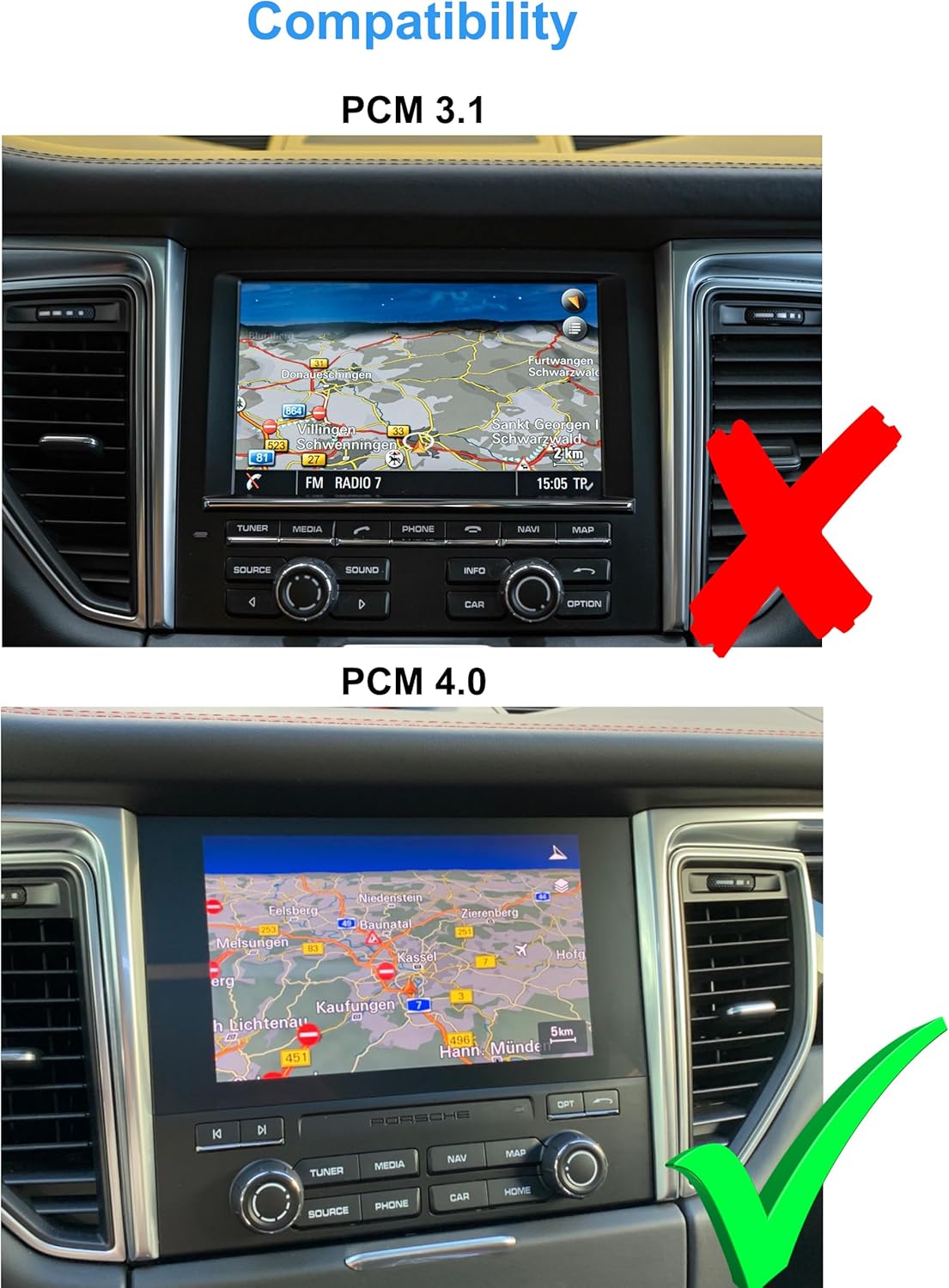
Figure 3.1: Visual guide for identifying PCM 3.1 (incompatible, marked with a red X) versus PCM 4.0 (compatible, marked with a green checkmark) in a Porsche Macan dashboard.
4. 패키지 내용
Please ensure all items listed below are present in your package before proceeding with installation.
- 1x Multimedia Display
- Panels and mounting accessories
- 1x Power cable with Canbus decoder
- 2x USB 케이블
- 2x Radio antenna adapters
- 1x Audio/Video cable
- 1x GPS 안테나
- 2x 4G antennas
- 1x PDF manual (available for download)
- 1x Invoice and 24 months warranty information

그림 4.1: 오버view of all components included in the TAFFIO TXH6701-4 package, including the multimedia display, power cables, antennas, and various adapters.
5. 설정 및 설치
The TAFFIO TXH6701-4 is designed for a Plug & Play installation, minimizing the need for additional adapters or mounting frames. However, professional installation is recommended to ensure correct wiring and functionality.
설치 단계(일반 가이드):
- 준비: 시동을 걸기 전에 차량의 시동이 꺼져 있고 배터리가 분리되어 있는지 확인하십시오.
- 원래 장치 제거: Carefully remove the existing PCM unit and associated trim panels from the dashboard. Refer to your vehicle's service manual for specific instructions on panel removal.
- 배선 연결: Connect the provided power cable with the Canbus decoder to the vehicle's wiring harness. Connect the GPS antenna, 4G antennas, USB cables, and audio/video cables as indicated in the wiring diagram.
- 새로운 유닛 장착: Secure the TAFFIO multimedia display using the provided mounting plates and frames. Ensure all connections are firm and properly routed to avoid pinching.
- 테스트 기능: Reconnect the battery and turn on the ignition. Test all functions of the new head unit, including touch response, audio, navigation, radio, and connectivity features.
- 재조립: 모든 기능이 제대로 작동하는지 확인한 후, 대시보드 트림 패널을 조심스럽게 다시 조립하십시오.

Figure 5.1: The Porsche Macan dashboard showing the original PCM unit before the installation of the TAFFIO Android Head Unit.
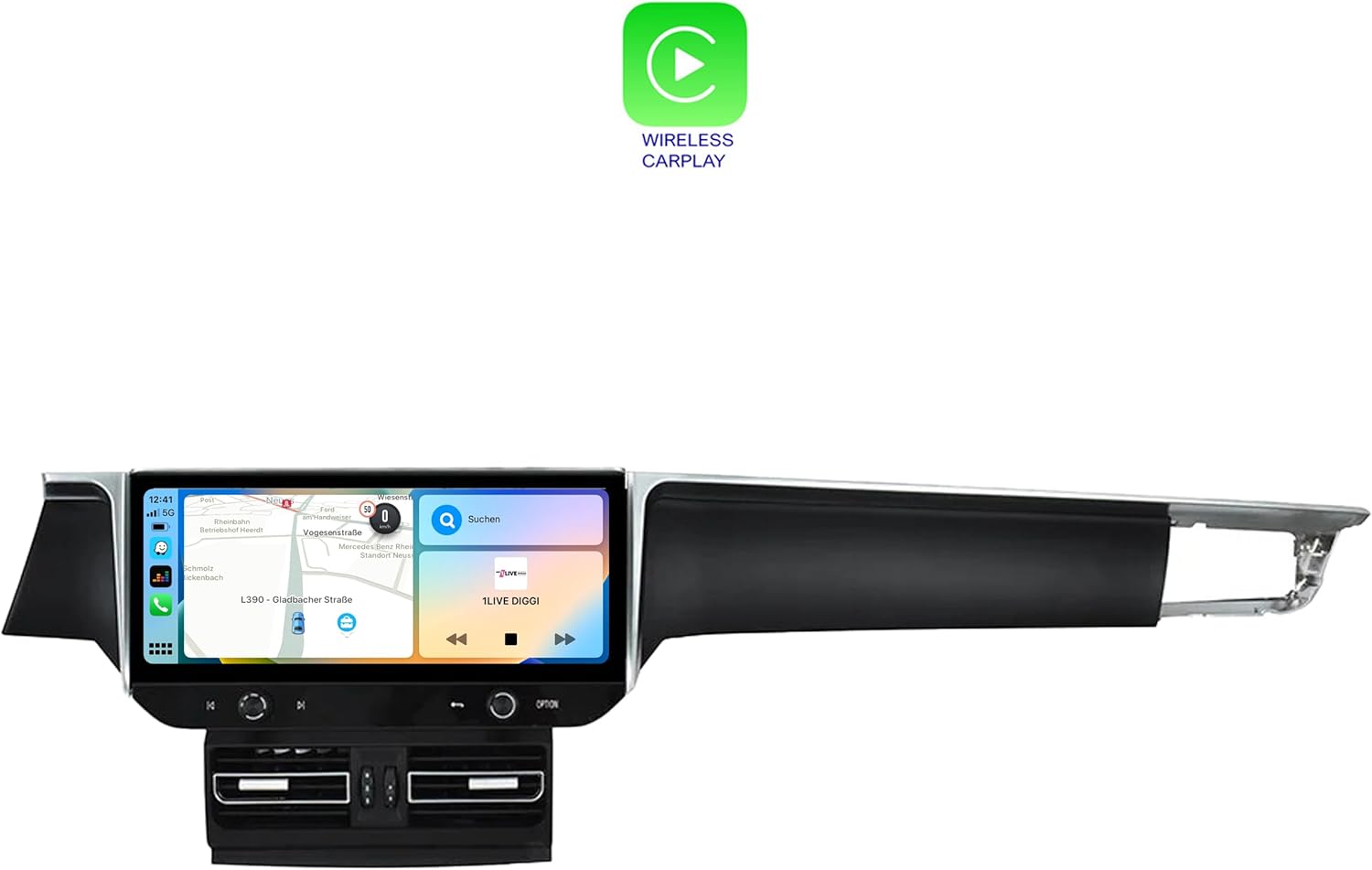
Figure 5.2: The Porsche Macan dashboard after the successful installation of the TAFFIO Android Head Unit, showcasin통합된 모습.

Figure 5.3: Detailed wiring diagram illustrating the connections for the TAFFIO TXH6701-4 head unit, including connections to the radio, GPS, 4G antennas, USB, and RCA plugs.
6. 사용 설명서
The TAFFIO Android Head Unit features a user-friendly touchscreen interface. Navigate through menus by tapping icons and swiping across the screen.
6.1. 기본 탐색
- 홈 화면: Access primary functions like Navigation, Radio, Music, and Setup directly from the home screen.
- 앱 서랍: 위로 스와이프하거나 앱 아이콘을 탭하세요. view 설치된 모든 응용 프로그램.
- 설정: Access system settings for display, sound, network, and vehicle-specific configurations.

Figure 6.1: The application menu of the TAFFIO Android Head Unit, showing various pre-installed and user-installed apps such as Chrome, Android Settings, Phone Link, and navigation applications.
6.2. 애플 카플레이 및 안드로이드 오토
The unit supports integrated Wireless Apple CarPlay and Android Auto. Connect your smartphone wirelessly to access navigation, music, messages, and other compatible apps directly on the head unit's display.
- 활성화: Ensure Bluetooth and Wi-Fi are enabled on your smartphone. Follow the on-screen prompts on the head unit to pair your device.
- 기능: Once connected, your phone's compatible apps will appear on the head unit's screen, allowing for voice control and touch interaction.

Figure 6.2: The Wireless Apple CarPlay interface displayed on the TAFFIO head unit, showing navigation, communication, and media applications.

Figure 6.3: The Android Auto interface displayed on the TAFFIO head unit, featuring navigation and media controls.
6.3. 라디오
The unit includes an FM/AM radio tuner with RDS. Access the radio application from the home screen to tune into stations.
- 스캐닝: Use the on-screen controls to scan for available stations.
- 사전 설정 : 자주 이용하는 채널을 저장해 두면 빠르게 접속할 수 있습니다.

Figure 6.4: The radio interface of the TAFFIO head unit, showing frequency display and controls for tuning and saving favorite stations.
6.4. 항해
The unit comes with current GPS navigation map material and offers free lifetime updates. Access the navigation application from the home screen.
- 목적지 항목: Input destinations via the touchscreen or voice command.
- 지도 업데이트: Information on map updates will be provided by the manufacturer.
6.5. Connectivity (Wi-Fi & 4G LTE)
- 와이파이: Connect to available Wi-Fi hotspots or your smartphone's hotspot for internet access.
- 4G LTE: Insert a 4G LTE SIM card into the designated slot for mobile internet connectivity without relying on Wi-Fi.
7. 유지관리
To ensure the longevity and optimal performance of your TAFFIO Android Head Unit, follow these maintenance guidelines:
- 화면 청소: 전자 기기 화면 전용으로 제작된 부드럽고 보풀 없는 천을 사용하십시오.ampen the cloth slightly with water or a screen-cleaning solution if necessary. Avoid harsh chemicals or abrasive materials.
- 소프트웨어 업데이트: Periodically check for software updates provided by TAFFIO to ensure you have the latest features and security patches.
- 환경 조건: 본 제품을 극한의 온도, 장시간 직사광선 또는 과도한 습기에 노출시키지 마십시오.
- 케이블 연결: 모든 케이블이 단단히 연결되어 있는지 확인하십시오. 케이블을 무리하게 잡아당기지 마십시오.
8. 문제 해결
If you encounter issues with your TAFFIO Android Head Unit, refer to the following common troubleshooting steps. If the problem persists, contact customer support.
일반적인 문제 및 해결책:
- 장치가 켜지지 않습니다:
- 모든 전원 연결부를 확인하고 단단히 꽂혀 있는지 확인하십시오.
- Verify the vehicle's battery is charged and connected.
- Check for blown fuses in the vehicle's fuse box related to the infotainment system.
- 소리 없음:
- 음량이 음소거되어 있거나 너무 낮게 설정되어 있지 않은지 확인하십시오.
- 오디오 케이블 연결을 확인하세요.
- Verify the correct audio output source is selected in the settings.
- 터치스크린이 반응하지 않음:
- Restart the unit by turning off the vehicle's ignition and restarting after a few minutes.
- 화면이 깨끗하고 이물질이 없는지 확인하세요.
- GPS 신호 끊김/정확도 불량:
- GPS 안테나가 제대로 설치되었고 깨끗한지 확인하십시오. view 하늘의.
- GPS 안테나와 헤드 유닛의 연결 상태를 확인하십시오.
- CarPlay/Android Auto 연결 안 됨:
- Ensure Bluetooth and Wi-Fi are enabled on your smartphone and the head unit.
- Forget the device on both the phone and head unit, then attempt to re-pair.
- 스마트폰 운영체제를 최신 버전으로 업데이트하세요.
9. 사양
| 모델명 | TXH6701-4 |
| 디스플레이 크기 | 12.3 인치 |
| 해결 | 1920 x 720 |
| 프로세서 | Snapdragon Qualcomm 668s 8x 2.0 GHz |
| 숫양 | 8GB (XNUMX기가바이트) |
| 내부 메모리 | 128GB (XNUMX기가바이트) |
| 운영 체제 | 안드로이드 13 |
| 연결성 | Bluetooth, USB, Wi-Fi, 4G LTE |
| 특별 기능 | Touchscreen, Integrated CarPlay & Android Auto |
| 지도 유형 | Worldwide (with free lifetime updates) |
| 오디오 출력 모드 | 보조 |
| 장착 유형 | 대시 보드 마운트 |
10. 보증 및 지원
The TAFFIO TXH6701-4 Android Head Unit comes with a 2년 제조사 보증. 본 보증은 정상적인 사용 중에 발생하는 재료 및 제조상의 결함을 보장합니다.
보증 청구 및 기술 지원:
Please retain your purchase invoice as proof of purchase for any warranty claims. For technical assistance, troubleshooting beyond this manual, or to initiate a warranty claim, please contact TAFFIO customer support through the retailer where the product was purchased or refer to the contact information provided with your product documentation.
11. 안전 정보
Observe the following safety symbols and guidelines for safe handling and disposal of the product.
Figure 11.1: Standard safety and handling symbols including 'This Way Up', 'Fragile', 'Keep Dry', CE Mark, FCC Mark, Recycling Symbol, and Waste Electrical and Electronic Equipment (WEEE) symbol.
- 설치: Ensure installation is performed by qualified personnel to prevent damage to the unit or vehicle.
- 작업: 운전에 방해가 되는 방식으로 기기를 작동하지 마십시오. 항상 도로 안전을 최우선으로 생각하세요.
- 처분: Dispose of this product responsibly at designated collection points for electronic waste, in accordance with local regulations. Do not dispose of with household waste.


