1. 제품 오버view
The VIMIN VM-S250501M is a 2.5G Web Managed Ethernet Switch designed for high-performance network environments. It features five 2.5 Gigabit RJ45 ports and one 10 Gigabit SFP+ port, providing flexible connectivity options for various devices. This switch supports multiple speeds (100Mbps, 1Gbps, 2.5Gbps) with intelligent auto-negotiation, making it suitable for 2.5G NAS, gaming PCs, WiFi 6 routers, and 4K video streaming. It incorporates essential Layer 2 management features such as Link Aggregation, IGMP Snooping, Quality of Service (QoS), and VLAN support, all accessible through a user-friendly web-based graphical interface.
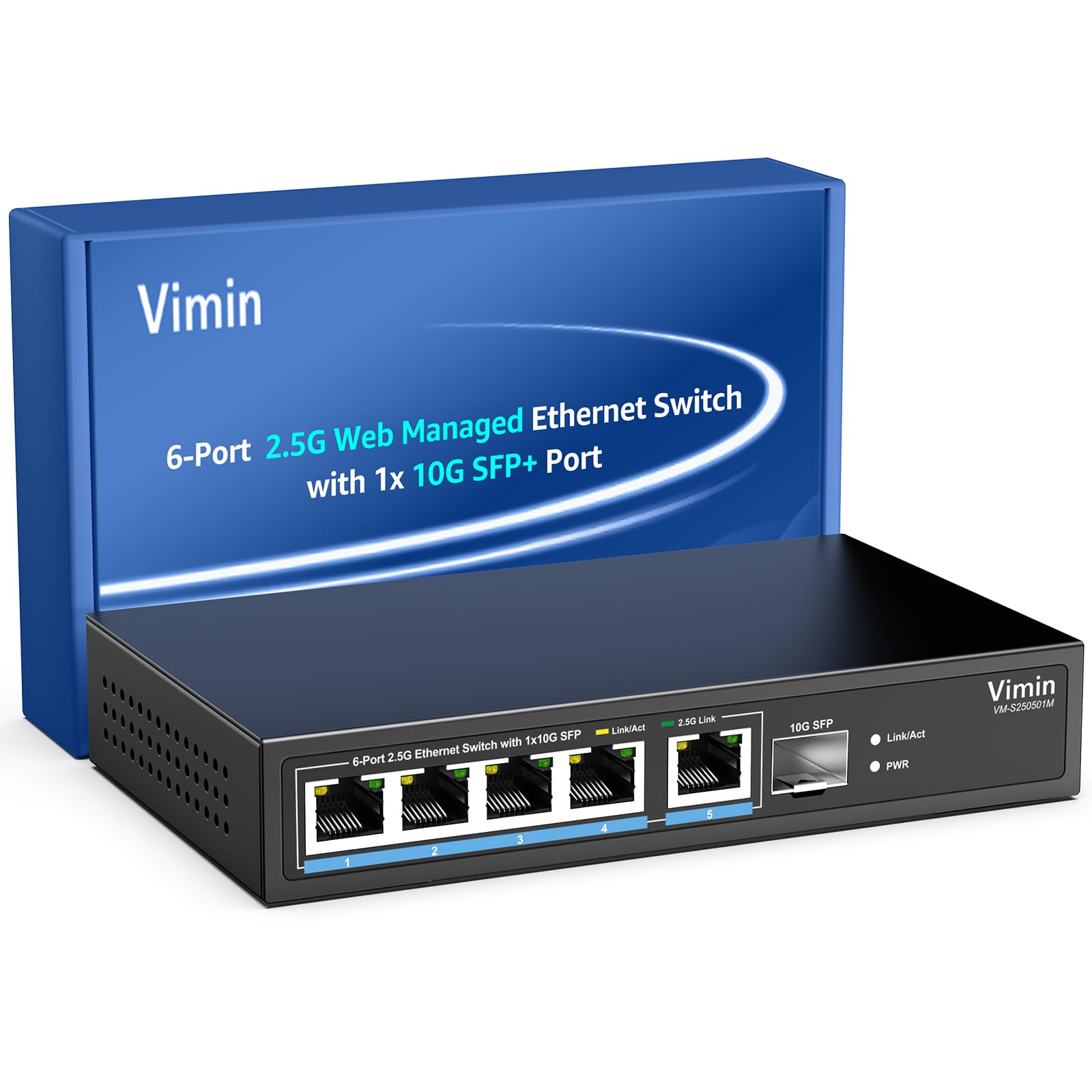
그림 1: 전면 view of the VIMIN VM-S250501M switch, showing the 2.5G RJ45 ports, 10G SFP+ port, and LED indicators.

Figure 2: Illustration highlighting the durability, high compatibility, and versatility of the switch.
2. 설정 지침
2.1 패키지 내용
패키지에 다음 항목들이 포함되어 있는지 확인하십시오:
- 1 x VIMIN VM-S250501M 2.5G Web 관리 형 이더넷 스위치
- 1 x 전원 어댑터
- 1 x 사용자 설명서

Figure 3: The switch, power cable, and user manual are included in the package.
2.2 물리적 설치
The switch can be placed on a desktop or mounted on a wall. Ensure proper ventilation around the device.
- 데스크탑 배치: 스위치를 평평하고 안정된 표면에 놓으십시오.
- 벽면 장착: The switch features two mounting holes at the base for wall installation. Use appropriate screws (not included) to secure the device to a wall.
2.3 전원 연결
- Connect the power adapter to the DC 12V/1A power port on the rear panel of the switch.
- 전원 어댑터의 다른 쪽 끝을 표준 전기 콘센트에 꽂습니다.
- The Power LED indicator on the front panel will illuminate when the switch is powered on.
2.4 네트워크 장치 연결
Connect your network devices (e.g., computers, NAS, routers, access points) to the switch using appropriate Ethernet cables.
- RJ45 포트(1-5): Use Category 5e (Cat5e) or Category 6 (Cat6) UTP cables for optimal performance with 1G/2.5G connections. For 100Mbps, Cat5 cables are sufficient.
- SFP+ 포트(6): Insert a compatible 1G/2.5G/10G SFP+ optical fiber module (not included) into the SFP+ slot, then connect a fiber optic cable.

Figure 4: Illustrates connecting devices to the switch and recommended cable types for different speeds.
3. 스위치 작동
3.1 LED 표시등
전면 패널 LED는 실시간 상태 정보를 제공합니다.
- 5*2.5G Ports (RJ45):
- Yellow: Indicates a 10/100/1000Mbps link or activity.
- Green: Indicates a 2.5Gbps link.
- 1*10G SFP (SFP+ Port):
- Green: Indicates a 1G/2.5G/10G link.
- Flashing: Indicates data transmission.
- PWR(전원):
- 켜짐: 장치의 전원이 켜져 있습니다.
- 꺼짐: 장치의 전원이 꺼집니다.

Figure 5: Detailed explanation of the LED indicators on the switch.
3.2 액세스 Web 관리 인터페이스
The switch can be configured and managed via a web그래픽 사용자 인터페이스(GUI) 기반.
- 컴퓨터가 스위치의 RJ45 포트 중 하나에 연결되어 있는지 확인하세요.
- 열기 web 브라우저(예: Chrome, Firefox, Edge).
- 주소 표시줄에 기본 IP 주소를 입력하십시오. 192.168.1.199.
- Press Enter. A login page will appear.
- 기본 사용자 이름과 비밀번호를 입력하세요.
- 사용자 이름: 관리자
- 비밀번호: 관리자
- Click "Log In" to access the management interface.
보안을 위해 초기 로그인 후 기본 비밀번호를 변경하는 것이 좋습니다.

그림 6: 스크린샷 web management interface login page.
3.3 Basic Management Features
그만큼 web interface provides access to various Layer 2 management functions:
- 링크 집계: Combine multiple physical links into a single logical link for increased bandwidth and redundancy. Supports static link aggregation.
- 점보 프레임: Support for larger Ethernet frames (up to 12KB) to improve network efficiency for large data transfers.
- VLAN(가상 로컬 영역 네트워크): Segment your network into smaller, isolated broadcast domains. Supports up to 32 VLANs (on 4K VLAN IDs), MTU/Port/802.1Q VLAN.
- 서비스 품질(QoS): Prioritize network traffic to ensure critical applications receive sufficient bandwidth. Supports port-based, 802.1p, and DSCP priority, with 4 priority queues, rate limiting, and storm control.
- IGMP 스누핑: 멀티캐스트 트래픽 전달을 최적화하여 모든 포트에 대한 불필요한 멀티캐스트 패킷 플러딩을 방지합니다.
- 포트 미러링: 네트워크 모니터링 및 분석을 위해 하나 이상의 소스 포트에서 대상 포트로 트래픽을 복사합니다.
- 케이블 테스트 : A diagnostic tool to check the status and length of connected Ethernet cables.

그림 7: 이상view of the basic management features available through the web 인터페이스.
4. 유지관리
4.1 일반 관리
- Keep the switch in a cool, dry environment, away from direct sunlight, heat sources, and moisture.
- 기기의 과열을 방지하기 위해 기기 주변에 적절한 공기 흐름이 확보되도록 하십시오.
- Clean the exterior of the switch with a soft, dry cloth. Do not use liquid cleaners or aerosols.
4.2 펌웨어 업데이트
Periodically check the VIMIN official web펌웨어 업데이트 사이트입니다. 펌웨어 업데이트는 새로운 기능, 성능 향상 및 보안 강화를 제공할 수 있습니다. 펌웨어 업데이트 패키지와 함께 제공된 지침을 주의 깊게 따르세요.
4.3 장치 재설정
If the switch is not functioning correctly or you forget the login credentials, you can reset it to factory default settings. Locate the "Reset" button on the rear panel of the switch. With the switch powered on, use a paperclip or a similar pointed object to press and hold the Reset button for approximately 5-10 seconds until the LEDs flash, then release. The switch will restart with factory default settings.
5. 문제 해결
5.1 전원 없음
- 전원 어댑터가 스위치와 작동하는 콘센트에 제대로 연결되어 있는지 확인하십시오.
- 다른 장치를 연결하여 전원 콘센트가 작동하는지 확인하세요.
- 전원 어댑터에 눈에 보이는 손상이 있는지 확인하세요.
5.2 링크/연결 없음
- Check the Ethernet cables connected to the switch and your devices. Ensure they are securely plugged in and not damaged.
- Verify the Link/Act LEDs on the switch for the connected ports. If they are off, there might be a cable issue or the connected device is not powered on/configured correctly.
- Try using a different Ethernet cable or port.
- 연결된 장치의 네트워크 어댑터가 활성화되어 있고 올바르게 구성되어 있는지 확인하십시오.
5.3 느린 네트워크 속도
- Ensure you are using Cat5e or Cat6 cables for 1G/2.5G connections. Lower category cables may limit speed.
- Check the Link/Act LED color for the connected port. A yellow LED on a 2.5G port indicates a 1G or lower connection.
- Verify that your connected devices (e.g., network card, NAS) support 2.5G or 10G speeds.
- Check for network congestion or high traffic on your network.
- Consider updating the switch firmware.
5.4 접근할 수 없습니다 Web 인터페이스
- Ensure your computer is on the same network segment as the switch. The default IP is 192.168.1.199, so your computer's IP should be in the 192.168.1.x range (e.g., 192.168.1.100) with a subnet mask of 255.255.255.0.
- Verify that the Ethernet cable is properly connected and the Link/Act LED is on.
- 브라우저 캐시를 지우거나 다른 브라우저를 사용해 보세요.
- If you have changed the switch's IP address and forgotten it, or forgotten the login password, perform a factory reset (refer to Section 4.3).
6. 사양
| 모델 | VM-S250501M |
| 표준 | IEEE 802.3/802.3u/802.3ab/802.3bz/802.3x/802.3cb |
| 포트 | 5 x 10/100/1000/2500 Mbps RJ45, 1 x 10G SFP+ slot |
| 스위칭 용량 | 45Gbps |
| MAC 주소 테이블 | 4K |
| 패킷 전달 속도 | 33.48메가피에스 |
| 점보 프레임 | 12킬로바이트 |
| 패킷 버퍼 | 8메가비트 |
| 전원 공급 장치 | 12V/1A 직류 |
| Network Cable (Max 100m) |
|
| 장착 방법 | Desktop and Wall Mount |
| 작동 온도 | 0℃ ~ 45℃ (32°F ~ 113°F) |
| 보관 온도 | -40℃ ~ 70℃ (-40°F ~ 158°F) |
| 작동 습도 | 10% ~ 90% 비응축 |
| 보관 습도 | 5% ~ 95% 비응축 |
| 무게 | 380g |
| 치수(길이 x 너비 x 높이) | 160 x 95 x 30mm(6.3 x 3.7 x 1.2인치) |
| 하우징 소재 | 금속 |
| 색상 | 검은색 |
7. 보증 및 지원
7.1 제품 보증
The VIMIN VM-S250501M 2.5G Web Managed Ethernet Switch comes with a 1년 보증 구매일로부터. 본 보증은 제조상의 결함에 대한 보증이며, 정상적인 사용 조건에서 제품이 지정된 성능 기준을 충족함을 보장합니다. 보증 청구를 위해 구매 증빙 자료를 보관해 주십시오.
7.2 기술 지원
VIMIN provides 평생 기술 지원 for this product. If you encounter any issues or have questions regarding the setup, operation, or troubleshooting of your switch, please contact our support team.
연락처 정보:
Figure 8: VIMIN support information, including email contact.


