소개
Welcome to the Kuephom Portable CD Player Boombox. This versatile device offers multiple audio playback options including CD, MP3, FM radio, Bluetooth, USB, and TF card support. Designed for both home and portable use, it features stereo speakers and a rechargeable battery for extended listening enjoyment. Please read this manual thoroughly to ensure proper operation and care of your new device.
중요한 안전 정보
- 경고: 이 제품을 비나 습기에 노출시키지 마십시오.
- 주의: 감전을 방지하기 위해 전원을 켜지 마십시오.asing. 모든 서비스는 자격을 갖춘 담당자에게 의뢰하세요.
- 라디에이터, 난방기, 스토브 또는 기타 열을 발생시키는 기기와 같은 열원 근처에 제품을 두지 마십시오.
- 제조사가 지정한 부속품/액세서리만 사용하세요.
- 전원 코드가 밟히거나 조이지 않도록 보호하십시오. 특히 플러그, 콘센트 및 기기에서 나오는 지점에서 전원 코드가 밟히거나 조이지 않도록주의하십시오.
- 번개 폭풍 시 또는 장기간 사용하지 않을 때는 기기의 플러그를 뽑아두세요.
- 환기구를 막지 마십시오. 제조업체의 지침에 따라 설치하십시오.
- 장치를 작동할 때는 적절한 환기를 확보하세요.
- 제품 내부에 이물질을 넣지 마십시오.
- 장치를 강한 자기장으로부터 멀리 두십시오.
- 배터리는 현지 규정에 따라 올바르게 폐기하세요.
패키지 내용
모든 항목이 있는지 확인하세요.
- Kuephom Portable CD Player Boombox (Model W15)
- USB 충전 케이블
- 전원 어댑터
- 사용자 설명서
제품 끝view
Familiarize yourself with the main components and controls of your CD player boombox.

그림 1: 전면 View - This image displays the main unit with its top-loading CD compartment open, revealing a CD. The front panel features control buttons for playback (play/pause, skip), a mode button, an LCD screen showing track time, and a large rotary volume knob. Two speaker grilles are visible at the bottom.

그림 2: 후면 View - The rear of the boombox is shown, highlighting the extendable FM antenna. Below the antenna, from left to right, are the USB port, TF (Micro SD) card slot, DC 5V IN power input, and a headphone jack. The speaker grilles are also visible from this angle.
컨트롤 및 포트:
- 재생/일시 정지 버튼(►▮▮): 오디오 재생을 재생하거나 일시 정지하려면 누르세요.
- Previous/Rewind Button (◀◀): Press to go to the previous track or rewind the current track.
- Next/Fast Forward Button (►►): Press to go to the next track or fast forward the current track.
- 모드 버튼(M): Press to switch between CD, FM Radio, Bluetooth, USB, and TF card modes.
- Repeat/Random Button (↺): Press to cycle through repeat modes (repeat one, repeat all) or enable random playback (shuffle).
- Volume Knob (MIN-MAX): Rotate to adjust the volume level. Also serves as the power on/off switch.
- LCD 디스플레이: 현재 모드, 트랙 번호, 시간 및 FM 주파수를 표시합니다.
- CD 수납공간: 오디오 CD를 넣는 상단 투입구 트레이.
- FM 안테나: FM 라디오 수신 성능 향상을 위한 확장형 안테나.
- USB 포트: MP3/WMA 재생용 fileUSB 플래시 드라이브(최대 32GB)에서 데이터를 가져올 수 있습니다.
- TF 카드 슬롯 : MP3/WMA 재생용 files from a TF (Micro SD) card (up to 32GB).
- DC 5V 입력 포트: Power input for charging the internal battery or operating the unit via the included power adapter.
- Headphone Jack (🎧): 유선 헤드폰을 사용하여 개인적으로 청취할 때 사용합니다.
설정
1. 장치에 전원 공급
Your Kuephom CD player boombox comes with a built-in rechargeable Lithium Ion battery. Before first use, it is recommended to fully charge the battery.
- Connect the provided USB charging cable to the DC 5V IN port on the back of the unit.
- Connect the other end of the USB cable to the power adapter, and plug the adapter into a standard wall outlet.
- The LCD display will indicate charging status. Charging typically takes 3-4 hours for a full charge.
- Alternatively, the unit can be powered directly from the wall adapter without battery charge.

그림 3: 충전 옵션 - This image illustrates the versatility of charging the boombox. It can be charged using a standard wall charger, a car charger (via a USB car adapter, not included), or a portable power bank, making it convenient for both indoor and outdoor use.
2. 켜기/끄기
To turn the unit on, rotate the Volume Knob clockwise from the MIN position. To turn off, rotate the Volume Knob counter-clockwise to the MIN position until it clicks.
작동 모드
를 누르세요 모드(M) button repeatedly to cycle through the available playback modes: CD, FM Radio, Bluetooth, USB, and TF Card.

Figure 4: 5 Play Modes - This graphic highlights the five primary playback modes of the Kuephom boombox: CD Player, Bluetooth, FM Radio, TF Card, and USB Input, emphasizing its multi-functional capabilities.
1. CD 재생
- CD 수납부 덮개를 살살 들어 올려 여세요.
- Place an audio CD or MP3 CD onto the spindle, label side up.
- CD 칸 뚜껑을 단단히 닫으세요.
- 를 누르세요 모드(M) button until "CD" appears on the LCD display.
- CD가 자동으로 재생됩니다. 재생되지 않으면 버튼을 누르세요. 재생/일시정지(►▮▮) 단추.
- 사용하세요 Previous (◀◀) 그리고 Next (►►) 트랙을 건너뛸 수 있는 버튼.
- 를 누르고 계세요 Previous (◀◀) or Next (►►) buttons to fast forward or rewind.
- 를 누르세요 Repeat/Random (↺) button to cycle through repeat modes (Repeat One, Repeat All) or enable random (shuffle) playback.
2. 블루투스 재생
- 를 누르세요 모드(M) button until "BT" appears on the LCD display. The unit will enter Bluetooth pairing mode, indicated by a flashing "BT".
- 블루투스 기능이 있는 기기(예: 스마트폰, 태블릿)에서 블루투스를 켜고 사용 가능한 기기를 검색하세요.
- Select "Kuephom W15" from the list of devices.
- Once paired, "BT" will stop flashing and remain solid. You can now play audio from your device through the boombox.
- Use the playback controls on your connected device or the boombox's 재생/일시정지(►▮▮), Previous (◀◀), 그리고 Next (►►) 재생을 제어하는 버튼.

Figure 5: CD Player & Bluetooth Speaker Functionality - This image demonstrates the dual functionality of the device, showing it first as a standalone CD player and then as a Bluetooth speaker, with a smartphone successfully paired to it. This highlights its versatility for different audio sources.
3. FM 라디오 작동
- Extend the FM antenna on the back of the unit for optimal reception.
- 를 누르세요 모드(M) LCD 화면에 "FM"이 나타날 때까지 버튼을 누르세요.
- 역을 자동 검색하고 저장하려면: 버튼을 길게 누르세요 재생/일시정지(►▮▮) button. The unit will automatically scan for available FM stations and save them as presets (up to 30 stations).
- To tune to a saved preset station: Use the Previous (◀◀) 그리고 Next (►►) buttons to navigate through the saved presets.
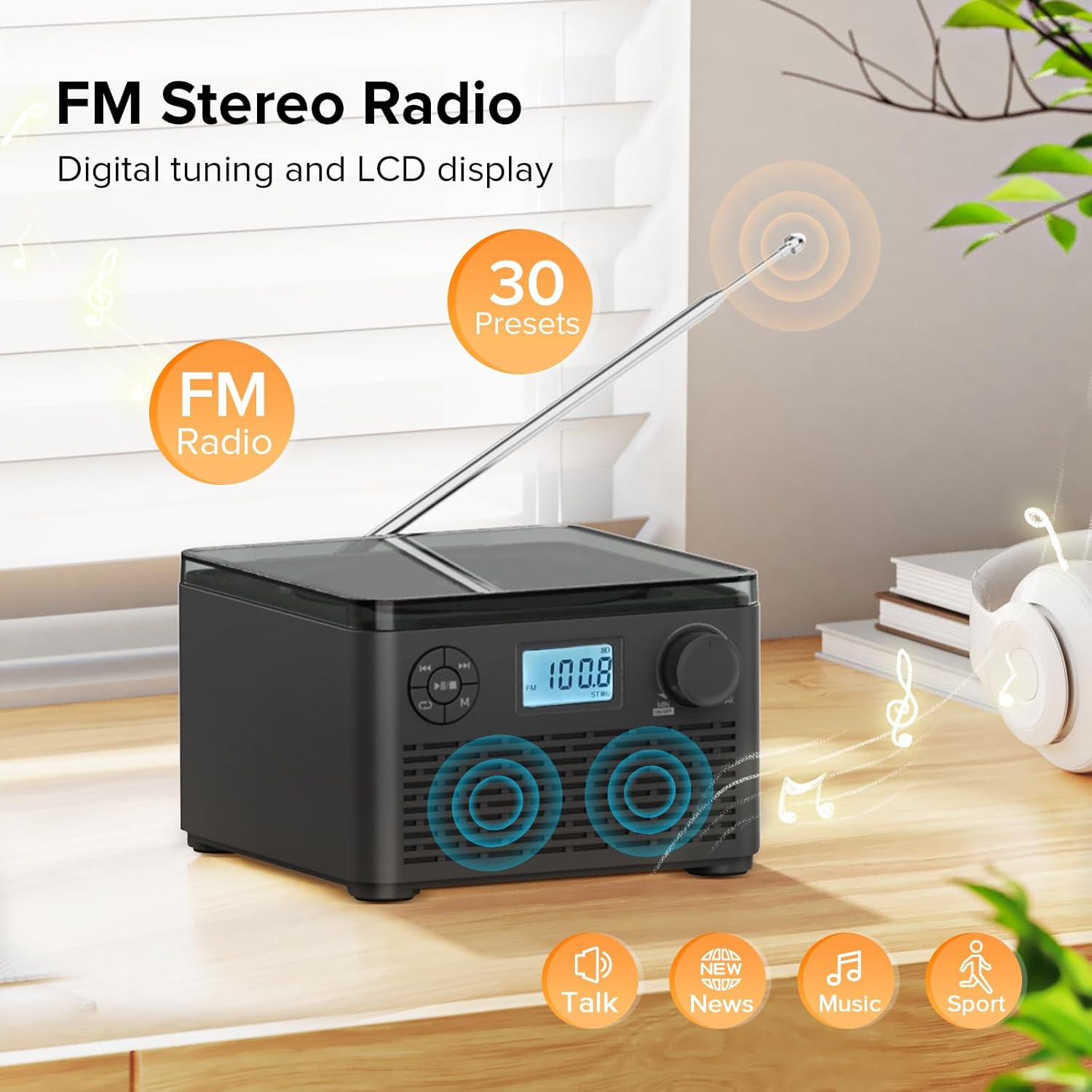
Figure 6: FM Stereo Radio - This image focuses on the FM radio feature, showing the digital display tuned to a frequency and indicating the availability of 30 presets. The extendable antenna is also visible, emphasizing its radio capabilities.
4. USB/TF 카드 재생
The unit supports MP3 and WMA audio formats from USB flash drives and TF (Micro SD) cards up to 32GB.
- Insert a USB flash drive into the USB port or a TF card into the TF card slot on the back of the unit. Ensure the antenna is moved out of the way if necessary.
- 를 누르세요 모드(M) button until "USB" or "TF" appears on the LCD display.
- The unit will automatically detect and begin playing audio file삽입된 저장 장치에서 가져온 s.
- 사용하세요 재생/일시정지(►▮▮), Previous (◀◀), 그리고 Next (►►) 재생을 제어하는 버튼.
- 를 누르세요 Repeat/Random (↺) button to cycle through repeat modes or enable random playback.
5. 헤드폰 사용
For private listening, connect standard 3.5mm headphones to the headphone jack on the back of the unit. The internal speakers will automatically mute when headphones are connected.
유지 보수 및 관리
- 청소: 부드럽고 마른 천을 사용하여 기기 외부를 닦으세요. 연마성 세제나 용제를 사용하지 마세요.
- CD 관리: CD는 가장자리를 잡고 다루세요. 깨끗하고 긁히지 않도록 하세요. 부드럽고 보풀이 없는 천을 사용하여 CD를 중앙에서 바깥쪽으로 닦으세요.
- 저장: 장기간 사용하지 않을 경우 직사광선과 극한의 온도를 피해 시원하고 건조한 곳에 보관하세요.
- 배터리 관리 : 배터리 수명을 연장하려면 배터리를 자주 완전히 방전시키지 마십시오. 자주 사용하지 않더라도 정기적으로 충전하십시오.
문제 해결
| 문제 | 가능한 원인 | 해결책 |
|---|---|---|
| 장치의 전원이 켜지지 않습니다. | 배터리가 방전되었거나 전원 어댑터가 제대로 연결되지 않았습니다. | Ensure the volume knob is rotated clockwise to turn on. Connect the power adapter and charge the unit. |
| CD is skipping or not playing. | CD가 더럽거나 긁혔거나 잘못 삽입되었습니다. | Clean the CD with a soft cloth. Ensure the CD is placed correctly in the compartment. Try a different CD. |
| FM 라디오 수신이 좋지 않습니다. | 안테나가 펼쳐지지 않았거나 신호가 약합니다. | FM 안테나를 완전히 펼치세요. 신호 수신이 더 잘 되도록 기기의 위치를 조정해 보세요. |
| Bluetooth 장치를 페어링할 수 없습니다. | 기기가 페어링 모드가 아니거나 기기와의 거리가 너무 멀습니다. | Ensure the unit is in "BT" mode and flashing. Move your Bluetooth device closer to the boombox. Disconnect other Bluetooth devices. |
| USB/TF 카드가 인식되지 않습니다. | 지원되지 않음 file format or card capacity. | 보장하다 files are MP3 or WMA format. Check that the card capacity is 32GB or less. Reinsert the card/drive. |
명세서
- 모델: W15
- 상표: 쿠에폼
- 제품 크기(길이 x 너비 x 높이): 6.3 x 6.3 x 4.2 인치
- 품목 무게: 1.9파운드
- 전원 입력: 직류 5V
- 배터리: 1개의 리튬 이온 배터리(포함)
- 배터리 재생 시간: 6-10 hours (approx., varies with usage)
- 지원되는 디스크 형식: CD, CD-R, CD-RW, MP3 CD
- Supported USB/TF Card Formats: MP3, WMA (up to 32GB)
- FM 라디오 주파수 범위: 87.5~108MHz
- 스피커 유형: 내장형 스테레오 스피커
- 헤드폰 잭: 3.5mm
보증 및 지원
Kuephom products are designed and manufactured to the highest quality standards. For any questions, technical support, or warranty claims, please contact Kuephom customer service through the retailer where you purchased the product or visit the official Kuephom web자세한 내용은 사이트를 참조하십시오.
보증을 위해 구매 증빙서류를 보관하세요.


