1. 소개 및 이상view
The Codnida 2K Security Camera is a versatile outdoor/indoor surveillance solution designed to provide comprehensive monitoring with advanced features. This camera offers 2K resolution for clear imaging, 360° pan-tilt-zoom (PTZ) capabilities for wide coverage, and intelligent motion detection with PIR human detection to minimize false alarms. It supports 24/7 recording, two-way audio communication, and integrates with smart home systems like Alexa. This manual provides detailed instructions for setup, operation, and maintenance of your Codnida security camera.

Figure 1.1: Codnida 2K Security Camera with live view 스마트폰에서.
2. 패키지 내용
패키지를 열 때 모든 품목이 들어 있고 상태가 양호한지 확인하세요.
- 1 x Codnida Q30S Surveillance Camera
- 1 x 3-meter USB Cable
- 1 x 전원 어댑터
- 1 x 빠른 시작 가이드
- 설치용 나사 1팩
3. 설정 가이드
3.1. 물리적 설치
Choose a suitable location for your camera, either indoors or outdoors. The camera is IP66 weatherproof, suitable for various environmental conditions. Use the provided screws to securely mount the camera to a wall or ceiling. Ensure the mounting surface is stable and can support the camera's weight.
3.2. 전원 연결
Connect the provided 3-meter USB cable to the camera and then plug the power adapter into a standard electrical outlet. The camera will power on and initiate its startup sequence.
3.3. 앱 다운로드 및 설정
The Codnida camera operates via the CloudEdge application. Follow these steps to set up the app and connect your camera:
- 앱 다운로드: 검색 "CloudEdge" on the Apple App Store (for iOS devices) or Google Play Store (for Android devices) and download the application.
- 계정 등록: Open the CloudEdge app and follow the on-screen prompts to register a new account. If you already have an account, simply log in.
- 장치 추가: In the app, tap the "+" icon or "Add Device" to begin the camera pairing process.
- Wi-Fi 연결: 2.4GHz Wi-Fi 네트워크를 선택하고 비밀번호를 입력하세요. 중요한: The camera only supports 2.4GHz Wi-Fi. Connection errors will occur if attempting to use a 5GHz network. Ensure your mobile device is also connected to the 2.4GHz network during setup.
- QR 코드 스캔: The app will display a QR code. Hold your camera approximately 15-20 cm (6-8 inches) in front of your phone screen until you hear a confirmation sound from the camera, indicating successful scanning.
- 설정 완료: Follow any remaining prompts in the app to name your camera and finalize the setup.

Figure 3.1: Visual guide for camera setup steps.
4. 사용 설명서
4.1. PTZ 제어 (좌우 이동, 상하 이동, 줌 기능)
The camera features 360° PTZ functionality, allowing you to remotely adjust its viewing angle. Use the directional controls within the CloudEdge app to pan (rotate horizontally up to 355°) and tilt (rotate vertically up to 90°) the camera lens. This helps eliminate blind spots and provides comprehensive coverage of your monitored area.

Figure 4.1: PTZ control range of the Codnida camera.
4.2. 24시간 연중무휴 녹화 및 저장
The camera supports continuous 24/7 recording. You have two primary options for video storage:
- TF 카드 저장: Insert a Micro SD card (16GB, 32GB, 64GB, or 128GB) into the camera's SD card slot. The camera will automatically begin recording to the card. (SD card not included).
- 클라우드 스토리지(선택 사항): CloudEdge 클라우드 스토리지 서비스를 구독하여 비디오 콘텐츠를 안전하게 원격으로 저장하세요.tage. This allows for easy playback and access from anywhere.

Figure 4.2: Recording options for the Codnida camera.
4.3. 동작 감지 및 경보
The camera is equipped with advanced PIR human detection technology to accurately identify human movement and reduce false alarms. When motion is detected, the camera can trigger the following actions:
- 내장형 사이렌: An audible alarm will sound from the camera.
- Motion-Activated Light Alarm: The camera's spotlights will illuminate.
- 메시지 푸시: You will receive real-time notifications on your mobile device via the CloudEdge app.
You can customize detection zones and sensitivity settings within the CloudEdge app to focus monitoring on specific areas and optimize performance.
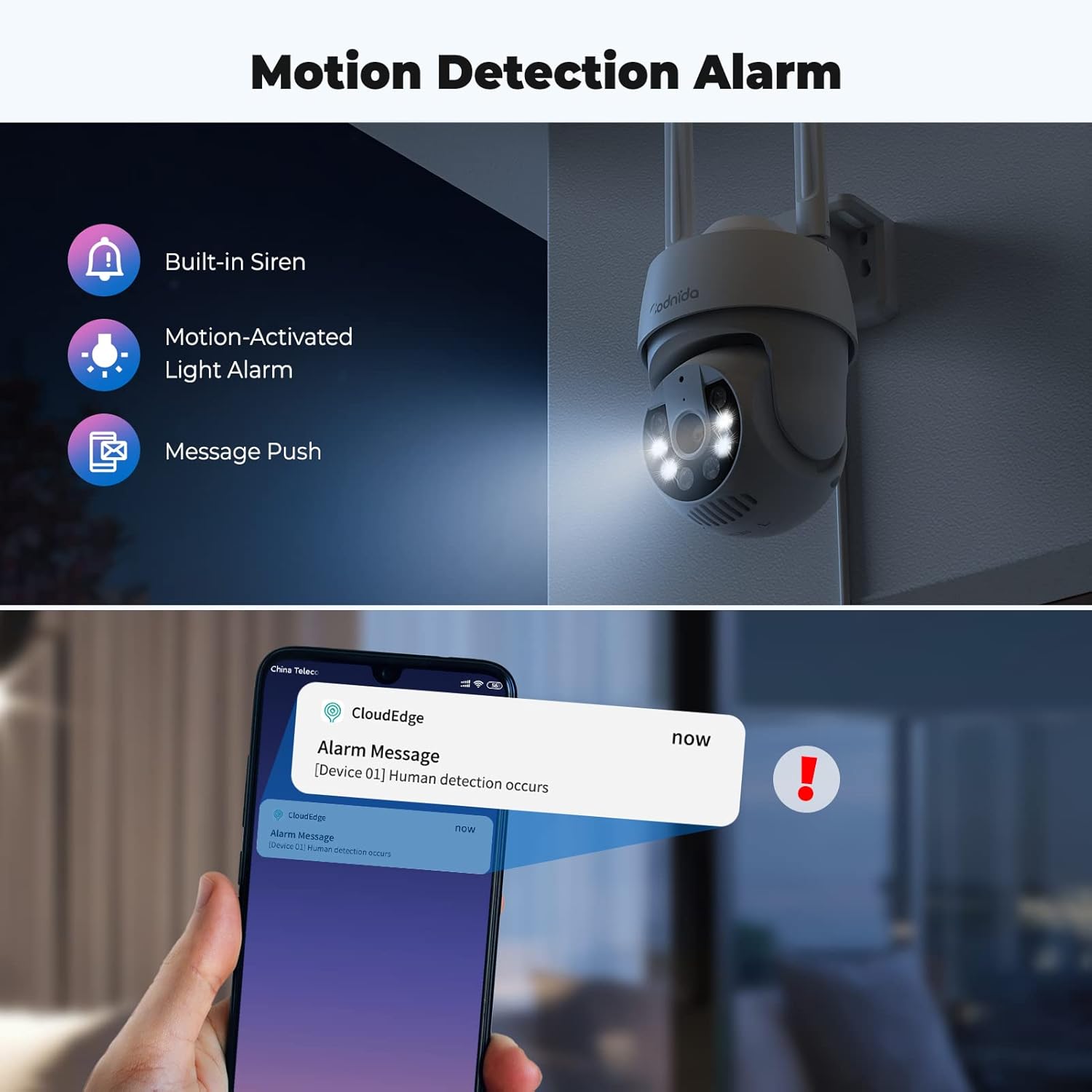
Figure 4.3: Motion detection and alarm capabilities.
4.4. 양방향 오디오
The integrated microphone and speaker allow for two-way audio communication. You can listen to the camera's surroundings and speak through the camera using the CloudEdge app. This feature is useful for communicating with visitors or deterring intruders.

그림 4.4: 양방향 오디오 기능 사용.
4.5. AI Automatic Tracking
움직임이 감지되면 카메라가 자동으로 시야 범위 내의 움직이는 물체를 추적할 수 있습니다. view. This ensures that the subject remains in the frame, providing continuous surveillance of activity.

Figure 4.5: AI automatic tracking in action.
4.6. Ultra 2K Night Vision
The camera provides clear visibility even in low-light conditions. It features 2K resolution night vision with a distance of up to 10 meters. The built-in spotlights can be activated to provide color night vision, enhancing detail and clarity in the dark.
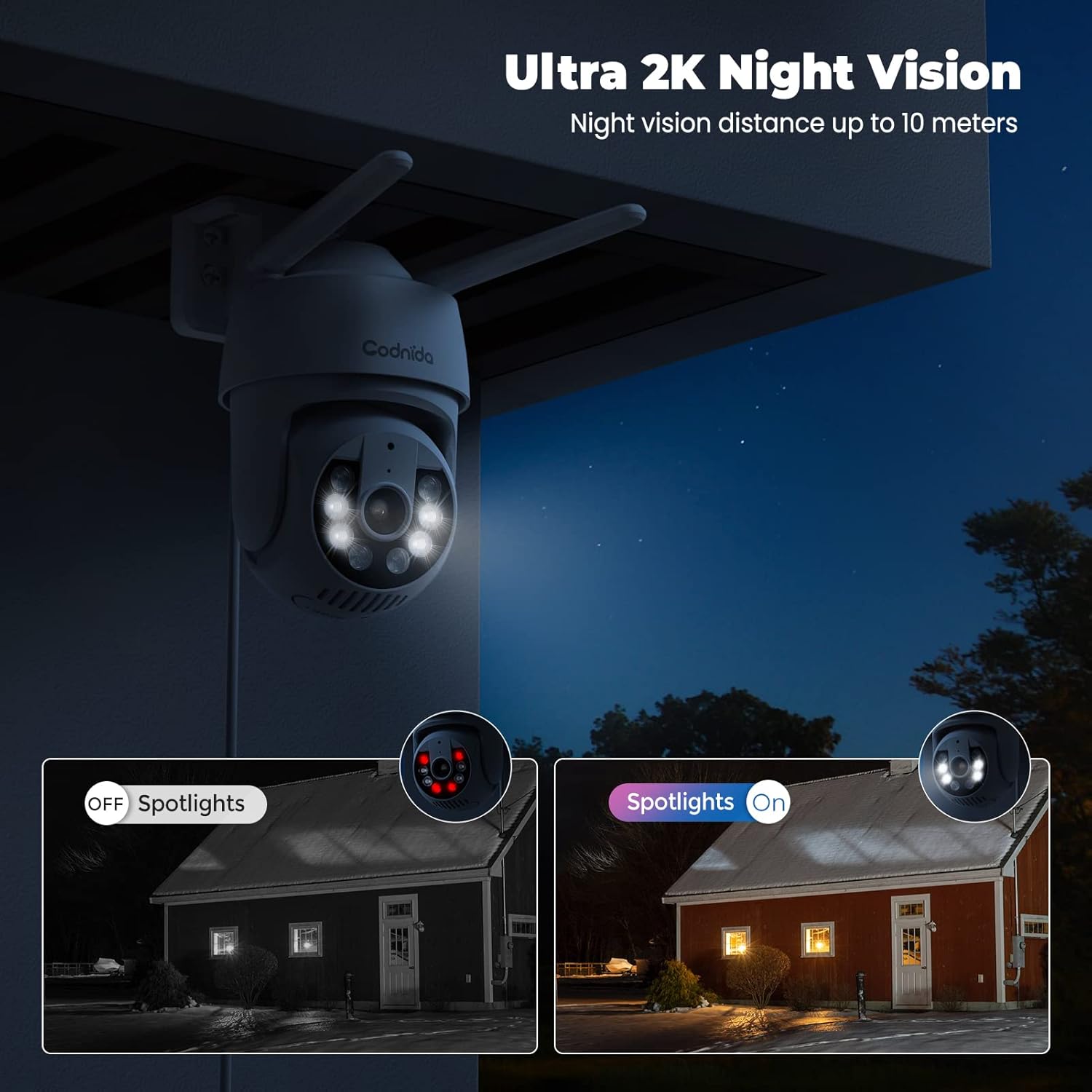
Figure 4.6: Night vision capabilities with and without spotlights.
5. 유지관리
Regular maintenance helps ensure the longevity and optimal performance of your Codnida security camera:
- 청소: 카메라 렌즈와 본체는 부드러운 천으로 주기적으로 닦아주세요.amp 천으로 먼지와 때를 제거하세요. 강한 화학 물질이나 연마성 세제는 사용하지 마세요.
- 펌웨어 업데이트: Check the CloudEdge app regularly for available firmware updates. Keeping your camera's firmware updated ensures you have the latest features and security enhancements.
- 전원 공급 장치: 전원 어댑터와 케이블이 손상되지 않았는지, 그리고 제대로 연결되어 있는지 확인하십시오.
- 환경 보호: While the camera is IP66 weatherproof, extreme weather conditions (e.g., direct lightning strikes, prolonged submersion) should be avoided.
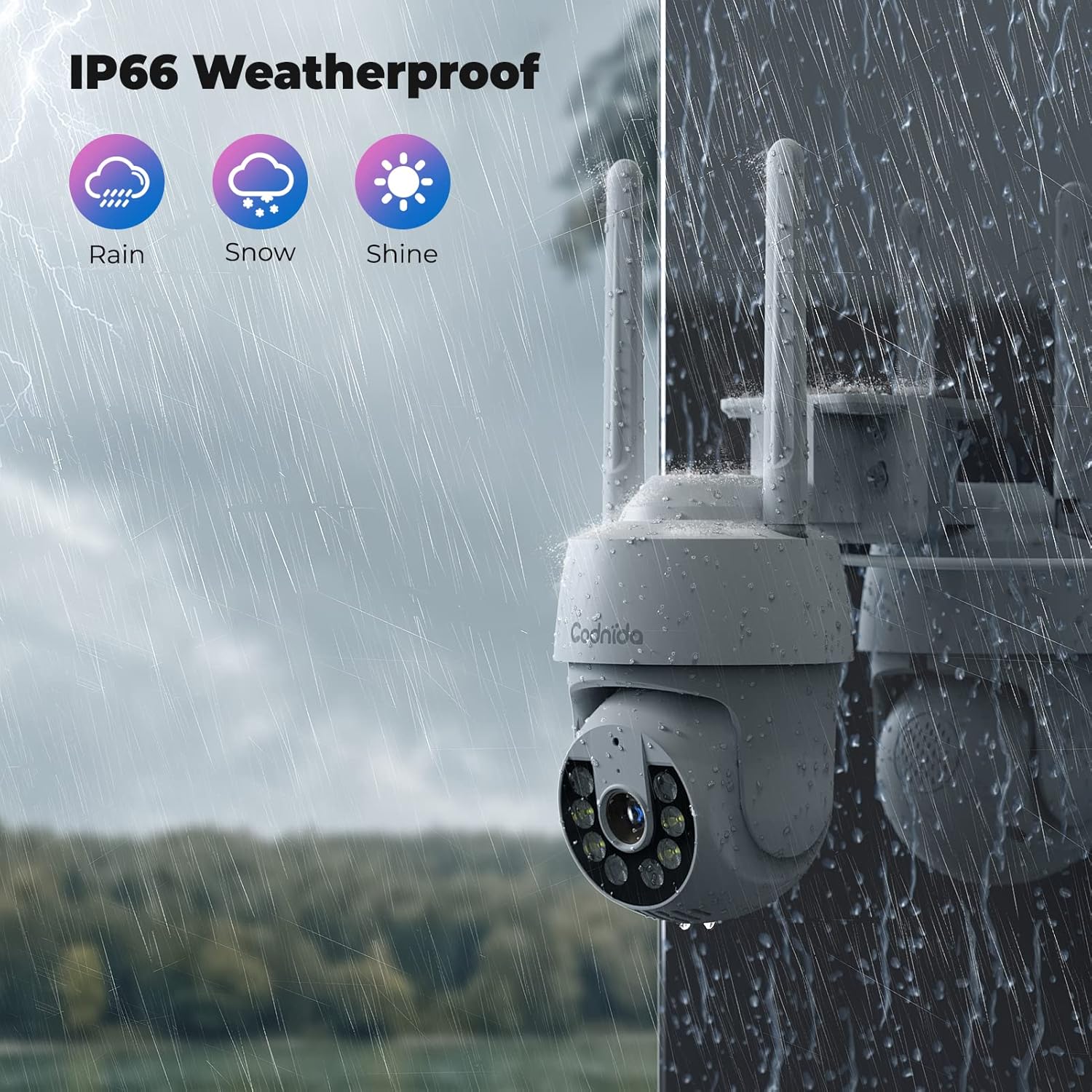
Figure 5.1: The camera's IP66 weatherproof rating ensures durability in various conditions.
6. 문제 해결
If you encounter issues with your Codnida camera, refer to the following common problems and solutions:
| 문제 | 가능한 원인 | 해결책 |
|---|---|---|
| 카메라가 Wi-Fi에 연결되지 않습니다. | Incorrect Wi-Fi band (5GHz), wrong password, weak signal. | Ensure you are connecting to a 2.4GHz Wi-Fi network. Double-check the Wi-Fi password. Move the camera closer to the router or use a Wi-Fi extender. |
| 잦은 오경보. | High motion detection sensitivity, environmental factors (e.g., swaying trees, shadows). | Adjust the motion detection sensitivity in the CloudEdge app. Define specific detection zones to exclude areas with frequent irrelevant motion. |
| SD 카드에 녹화되지 않습니다. | SD card not inserted correctly, card full, card not formatted, incompatible card. | Ensure the SD card is inserted correctly. Format the SD card via the app. Check if the card is within the supported capacity (16-128GB). |
| 이미지 품질이 좋지 않습니다. | 렌즈가 더럽고, 대역폭이 낮고, 조명이 좋지 않습니다. | Clean the camera lens. Ensure stable internet connection. Utilize the camera's spotlights for enhanced night vision. |
| 양방향 오디오가 작동하지 않습니다. | Microphone/speaker disabled in app, volume too low, network issues. | Check audio settings in the CloudEdge app. Ensure your phone's volume is up. Verify stable network connection. |
For further assistance, please refer to the CloudEdge app's help section or contact Codnida customer support.
7. 사양
| 특징 | 세부 사항 |
|---|---|
| 모델 | B0CSSQJSDS |
| 상표 | 대구 |
| 해결 | 2K (Video capture resolution listed as 720p in some specs, but product title indicates 2K) |
| PTZ Range | 팬 355 °, 틸트 90 ° |
| 연결성 | Wi-Fi(2.4GHz만 해당) |
| 저장 옵션 | Micro SD Card (16-128GB), Cloud Storage (Subscription required) |
| 발각 | PIR Human Detection, Motion Tracking |
| 오디오 | 양방향 오디오 |
| 나이트 비전 | Infrared, Color Night Vision with Spotlights (up to 10 meters) |
| 비바람에 견디는 등급 | IP66 |
| 호환 장치 | Tablet, Smartphone (via CloudEdge App), Works with Alexa |
| 전원 입력 | 10 와트시 |
| 품목 무게 | 610그램 |
| 패키지 크기 | 18.1 x 17.9 x 10.7cm |
| 원산지 | 중국 |
8. 보증 및 지원
Codnida products are designed for reliability and performance. For information regarding warranty coverage, technical support, or service inquiries, please refer to the contact details provided in your product packaging or visit the official Codnida web사이트. 보증 청구를 위해 구매 증빙 자료를 보관하세요.
