
1. 서론
This manual provides comprehensive instructions for the installation, operation, and maintenance of your TAFFIO 10.25-inch Touchscreen Android Navigation System. This system is designed to integrate seamlessly into Volvo S40, C30, C70, and V50 models from 2004-2013, offering advanced navigation, entertainment, and communication features.
Please read this manual thoroughly before installation and use to ensure proper function and to maximize your experience with the device. Keep this manual for future reference.
2. 안전 정보
- Always prioritize safe driving. Do not operate the system in a way that distracts you from the road.
- Ensure all connections are secure and correctly installed to prevent electrical hazards or damage to the vehicle's systems.
- 제품을 분해하거나 개조하지 마십시오. 보증이 무효화되고 손상이 발생할 수 있습니다.
- 설치 단계에 대해 확신이 없다면 전문가에게 문의하세요.
- 화면을 깨끗하게 유지하고 장애물이 없도록 하여 선명한 시야를 확보하십시오.
3. 설정
3.1 패키지 내용
설치를 시작하기 전에 패키지에 모든 구성 요소가 들어 있는지 확인하세요.
- 1x Android multimedia system
- 1x 전원 케이블
- 1x CAN-BUS Decoder
- 2x USB 케이블
- 1x RCA Plugs & Sim Card Slot cable
- 1x Rear camera input cable
- 1x GPS 안테나
- 4G 안테나 1개

Figure 3.1: Included components of the TAFFIO Android multimedia system.
3.2 설치
The TAFFIO Android multimedia system is designed for Plug & Play installation, minimizing the need for additional adapters or mounting frames. However, careful attention to connections is required.
- 준비: 설치를 시작하기 전에 차량의 점화가 꺼져 있고 배터리가 분리되어 있는지 확인하세요.
- 원래 장치 제거: Carefully remove the existing car radio or display unit from your Volvo dashboard. Refer to your vehicle's service manual for specific instructions on removing dashboard components.
- 본체 연결: Connect the main power cable (B) from the TAFFIO system to the original main unit's wiring harness.
- Connect to TAFFIO Radio: Connect the appropriate cable (A) to the TAFFIO Android multimedia system.
- LCD Plug Connection: Connect the original LCD plug (C) to the designated port on the TAFFIO system.
- SIM 카드 슬롯: Insert your 4G LTE SIM card into the provided slot (D) if you intend to use mobile internet without Wi-Fi.
- 추가 연결: Connect the GPS antenna, 4G antenna, USB cables, RCA plugs, and rear camera input cable to their respective ports on the TAFFIO system. Ensure the CAN-BUS decoder is correctly integrated into the wiring harness (E) to support steering wheel controls and vehicle settings.
- AUX Input Verification: It is crucial to determine if your original Volvo radio has an AUX (Auxiliary Audio Input). This information may be necessary for proper audio integration.
- 테스트 기능: Before fully reassembling the dashboard, reconnect the battery and test the system's basic functions, including power on/off, audio, touchscreen response, and steering wheel controls.
- 최종 조립: Once functionality is confirmed, carefully reassemble the dashboard components, ensuring no wires are pinched.
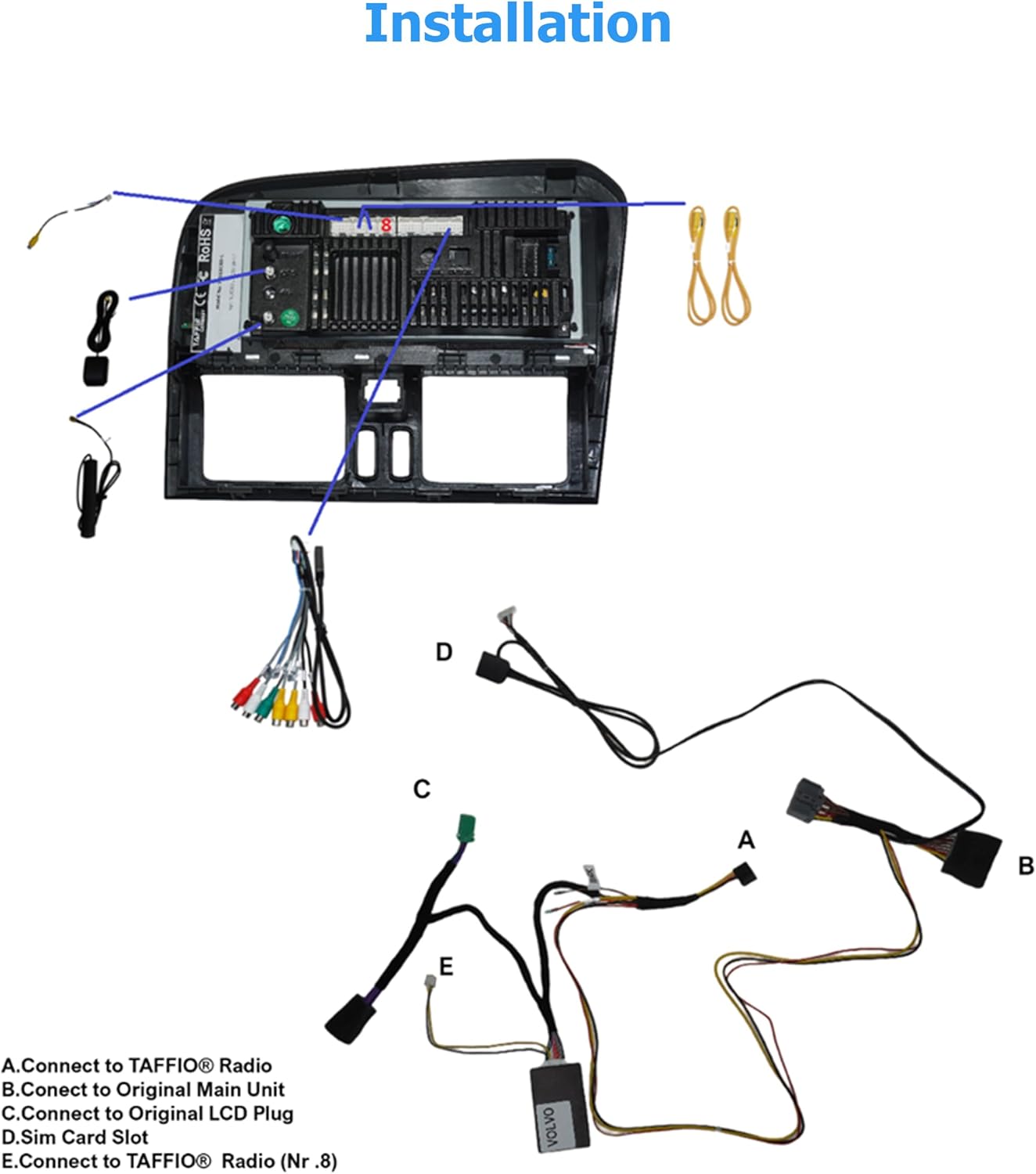
Figure 3.2: Installation diagram for the TAFFIO Android multimedia system.
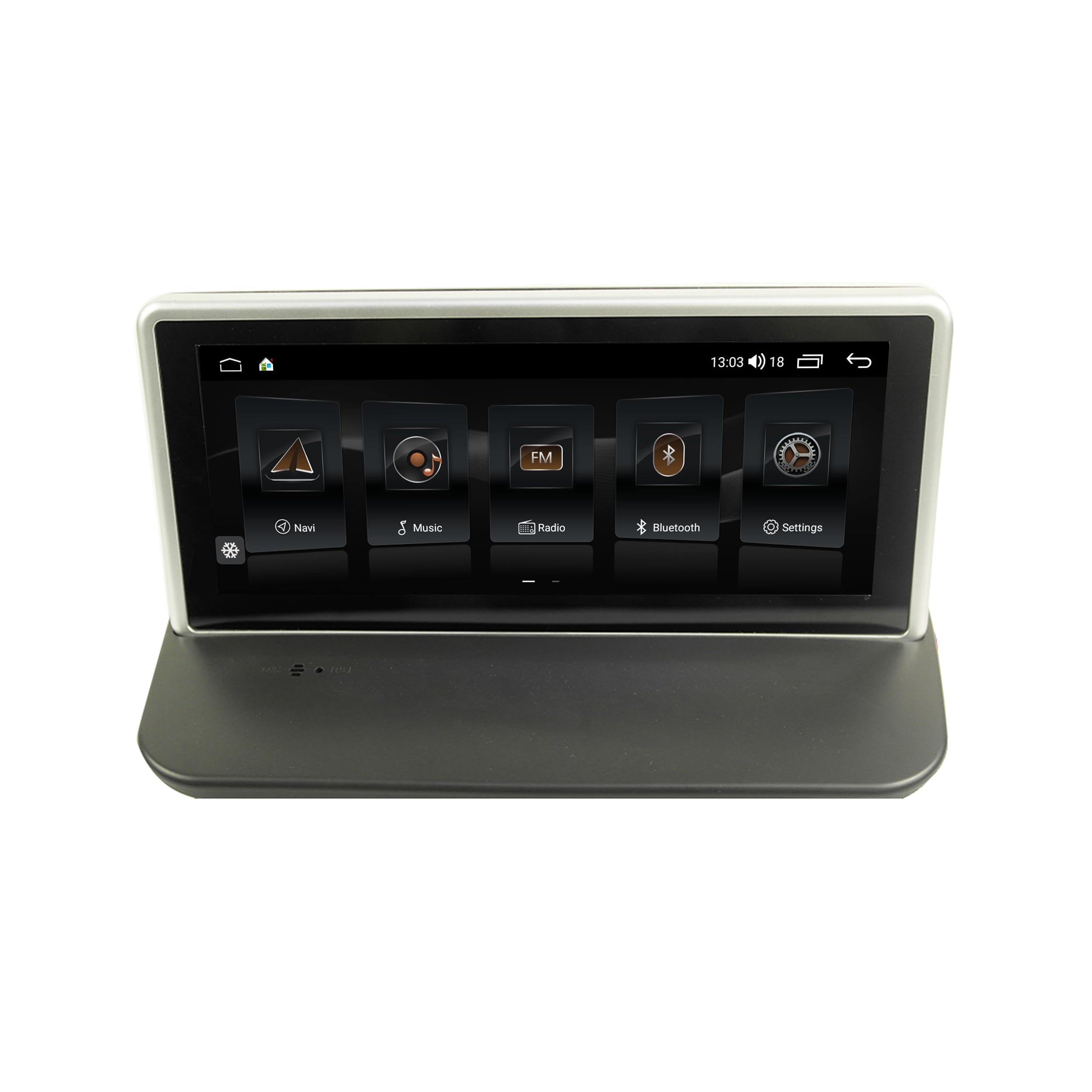
Figure 3.3: TAFFIO system installed in a Volvo dashboard, showing the main interface and rearview 카메라 view.
4. 사용 설명서
4.1 전원 켜기 및 초기 설정
After installation, turn on your vehicle's ignition. The system will boot up, displaying the TAFFIO logo. The initial boot may take slightly longer. Follow any on-screen prompts for language selection and basic Android setup.
4.2 사용자 인터페이스 및 탐색
The system features an intuitive user interface with a 3D graphical display. Control is primarily via the capacitive multitouch screen. You can also use the vehicle's original steering wheel controls, which are supported by the system.

Figure 4.1: Main menu of the TAFFIO Android system.

Figure 4.2: Android applications screen.
4.3 연결성
- 와이파이: Connect to available WLAN hotspots or your smartphone's hotspot for internet access. Navigate to Settings > Network & Internet > Wi-Fi.
- 4G LTE: If a SIM card is installed, the system will automatically connect to the mobile network for internet access.
- 블루투스: Pair your mobile phone for hands-free calling and A2DP music streaming. Go to Settings > Connected devices > Pair new device. The system supports synchronization of phone book contacts.
- USB: Use the provided USB cables to connect external storage devices for music, pictures, and videos.
4.4 탐색
The system comes with pre-installed GPS navigation map material and offers free lifetime updates. Access navigation through the dedicated 'Maps' or 'Navigation' app icon. The system supports 2-Zone function, allowing you to listen to radio or music while navigating.

Figure 4.3: Wireless Carplay navigation interface.
4.5 CarPlay 및 Android Auto
The system features integrated CarPlay and Android Auto functionality without requiring an additional adapter. Connect your compatible smartphone via USB or wirelessly (if supported by your phone and the system) to access these features.

그림 4.4: 안드로이드 오토 인터페이스.
4.6 멀티미디어 기능
- 라디오: FM/AM tuner with RDS (Radio Data System) for displaying station names.
- 미디어 재생 : 음악, 비디오 등을 재생합니다. view pictures from USB drives or internal storage.
- 이퀄라이저 : Customize audio settings with preset EQ modes (Pop, Classic, Rock, Jazz) or user-defined Bass/Treble/Balance controls.
- Back-Zone Function: Allows navigation on the front screen while passengers in the back can watch TV or video (requires additional rear displays).
4.7 차량 통합
The system supports various vehicle-specific functions:
- 스티어링 휠 컨트롤: Retains original steering wheel control functionality.
- 차량 설정: Access and adjust certain vehicle settings through the system interface.
- 뒤쪽view 카메라: Automatic switching to the rearview 후진 시 카메라 화면 표시.
- Day and Night Display: Automatic or manual adjustment of screen brightness for optimal visibility.

Figure 4.5: Vehicle personalization settings.
5. 유지관리
- 화면 청소: Use a soft, lint-free cloth to clean the touchscreen. For stubborn marks, lightly damp천에 물이나 화면에 안전한 세척제를 묻혀 닦아주세요. 연마재나 강한 화학 물질은 사용하지 마세요.
- 소프트웨어 업데이트: Periodically check for software updates to ensure optimal performance and access to new features. Updates can typically be found through the system's settings or TAFFIO's official support channels.
- 일반 관리 : 본 제품을 극한의 온도, 장시간 직사광선 또는 과도한 습기에 노출시키지 마십시오.
6. 문제 해결
This section addresses common issues you might encounter with your TAFFIO Android Navigation System.
| 문제 | 가능한 원인 | 해결책 |
|---|---|---|
| 전원이 켜지지 않음 / 시스템이 켜지지 않음 | 배선 오류; 퓨즈 단선; 차량 배터리 문제 | Check all power connections. Verify vehicle fuses. Ensure vehicle battery is charged. |
| 소리가 나지 않습니다 | Volume too low; Mute activated; Incorrect audio output settings; Wiring issue | Increase volume. Check if mute is active. Verify audio settings. Inspect speaker wiring. Ensure AUX input is correctly configured if applicable. |
| Touchscreen unresponsive or inaccurate | Software glitch; Screen dirty; Physical damage | Restart the system. Clean the screen. If issue persists, contact support. |
| GPS 신호가 손실되었거나 부정확함 | GPS antenna obstructed or disconnected; Environmental interference | GPS 안테나가 제대로 연결되었고 깨끗한지 확인하십시오. view 하늘의. 열린 공간으로 이동하세요. |
| 블루투스 연결 문제 | Device not in pairing mode; Interference; Software issue | Ensure both devices are in pairing mode. Restart both devices. Clear Bluetooth cache on phone. |
| CarPlay/Android Auto가 연결되지 않습니다 | Incorrect USB cable; Phone software issue; System software issue | Use a high-quality USB data cable. Ensure phone's CarPlay/Android Auto settings are correct. Restart phone and system. |
| 스티어링 휠 컨트롤이 작동하지 않습니다 | CAN-BUS decoder not connected; Incorrect settings | Verify CAN-BUS decoder connection. Check system settings for steering wheel control configuration. |
If you encounter an issue not listed here or if the suggested solutions do not resolve the problem, please contact TAFFIO customer support for further assistance.
7. 사양
| 특징 | 세부 사항 |
|---|---|
| 모델명 | TJ-S40 |
| 디스플레이 크기 | 10.25 인치 |
| 운영 체제 | 안드로이드 10 |
| 프로세서 | Octa-Core 1.8Ghz CPU |
| 숫양 | 4GB (XNUMX기가바이트) |
| 내부 저장소 | 64GB 플래시 |
| 연결성 | Bluetooth, USB, Wi-Fi, 4G LTE (SIM card slot) |
| 특별 기능 | Touchscreen, Integrated CarPlay & Android Auto, GPS Navigation, RDS Radio, Rear Camera Input |
| 지도 유형 | Worldwide (with free lifetime updates) |
| 오디오 출력 모드 | 스테레오 재생 |
| 장착 유형 | 대시 보드 마운트 |
| 호환 차량 | Volvo S40, C30, C70, V50 (2004-2013) |
8. 보증 및 지원
8.1 보증 정보
Your TAFFIO 10.25-inch Touchscreen Android Navigation System comes with a 2년 제조사 보증. This warranty covers defects in materials and workmanship under normal use. Please retain your purchase invoice as proof of purchase for warranty claims.
The warranty does not cover damage caused by improper installation, misuse, accidents, unauthorized modifications, or normal wear and tear.
8.2 고객 지원
For technical assistance, warranty claims, or any questions regarding your TAFFIO product, please contact TAFFIO customer support through the retailer where you purchased the device or visit the official TAFFIO web연락처 정보 사이트.