1. 서론
This manual provides essential information for the safe and efficient operation of your TELLUR Obia PRO 60W Bluetooth Speaker. Please read this manual thoroughly before using the product and retain it for future reference.
2. 안전 정보
- 스피커를 극한의 온도나 직사광선에 장시간 노출시키지 마세요.
- 스피커를 떨어뜨리거나 강한 충격을 주지 마십시오.
- 스피커를 분해하거나 개조하지 마십시오. 보증이 무효화됩니다.
- 스피커를 의료기기에서 멀리 떨어뜨려 놓으십시오.
- IPX6 방수 기능을 유지하려면 물 근처에서는 충전 포트 덮개를 단단히 닫아 두세요.
- 지정된 충전 케이블과 전원 어댑터만 사용하세요.
3. 패키지 내용
패키지에 모든 품목이 들어 있는지 확인하세요.
- TELLUR Obia PRO 60W Bluetooth Speaker
- USB 충전 케이블
- 3.5mm AUX 오디오 케이블
- 사용 설명서 (본 문서)
4. 제품 오버view 및 제어
Familiarize yourself with the speaker's components and control buttons.

그림 4.1: 앞쪽 view of the TELLUR Obia PRO speaker, showcasing the main grille, control panel, and integrated LED lights on the handle and side woofers.
4.1 제어판

그림 4.2: 상세한 view of the control buttons located on the top panel of the speaker.
- 볼륨 낮추기(-) / 이전 트랙: 짧게 누르면 볼륨이 낮아집니다. 길게 누르면 이전 트랙으로 이동합니다.
- 볼륨 높이기(+) / 다음 트랙: 짧게 누르면 볼륨이 커집니다. 길게 누르면 다음 곡으로 넘어갑니다.
- LED 조명 모드 버튼: 눌러서 다양한 LED 조명 모드를 순환하세요.
- 전원 버튼: Press and hold to power on/off. Briefly press to play/pause music.
- TWS(True Wireless Stereo) 버튼: Press to activate TWS pairing mode.
- 모드 버튼(M): Press to switch between Bluetooth, USB, and AUX input modes.
4.2 입력/출력 포트
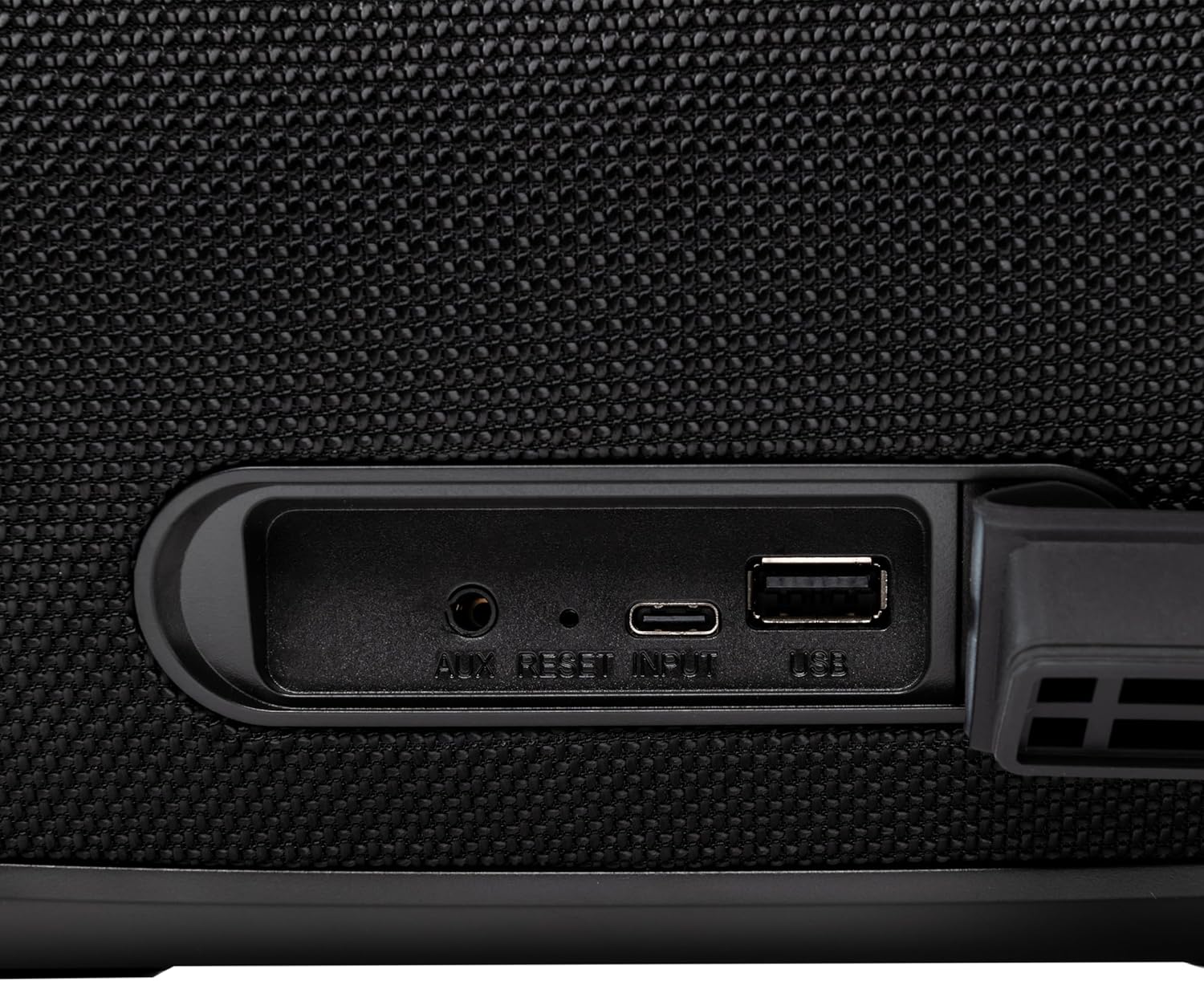
그림 4.3: Close-up of the protected input/output ports on the rear of the speaker.
- AUX-IN 포트: 3.5mm 오디오 케이블을 통해 외부 오디오 장치를 연결합니다.
- 재설정 버튼: Use a thin object to press and reset the speaker if necessary.
- USB-C 입력 : 스피커를 충전합니다.
- USB-A 포트: For playing MP3 audio files from a USB drive or for power bank functionality.
5. 설정
5.1 스피커 충전
Before initial use, fully charge the speaker. The speaker also functions as a power bank to charge other devices via its USB-A port.
- Connect the USB charging cable to the USB-C input port on the speaker.
- 케이블의 다른 쪽 끝을 호환되는 USB 전원 어댑터(포함되지 않음)에 연결합니다.
- The charging indicator light will illuminate. It will turn off once charging is complete.
- The battery level can be displayed on your connected phone when paired via Bluetooth.
5.2 전원 켜기/끄기
- 전원을 켜려면: 를 누르고 계세요 전원 버튼 for approximately 3 seconds until you hear an audible prompt and the LED lights activate.
- 전원을 끄려면: 를 누르고 계세요 전원 버튼 for approximately 3 seconds until you hear an audible prompt and the LED lights turn off.
6. 사용 설명서
6.1 블루투스 페어링
The speaker uses Bluetooth v5.3 for stable wireless connection up to 10 meters.
- Ensure the speaker is powered on and in Bluetooth mode (indicated by a flashing blue LED). If not, press the 모드 버튼(M) 블루투스 모드로 전환합니다.
- 모바일 기기(스마트폰, 태블릿 등)에서 Bluetooth를 활성화하세요.
- 검색 사용 가능한 Bluetooth 장치를 선택하고 "TELLUR Obia PRO" 목록에서.
- Once paired, the speaker will emit an audible confirmation, and the blue LED will stop flashing.
- 스피커의 전원을 켜면 마지막으로 페어링된 장치가 있는 경우 해당 장치에 자동으로 다시 연결됩니다.

그림 6.1: The TELLUR Obia PRO speaker wirelessly connected to a smartphone, ready for audio playback.
6.2 True Wireless Stereo(TWS) 기능
TWS allows you to pair two Obia PRO speakers for a stereo sound experience.
- Ensure both Obia PRO speakers are powered on and in Bluetooth mode, but not yet paired with any device.
- 한 스피커(기본 스피커)에서 다음을 누릅니다. TWS 버튼. The speaker will enter TWS pairing mode, indicated by a flashing light.
- The two speakers will automatically connect to each other. Once connected, you will hear an audible confirmation, and the TWS indicator light on both speakers will become solid.
- Now, connect your mobile device to the primary speaker via Bluetooth as described in Section 6.1. The audio will play in stereo across both speakers.
6.3 Multiple Link Technology
This technology allows connecting an unlimited number of Obia PRO speakers wirelessly for a synchronized audio experience. Refer to the manufacturer's website or specific instructions for detailed setup of Multiple Link.
6.4 USB 재생(MP3)
MP3 오디오 재생 files directly from a USB flash drive (up to 128GB).
- MP3가 포함된 USB 플래시 드라이브 삽입 fileUSB-A 포트에 연결하세요.
- 를 누르세요 모드 버튼(M) to switch to USB mode. The speaker will automatically begin playing music from the USB drive.
- 사용하세요 볼륨 높이기/낮추기 그리고 전원 버튼 (for play/pause) to control playback.
6.5 AUX-IN 연결
Connect non-Bluetooth devices using the 3.5mm AUX audio cable.
- Connect one end of the 3.5mm AUX audio cable to the AUX-IN port on the speaker.
- 다른 쪽 끝을 외부 장치(예: MP3 플레이어, 노트북)의 오디오 출력 잭에 연결합니다.
- 를 누르세요 모드 버튼(M) AUX 모드로 전환합니다.
- 외부 기기에서 재생과 볼륨을 제어하세요.
6.6 핸즈프리 통화
When connected to a smartphone via Bluetooth, the speaker's built-in microphone allows for hands-free calls.
- 전화 받기/종료: 짧게 누르세요 전원 버튼.
- 전화 거부: 를 누르고 계세요 전원 버튼 2초 동안.
6.7가지 LED 조명 모드
The speaker features integrated LED lights with multiple display modes.
- 를 누르세요 LED 조명 모드 버튼 to cycle through available light patterns and colors.
- 를 누르고 계세요 LED 조명 모드 버튼 불을 끄거나 켜다.

그림 6.2: A user interacting with the LED light mode button to change the speaker's lighting effects.
6.8 Equalizer Settings (Indoor/Outdoor)
The speaker allows for equalizer customization for different environments. Specific controls for this are not detailed in the provided data, but typically involve a dedicated button or a combination of existing buttons. Refer to the product's quick start guide or manufacturer's website for precise instructions on adjusting the equalizer.
7. 유지관리
7.1 청소
- 부드럽고 마른 천으로 스피커를 닦으세요.
- 연마성 세척제, 알코올, 화학 용제는 사용하지 마세요.
7.2 방수 등급(IPX6)
The Obia PRO speaker is rated IPX6, meaning it is protected against high-pressure water jets from any direction. This makes it suitable for outdoor use and environments where it might be exposed to splashes or rain.
- Ensure the rubber cover for the charging and AUX ports is securely closed before exposing the speaker to water.
- 스피커를 물에 담그지 마십시오.
- 물에 닿은 후에는 스피커를 깨끗이 닦은 다음 충전하십시오.
7.3 배터리 관리
- 배터리 수명을 연장하려면 배터리를 자주 완전히 방전하지 마세요.
- 배터리 수명 유지를 위해 사용하지 않을 때에도 스피커를 정기적으로 충전하십시오.
- 장시간 사용하지 않을 때는 스피커를 시원하고 건조한 곳에 보관하세요.
8. 문제 해결
| 문제 | 가능한 원인 | 해결책 |
|---|---|---|
| 스피커의 전원이 켜지지 않습니다. | 배터리가 부족합니다. | 스피커를 완전히 충전하세요. |
| 블루투스로 페어링할 수 없습니다. | 스피커가 페어링 모드가 아닙니다. 기기의 Bluetooth가 꺼져 있습니다. 스피커와의 거리가 너무 멀습니다. | Ensure speaker is in Bluetooth mode (flashing LED). Turn on Bluetooth on your device. Move device closer to speaker (within 10m). |
| 소리가 나지 않습니다. | Volume too low; incorrect mode selected; device not playing. | Increase speaker and device volume. Press 모드 버튼(M) to select correct input. Ensure audio is playing on the connected device. |
| TWS 페어링이 실패합니다. | Speakers already paired to a device; not both Obia PRO models. | Disconnect both speakers from any Bluetooth devices. Ensure both speakers are Obia PRO models. Try TWS pairing again. |
| USB 재생이 작동하지 않습니다. | USB 드라이브가 올바르게 포맷되지 않았습니다. 지원되지 않습니다. file 유형; 구동 용량이 너무 큽니다. | USB 드라이브가 FAT32 형식으로 포맷되어 있는지 확인하십시오. MP3 파일만 해당됩니다. files are supported. Max capacity 128GB. |
9. 사양
| 모델명 | Obia PRO |
| 상표 | 텔루르 |
| 출력 전력 | 60W (2x 20W RMS subwoofers, 2x 10W RMS tweeters) |
| 블루투스 버전 | v5.3 |
| 무선 범위 | 최대 10미터 |
| 주파수 응답 | 80MHz (Note: This value is unusual for speaker frequency response and may be a typo in source data. Typically measured in Hz-kHz.) |
| 임피던스 | 4옴 |
| 오디오 모드 | Bluetooth, USB (MP3), AUX-IN |
| USB 지원 | USB 2.0/3.0, up to 128GB (MP3 format) |
| 방수성 | IPX6 |
| 배터리 용량 | 5400mAh |
| 재생 시간 | 최대 12시간(중간 볼륨 기준) |
| 파워뱅크 기능 | Yes, via USB-A port |
| 치수(길이 x 너비 x 높이) | 37.7 x 17 x 18cm |
| 무게 | 3.48kg |
| 재료 | 플라스틱 |
| 색상 | 검은색 |
참고: 사양은 사전 통지 없이 변경될 수 있습니다.
10. 보증 및 지원
TELLUR products are manufactured to the highest quality standards. For information regarding warranty terms, technical support, or service, please refer to the warranty card included with your product or visit the official TELLUR web대지.
연락처 정보: 방문해주세요 www.tellur.com 최신 지원 정보를 확인하세요.


