1. 서론
This manual provides detailed instructions for the safe and efficient operation of your Xprinter XP-P323B Portable Thermal Printer. Please read this manual thoroughly before using the device to ensure proper functionality and to prevent damage. The XP-P323B is designed for printing receipts and labels, offering portability and high-speed capabilities for various business needs.
2. 안전 정보
- 프린터를 물이나 과도한 습기에 노출시키지 마십시오.
- 프린터를 떨어뜨리거나 강한 충격을 주지 마세요.
- 지정된 전원 어댑터와 액세서리만 사용하세요.
- 프린터를 열원과 직사광선으로부터 멀리 두십시오.
- 프린터를 직접 분해하거나 수리하려고 하지 마십시오. 자격을 갖춘 서비스 담당자에게 문의하십시오.
- 작동 중 적절한 환기를 보장하십시오.
3. 패키지 내용
패키지에 모든 품목이 들어 있는지 확인하세요.
- Xprinter XP-P323B Portable Thermal Printer
- Power Adapter (not explicitly listed but standard)
- USB Cable (not explicitly listed but standard)
- Sample Thermal Paper Roll (not explicitly listed but standard)
- 사용 설명서 (본 문서)
4. 제품 오버view
The Xprinter XP-P323B is a compact and efficient thermal printer designed for various printing tasks. It supports NV logo download and picture printing (BMP format), along with concentration adjustment for print quality.
4.1. 프린터 구성 요소

그림 1: 앞쪽 view of the Xprinter XP-P323B Portable Thermal Printer, showing the power button, display, and a sample label being printed.
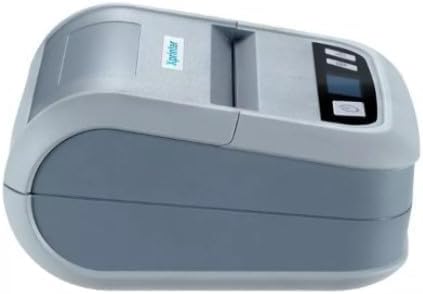
그림 2: 옆 view of the Xprinter XP-P323B, highlighting its compact design and the Xprinter logo.
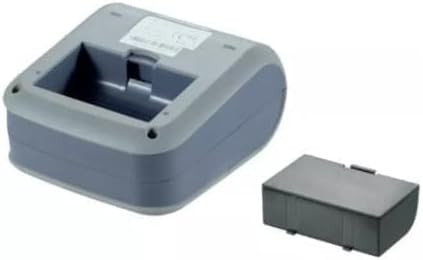
그림 3: 밑면 view of the Xprinter XP-P323B, showing the base and the removable battery compartment.
5. 설정
5.1. 배터리 충전
- Connect the power adapter to the printer's charging port.
- 전원 어댑터를 벽면 콘센트에 꽂으세요.
- The charging indicator light will illuminate. Allow the printer to charge fully before first use.
5.2. Loading Thermal Paper/Labels
- Open the paper compartment cover by gently pushing the release latch.
- Insert the thermal paper roll with the printing surface facing the print head. Ensure the roll is seated correctly.
- 프린트 헤드를 지나 종이를 조금 빼내세요.
- 용지 보관함 덮개를 딸깍 소리가 날 때까지 단단히 닫습니다.
5.3. 장치에 연결하기
The XP-P323B supports USB and Bluetooth connectivity.
5.3.1. USB 연결
- 제공된 USB 케이블을 사용하여 프린터를 컴퓨터에 연결합니다.
- Install the necessary printer drivers (available from the Xprinter website or included software).
5.3.2. Bluetooth Connection (for Smartphones/iOS)
- 프린터 전원이 켜져 있는지 확인하세요.
- On your smartphone or iOS device, go to Bluetooth settings and enable Bluetooth.
- 검색 available devices and select 'XP-P323B' (or similar name).
- Enter the pairing PIN if prompted (refer to printer documentation for default PIN, often '0000' or '1234').
- Once paired, you can use a compatible printing application to send print jobs.
6. 프린터 작동
6.1. 기본 인쇄
- Ensure the printer is connected to your device and has paper loaded.
- Open the document or image you wish to print on your connected device.
- Select the print option within your application.
- Choose 'XP-P323B' as the printer.
- Adjust print settings as needed (e.g., paper size, print quality).
- 인쇄 작업을 시작하세요.
6.2. NV Logo and Picture Printing
The printer supports downloading and printing NV (Non-Volatile) logos and BMP format pictures. This functionality typically requires specific software or commands. Refer to the advanced programming guide or software documentation for detailed instructions on how to upload and print custom logos or images.
6.3. Adjusting Print Concentration
Print concentration can be adjusted to optimize print quality. This setting is usually accessible through the printer driver software on a computer or within the settings of a compatible mobile printing application. Consult your software's help section for specific steps.
7. 유지관리
7.1. 프린터 청소
- 외부: 프린터 외부를 부드러운 천으로 닦으세요.amp 옷감. 강한 화학 물질이나 연마성 세제를 사용하지 마십시오.
- 프린트 헤드: The thermal print head should be cleaned periodically to ensure optimal print quality. Use a cotton swab lightly dampened with isopropyl alcohol. Gently wipe the print head surface. Allow it to dry completely before closing the cover and resuming operation.
- 종이 경로: 부드러운 브러시나 압축 공기를 사용하여 용지 경로에서 종이 먼지나 이물질을 제거하십시오.
7.2. 보관
When not in use for extended periods, store the printer in a cool, dry place, away from direct sunlight and extreme temperatures. Remove the paper roll if storing for a very long time to prevent dust accumulation.
8. 문제 해결
| 문제 | 가능한 원인 | 해결책 |
|---|---|---|
| 프린터 전원이 켜지지 않습니다 | Low battery; Power adapter not connected; Faulty power adapter | Charge the battery; Ensure power adapter is securely connected; Try a different power outlet or adapter |
| 출력 없음 | No paper; Paper loaded incorrectly; Printer not connected; Driver issue | Load paper correctly; Re-establish connection; Reinstall printer drivers |
| 인쇄 품질이 좋지 않음 | Dirty print head; Low print concentration; Low battery | Clean the print head; Adjust print concentration in software; Charge the battery |
| 블루투스 연결 실패 | Bluetooth off on device; Incorrect pairing PIN; Printer out of range | Enable Bluetooth; Re-enter correct PIN; Move device closer to printer |
9. 사양
| 상표 | 엑스프린터 |
| 모델 번호 | XP-P323B |
| 품목 치수(D x W x H) | 15D x 7W x 10H 센티미터 |
| 연결 기술 | USB |
| 프린터 기술 | 열의 |
| 특별 기능 | 가지고 다닐 수 있는 |
| 색상 | 회색 |
| 호환 장치 | 스마트폰 |
| 컨트롤러 유형 | 아이폰 OS |
| 최대 미디어 크기 | 4 x 6 인치 |
| 인쇄 매체 | 라벨 |
| 용지 크기 | 4 x 6 인치 |
| 프린터 출력 | 단색화 |
| Maximum Print Speed (Black and White) | 40 mm/s (estimated from context) |
| 품목 무게 | 300그램 |
10. 보증 및 지원
For warranty information and technical support, please refer to the warranty card included with your product or visit the official Xprinter web사이트. 보증 청구를 위해 구매 증빙 자료로 구매 영수증을 보관하세요.


