1. 서론
This user manual provides detailed instructions for the setup, operation, maintenance, and troubleshooting of your GEEKOM Mini IT12 Mini PC. Please read this manual thoroughly before using the device to ensure proper functionality and longevity.
2. 상자 안에 무엇이 들어있나요?
Upon opening your GEEKOM Mini IT12 package, you should find the following items:
- 1 x GEEKOM Mini IT12 Mini PC
- 1 x HDMI 케이블
- VESA 마운트 1개
- 1 x 전원 어댑터
- 1 x 사용자 가이드(이 문서)
동영상: Unboxing GEEKOM Mini IT12. This video demonstrates the unboxing process and shows all included components.

영상: The GEEKOM Mini IT12 shown with its VESA mount, demonstrating its compact size and mounting capability.
3. 제품 오버view
The GEEKOM Mini IT12 is a compact yet powerful mini PC designed for various computing needs. It features a robust processor, amp대용량 메모리와 다양한 연결 옵션을 제공합니다.
3.1 전면 패널
영상: 상세한 view of the front and rear ports on the GEEKOM Mini IT12.
- SD 카드 리더기: SD 카드에 데이터를 읽고 쓰는 데 사용합니다.
- USB 3.2 Gen 2 포트(2개): 고속 데이터 전송 포트.
- 3.5mm 헤드폰 잭: 헤드폰이나 스피커로 오디오를 출력하려면.
- 전원 버튼: 장치의 전원을 켜거나 끕니다.
3.2 후면 패널
- DC 잭 : Power input for the Mini PC.
- USB4 포트(2개): High-speed data transfer and display output, supporting up to 8K resolution.
- 2.5GbE LAN 포트: 고속 유선 네트워크 연결용입니다.
- USB 3.2 Gen 2 Port (x1): 고속 데이터 전송 포트.
- USB 2.0 포트(x1): 주변기기 연결을 위한 표준 USB 포트입니다.
- HDMI 2.0 포트(2개): 디스플레이 연결용으로 최대 4K 해상도를 지원합니다.
4. 설정
Follow these steps to set up your GEEKOM Mini IT12 Mini PC:
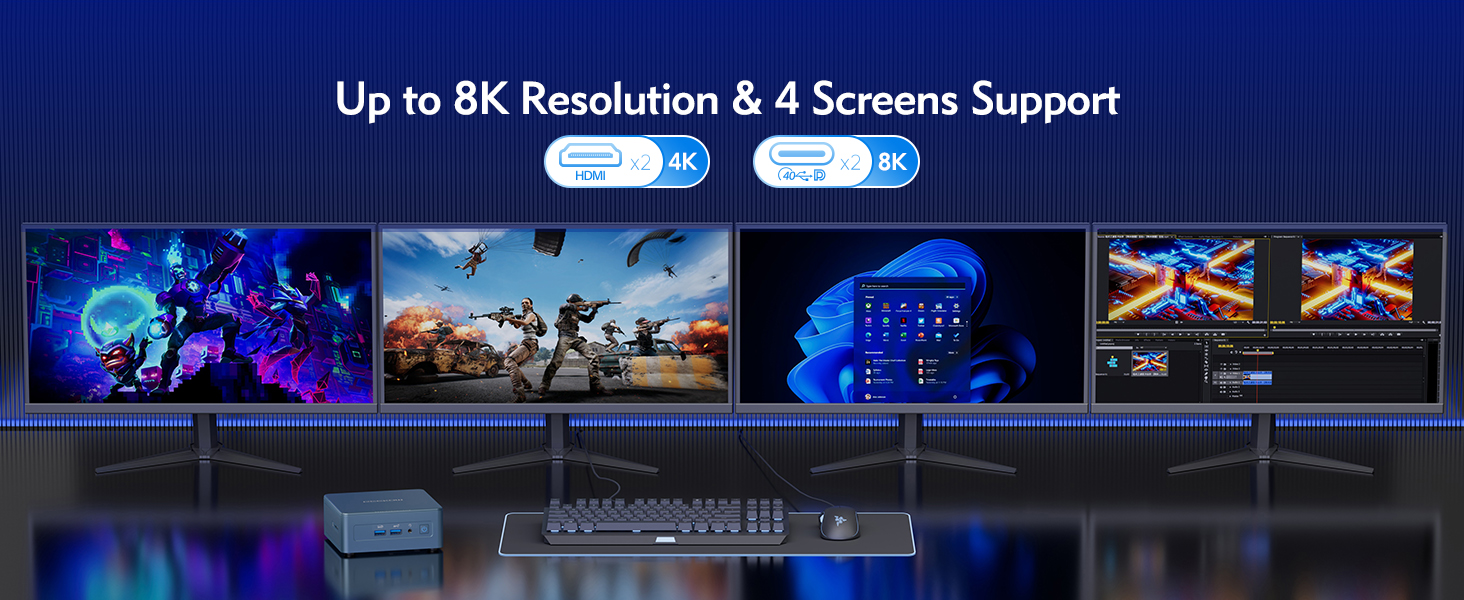
- 디스플레이에 연결: Use an HDMI cable to connect the Mini IT12 to your monitor or TV. The device supports up to four displays simultaneously via its HDMI and USB4 ports.
- 주변기기 연결: 키보드, 마우스 및 기타 USB 장치를 사용 가능한 USB 포트에 꽂습니다.
- 네트워크에 연결: For wired internet, connect an Ethernet cable to the 2.5GbE LAN port. For wireless internet, the device supports Wi-Fi 6E.
- 전원 연결: 전원 어댑터를 후면 패널의 DC 잭에 꽂은 다음 어댑터를 전원 콘센트에 꽂으십시오.
- 전원 켜기: 미니 PC를 켜려면 전면 패널의 전원 버튼을 누르십시오.
5. 운영
The GEEKOM Mini IT12 comes pre-installed with Windows 11 Pro, offering a familiar and user-friendly operating environment.
5.1 초기 부팅 및 Windows 설치
On the first boot, you will be guided through the Windows 11 Pro setup process. Follow the on-screen instructions to configure your language, region, network, and user account settings.
5.2 멀티 디스플레이 지원
The Mini IT12 supports up to four displays simultaneously, allowing for enhanced productivity and immersive experiences. Connect your displays to the available HDMI 2.0 ports and USB4 ports. You can configure display settings within Windows 11 Pro (Right-click on desktop > Display settings).

영상: The GEEKOM Mini IT12 demonstrating its capability to support four screens simultaneously for enhanced productivity.
5.3 무선 연결
The Mini IT12 is equipped with Wi-Fi 6E and Bluetooth 5.2 for fast and reliable wireless connections. Connect to your wireless network via Windows settings and pair Bluetooth devices as needed.

영상: Illustration of the GEEKOM Mini IT12's powerful Wi-Fi 6E and Bluetooth 5.2 capabilities, ideal for wireless peripherals and fast internet.
6. 유지 관리 및 업그레이드
The GEEKOM Mini IT12 offers options for memory and storage expansion to enhance its performance and capacity.
6.1 Expanding RAM
The Mini IT12 supports dual-channel DDR4 SODIMM memory, expandable up to 64GB. Refer to the video below for detailed instructions on how to expand the RAM.
동영상: How to expand RAM in GEEKOM Mini IT12. This video guides you through the process of installing additional RAM modules.
6.2 Installing an SSD
The Mini IT12 includes an M.2 2280 PCIe Gen 4 x4 SSD slot, expandable up to 2TB, and an M.2 2242 SATA SSD slot, expandable up to 1TB. Follow the video instructions for SSD installation.
동영상: How to install an SSD in GEEKOM Mini IT12. This video demonstrates the steps for adding an SSD to your Mini PC.
6.3 Installing a Hard Disk Drive (HDD)
The Mini IT12 also features a 2.5" SATA HDD (7mm) slot, expandable up to 2TB. Watch the video below for guidance on HDD installation.
동영상: How to install an HDD in GEEKOM Mini IT12. This video provides instructions for installing a hard disk drive.
7. 문제 해결
If you encounter issues with your GEEKOM Mini IT12, try the following common troubleshooting steps:
- 전원 없음: 전원 어댑터가 미니 PC와 작동하는 콘센트에 제대로 연결되어 있는지 확인하십시오. 가능하다면 다른 콘센트나 전원 어댑터를 사용해 보십시오.
- 디스플레이 없음: Check all HDMI/USB4 cable connections to your monitor. Ensure the monitor is powered on and set to the correct input source.
- 인터넷에 연결되지 않음: For wired connections, verify the Ethernet cable is properly connected. For Wi-Fi, check your router and ensure Wi-Fi is enabled in Windows settings.
- 느린 성능: Close unnecessary applications. Check for background updates. Consider upgrading RAM or storage if performance issues persist.
- 주변 장치가 감지되지 않음: 주변기기를 다른 USB 포트에 연결해 보세요. 드라이버가 최신 버전인지 확인하십시오.
추가 지원이 필요하면 보증 및 지원 섹션을 참조하세요.
8. 사양
Below are the key specifications for the GEEKOM Mini IT12 Mini PC:
| 특징 | 사양 |
|---|---|
| 프로세서 | 12th Gen Intel Core i7-12650H (10 Cores/16 Threads, up to 4.7GHz) |
| 제도법 | Intel Iris Xe Graphics eligible |
| 숫양 | 32GB DDR4 RAM (Dual-channel, expandable up to 64GB) |
| 저장 | 1TB PCIe Gen 4 SSD (expandable up to 2TB), M.2 2242 SATA SSD slot (expandable up to 1TB), 2.5" SATA HDD slot (expandable up to 2TB) |
| 운영 체제 | 윈도우 11 프로 |
| 비디오 출력 | 2x HDMI 2.0 (4K), 2x USB4 (8K) - Supports up to 4 displays |
| 무선 연결 | Wi-Fi 6E, 블루투스 5.2 |
| 랜 | 2.5GbE LAN 포트 |
| 포트 | 2x USB4, 3x USB 3.2 Gen 2, 1x USB 2.0, 2x HDMI 2.0, 1x SD Card Reader, 1x 3.5mm Headphone Jack, 1x DC Jack |
| 치수 | 4.6 x 4.4 x 1.79 인치 |
| 무게 | 1.4파운드 |

영상: 오버view of the GEEKOM Mini IT12 highlighting its core specifications and features.
9. 보증 및 지원
Your GEEKOM Mini IT12 Mini PC is covered by a manufacturer's warranty. For specific warranty terms and conditions, please refer to the warranty card included in your product packaging or visit the official GEEKOM web대지.
For technical support, troubleshooting assistance, or service inquiries, please contact GEEKOM customer support through their official channels. You can typically find contact information on the GEEKOM website or in the included user guide.
온라인 리소스:
- GEEKOM 공식 Web대지: www.geekompc.com
- 고객 지원 이메일: support@geekompc.com


