1. 서론
Thank you for choosing the VOCOO Digital Kitchen Timer Model 5285W. This versatile timer is designed for various applications, including cooking, classroom management, home gym workouts, and more. Featuring an extra-large LED display, multiple alarm options, adjustable brightness, and convenient placement methods, it aims to simplify your timing needs.
2. 주요 특징
- Extra Large 7.8-inch LED Display: Clear, easy-to-read numbers visible from a distance.
- 3가지 밝기 레벨: Adjustable display brightness (Dim/Medium/Bright) to suit any environment.
- 4 Alarm Options with 3 Volume Levels: Choose from different melodies and adjust volume (Loud, Medium, Soft).
- Versatile Timing Modes: Countdown from 99 hours 59 minutes or count up (stopwatch) from 0 to 99 hours 59 minutes 59 seconds.
- 충전식 배터리: Powered by an included C battery, with a low power indicator.
- 다양한 배치 옵션: Strong silicone-covered magnets for metal surfaces, a fold-out stand for desktops, and a hanging hole.
- 직관적인 컨트롤: Dedicated buttons for setting time, reset, and start/pause for ease of use.
3. 패키지 내용
- VOCOO Digital Timer (Model 5285W)
- USB-C 플러그
- USB-C 충전 케이블
- 사용자 설명서
4. 제품 오버view
Familiarize yourself with the timer's display and control buttons.
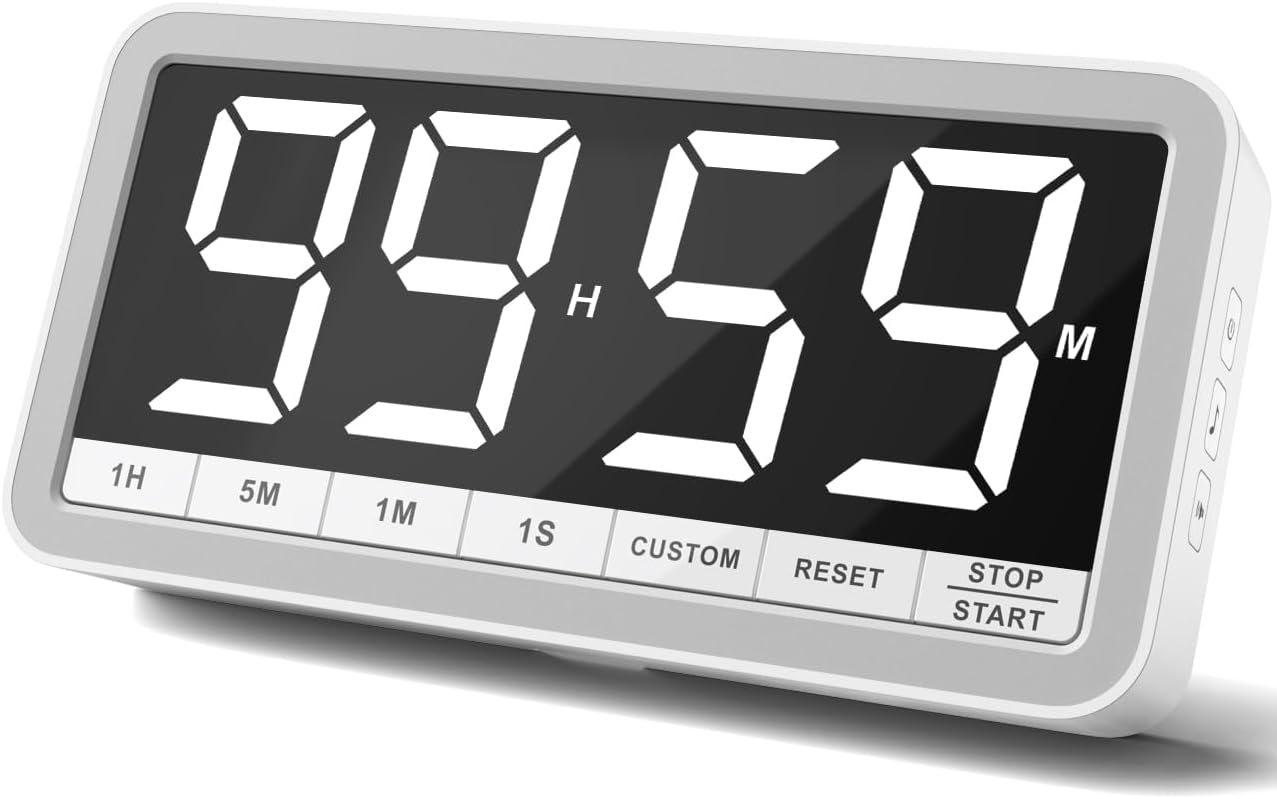
전면 패널 버튼:
- 1시간: Add 1 hour
- 5M: 5분을 더하세요
- 1M: 1분 추가
- 1S: Add 1 second
- 커스텀: Set/Recall custom time
- RESET : Clear current time setting
- 중지/시작: Begin or pause timing
Side Panel Buttons:
- 전원 버튼: Turn the timer On/Off. Also cycles through brightness levels (Dim/Medium/Bright) when pressed briefly while on.
- 음표 버튼: Cycle through 4 different alarm sounds.
- Speaker Icon Button: Cycle through 3 volume levels (Loud/Medium/Soft).
5. 설정
- 초기 청구 : Before first use, fully charge the timer using the provided USB-C cable and plug. A low power icon will indicate when charging is needed.
- 전원 켜기: Press and hold the Power Button on the side for a few seconds to turn the timer on.
6. 사용 설명서
6.1. 카운트다운 타이머 모드
- 시간 설정: 사용하세요 1H, 5M, 1M, 그리고 1S buttons to set your desired countdown time. The maximum time is 99 hours 59 minutes.
- 카운트다운 시작: 를 누르세요 중지 / 시작 카운트다운을 시작하려면 버튼을 누르세요.
- 일시 중지/재개: 누르다 중지 / 시작 again to pause or resume the countdown.
- 재설정 : 를 누르세요 다시 놓기 button to clear the current time and return to 00:00.
- 1-Minute Reminder: When the countdown reaches 1 minute, the display digits will turn red to provide a visual alert.
- 경보: Once the timer reaches 00:00, the selected alarm will sound.

6.2. Count-Up Timer (Stopwatch) Mode
- Start Count-Up: Ensure the timer is at 00:00. Press the 중지 / 시작 카운트업을 시작하려면 버튼을 누르세요.
- 일시 중지/재개: 누르다 중지 / 시작 again to pause or resume the count-up.
- 재설정 : 를 누르세요 다시 놓기 button to clear the count-up time and return to 00:00.
6.3. Custom Time Setting
그만큼 관습 button allows you to save and quickly recall a frequently used time setting. To set a custom time, first set the desired time using the 1H, 5M, 1M, 1S buttons, then press and hold the 관습 button until the display flashes, indicating the time is saved. To recall, simply press the 관습 버튼을 짧게 누르세요.
6.4. Adjusting Alarm and Volume
사용하세요 Music Note Button on the side to cycle through the 4 available alarm sounds. Use the Speaker Icon Button on the side to select one of the 3 volume levels (Loud, Medium, Soft).

6.5. 밝기 조정
짧게 누르세요 전원 버튼 on the side while the timer is on to cycle through the 3 brightness levels: Dim, Medium, and Bright.

7. 배치 옵션
The VOCOO Digital Kitchen Timer offers flexible placement options to suit your needs:
- 자석 부착: Two strong magnets covered with silicone on the back allow you to securely attach the timer to any metal surface, such as a refrigerator or whiteboard, without slipping or scratching.
- 데스크탑 스탠드: A built-in fold-out stand enables the timer to be placed upright on any flat surface, like a countertop or desk.
- 교수형: A hanging hole is provided on the back for wall mounting using a nail or hook.

8. 충전
The timer is powered by a rechargeable battery. Use the included USB-C cable and a 5V (output voltage) power plug to charge it. A low power sign will appear on the display to remind you when charging is needed. Using a power plug higher than 5V may damage the battery.
9. 유지관리
To ensure the longevity of your VOCOO Digital Kitchen Timer, follow these simple maintenance guidelines:
- Wipe the display and body with a soft, dry cloth.
- 연마성 세척제나 용제를 사용하지 마십시오.
- Keep the timer away from extreme temperatures and direct sunlight.
- 타이머를 물에 담그거나 과도한 습기에 노출시키지 마십시오.
10. 문제 해결
If you encounter any issues with your timer, please refer to the following common solutions:
- 디스플레이가 켜지지 않음: Ensure the timer is charged. Connect it to the USB-C charger and allow it to charge for at least 30 minutes before attempting to power it on again.
- 알람이 울리지 않습니다: Check the volume level using the Speaker Icon Button on the side. Ensure it is not set to 'LO0' (silent).
- Incorrect time setting: Press the RESET button to clear the current setting, then re-enter the desired time using the 1H, 5M, 1M, and 1S buttons.
- 타이머가 응답하지 않습니다: Try turning the timer off and then on again using the Power Button.
11. 사양
| 기인하다 | 세부 사항 |
|---|---|
| 상표 | 보쿠 |
| 모델 번호 | 5285와트 |
| 색상 | 하얀색 |
| 화면 크기 | 7.8 인치 |
| 제품 치수 | 1.38인치 깊이 x 8.27인치 너비 x 4.13인치 높이 |
| 품목 무게 | 9.5온스(270그램) |
| 재료 | 실리콘 |
| 배터리 | C형 배터리 1개 필요(포함) |
12. 공식 제품 영상
13. 지원
For any questions or support regarding your VOCOO Digital Kitchen Timer, please contact us at: support@vocoo.vip.com


