소개
Welcome to the user manual for your Keychron Q3 Max Wireless Custom Mechanical Keyboard. This guide provides comprehensive instructions for setting up, operating, maintaining, and troubleshooting your new keyboard. The Keychron Q3 Max combines advanced wireless connectivity with a robust full aluminum body and customizable features, designed for enhanced productivity and gaming.

이미지: 키크론 Q3 맥스 키보드,asing its TKL layout and keycap design, alongside a Gateron Jupiter Banana switch.
상자 안에 무엇이 들어있나요?
다음 품목이 모두 패키지에 포함되어 있는지 확인하세요.
- 1x Fully Assembled Keyboard (Keychron Q3 Max)
- 1x USB Type-C-Type-C 케이블
- 1x Type-A-Type-C 어댑터
- 1x Extension Adapter for 2.4 GHz Receiver
- 1x Type-A 2.4GHz 수신기
- 1x 키캡 및 스위치 풀러
- 1x Screwdriver & Hex Key
- Additional Keycaps (for Windows layout)
- Internal components: IXPE Foam, PET Film, Latex Bottom Pad, Bottom Case Acoustic Foam, Bottom Case PET Film, Gaskets, Stabilizers, Switches.
설정
초기 연결
The Keychron Q3 Max supports three connectivity modes: 2.4 GHz Wireless, Bluetooth 5.1, and Wired (USB-C).

Image: A close-up of the side of the Keychron Q3 Max, highlighting the physical switches for operating system layout (Win/Mac) and connection mode (G/Cable/BT).
유선 모드(USB-C)
- Connect the provided USB Type-C cable to the keyboard's Type-C port and the other end to your computer.
- Ensure the mode switch on the back of the keyboard is set to "Cable".
- 키보드는 운영 체제에서 자동으로 인식됩니다.
2.4GHz 무선 모드
- Plug the 2.4 GHz receiver into an available USB-A port on your computer. For optimal signal, use the included extension adapter.
- Set the mode switch on the back of the keyboard to "G" (2.4 GHz).
- The keyboard should automatically connect. This mode offers a rapid 1000 Hz polling rate for responsive use.

Image: The Keychron Q3 Max keyboard positioned between a desktop and a laptop, demonstrating its wireless connectivity options.
블루투스 모드
- Set the mode switch on the back of the keyboard to "BT" (Bluetooth).
- 컴퓨터나 기기에서 Bluetooth를 활성화하고 새 기기를 검색하세요.
- Select "Keychron Q3 Max" from the list of available devices to pair.
- The keyboard can connect to up to 3 devices via Bluetooth 5.1. Switch between paired devices using Fn + 1, Fn + 2, or Fn + 3.
운영 체제 레이아웃 전환
The Keychron Q3 Max includes a physical switch to toggle between macOS and Windows/Linux layouts. This ensures proper key mapping for your operating system.
- Locate the "Win/Mac" switch on the back of the keyboard.
- Slide the switch to the appropriate position for your operating system.
- For Windows users, replacement keycaps for the Windows and Alt keys are provided in the box.
키보드 작동
Key Remapping and Macros (QMK/VIA)
The Keychron Q3 Max is fully compatible with QMK/VIA firmware, allowing for extensive customization of key functions and macros.
- To remap keys or create macros, connect the keyboard via USB-C cable.
- Access the Keychron Launcher web app (recommended) or open-source QMK firmware tools.
- Drag and drop functions to remap any key across macOS, Windows, or Linux.

Image: The Keychron Launcher web application interface, demonstrating how users can remap keys and assign macro commands.
RGB 백라이트
The keyboard features south-facing RGB backlighting with multiple effects and brightness levels.
- Use the dedicated function keys (e.g., Fn + Lightbulb icon) to cycle through lighting effects.
- Fn 키와 위/아래 화살표 키를 사용하여 밝기를 조절하세요.
- Further customization of RGB effects is available through the QMK/VIA software.
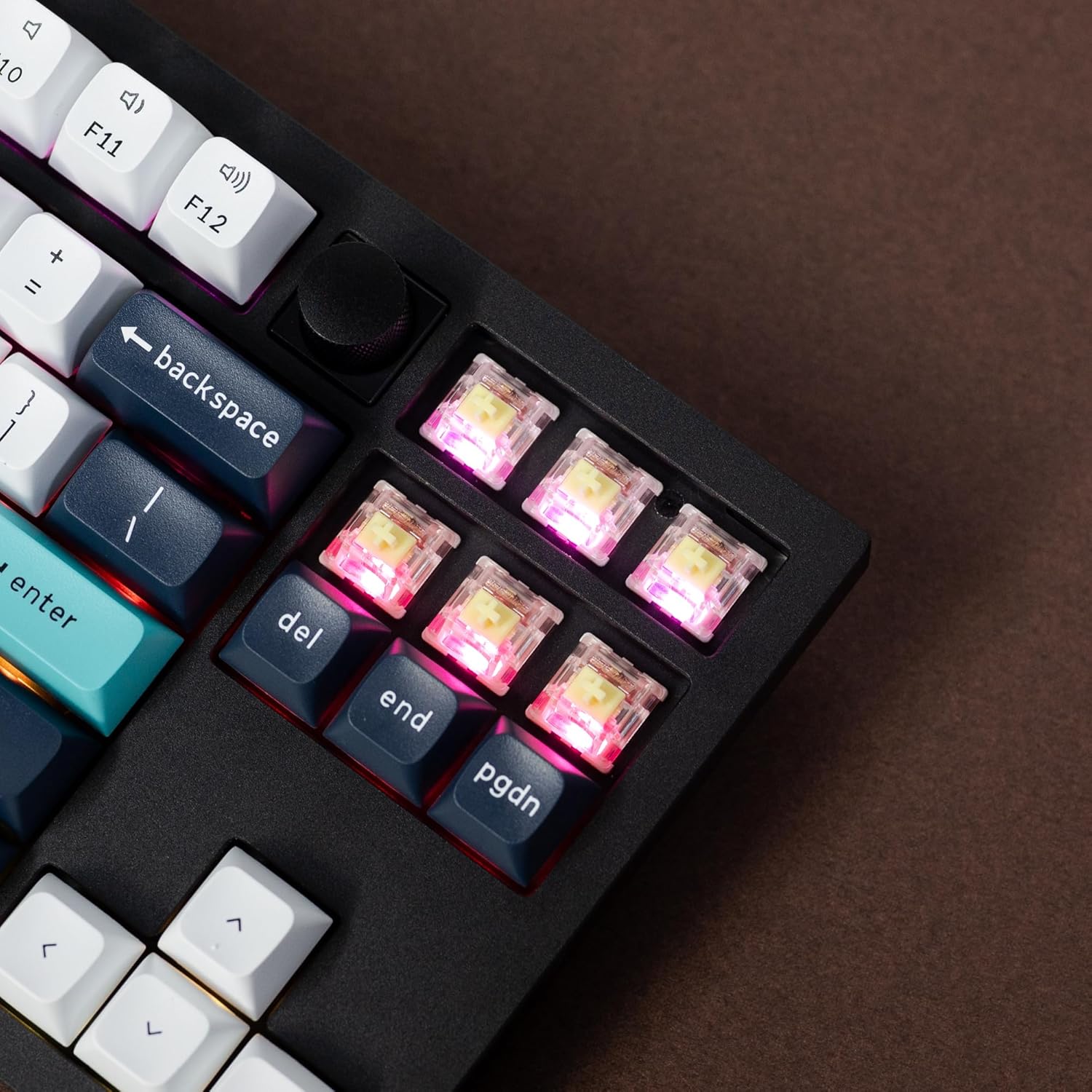
이미지: 자세한 view of the keyboard's hot-swappable switches, illuminated by the RGB backlighting.
프로그래밍 가능한 노브
The rotary knob on the top right of the keyboard is programmable via QMK/VIA. By default, it controls volume and mute functions.

Image: A close-up shot of the textured, programmable rotary knob located on the top right of the keyboard.
핫 스왑 가능한 스위치
The Keychron Q3 Max features hot-swappable sockets, allowing you to change switches without soldering. It supports almost all 3-pin and 5-pin MX mechanical switches.

이미지: 자세한 view of the Gateron Jupiter Banana switches installed in the keyboard, with their operating force, pre-travel, and travel distance specifications.

Image: A single Gateron Jupiter Banana switch, highlighting its design.
- To remove a switch, use the provided switch puller. Gently grip the switch from the top and bottom and pull upwards.
- To install a new switch, align the pins with the holes on the PCB and press down firmly until it clicks into place. Ensure pins are straight before insertion to avoid bending.
유지
청소
- Regularly clean keycaps with a soft, damp 옷감.
- For deeper cleaning, remove keycaps using the keycap puller and use compressed air to clear debris from beneath.
스위치 및 키캡 교체
The hot-swappable design allows for easy replacement of switches and keycaps. Refer to the "Hot-swappable Switches" section for detailed instructions on switch replacement.
- Use the keycap puller to remove keycaps by gently pulling upwards.
- Press new keycaps firmly onto the switch stem until secure.
배터리 관리
The keyboard is equipped with a 4000 mAh rechargeable Li-polymer battery.
- Charge the keyboard using the provided USB-C cable connected to a computer or a standard USB power adapter.
- 배터리 수명을 연장하려면 배터리를 자주 완전히 방전시키지 마세요.
- 장시간 사용하지 않을 때는 키보드를 서늘하고 건조한 곳에 보관하세요.

Image: An illustration indicating the 4000mAh battery capacity of the Keychron Q3 Max keyboard.
문제 해결
| 문제 | 해결책 |
|---|---|
| 무선 모드에서 키보드가 응답하지 않습니다. | Ensure the mode switch is set correctly (G for 2.4 GHz, BT for Bluetooth). Check battery level. Re-pair Bluetooth or re-insert 2.4 GHz receiver. Try wired mode to confirm keyboard functionality. |
| Keys are not mapping correctly (e.g., Alt/Command). | Verify the Win/Mac switch on the back of the keyboard is set to your operating system. Use the Keychron Launcher web app to remap keys if custom layouts are desired. |
| RGB backlighting is not working or dim. | Check brightness settings (Fn + Up/Down arrow). Ensure the keyboard is charged. Some lighting effects may consume more power. |
| Typing latency in wireless mode. | For critical applications like gaming, use 2.4 GHz wireless mode (1000 Hz polling rate) or wired mode. Ensure no significant wireless interference. |
| Switch feels loose or not registering. | Carefully remove the keycap and then the switch. Check if the switch pins are bent. Straighten them if necessary and re-insert the switch firmly. |
명세서
| 특징 | 세부 사항 |
|---|---|
| 모델 | Keychron Q3 Max TKL Wireless |
| 공들여 나열한 것 | 80% TKL(텐키리스) |
| 본체 소재 | 완전 CNC 가공된 6063 알루미늄 |
| 연결성 | 2.4GHz 무선, 블루투스 5.1, USB-C 유선 |
| 폴링 속도 | 1000Hz(2.4GHz 유선), 90Hz(블루투스) |
| 스위치 | Hot-swappable Gateron Jupiter Banana (compatible with 3-pin & 5-pin MX mechanical switches) |
| 키캡 | KSA Double-shot PBT |
| 백라이트 | 남향 RGB |
| 배터리 | 4000 mAh Rechargeable Li-polymer Battery |
| 배터리 수명 | Up to 100 hours (lowest brightness) |
| MCU | ARM Cortex-M4 32비트 STM32F402 (256KB 플래시 메모리) |
| 치수 | 14.37 x 5.39 x 1.57 inches (365 x 137 x 40 mm) approx. |
| 무게 | 5.52 pounds (2.5 kg) approx. |
| 호환 OS | 맥OS, 윈도우, 리눅스 |
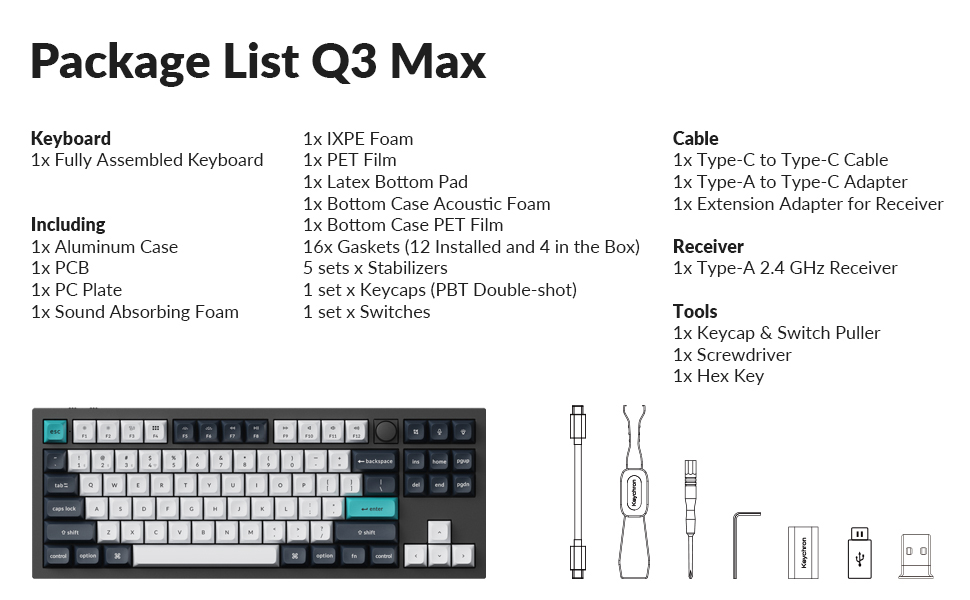
Image: A visual representation of the Keychron Q3 Max specifications, including dimensions, weight, and technical details.
보증 및 지원
보증 정보 및 기술 지원에 대해서는 키크론 공식 웹사이트를 참조하십시오. web해당 웹사이트를 방문하거나 키크론 고객 서비스 센터에 직접 문의하십시오. 보증 청구를 위해서는 구매 영수증을 증빙 자료로 보관하십시오.
공식 키크론 Web대지: www.keychron.com


