1. 제품 오버view
The MokerLink 16-Port Gigabit Ethernet Switch is an unmanaged network switch designed for expanding network connectivity in home or small office environments. It features 16 Gigabit Ethernet ports, offering high-speed data transfer with plug-and-play simplicity. The fanless metal design ensures quiet and stable operation.

그림 1: 이상view of the MokerLink 16-Port Gigabit Ethernet Switch, highlighting its full Gigabit ports, plug and play functionality, power-saving features, wall-mountable design, LED indicators, and fanless operation.
주요 특징:
- 16 개의 기가비트 이더넷 포트 : Provides 16 10/100/1000Mbps RJ45 ports for high-speed network connections.
- 플러그 앤 플레이: Requires no configuration, making setup quick and easy.
- 팬리스 디자인: 다양한 환경에 적합하며, 조용한 작동을 보장합니다.
- 내구성 있는 금속 Casing: Offers robust protection and efficient heat dissipation.
- 에너지 효율성: Features power-saving functionality (IEEE 802.3az EEE support) to reduce energy consumption.
- 유연한 배치: Supports desktop or wall-mount installation.
2. 패키지 내용
패키지에 모든 품목이 들어 있는지 확인하세요.
- 1 x MokerLink 16-Port Gigabit Ethernet Switch
- 1 x Power Adapter (DC 12V / 1.0A)
- 1 x 사용자 매뉴얼(이 문서)
3. 설정 및 설치
Follow these steps to set up your MokerLink Gigabit Ethernet Switch:
- 위치를 선택하세요: Place the switch on a stable desktop or mount it on a wall. Ensure adequate ventilation around the device.
- 전원 연결: Insert the DC plug of the power adapter into the switch's DC input port. Plug the other end of the power adapter into a standard electrical outlet. The power LED indicator will illuminate.
- 네트워크 장치 연결: Connect your network devices (e.g., computers, printers, network-attached storage, routers, IP cameras, wireless access points) to any of the 16 RJ45 ports using standard Ethernet cables. The switch supports auto MDI/MDIX, so crossover cables are not required.
- 연결 확인: Once a device is connected, the corresponding port's LED indicator will light up (green for link, flashing for data transmission).
- 벽면 장착(선택 사항): If wall mounting, use appropriate screws and anchors (not included) with the mounting holes on the switch.
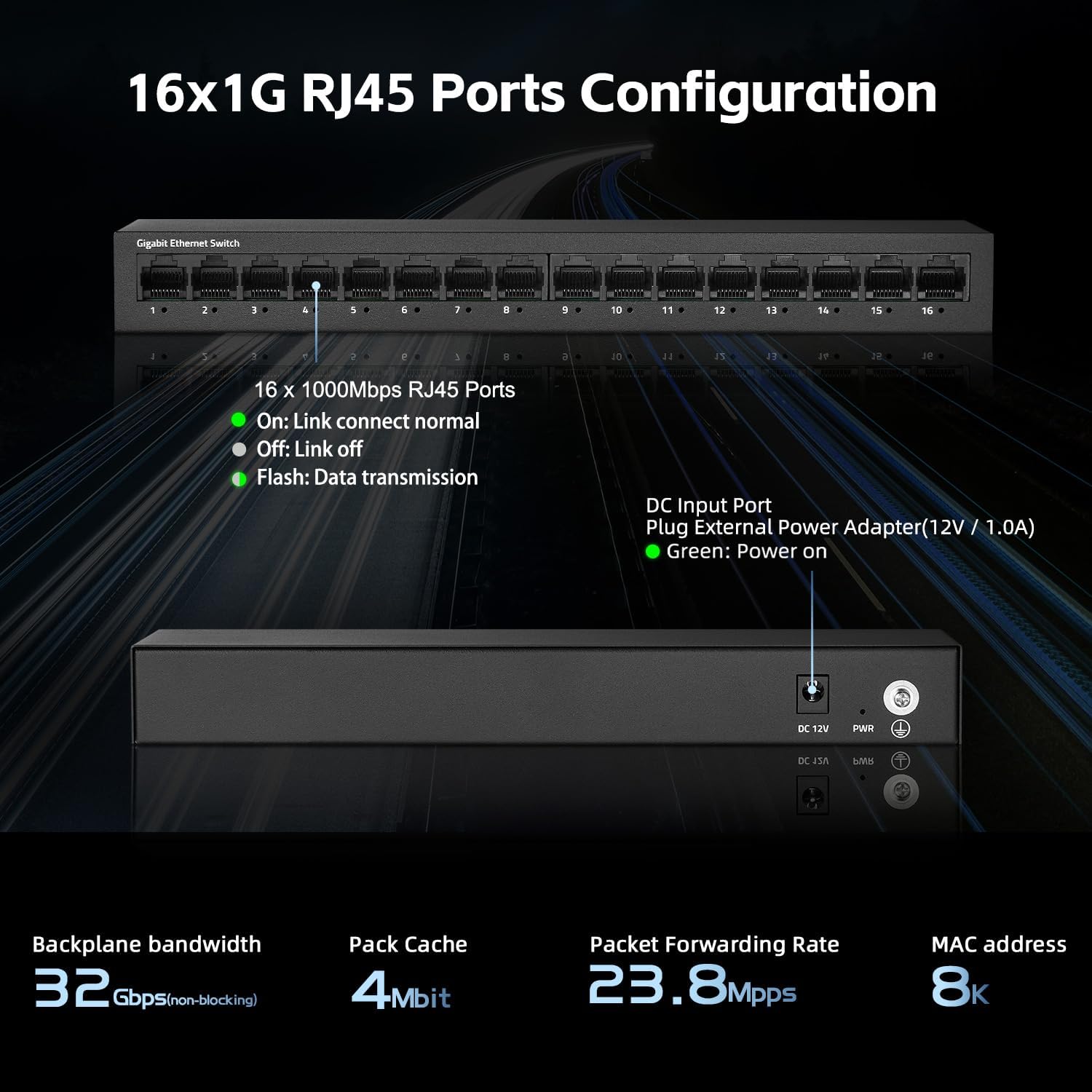
그림 2: 후면 view of the switch showing the DC input port and power LED indicator.

Figure 3: Ethernet cables connected to the switch ports.

그림 4: 예ample of the switch mounted on a wall, demonstrating its flexible placement options.
4. 사용 설명서
The MokerLink 16-Port Gigabit Ethernet Switch is an unmanaged device, meaning it operates automatically without requiring user configuration. Simply connect your devices, and the switch will handle network traffic efficiently.
LED 표시등:
| 지시자 | 상태 | 설명 |
|---|---|---|
| 전원 LED | 녹색 | 스위치가 켜져 있습니다. |
| Port Link/Act LEDs (1-16) | 녹색(단색) | A device is connected to the port, and the link is active. |
| 녹색(깜박임) | 포트를 통해 데이터가 전송되거나 수신되고 있습니다. | |
| 끄다 | No device is connected, or the connected device is powered off/inactive. |

그림 5: 클로즈업 view of the port LED indicators, showing a green light for an active link.
자동 기능:
- 자동 협상: Each port automatically detects the link speed of the connected network device (10/100/1000Mbps) and adjusts for compatibility and optimal performance.
- 자동 MDI/MDIX: Automatically detects the type of Ethernet cable (straight-through or crossover) and adjusts accordingly, eliminating the need for specific cable types.
- Non-Blocking Wire Speed: All ports can simultaneously transmit and receive data at their full wire speed without congestion.
5. 유지관리 및 관리
To ensure the longevity and optimal performance of your MokerLink switch, follow these maintenance guidelines:
- 환경: Operate the switch within its specified temperature range (0°C to 45°C). Avoid placing it in direct sunlight, near heat sources, or in areas with high humidity.
- 청소: 부드럽고 마른 천으로 스위치 외부를 닦으세요. 액체나 에어로졸 세척제는 사용하지 마세요.
- 통풍: Ensure that the ventilation holes on the sides of the switch are not blocked to allow for proper heat dissipation. The fanless design relies on natural convection.
- 전원 공급 장치: Use only the provided power adapter. If the adapter is damaged, replace it with an equivalent approved adapter.
- 케이블 관리 : Organize network cables neatly to prevent strain on the ports and accidental disconnections.

Figure 6: The switch features a fanless metal design for efficient heat dissipation and energy saving.
6. 문제 해결
If you encounter issues with your MokerLink switch, refer to the following common troubleshooting steps:
- 전원 없음:
- 전원 어댑터가 스위치와 작동하는 콘센트에 제대로 연결되어 있는지 확인하십시오.
- 다른 장치를 연결해 전원 콘센트가 작동하는지 확인하세요.
- Verify the power LED on the switch is illuminated.
- 포트에 링크/활동이 없습니다.
- 이더넷 케이블이 스위치 포트와 네트워크 장치에 제대로 연결되어 있는지 확인하십시오.
- Check the status of the connected network device (e.g., computer is powered on, network adapter is enabled).
- 다른 이더넷 케이블을 사용해 보세요.
- 장치를 스위치의 다른 포트에 연결해 보십시오.
- Verify the link/activity LED for the port is illuminated (solid green for link, flashing for activity).
- 네트워크 속도가 느립니다:
- Ensure all connected devices and cables support Gigabit Ethernet (1000Mbps). The switch will operate at the lowest common speed.
- 연결된 기기에서 과도한 네트워크 트래픽이나 대역폭을 많이 사용하는 애플리케이션이 실행 중인지 확인하십시오.
- Restart the switch by unplugging and replugging the power adapter.
- 간헐적인 연결:
- 이더넷 케이블에 손상이 있는지 점검하십시오.
- Ensure the switch is placed in a stable environment, free from excessive heat or electromagnetic interference.
- Check for loose power or Ethernet cable connections.
7. 사양
| 특징 | 설명 |
|---|---|
| 모델 | 16*1G Unmanaged |
| 포트 | 16 x 10/100/1000Mbps RJ45 포트 |
| 스위칭 용량 | 32Gbps |
| 패킷 전달 속도 | 23.8메가피에스 |
| MAC 주소 테이블 | 8K |
| 점보 프레임 | 9K (Standard for Gigabit Ethernet) |
| 표준 | IEEE 802.3, IEEE 802.3u, IEEE 802.3ab, IEEE 802.3x, IEEE 802.3az |
| 인터페이스 유형 | RJ45 |
| 전송 방식 | 저장 및 전달 |
| 전원 공급 장치 | External Power Adapter (DC 12V / 1.0A) |
| 전력 소비 | Low power consumption (Energy Efficient Ethernet support) |
| LED 표시등 | Power, Link/Act (per port) |
| 치수(길이 x 너비 x 높이) | 약 10.16 x 5.04 x 3.23cm(25.8 x 12.8 x 8.2인치) |
| 품목 무게 | 약 1.65kg(0.75파운드) |
| 케이스 소재 | 금속 |
| 작동 온도 | 0°C ~ 45°C(32°F ~ 113°F) |
| 작동 습도 | 10% ~ 90% 비응축 |
| 설치 | Desktop or Wall-Mount |

Figure 7: Visual representation of the switch's high port speed and switching capacity.
8. 공식 제품 영상
The following videos provide additional information and visual guidance for the MokerLink 16-Port Gigabit Ethernet Switch:
비디오 1: 제품 종료view (0:38)
이 짧은 영상은 간략한 개요를 제공합니다.view of the MokerLink 16-Port Gigabit Ethernet Switch, highlighting its main features and design.
Video 2: Detailed Features and Usage (2:11)
A more in-depth video demonstrating the features and typical usage scenarios of the Gigabit Ethernet Switch.
Video 3: Installation and Connectivity (1:38)
This video guides you through the physical installation and connection process for the switch.
Video 4: Key Highlights (0:36)
A concise video highlighting important aspects and benefits of the MokerLink switch.
Video 5: Advanced Overview (1:25)
This video offers a more advanced look at the switch's capabilities and performance.
Video 6: Quick Feature Spotlight (0:20)
A very brief video focusing on a specific feature or benefit of the switch.
Video 7: Comprehensive Demonstration (2:59)
This comprehensive video provides a full demonstration of the MokerLink 16-Port Gigabit Ethernet Switch, from unboxing to operation.
9. 보증 및 지원
보증 정보: For details regarding the product warranty, please refer to the warranty card included with your purchase or contact the seller/manufacturer directly. Warranty terms may vary by region and retailer.
기술 지원: If you require technical assistance or have questions not covered in this manual, please contact MokerLink customer support through their official web제품을 구매한 사이트 또는 소매업체.
자세한 내용은 다음을 방문하세요. MokerLink Store on Amazon.


