소개
Thank you for choosing the arVin D8 Pro Wireless Gamepad Controller. This manual provides detailed instructions for setting up, operating, and maintaining your controller to ensure an optimal gaming experience across various platforms including iOS, Android, PC, and Xbox consoles. Please read this manual thoroughly before use.
설정
1. 컨트롤러 충전
Before first use, fully charge the controller using the provided USB-C cable. Connect the cable to the controller's charging port and a compatible USB power source. The indicator lights will show charging status.
2. 전원 켜기/끄기
To power on, press and hold the 'HOME' button for 2 seconds until the indicator lights flash. To power off, press and hold the 'HOME' button for 5 seconds until the lights turn off.
3. 장치 장착
The arVin D8 Pro features a stretched design that supports tablets and phones from 128-289mm in length and up to 13mm thick. This allows for use with various devices, including iPad Pro (M4) 13 inch, without needing to remove most phone cases.

Image: The arVin D8 Pro controller demonstrating its compatibility with various devices, including a Nintendo Switch, an iPhone, and an iPad, highlighting its adjustable length from 128-289mm.
4. Bluetooth Connection (iOS/iPad)
Follow these steps to connect your controller to an iOS device or iPad:
- 컨트롤러가 꺼져 있는지 확인하십시오.
- Hold down the 'RB' key, then press the 'HOME' key for 2 seconds. The indicator lights will flash quickly.
- On your iOS/iPad device, go to 설정 > 블루투스.
- 검색 사용 가능한 장치 목록에서 'Xbox 무선 컨트롤러'를 선택하세요.
- Once connected, the indicator light on the controller will remain solid.
Video: Instructions for connecting the arVin D8 Pro controller to an iPad or iPhone via Bluetooth, demonstrating the button presses and device pairing process.
5. Bluetooth Connection (Android Phone/Tablet)
There are two modes for Android connection:
Mode 1: Standard Android Connection
- 컨트롤러가 꺼져 있는지 확인하십시오.
- Hold down the 'RB' key, then press the 'HOME' key for 2 seconds. The indicator lights will flash quickly.
- 안드로이드 기기에서 다음으로 이동하세요. 설정 > 블루투스.
- 검색 사용 가능한 장치 목록에서 'Xbox 무선 컨트롤러'를 선택하세요.
- Once connected, the indicator light on the controller will remain solid.
Mode 2: Direct Play Android Connection (for specific games)
- 컨트롤러가 꺼져 있는지 확인하십시오.
- Hold down the 'X' key, then press the 'HOME' key for 2 seconds. The indicator lights will flash quickly.
- 안드로이드 기기에서 다음으로 이동하세요. 설정 > 블루투스.
- 검색 and select 'BSP-D8Pro' from the available devices.
- Once connected, the indicator light on the controller will remain solid.
Video: A guide on how to connect the arVin D8 Pro controller to an Android phone or tablet, detailing the pairing process for different connection modes.
6. 블루투스 연결 (PC)
To connect your controller to a PC via Bluetooth:
- 컨트롤러가 꺼져 있는지 확인하십시오.
- Hold down the 'RB' key, then press the 'HOME' key for 2 seconds. The indicator lights will flash quickly.
- On your PC, enable Bluetooth and go to 설정 > 장치 > Bluetooth 및 기타 장치.
- '블루투스 또는 기타 장치 추가'를 선택하고 '블루투스'를 선택하세요.
- 검색 and select 'Xbox Wireless Controller'.
- Once connected, the indicator light on the controller will remain solid.
- For Steam games, ensure 'Xbox Configuration Support' is enabled in Steam's controller settings.
Video: Demonstrates how to connect the arVin D8 Pro controller to a PC via Bluetooth and set it up for Steam streaming, including enabling Xbox Configuration Support.
컨트롤러 작동
1. 주요 특징
- 홀 효과 조이스틱 및 트리거: Designed for precise control with accuracy up to 0.1mm, minimizing drift and dead zones.
- Macro Programming (M1/M2): Two programmable buttons (M1/M2) support single or multiple programming modes to customize your gameplay.
- 터보 기능 : Three adjustable turbo speeds (8, 15, 25 shoots/s) can be set for A/B/X/Y/LT/LB/RT/RB/cross keys.
- 조절 가능한 RGB 조명: Customize the controller's lighting with various modes (Breathing, Fixed 7 colors, Off) by pressing the 'Programming key + L3 key'.
- Three Joystick Modes: Switch between FPS Mode, Normal Mode, and Racing Mode for optimized control in different game genres.
- ABXY Key-value Interchange: Allows swapping the functions of the ABXY buttons.
- Axis Calibration Function: For maintaining joystick accuracy.
- Controller Sleep/Wake Up/Off Function: 전력 관리를 위해서입니다.
- 이중 진동 기능: Provides haptic feedback (Note: Not supported on iOS and Android devices).
- 6-Axis Gyroscope Function: Enhances motion control (Note: Not supported on iOS and Android devices).

이미지: 오버view of the arVin D8 Pro controller's key features, including six-axis gyro, dual vibration, macro buttons, and turbo function.

이미지: 상세 view of the Hall Effect Joysticks and Triggers, emphasizing their precision and durability.
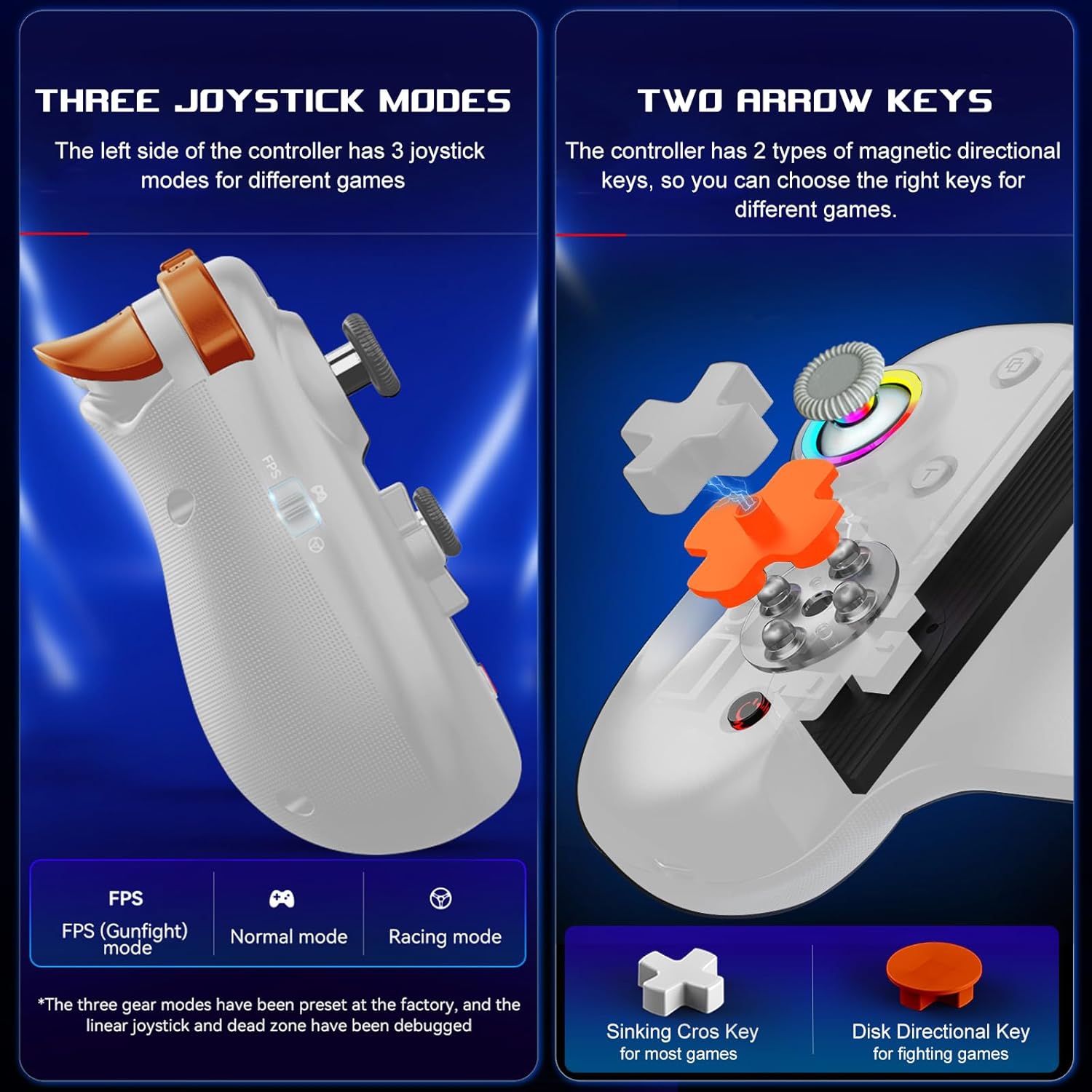
Image: Illustration of the three distinct joystick modes and the interchangeable magnetic arrow keys for varied gameplay.
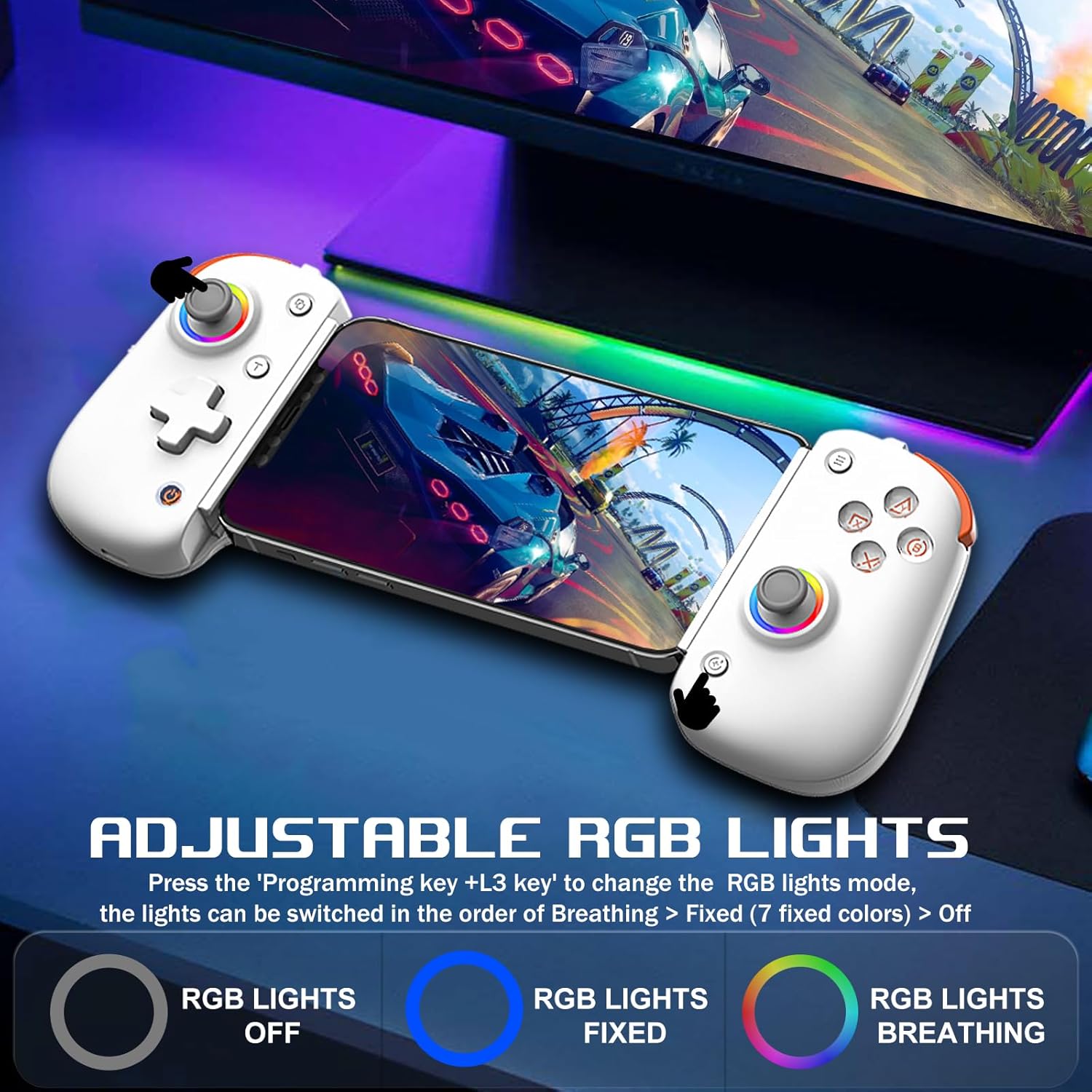
Image: Demonstrates the adjustable RGB lighting features of the controller, including different light modes.
호환성
The arVin D8 Pro Wireless Gamepad Controller offers broad compatibility:
- 운영 체제: iOS 13.0+, Android 6.0+, Windows 7/8/10/11.
- 장치: iPad/iPad mini/Air/Pro/iPhone/Macbook, Android phones/tablets (Galaxy Tab, Lenovo Tab, HUAWEI MatePad, Yoga Tab), PC/Laptop/Desktop, Nintendo Switch/Switch Lite/Switch OLED, PS3/PS4.
- Note on PS5: Compatible with PS5 for playing PS4 games only; does not support PS5 games.
- 제외 사항: Not compatible with Apple TV, iPod, Fire TV/TV Box.
1. Cloud Gaming Support
The controller is compatible with most cloud gaming services and platforms:
- 엑스박스 게임 패스
- 엔비디아 지포스 나우
- 아마존 루나
- Google Stadia
- Rainway
- Apple Arcade and MFi games
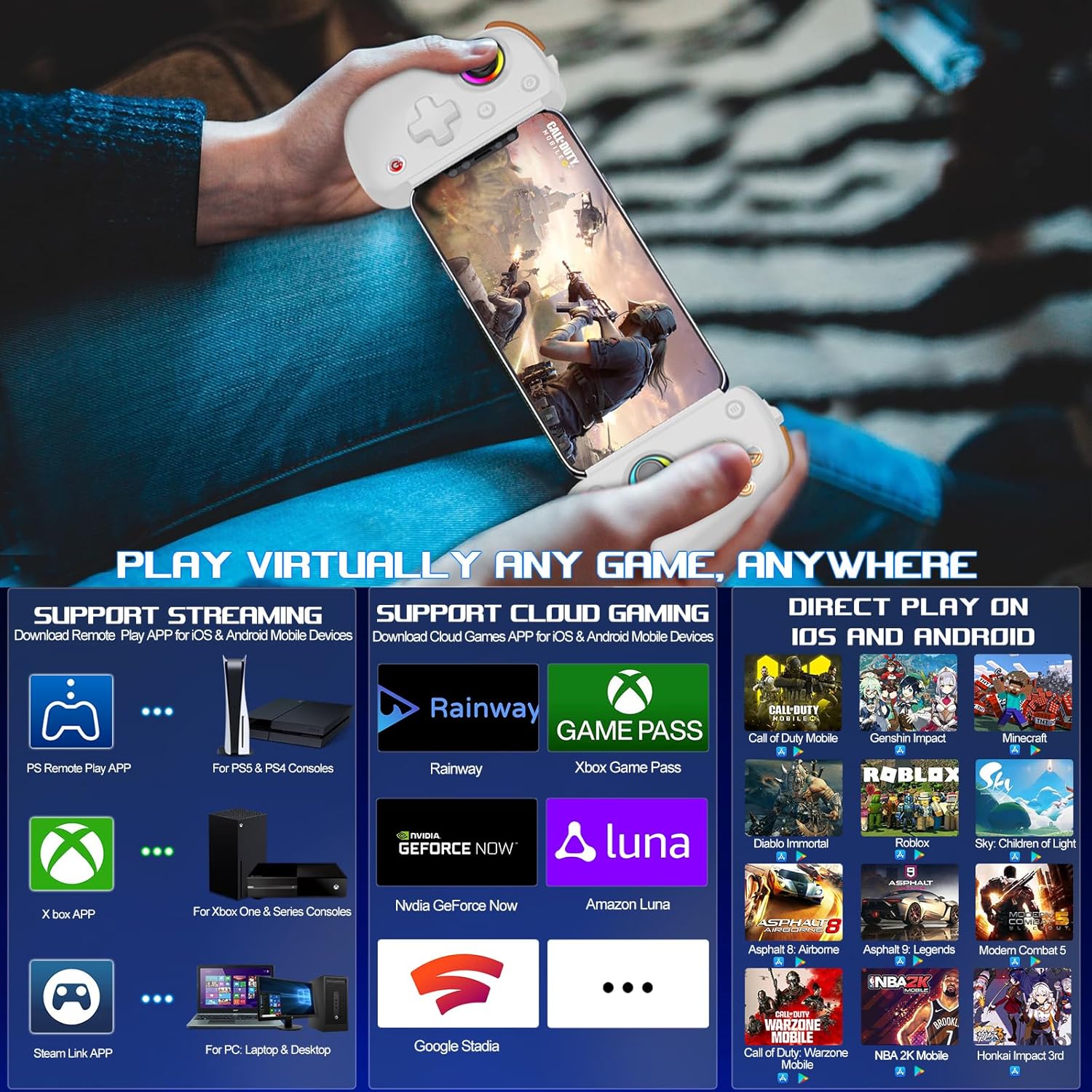
Image: Visual representation of the controller's support for popular cloud gaming platforms and direct play mobile titles.
2. Remote Play Support
Stream console games to your mobile device or tablet:
- PS Remote Play App: For PS5 and PS4 consoles.
- Xbox App: For Xbox One, Xbox Series S, and Xbox Series X consoles.
- Steam Link App: For PC/Laptop/Desktop.
Video: A demonstration of connecting the arVin D8 Pro controller for Xbox Remote Play, showing the setup process and gameplay.
3. Direct Play Games
The controller supports direct play for many popular mobile games, including:
- Call of Duty Mobile (CODM)
- Call of Duty: Warzone Mobile
- 원신 임팩트
- Sky: Children of Light
- 마인크래프트
- 디아블로 이모탈
- Combat Modern 5
- 아스팔트 9: 레전드
- Asphalt 8: Airborne
- And many more controller-supported titles.
유지
To ensure the longevity and optimal performance of your arVin D8 Pro controller, follow these maintenance guidelines:
- 청소: Use a soft, dry cloth to wipe the controller. Avoid using harsh chemicals, solvents, or abrasive cleaners.
- 저장: 컨트롤러는 직사광선과 극한의 온도를 피해 서늘하고 건조한 곳에 보관하세요.
- 배터리 관리 : 배터리를 고온에 노출하거나 분해하지 마십시오. 배터리 성능을 유지하려면 사용하지 않더라도 컨트롤러를 정기적으로 충전하십시오.
- 손질: 컨트롤러를 떨어뜨리거나 강한 충격을 주지 마십시오.
문제 해결
If you encounter issues with your arVin D8 Pro controller, please refer to the following common solutions:
- 컨트롤러 전원이 켜지지 않음: Ensure the controller is fully charged. Connect it to a power source and try again.
- Bluetooth를 통해 연결할 수 없습니다:
- Ensure the controller is in the correct pairing mode for your device (e.g., 'RB' + 'HOME' for iOS/PC, 'X' + 'HOME' for Android Mode 2).
- 기기에서 Bluetooth가 활성화되어 있는지 확인하세요.
- 기기의 Bluetooth 설정에서 기기를 삭제하고 다시 페어링을 시도하세요.
- 컨트롤러와 장치를 모두 다시 시작하세요.
- 버튼/조이스틱이 작동하지 않음:
- 컨트롤러가 제대로 연결되었는지 확인하세요.
- Try calibrating the joysticks (refer to the full manual for specific calibration steps if needed).
- Test the controller with a different game or application to determine if the issue is game-specific.
- 지연 또는 연결 끊김:
- Ensure your device is within range of the controller.
- 다른 무선 장치의 간섭을 최소화하세요.
- For streaming, ensure a stable and strong Wi-Fi connection for both your device and the host PC/console.
- Vibration/Gyro Not Working on iOS/Android: These functions are not supported on iOS and Android devices due to system limitations.
명세서
| 특징 | 세부 사항 |
|---|---|
| 모델 | D8 프로 |
| 연결성 | 무선(블루투스) |
| 호환 OS | iOS 13.0+, Android 6.0+, Windows 7/8/10/11 |
| 지원되는 장치 길이 | 128-289mm |
| 지원되는 기기 두께 | 최대 13mm |
| 배터리 용량 | 600mAh |
| 재생 시간 (완충 시) | 최대 15시간 |
| 조이스틱 유형 | Hall Effect Sensing Joystick |
| 트리거 유형 | Hall Linear Trigger |
| 매크로 버튼 | M1/M2 (Programmable) |
| 터보 속도 | 8, 15, 25발/초 |
| 특별 기능 | RGB Light, Dual Vibration (not iOS/Android), 6-Axis Gyroscope (not iOS/Android), ABXY Key-value Interchange, Axis Calibration |
| 품목 무게 | 12.8 온스 |
| 패키지 크기 | 10.43 x 5.12 x 2.44 인치 |
보증 및 지원
arVin products are designed and manufactured to the highest quality standards. This product is covered by a limited warranty from the date of purchase. Please retain your proof of purchase for warranty claims.
For technical support, troubleshooting assistance, or warranty inquiries, please contact arVin customer service through the retailer's platform or visit the official arVin web연락처 정보 사이트.


