1. 서론
Thank you for choosing the ATUMTEK Wireless Bluetooth Camera Remote Shutter. This device allows you to remotely control your smartphone's camera for taking photos and videos, providing convenience for selfies, group shots, and stable long-exposure photography. This manual provides detailed instructions for setup, operation, and maintenance.

Image: Two ATUMTEK wireless Bluetooth camera remote shutters in white, with wrist straps.
주요 특징:
- 고급 블루투스 5.2 기술: Ensures a stable and fast connection up to 10 meters (33 feet).
- 확장된 호환성: Works with most iOS (iPhone) and Android smartphones.
- Long-Life Button Battery: Powered by a CR2032 battery (210mAh), capable of capturing over 20,000 photos.
- 컴팩트하고 휴대하기 편리한 디자인: Small dimensions (48.5mm x 33.7mm x 12.5mm) and lightweight (14g) for easy carrying.
- Detachable Wrist Strap: Provides added security and prevents loss.
2. 설정
2.1 언박싱
패키지를 열면 모든 구성품이 들어 있는지 확인하세요.
- ATUMTEK Wireless Bluetooth Camera Remote Shutter (2 units)
- Wrist Straps (2 units)
- 사용자 설명서

Image: The ATUMTEK product box and its contents: two white remote shutters, two wrist straps, and a user manual.
영상: 언박싱 및 전체 리뷰view of the ATUMTEK Bluetooth Camera Remote Shutter, demonstrating its features and compact design.
2.2 배터리 설치
The remote shutter comes with a pre-installed CR2032 button battery. If replacement is needed, follow these steps:
- 리모컨 뒷면에서 배터리함을 찾으세요.
- Use a small tool or coin to gently open the compartment.
- 새 CR2032 배터리를 양극(+)이 위를 향하게 하여 삽입하세요.
- 배터리 칸을 단단히 닫으세요.

Image: Close-up of a CR2032 lithium battery, which powers the remote shutter.
3. 사용 설명서
3.1 전원 켜기/끄기
- 돌다 ON: Slide the power switch on the side of the remote to the 'ON' position. The blue LED indicator will flash.
- 돌다 끄다: Slide the power switch to the 'OFF' position.
3.2 블루투스 페어링
Follow these steps to pair your ATUMTEK remote shutter with your smartphone:
- Ensure the remote shutter is turned ON. The blue LED will rapidly flash for 7 seconds, then enter a slow flash state, indicating it's in pairing mode.
- 스마트폰에서 다음 경로로 이동하세요. 설정 그리고 가능하게 하다 블루투스.
- Look for "ATUMTEK" in the list of available devices.
- Tap on "ATUMTEK" to connect. If prompted, select "Pair".
- Once successfully paired, the blue LED on the remote will turn off.
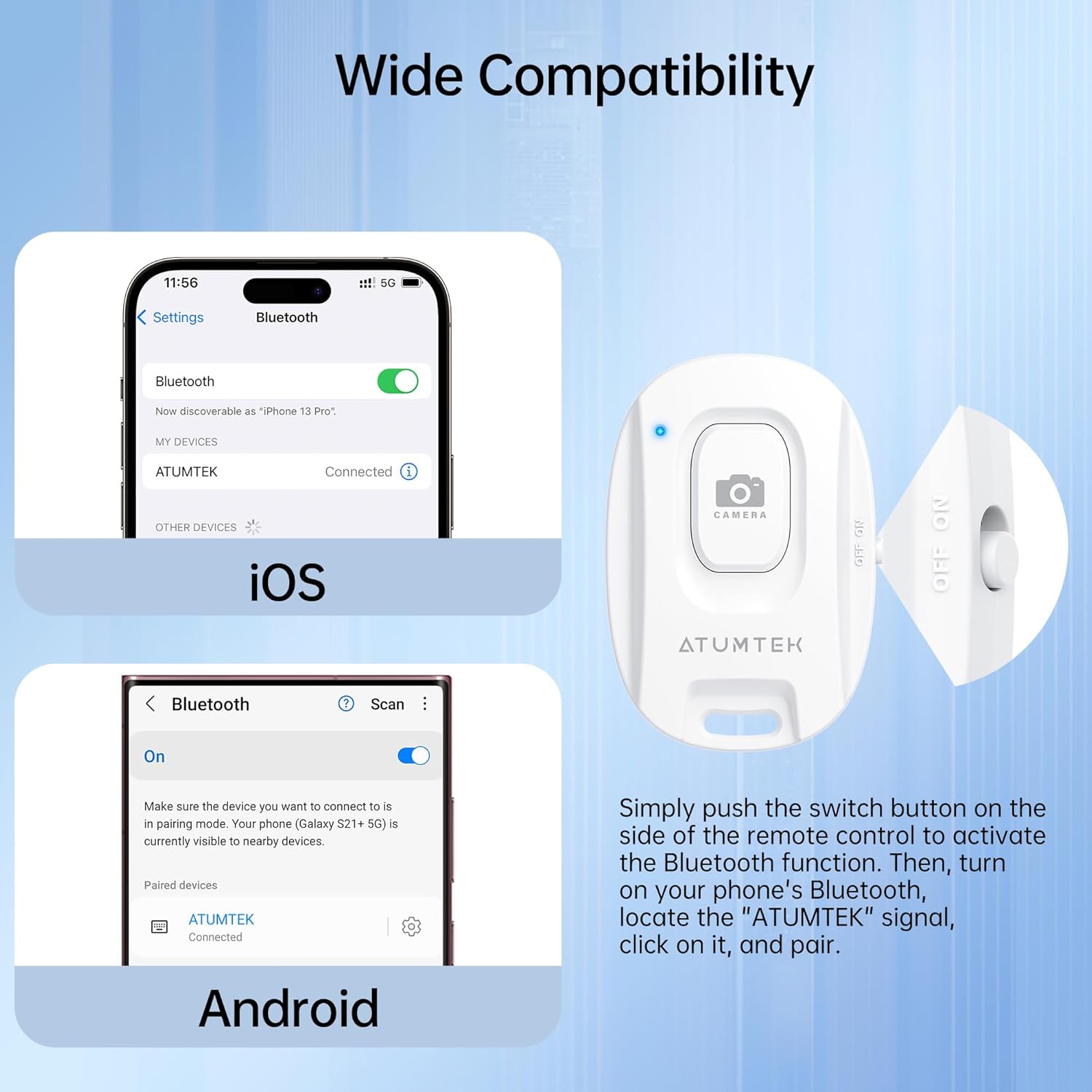
Image: Bluetooth pairing instructions for iOS and Android devices.
Video: Detailed instructions on how to pair the ATUMTEK remote shutter with iOS and Android devices, and how to use its functions for photos and videos.
3.3 사진 및 비디오 촬영
- 스마트폰의 카메라 앱을 여세요.
- Ensure the camera app is in the desired mode (Photo or Video).
- 를 누르세요 카메라 button on the remote shutter once to take a photo or start/stop video recording.
3.4 LED 표시등 상태
- Rapid Flashing (7 seconds after power on): Initial pairing mode.
- 느린 깜박임: Standby state, ready for pairing.
- Off (after pairing): Successfully connected to a device.
- Off (after 5 minutes of no operation): Enters sleep mode to conserve battery.
- Brief Light-up (when pressing button in sleep mode): Remote is waking up and re-entering pairing mode.
- 배터리 부족: The LED will turn off, and the connection may be lost. Replace the battery.
4. 유지관리
4.1 배터리 교체
The remote uses a CR2032 button battery. When the battery is low or depleted, replace it as described in Section 2.2. A fresh battery can last for over 20,000 photos.
4.2 청소
To clean the remote shutter, use a soft, dry cloth. Avoid using harsh chemicals or abrasive materials, as these may damage the device.
5. 문제 해결
5.1 Remote Not Pairing
- 전원 확인: Ensure the remote is turned ON.
- Check Bluetooth on Phone: 스마트폰에서 Bluetooth가 활성화되어 있는지 확인하세요.
- 배터리 수준: A low battery can prevent successful pairing. Replace the CR2032 battery if necessary.
- 거리: Ensure the remote is within 10 meters (33 feet) of your smartphone.
- 간섭: Move away from other Bluetooth devices or strong electromagnetic fields.
5.2 Remote Not Taking Photos/Videos
- Camera App Open: The remote only functions when your smartphone's camera application is open and active.
- Android Specific Setting: For some Android devices (e.g., Samsung Galaxy S25 Ultra), you may need to adjust a camera setting. Go to Camera app > Quick controls icon (four small dots) > Settings icon > Shooting methods > Press Volume buttons to > Choose "Take pictures or record video".
- 배터리 수준: 배터리가 완전히 방전되지 않았는지 확인하십시오.
6. 사양
| 모델 번호 | ATYK179 |
| 제품 치수 | 48.5mm x 33.7mm x 12.5mm(1.89 x 1.18 x 0.39인치) |
| 품목 무게 | 1.41온스(약 40g) |
| 블루투스 버전 | 5.2 |
| 무선 범위 | 최대 10미터(33피트) |
| 배터리 유형 | CR2032 Lithium Button Battery (included) |
| 배터리 용량 | 210mAh |
| 배터리 수명 | Over 20,000 photos |
| 호환 장치 | Most iOS (iPhone, iPad) and Android smartphones/tablets |
7. 보증 및 지원
7.1 보증 정보
ATUMTEK offers a warranty for all its branded products when purchased through authorized channels. Please retain your proof of purchase for warranty claims.
7.2 고객 지원
For further assistance, troubleshooting, or to provide feedback, please visit the official ATUMTEK store or contact customer service through the platform where you purchased the product.
Official ATUMTEK Store: ATUMTEK Store on Amazon


