1. 서론
The SingularXYZ Sfaira ONE Plus is a compact and highly efficient RTK GNSS survey equipment designed for professional surveying applications. It features a built-in IMU (Inertial Measurement Unit) allowing for up to 60° tilt surveying, significantly increasing operational efficiency. This device tracks multiple satellite constellations including GPS, BDS, GLONASS, Galileo, and QZSS, ensuring accurate and reliable positioning data.
Its pocket-size portability and long 16-hour battery life make it suitable for extensive fieldwork. The Sfaira ONE Plus integrates seamlessly with Android-based field surveying software, providing a comprehensive solution for various surveying tasks.

Image: The SingularXYZ Sfaira ONE Plus RTK GNSS receiver, shown with its packaging, USB-C cable, power adapter, and a smartphone displaying the SingularPad software interface.
2. 상자 안에 무엇이 들어있나요?
포장을 개봉한 후 다음 구성품이 모두 포함되어 있는지 확인하십시오.
- Sfaira ONE Plus GNSS Receiver (1 unit)
- USB-Type C Cable (1 unit)
- SingularPad Software (1 unit - typically provided via USB drive or download link)
- Quick Start Guide & Card
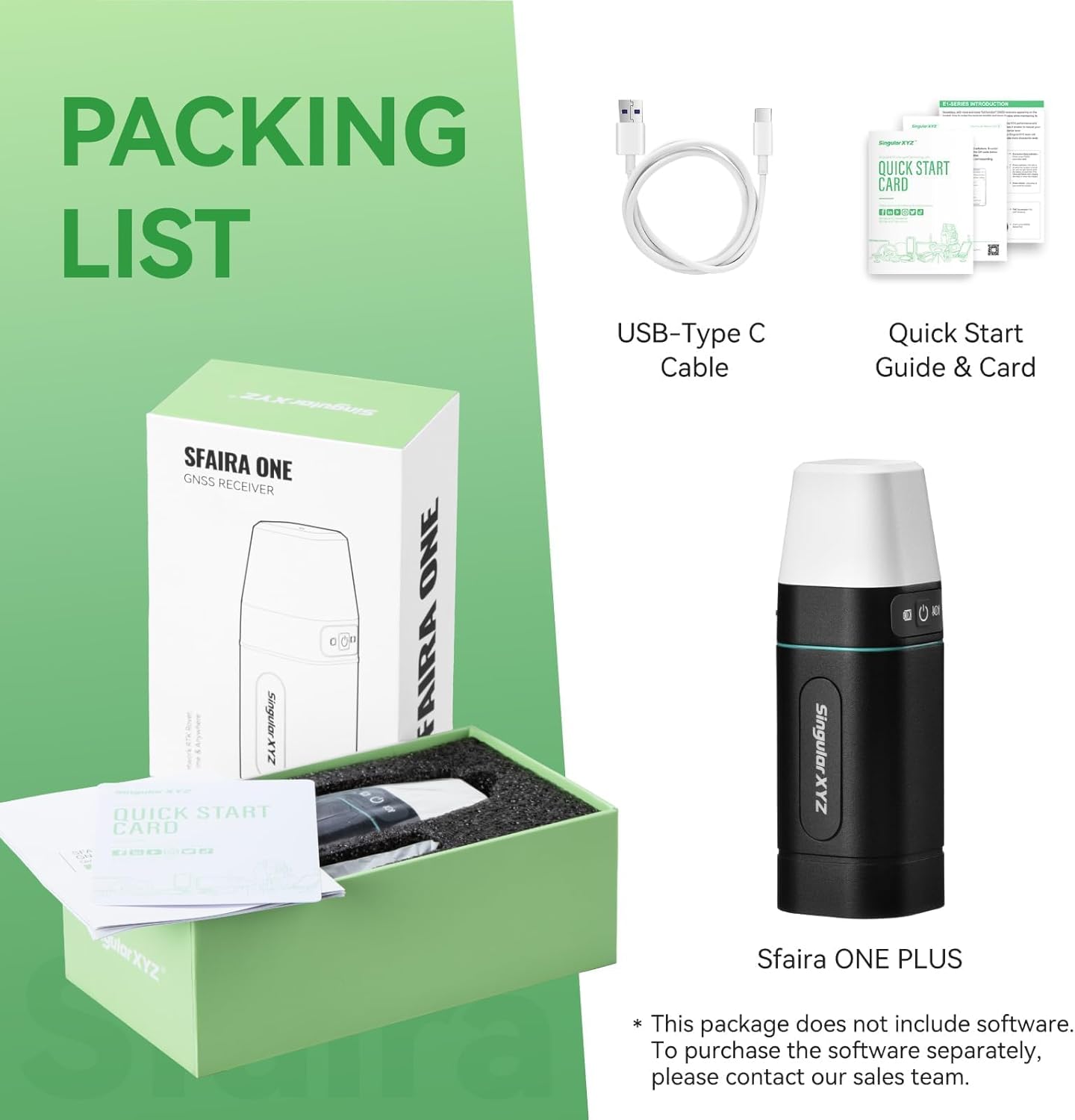
Image: A visual representation of the Sfaira ONE Plus packaging contents, including the receiver, USB-C cable, and quick start guide.
3. 주요 특징
- 60° Tilt Surveying: The built-in IMU allows for surveying with the pole tilted up to 60 degrees, eliminating the need for perfect vertical alignment and significantly increasing efficiency. This feature is immune to magnetic interference.
- Multi-Constellation GNSS Support: Tracks signals from GPS, BDS, GLONASS, Galileo, and QZSS satellite systems for robust and accurate positioning.
- 소형 및 휴대성: Designed for ease of transport and use in various field conditions.
- 배터리 수명 연장: 한 번 충전으로 최대 16시간 동안 연속 사용이 가능합니다.
- Fast Initialization: The tilt IMU function initializes quickly, typically within 5 seconds, by shaking the pole.

Image: A diagram demonstrating the 60-degree tilt surveying capability of the Sfaira ONE Plus, highlighting its built-in IMU and fast initialization.

이미지: 전amples of the Sfaira ONE Plus being used in challenging environments such as dense forests, near building corners, and areas with glass multi-path interference, demonstrating its strong anti-interference capabilities.
4. 응용 프로그램
The accurate coordinate, elevation, distance, and azimuth data provided by the Sfaira ONE Plus make it suitable for a wide range of professional applications, including but not limited to:
- 토지 측량
- GIS (Geographic Information Systems)
- Mine Surveying
- Topographic Survey
- Cadastral Survey
- Road Stakeout
- 로봇공학

Image: The Sfaira ONE Network RTK Rover depicted in various application settings, such as urban construction, mountainous terrain, and open landscapes, illustrating its versatility.
5. SingularPad Field Surveying Software
The Sfaira ONE Plus operates in conjunction with the SingularPad field surveying software, an Android-based application. This software can be installed on smartphones, data collectors, and tablets, offering a flexible and powerful interface for your surveying needs. Software updates are regularly provided and available for free to all users.
5.1. 소프트웨어 기능
SingularPad supports a wide array of surveying functions:
- 포인트 측량
- Detail Survey
- CAD Mapping
- CAD Stakeout
- Road Stakeout
- Surface Stakeout
- Layer Editing
- 부피 계산
- Perimeter and Area Calculation
- 현지화
- Survey Range Settings

Image: A screenshot of the SingularPad software interface on a smartphone, displaying various surveying functions and a map view.
5.2. 소프트웨어 설치
The necessary software is typically provided on a USB drive. Copy and install it onto your Android phone, tablet, or data collector before proceeding with the configuration and operation of the Sfaira ONE Plus.

Image: A SingularXYZ branded USB drive next to a smartphone displaying the SingularPad software, indicating the method of software installation.
5.3. 지원 File 형식
The SingularPad software supports a wide range of file formats for import and export, ensuring compatibility with various surveying workflows and other software platforms. Common supported formats include:
- XLS (Microsoft Excel Spreadsheet)
- CSV (Comma Separated Values)
- NCN (Nikon Coordinate File)
- DXF (Drawing Exchange Format)
- CSX (Carlson Survey Exchange)
- DAT (Data File)
- HTML (HyperText Markup Language)
- SHP (ESRI Shapefile)
- CRD (Coordinate File)
- KML (Keyhole Markup Language)
- PXY (Point XY File)
- KMZ (Keyhole Markup Language Zipped)
- GPX (GPS Exchange Format)
- JPG (JPEG Image)
- TXT (Plain Text File)

Image: A circular diagram illustrating the various supported file formats for import and export within the SingularPad software.
6. 설치 및 작동 지침
This section outlines the general steps to set up and operate your Sfaira ONE Plus for surveying tasks. For detailed instructions, refer to the SingularPad software manual.
6.1. Work Mode: RTK Rover + CORS Account
The Sfaira ONE Plus typically operates as an RTK Rover, receiving corrections from a CORS (Continuously Operating Reference Station) account. A CORS account is not included with the product and must be purchased from your local CORS provider.

Image: A diagram illustrating the components of an RTK Rover setup, including the GPS rover, range pole, data controller/phone/tablet, and the connection to a CORS account.
6.2. 빠른 시작 가이드
Follow these steps to begin surveying with your Sfaira ONE Plus:
- Step 1: Device Connection via Bluetooth
Connect the Sfaira ONE Plus receiver to your Android phone, tablet, or data collector via Bluetooth. Ensure Bluetooth is enabled on both devices and pair them through the SingularPad software.

Image: A sequence of screenshots demonstrating the process of connecting the Sfaira ONE Plus to a mobile device via Bluetooth within the SingularPad application.
- Step 2: Create a New Project & Set Coordinate Systems
Within the SingularPad software, create a new project. Configure the project settings, including selecting the appropriate coordinate system for your survey area. You can choose from predefined projections or define custom ones.

Image: A series of screenshots guiding the user through creating a new project and setting up coordinate systems in the SingularPad software.
- Step 3: Log in to RTK Correction Service Account (CORS Account)
Access the Rover settings in SingularPad. Configure the data link to use your phone's internet connection or connect to your RTK base station in GSM mode. Enter your CORS account details (server IP, port, username, password) to receive RTK corrections. Select the appropriate MountPoint from your account.

Image: Screenshots detailing the process of logging into an RTK correction service (CORS) account within the SingularPad application.

Image: A screenshot showing the selection of a MountPoint within the SingularPad software for RTK correction services.
- Step 4: Initialize Tilt IMU Function & Start Surveying
Once connected and receiving corrections, initialize the tilt IMU function by gently shaking the survey pole for approximately 5 seconds. This calibrates the IMU for accurate tilt compensation. Verify that the RTK status changes to "FIXED" in the software, indicating a stable and accurate solution. You can also view the number of satellites being tracked. With a FIXED solution, you can begin your surveying tasks with centimeter-level accuracy.

Image: Screenshots illustrating how to check the RTK status for a "FIXED" solution and access the surveying functions within the SingularPad software.

Image: A comprehensive flowchart outlining the quick start process for Sfaira ONE surveying, from project creation to data export.
7. 사양
| 특징 | 세부 사항 |
|---|---|
| 품목 무게 | 2.2파운드 |
| 제품 치수 | 1.9 x 1.9 x 5.8 인치 |
| 품목 모델 번호 | Network GPS Rover |
| 모델명 | Sfaira one Plus |
| 배터리 | 1개의 리튬 폴리머 배터리 필요(포함) |
| 배터리 수명 | 16시간 |
| Display Size (for connected device) | 2.32 인치 |
| 음성 명령 | Touchscreen (via connected device) |
| 연결 기술 | 블루투스 |
| 지도 유형 | Worldwide (via SingularPad software) |
| 장착 유형 | 패널 실장 |
| 운영 체제(소프트웨어용) | 기계적 인조 인간 |
| 제조업체 | 싱귤러XYZ |
| 첫 번째 이용 가능 날짜 | 30년 2023월 XNUMX일 |
8. 유지관리
Proper maintenance ensures the longevity and optimal performance of your Sfaira ONE Plus GNSS receiver. Follow these general guidelines:
- 청소: 부드러운 천으로 기기를 정기적으로 닦아주세요.amp 천을 사용하세요. 천을 손상시킬 수 있는 강한 화학 물질이나 연마재는 사용하지 마세요.asing 또는 센서.
- 저장: When not in use, store the device in a cool, dry place, away from direct sunlight and extreme temperatures. Ensure the battery is charged to approximately 50% for long-term storage.
- 배터리 관리 : Avoid fully discharging the battery frequently. Charge the device using only the provided USB-Type C cable and a compatible power adapter.
- 물리적 검사: Periodically inspect the device for any signs of damage, such as cracks, loose connections, or debris in ports.
- 소프트웨어 업데이트: Keep the SingularPad software updated to the latest version to benefit from performance improvements and new features.
9. 문제 해결
This section provides general guidance for common issues. For more specific problems, refer to the SingularPad software's help section or contact technical support.
- 장치가 Bluetooth를 통해 연결되지 않음:
- Ensure the Sfaira ONE Plus is powered on and within range.
- 모바일 기기에서 Bluetooth가 활성화되어 있는지 확인하세요.
- Try restarting both the Sfaira ONE Plus and your mobile device.
- Check if the device is already paired with another mobile device.
- No RTK Fixed Solution:
- Confirm your CORS account details (IP, port, username, password) are correctly entered in SingularPad.
- 모바일 기기의 인터넷 연결이 안정적인지 확인하십시오.
- Check the status of your CORS service.
- Ensure clear sky visibility for the GNSS receiver. Obstructions can affect signal reception.
- IMU Tilt Function Not Initializing:
- Ensure you are shaking the pole sufficiently for about 5 seconds as instructed.
- Verify that the IMU function is enabled in the SingularPad software settings.
- 소프트웨어 충돌 또는 멈춤 현상:
- Ensure your SingularPad software is the latest version.
- Clear the app cache on your Android device.
- Ensure your Android device meets the minimum system requirements for the software.
10. 보증 정보
The SingularXYZ Sfaira ONE Plus RTK GNSS Survey Equipment comes with a 1년 제조사 보증. 본 보증은 정상적인 사용 환경에서 발생하는 재료 및 제조상의 결함에 적용됩니다. 보증 청구를 위해 구매 증빙 서류를 보관해 주십시오.
For detailed warranty terms and conditions, please refer to the documentation included with your product or contact SingularXYZ customer support.
11. 기술 지원
Should you require technical assistance or have questions regarding your Sfaira ONE Plus, SingularXYZ offers comprehensive support:
- 사용자 설명서: Refer to the detailed manual included in the product package.
- 이메일 지원: Contact SingularXYZ technical support via email for assistance.
- 공식적인 Web대지: 방문하세요 싱귤러XYZ web대지 제품 정보, 자주 묻는 질문(FAQ) 및 연락처 정보는 다음을 참조하십시오.
- Video Conference Guidance: SingularXYZ also offers video conference guidance to help users get started and resolve issues.
- 튜토리얼 비디오 : Access tutorial videos for easy setup and operation.
12. 제품 비디오
The following videos provide visual demonstrations of the Sfaira ONE Plus and its features. Please note these are short preview 비디오.
Video: A short demonstration of the Sfaira ONE Plus in operation, highlighting its compact design and ease of use in the field.
비디오: 간략하게 살펴보기view of the Sfaira ONE Plus's key features, including its multi-constellation GNSS support and IMU capabilities.
Video: A quick look at the SingularPad software interface, showcasing some of its surveying functions and user-friendly design.
Video: A short clip demonstrating the tilt surveying feature in action, showing how the IMU allows for accurate measurements without vertical alignment.
Video: A brief visual summary of the Sfaira ONE Plus's benefits for professional surveyors, emphasizing efficiency and accuracy.


