1. 제품 오버view
The VTech ES2050 is a DECT cordless phone designed for home and office use, featuring an integrated digital answering machine, call blocking capabilities, and enhanced audio functions. This manual provides detailed instructions for setting up, operating, and maintaining your phone.

The VTech ES2050 DECT Cordless Phone with its base unit, showcasing the handset's backlit display and keypad, and the base unit's answering machine controls.

The VTech ES2050 DECT Cordless Phone positioned in a contemporary living space, highlighting its sleek design and integration into a home environment.

Illustration of the VTech ES2050's Nuisance Call Blocker feature, showing how it helps prevent unwanted calls from ringing through. Up to 100 numbers can be blacklisted.

The VTech ES2050's Digital Answering System, capable of recording up to 30 minutes of messages, with a digital message counter on the base unit.

Depiction of the VTech ES2050's easy one-touch features, including Mute/Alarm, adjustable ring volume and melodies, and a high-quality handsfree speakerphone.

Visual representation of the VTech ES2050's Volume Booster function, which amplifies incoming sounds for enhanced clarity and loudness, beneficial for hearing-impaired users.

The VTech ES2050 handset with its backlit display and keypad illuminated, demonstrating improved visibility in low-light conditions.

A composite image illustrating key features: 100 name and number phonebook, calling numbers displayed with 20 call list records, 10 last number redial, and up to 18 hours talk time / 250 hours standby time.
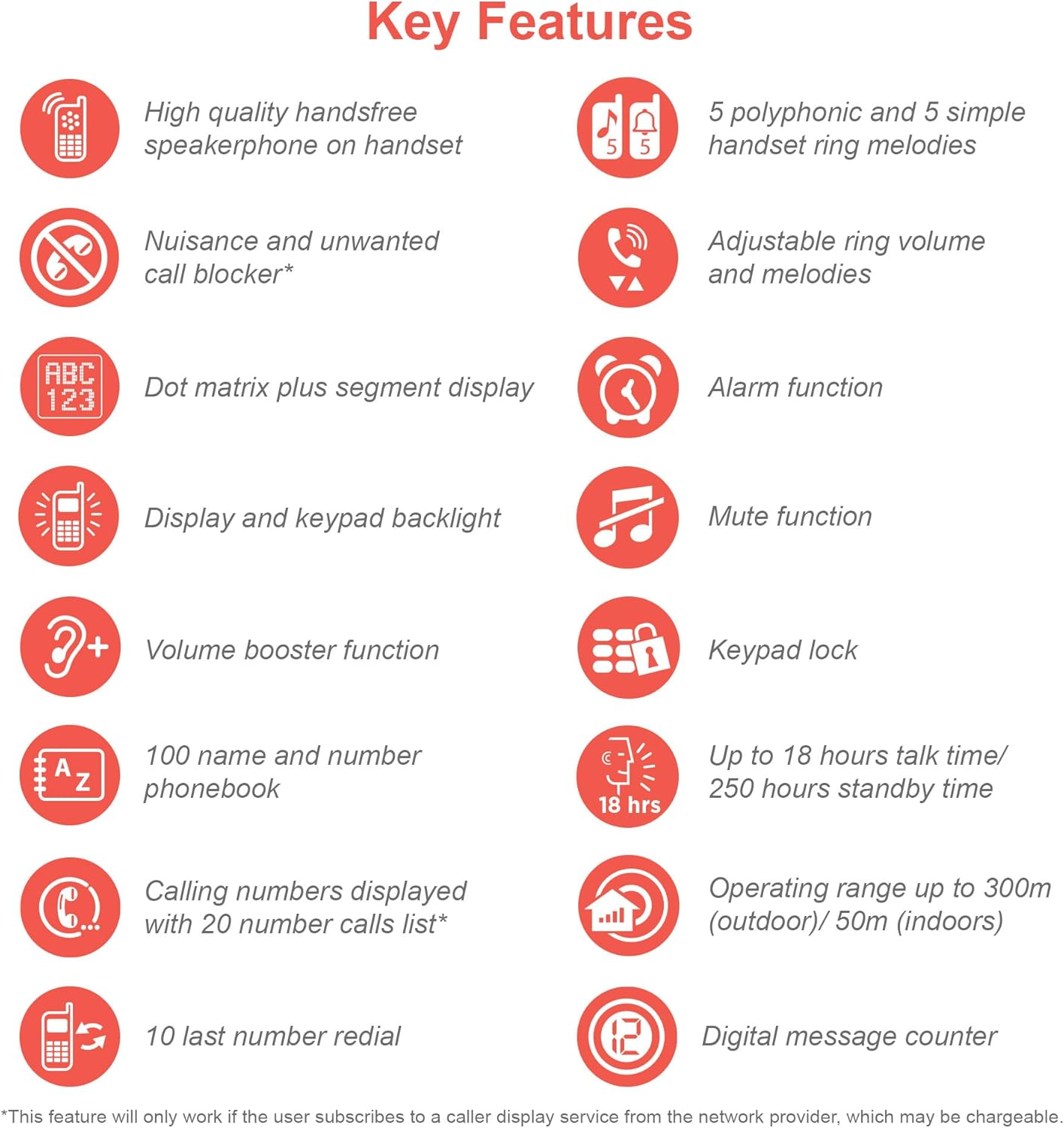
An infographic summarizing the VTech ES2050's key features, including speakerphone, call blocker, polyphonic ringtones, alarm, mute, keypad lock, volume booster, phonebook, call list, redial, talk time, operating range, and digital message counter.
주요 특징:
- 디지털 자동 응답기: 30 minutes recording time.
- Nuisance Call Blocker: Block up to 100 blacklisted numbers.
- 볼륨 부스터: Amplifies incoming sounds for enhanced clarity.
- 긴 배터리 수명: Up to 18 hours talk time / 250 hours standby time.
- 백라이트 디스플레이 및 키패드: 쉬운 view어두운 곳에서.
- 핸즈프리 스피커폰: High-quality speakerphone on handset.
- 전화 번호부: 100 name and number capacity.
- 단축 다이얼: 3 speed dial numbers.
- 에코 모드: For reduced power consumption.
- 발신자 ID / 통화 대기: Stores 20 records.
- 재 다이얼 : 10 last number redial.
- 알람 기능: Integrated alarm.
- 음소거 기능: For privacy during calls.
- 키패드 잠금: Prevents accidental dialing.
2. 상자 안에 무엇이 들어있나요?
시작하기 전에 모든 구성 요소가 있는지 확인하세요.
- 1 기본 유닛
- 무선 단말기 1개
- 1 Charger (for handset)
- 1 Battery Pack (2 AAA batteries included)
- 전화선 코드
- 빠른 시작 가이드(자세한 내용은 이 설명서를 참조하세요)
3. 설정 가이드
3.1. 배터리 설치 및 충전
- Locate the battery compartment cover on the back of the handset. Slide it open.
- 배터리 팩 플러그를 수납 공간 내부의 잭에 단단히 연결하세요.
- Place the 2 AAA batteries (included) into the compartment, ensuring correct polarity (+ and -).
- 배터리 덮개를 다시 장착하세요.
- Place the handset on the base unit or charger. The charging indicator light on the handset should illuminate.
- 처음 사용하기 전에 최소 16시간 동안 핸드셋을 충전하여 배터리 용량을 완전히 확보하세요.
3.2. 베이스 유닛 연결
- 전화선 코드의 한쪽 끝을 기본 장치 뒷면의 TEL LINE 잭에 연결합니다.
- 전화선 코드의 다른 쪽 끝을 전화 벽면 잭에 연결합니다.
- 전원 어댑터의 작은 쪽 끝을 본체 뒷면의 전원 단자에 꽂으세요.
- 전원 어댑터의 큰 쪽을 표준 전기 콘센트에 꽂습니다.
- Ensure all cables are securely connected and routed to prevent tripping hazards.
3.3. 초기 설정(날짜 및 시간)
After the handset is charged, you will need to set the date and time. Follow the on-screen prompts on the handset display. If prompted multiple times, ensure each step is confirmed before proceeding.
- 를 누르세요 메뉴/확인 단추.
- 로 이동 날짜 및 시간 화살표 키를 사용하여.
- 누르다 메뉴/확인 선택하다.
- Enter the current date and time using the keypad.
- 누르다 메뉴/확인 저장하다.
4. 사용 설명서
4.1. 전화 걸고 받기
- 전화를 걸려면: 핸드셋을 들거나 말하다 button. Dial the number.
- 전화를 받으려면: 전화가 울리면 수화기를 들거나 버튼을 누르세요. 말하다 단추.
- 통화를 종료하려면: Place the handset back on the base unit/charger or press the 끝 단추.
4.2. 스피커폰 사용
통화 중에 스피커 button to activate the handsfree speakerphone. Press it again to switch back to the handset earpiece.
4.3. 디지털 자동응답기
- 재생 메시지: 베이스 유닛에서 다음을 누르세요. 재생/정지.
- 메시지 삭제: 메시지 재생 중 삭제 기본 장치에.
- 발신 메시지(OGM) 녹음: Refer to the handset menu for OGM recording options.
4.4. 귀찮은 전화 차단기
This feature allows you to block unwanted calls. You can add numbers to a blacklist.
- 통화 내역에 특정 번호를 차단하려면 다음 단계를 따르세요. Access the Call History, select the number, and choose the "Block" option.
- To Manually Add a Number to Blacklist: Navigate to the Call Blocker menu in the handset settings and add the number.
- The phone can store up to 100 blacklisted numbers.
4.5. 볼륨 부스터
에게 amplify the incoming sound during a call, press the 후원 button (often marked with a speaker icon or "+") on the handset. Press it again to deactivate.
4.6. 전화번호부 및 단축 다이얼
- 연락처 추가: Access the Phonebook menu, select "Add New Entry", and enter the name and number.
- 전화번호부에서 전화 걸기: 를 누르세요 전화 번호부 버튼을 누르고 원하는 연락처로 스크롤한 후 누르세요. 말하다.
- 단축 다이얼: Assign frequently called numbers to speed dial keys (e.g., 1, 2, 3). Refer to the handset menu for speed dial setup.
4.7. 에코 모드
The phone automatically enters ECO mode when the handset is close to the base unit, reducing power consumption and transmission power. This mode is indicated by an ECO icon on the display.
5. 유지관리
- 청소: 부드러운 천으로 휴대폰과 베이스 유닛을 닦으세요.amp 천. 연마성 세척제나 용매를 사용하지 마십시오.
- 배터리 관리 : For optimal battery life, avoid overcharging by leaving the handset off the charger for extended periods once fully charged. If the phone will not be used for a long time, remove the batteries.
- 위치: 다른 전자 장치와 간섭을 일으킬 수 있는 곳에서 멀리 떨어진 중앙 위치에 베이스 유닛을 놓으세요.
6. 문제 해결
If you experience issues with your VTech ES2050 phone, try the following solutions:
| 문제 | 가능한 해결책 |
|---|---|
| 전화음이 나지 않습니다. 전화를 걸거나 받을 수 없습니다. |
|
| 음질이 좋지 않음 / 잡음이 있음. |
|
| 응답기가 메시지를 녹음하지 않습니다. |
|
| Handset display is blank or unresponsive. |
|
| Difficulty with menu navigation or settings. |
|
7. 사양
| 특징 | 세부 사항 |
|---|---|
| 모델 번호 | ES2050 |
| 전화 유형 | 무선 DECT |
| 응답 시스템 유형 | 디지털 |
| 기록 용량 | 30 분 |
| 전화 통화 시간 | 최대 18시간 |
| 전화 대기 시간 | 최대 250시간 |
| 배터리 | AAA 배터리 2개 (포함) |
| 전원 | 배터리 구동 |
| 다이얼러 유형 | 단일 키패드 |
| 호환 장치 | Standard Landline Telephone Networks |
| 색상 | 검은색 |
| 제조업체 | VTECH |
| 원산지 | 중국 |
8. 보증 및 지원
보증 정보 및 기술 지원에 대해서는 공식 VTech를 참조하십시오. web웹사이트를 방문하거나 VTech 고객 서비스 센터에 문의하십시오. 구매 영수증을 보관하여 구매 증빙 자료로 활용하십시오.
제조업체: VTECH
For the most up-to-date support resources, visit the VTech support page or refer to the contact information provided with your product packaging.


