1. 서론
This user manual provides comprehensive instructions for the setup, operation, and maintenance of your IPEVO VC-Z4K UHD 4K PTZ Camera. The VC-Z4K is designed to enhance educational and worship spaces with its 4K UHD resolution and 8.29-MP Sony CMOS sensor. It features advanced pan-tilt-zoom capabilities, AI auto-tracking, and a powerful 12X Optical + 15X Digital Zoom, making it ideal for capturing detailed and engaging remote sessions. Its AI functionality helps minimize the need for additional personnel, and its easy setup allows seamless integration with popular platforms like YouTube, OBS, and Zoom.
2. 안전 정보
Please read and understand all safety instructions before using the IPEVO VC-Z4K camera to prevent injury or damage to the device. Keep this manual for future reference.
- 전원: Use only the provided power adapter. Ensure the power outlet meets the camera's voltag요구사항
- 통풍: 통풍구를 막지 마십시오. 과열을 방지하기 위해 카메라 주변에 적절한 공기 흐름을 확보하십시오.
- 환경: Avoid exposing the camera to water, moisture, extreme temperatures, or direct sunlight. Operate in a clean, dry environment.
- 손질: 카메라를 조심스럽게 다루십시오. 떨어뜨리거나 강한 진동에 노출시키지 마십시오.
- 청소: 청소하기 전에 전원을 분리하세요. 부드럽고 마른 천을 사용하세요. 액체 또는 에어로졸 세척제는 사용하지 마세요.
- 서비스: 카메라를 직접 분해하거나 수리하지 마십시오. 모든 정비는 자격을 갖춘 기술자에게 맡기십시오.
3. 패키지 내용
아래 나열된 모든 품목이 패키지에 포함되어 있는지 확인하세요.
- IPEVO VC-Z4K 카메라
- 전원 어댑터 (8.2피트/2.5미터)
- USB 3.0 케이블 (1.5m/4.9피트)
- RS232 케이블 (2m/6.5피트)
- 리모컨(배터리는 포함되지 않음)
- 사용자 설명서(본 문서)
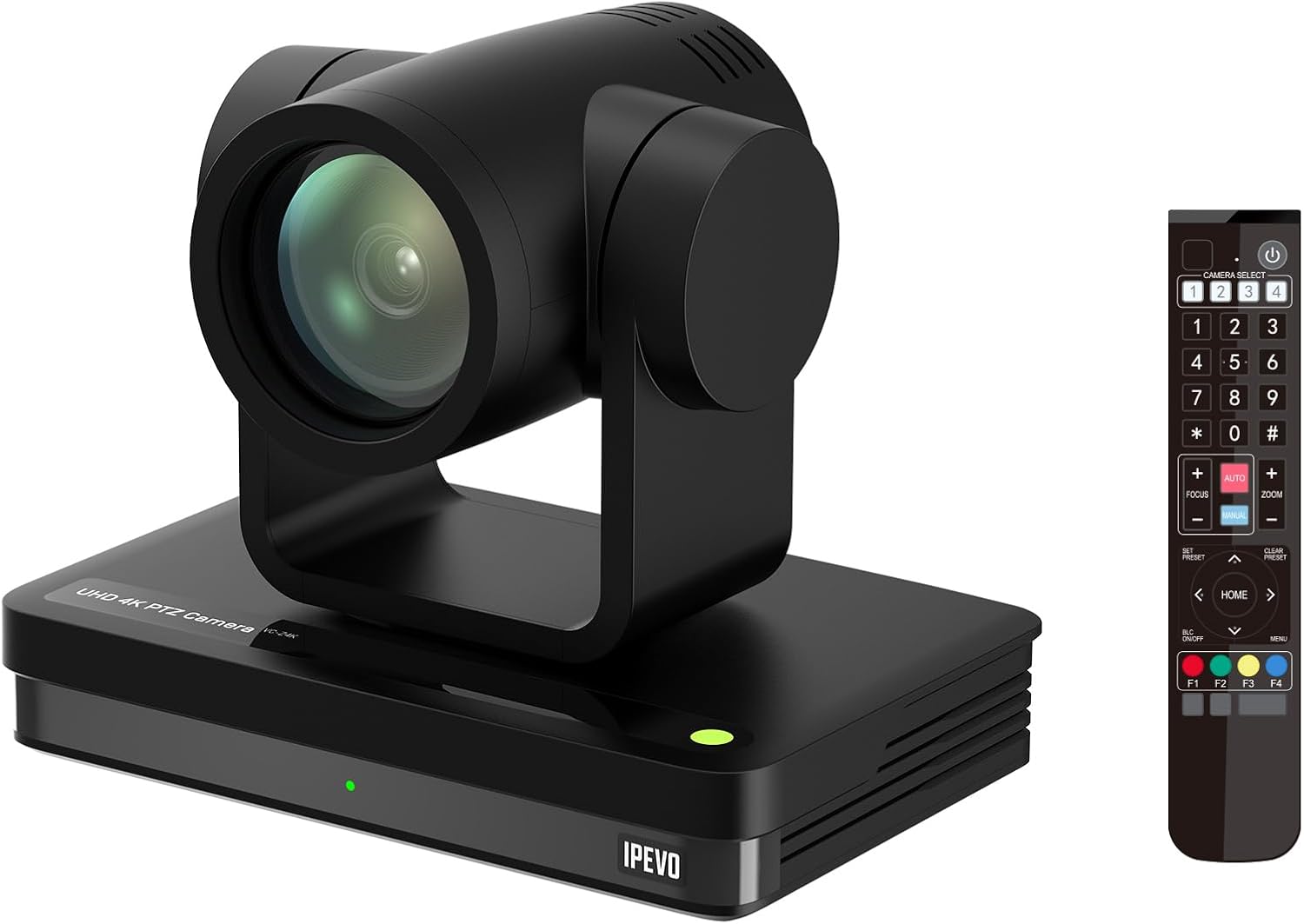
Image: The IPEVO VC-Z4K camera unit shown alongside its remote control, illustrating the main components included in the package.
4. 제품 오버view
4.1 주요 특징
- 4K 울트라 HD 해상도: Equipped with a 1/2.8" HD CMOS sensor for stunning 4K video output.
- 12배 광학 줌: Provides clear, detailed close-ups without loss of quality.
- AI 자동 추적: Automatically follows speakers or presenters, ensuring they remain in frame.
- 유연한 연결성: Features HDMI, USB-C, LAN (PoE), and SDI outputs for versatile integration.
- Wide Pan and Tilt Range: Offers 340° pan and 120° tilt for comprehensive room coverage.
- 고급 소음 감소: 2D/3D noise reduction ensures clear video in various lighting conditions.
4.2 Camera Components and Ports

이미지: 후면 view of the IPEVO VC-Z4K camera showing its various connectivity ports including USB 3.0, HDMI, SDI, LAN (PoE), and power input.
The VC-Z4K camera features a range of ports for diverse connectivity options:
- HDMI 출력: For high-definition video output to displays or capture devices.
- USB-C 포트: For direct connection to computers for video and control.
- LAN(PoE) 포트: For network connectivity and Power over Ethernet, simplifying installation.
- SDI 출력: For professional video workflows requiring longer cable runs.
- RS232 포트: For serial control via external control systems.
- 전원 입력: 동봉된 전원 어댑터를 연결하기 위한 것입니다.
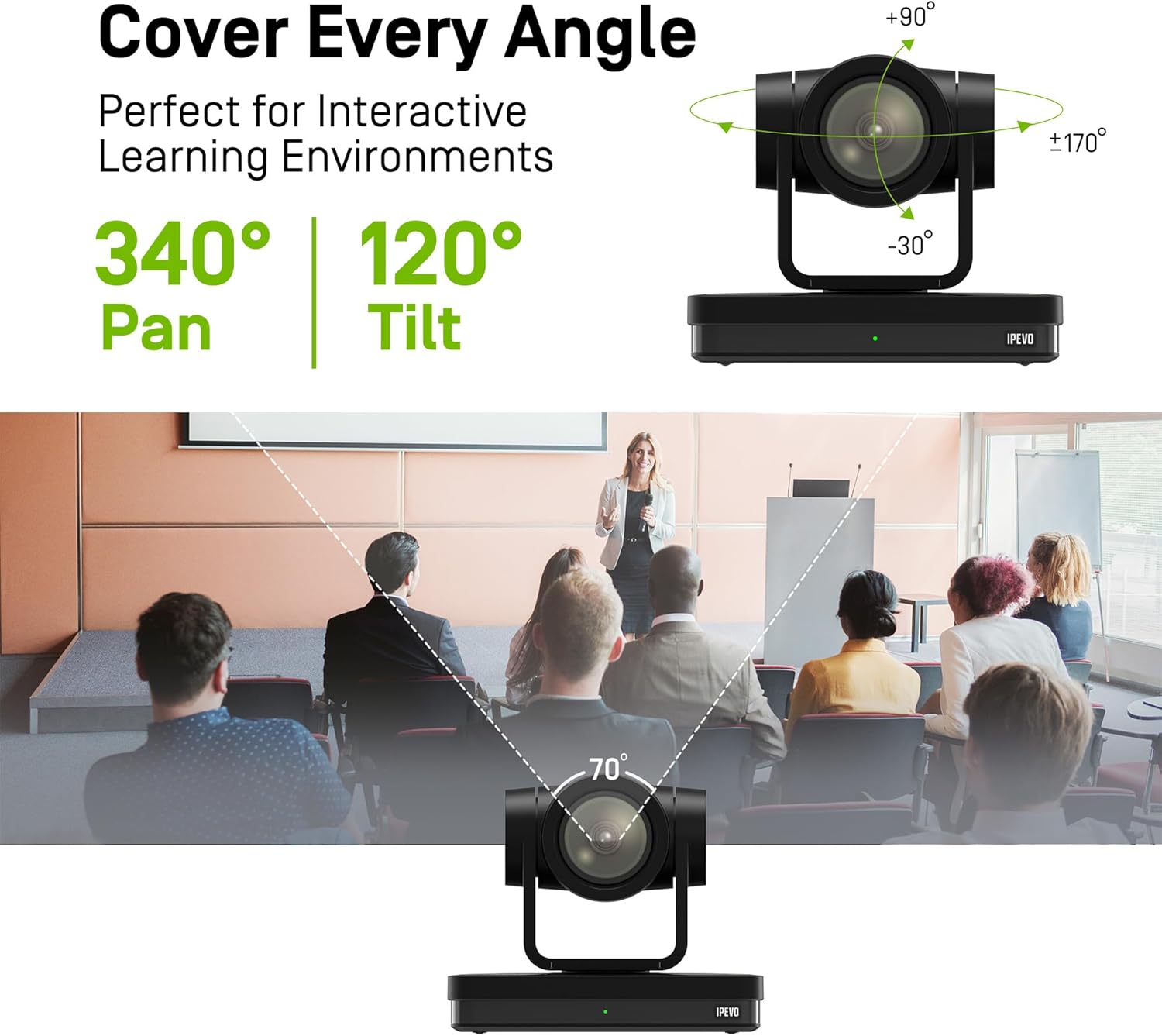
Image: Diagram illustrating the IPEVO VC-Z4K camera's pan (340°) and tilt (120°) ranges, highlighting its ability to cover a wide area.
The camera's motorized head allows for precise pan and tilt movements, enabling comprehensive coverage of your space. The pan range is 340 degrees, and the tilt range is 120 degrees (-30° to +90°).
5. 설정
Follow these steps for the initial setup of your IPEVO VC-Z4K camera:
- 놓기: Choose a stable surface or mount the camera securely in your desired location. Ensure it has a clear line of sight to the area you wish to capture.
- 전원 연결:
- 전원 어댑터 사용: Connect the provided power adapter to the camera's power input port and then plug it into a wall outlet.
- PoE(Power over Ethernet) 사용: If your network switch supports PoE, connect an Ethernet cable from the PoE-enabled switch to the camera's LAN (PoE) port. This will provide both power and network connectivity.
- Video Output Connection (Choose one or more):
- HDMI : Connect an HDMI cable from the camera's HDMI output to a display, projector, or video capture card.
- USB-C : Connect the USB 3.0 cable from the camera's USB-C port to a USB 3.0 port on your computer. This enables the camera as a web화상회의 애플리케이션을 위한 캠.
- LAN : Connect an Ethernet cable from the camera's LAN port to your network router or switch for IP streaming and control.
- SDI: Connect an SDI cable from the camera's SDI output to a professional video switcher or recorder.
- 원격 제어 설정: Insert two AAA batteries (not included) into the remote control. The remote control is essential for initial configuration and operation.
- 전원 켜기: Once all connections are secure, power on the camera. The indicator light will illuminate.
6. 사용 설명서
6.1 Basic Camera Control (via Remote Control)
- 팬/틸트: Use the directional arrows on the remote control to move the camera horizontally (pan) and vertically (tilt).
- 줌: Use the 'ZOOM +' and 'ZOOM -' buttons to adjust the optical zoom.
- 집중하다: Press 'AUTO FOCUS' for automatic focus. Use 'FOCUS +' and 'FOCUS -' for manual adjustment if needed.
- 사전 설정 : The camera supports up to 255 presets. You can save and recall up to 10 presets directly from the remote control using the number buttons (0-9). To save a preset, position the camera, then press 'PRESET' followed by a number (e.g., '1'). To recall, press the number button.

Image: The IPEVO VC-Z4K camera demonstrating its 12X optical zoom capability, highlighting its 8.29-MP Sony CMOS sensor for high-quality video.
6.2 AI 자동 추적
The VC-Z4K features advanced AI auto-tracking to keep a presenter or subject automatically in frame.
- Enabling Tracking: Refer to the remote control or camera's web interface for specific buttons or settings to activate AI tracking.
- 구역 추적: Configure specific zones within the camera's view where tracking should occur.
- 발표자 추적: The camera can identify and follow a designated presenter as they move within the defined area.

Image: A visual representation of the IPEVO VC-Z4K's AI auto-tracking and auto-focus features, showing how it maintains focus on a moving subject in a classroom setting.
6.3 Integration with Platforms
The VC-Z4K seamlessly integrates with various video conferencing and streaming platforms:
- USB 연결: When connected via USB-C, the camera will be recognized as a standard webcam by applications like Zoom, OBS Studio, Microsoft Teams, Google Meet, GoTo Meeting, and Skype. Select "IPEVO VC-Z4K" as your video input device within the application settings.
- LAN/IP Streaming: For advanced streaming setups, use the LAN connection to stream video via RTSP/RTMP protocols to platforms like YouTube Live or OBS Studio. Refer to the camera's web interface for IP configuration and streaming settings.
7. 유지관리
Proper maintenance ensures the longevity and optimal performance of your IPEVO VC-Z4K camera.
- 렌즈 청소: 광학 렌즈 전용으로 제작된 부드럽고 보풀 없는 천을 사용하십시오. 렌즈를 부드럽게 닦아 먼지나 얼룩을 제거하십시오. 연마성 재질이나 강한 화학 약품은 사용하지 마십시오.
- 본체 청소: 카메라 바디는 부드럽고 마른 천으로 닦으세요. 잘 지워지지 않는 오염의 경우, 가볍게 두드리세요.ampen the cloth with water, then wipe dry immediately. Do not allow liquids to enter the camera.
- 저장: 장기간 사용하지 않을 때는 카메라를 직사광선과 극한 온도 변화를 피해 서늘하고 건조한 곳에 보관하십시오.
- 펌웨어 업데이트: IPEVO 공식 웹사이트를 주기적으로 확인하세요. website for firmware updates. Keeping your camera's firmware up-to-date can improve performance and add new features.
8. 문제 해결
If you encounter issues with your IPEVO VC-Z4K camera, refer to the following common problems and solutions:
| 문제 | 가능한 원인 | 해결책 |
|---|---|---|
| 전원이 안 들어옴/카메라가 켜지지 않음 | Power adapter not connected or faulty; no PoE connection. | Ensure power adapter is securely connected and plugged into a working outlet. If using PoE, verify the network switch is PoE-enabled and the Ethernet cable is functional. |
| 비디오 출력이 없습니다 | Incorrect cable connection; wrong input selected on display; software issue. | Check HDMI, USB-C, LAN, or SDI cable connections. Ensure the display is set to the correct input source. Restart the computer/application if connected via USB. |
| 리모컨이 작동하지 않습니다 | 배터리가 방전되었거나 잘못 삽입되었습니다. 적외선 센서가 차단되었습니다. | Replace batteries (AAA). Ensure batteries are inserted with correct polarity. Point the remote directly at the camera's IR receiver. |
| AI tracking not functioning | Tracking feature not enabled; subject out of tracking range; poor lighting. | Activate AI tracking via remote or web interface. Ensure the subject is within the optimal tracking area. Improve lighting conditions if too dark. |
| Poor video quality (blurry, noisy) | Lens is dirty; focus issue; low light conditions; network bandwidth. | Clean the lens. Adjust focus manually or use auto-focus. Ensure adequate lighting. For IP streaming, check network bandwidth and camera's streaming settings. |
9. 사양
Detailed technical specifications for the IPEVO VC-Z4K UHD 4K PTZ Camera:
| 제품 치수 | 7.1 x 5.9 x 4.5 인치 |
| 품목 무게 | 2.64파운드 |
| 품목 모델 번호 | CDCU-06IP |
| 포토 센서 기술 | CMOS (1/2.8" HD CMOS 센서) |
| 비디오 캡처 해상도 | 4K UHD |
| 광학 줌 | 12X |
| 디지털 줌 | 15X |
| 최대 조리개 | 2.8 밀리미터 |
| 연결 기술 | USB, HDMI, LAN(PoE), SDI, RS232 |
| 특별 기능 | AI Tracking and Auto Focus, Low Noise and High SNR, Multiple Presets (up to 255) |
| 색상 | 검은색 |
| 제조업체 | IPEVO |
10. 보증 및 지원
IPEVO products are designed for reliability and performance. For warranty information, technical support, or service inquiries, please visit the official IPEVO web사이트를 방문하거나 고객 지원팀에 직접 문의하세요. 보증 청구를 위해 구매 증빙 자료로 구매 영수증을 보관하세요.
추가 지원을 받으려면 다음을 방문하세요. www.ipevo.com


