소개
Thank you for choosing the Diivoo Bluetooth Smart Watering Timer. This device is designed to automate your garden irrigation, providing convenience and efficient water management. With app control, you can easily set up watering schedules, activate manual watering, and utilize the rain delay function for optimal plant care.
제품 끝view 및 특징
The Diivoo WT-05 Smart Watering Timer offers advanced features for flexible and efficient irrigation:
- 블루투스 연결: Control your watering timer wirelessly via the dedicated smartphone application.
- 스마트 앱 제어: Manage up to 20 customizable watering plans directly from your mobile device.
- 다양한 급수 모드: Supports both automatic scheduled watering and instant manual watering.
- 비 지연 기능: Pause your watering schedule for 24, 48, or 72 hours to conserve water during rainy periods.
- 다양한 응용 프로그램: Ideal for various watering needs including gardens, vegetable patches, lawns, greenhouses, flower beds, and even pool filling.
- 확장된 Bluetooth 범위: Reliable control up to 49.2 feet (15 meters) without interference.

Image: The Diivoo Smart Watering Timer shown alongside a smartphone displaying its control application, illustrating the device's app-controlled functionality.

Image: A user relaxing in a hammock while controlling the Diivoo watering timer via Bluetooth on their smartphone, demonstrating the convenience of remote app control.

Image: An illustration showing the effective Bluetooth remote control range of the Diivoo watering timer, indicating a distance of up to 49.2 feet (15 meters).
패키지 내용
다음 품목이 패키지에 포함되어 있는지 확인하세요.
- Diivoo Bluetooth Smart Watering Timer (WT-05)
- 사용 설명서 (본 문서)
설정
1. 배터리 설치
The Diivoo Smart Watering Timer requires batteries for operation. Locate the battery compartment, typically on the back or side of the device. Insert the required batteries (usually AA or AAA, check device markings) ensuring correct polarity.

이미지: 자세한 view of the Diivoo watering timer's components, highlighting the battery compartment, inlet filter, and hose connections.
2. 물리적 설치
- 실외 수도꼭지가 잠겨 있는지 확인하십시오.
- Screw the Diivoo Smart Watering Timer onto your outdoor faucet. Ensure a tight, leak-free connection.
- Connect your garden hose to the outlet of the watering timer.
- Turn on your outdoor faucet. The timer is now ready to receive commands.
3. 앱 다운로드 및 페어링
- Download the "Smart Life" or "Diivoo Home" app from your smartphone's app store (iOS App Store or Google Play Store).
- 앱을 열고 계정을 만들거나 로그인하세요.
- Follow the in-app instructions to add a new device. The app will guide you through the pairing process using Bluetooth. Ensure Bluetooth is enabled on your smartphone.
- Once paired, you will see the Diivoo Smart Watering Timer listed in your app, ready for configuration.
작동 지침
1. Creating Watering Schedules
The app allows you to create up to 20 different watering plans:
- Open the Diivoo app and select your watering timer.
- "일정" 또는 "타이머" 섹션으로 이동합니다.
- Tap the "+" icon to add a new schedule.
- Choose between "Normal Schedule" (timed irrigation) or "Cycle/Soak" (cyclical irrigation).
- Set the start time, duration, frequency (e.g., daily, specific days of the week, every few days), and any other desired parameters.
- Save the schedule. The timer will now automatically follow this plan.

Image: The Diivoo app interface demonstrating the two available watering modes: Timed Irrigation for setting specific durations, and Cyclical Irrigation for repeating on/off cycles.
2. 수동 물주기
For immediate watering outside of your set schedules:
- In the app, select your watering timer.
- Look for a "Manual" or "Instant On" option.
- Set the desired duration for manual watering.
- Confirm to start watering immediately. This will not interfere with your pre-set automatic schedules.
3. 비 지연 기능
To prevent overwatering during rainy weather:
- Access the "Rain Delay" feature in the app.
- Select the desired delay period: 24 hours, 48 hours, or 72 hours.
- Confirm the delay. All scheduled watering will be paused for the selected duration and will resume automatically afterward.
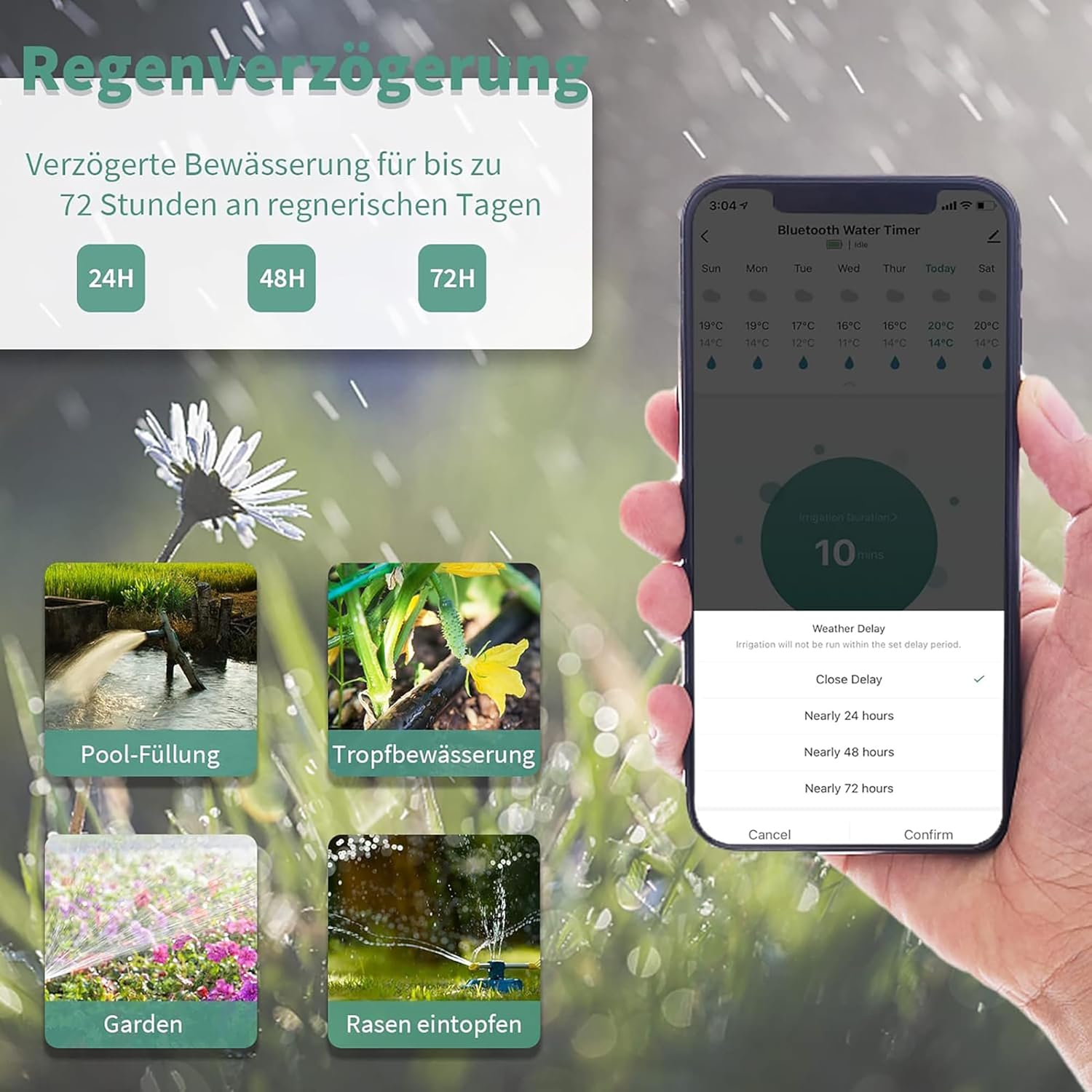
Image: The Diivoo app displaying the rain delay options, allowing users to pause watering for 24, 48, or 72 hours to conserve water during rainfall.

Image: A collage illustrating diverse applications of the Diivoo watering timer, including sprinkler systems, drip irrigation, pool filling, and general garden watering.
유지
- 배터리 교체: Replace batteries when the low battery indicator appears in the app or on the device (if applicable). Always use fresh batteries of the recommended type.
- 청소: 타이머 외부를 주기적으로 청소하십시오.amp 천. 연마성 세척제는 사용하지 마십시오.
- 필터 청소: The inlet connection has a filter to prevent debris from entering the timer. Periodically remove and clean this filter to ensure proper water flow.
- 겨울철 : Before freezing temperatures, disconnect the timer from the faucet and hose, remove batteries, and store it indoors in a dry, protected area to prevent damage from freezing water.
문제 해결
| 문제 | 가능한 원인 | 해결책 |
|---|---|---|
| 타이머가 켜지지/꺼지지 않음 | Low or dead batteries; Incorrect schedule; Faucet off; Water pressure too low. | Replace batteries; Check app schedule settings; Ensure faucet is fully open; Check water supply pressure. |
| 연결부에서 누수 | Loose connections; Worn washers; Damaged threads. | Tighten connections; Replace rubber washers; Inspect threads for damage. |
| 블루투스를 통해 앱에 연결할 수 없습니다 | Bluetooth off on phone; Timer out of range; Batteries low; App issue. | Enable Bluetooth; Move closer to timer (within 15m); Replace batteries; Restart app/phone. |
| 급수 일정이 실행되지 않음 | Rain delay active; Schedule disabled; Incorrect time/date setting. | Check and disable rain delay; Ensure schedule is enabled in app; Verify correct time/date in app. |
명세서
| 모델 번호 | WT-05 |
| 상표 | 디부 |
| 색상 | 녹색 |
| 치수(길이 x 너비 x 높이) | 14.7 x 6.65 x 11.85cm(5.79 x 2.62 x 4.67인치) |
| 무게 | 350그램(0.77파운드) |
| Watering Plans | 최대 20개 |
| 연결성 | 블루투스 |
| 블루투스 범위 | 최대 15미터(49.2피트) |
Image: Technical drawing showing the precise dimensions of the Diivoo Smart Watering Timer in both millimeters and inches.
보증 및 지원
Diivoo products are designed for reliability and performance. For warranty information, technical support, or any inquiries regarding your Diivoo Smart Watering Timer, please refer to the contact information provided on the product packaging or visit the official Diivoo web사이트. 보증 청구를 위해 구매 증빙 자료를 보관하세요.


