1. 서론
Welcome to the user manual for your MESWAO MES-B3 15.6-inch Android 13 Tablet. This document provides essential information for setting up, operating, maintaining, and troubleshooting your device. The MES-B3 tablet features a large 15.6-inch IPS HD display, an Octa-Core processor, 6GB RAM, 128GB internal storage (expandable), and a 12000mAh battery, designed for a versatile user experience.

Figure 1: MESWAO MES-B3 Tablet Overview
2. 안전 정보
Please read all safety instructions carefully before using your tablet to prevent injury or damage to the device. Keep this manual for future reference.
- 배터리 안전: Do not attempt to replace the battery yourself. Do not expose the tablet to extreme temperatures, direct sunlight, or fire. Do not puncture, drop, or disassemble the battery.
- 물과 습기: This tablet is not waterproof. Avoid exposing it to water, rain, or high humidity.
- 청소: Use a soft, dry cloth to clean the tablet. Do not use liquid cleaners or aerosols.
- 손질: 태블릿을 떨어뜨리거나 강한 충격을 가하지 마십시오.
- 청력 보호: When using headphones, set the volume to a moderate level to avoid hearing damage.
3. 패키지 내용
패키지에 모든 품목이 들어 있는지 확인하세요.
- MESWAO MES-B3 15.6-inch Android 13 Tablet
- 전원 어댑터
- USB-C 케이블
- 사용 설명서 (본 문서)
4. 디바이스 오버view
Familiarize yourself with the physical components of your MESWAO MES-B3 tablet.

Figure 2: Buttons and Connectors
- 전원 버튼: Press and hold to turn the tablet on or off. Press briefly to turn the screen on or off.
- 볼륨 버튼: 오디오 볼륨을 조절합니다.
- 전면 카메라: 영상 통화 및 셀카 촬영용 (5MP).
- Rear Camera with Flashlight: For taking photos and videos (13MP).
- C 형 포트 : 태블릿을 충전하고 컴퓨터에 연결합니다.
- TF 카드 슬롯 : Insert a MicroSD card to expand storage.
- 스테레오 스피커: 오디오 출력을 제공합니다.
5. 설정
5.1 태블릿 충전
Before first use, fully charge your tablet. Connect the USB-C cable to the tablet's Type-C port and the other end to the power adapter. Plug the adapter into a wall outlet. The battery indicator on the screen will show charging status.
5.2 전원 켜기/끄기
- 전원을 켜려면: Press and hold the Power Button until the MESWAO logo appears.
- 전원을 끄려면: Press and hold the Power Button until the power options appear, then select 'Power off'.
- 재시작하기 위해: 전원 옵션이 나타날 때까지 전원 버튼을 길게 누른 다음 '다시 시작'을 선택하세요.
5.3 초기 설정 마법사
태블릿을 처음 켜면 초기 설정 과정을 안내해 줍니다.
- 원하는 언어를 선택하세요.
- Wi-Fi 네트워크에 연결합니다.
- Google 계정으로 로그인하거나 새 계정을 만드세요.
- Review 이용약관에 동의하세요.
- 화면 잠금(PIN, 패턴, 비밀번호)을 설정합니다.
5.4 MicroSD 카드 삽입
To expand the tablet's storage, you can insert a MicroSD card (up to 256GB, as per some product information, though 1TB is also mentioned in images, please verify with product packaging for exact maximum). Locate the TF card slot on the side of the tablet. Gently insert the MicroSD card with the gold contacts facing down until it clicks into place.

Figure 3: Storage Expansion with MicroSD Card
6. 태블릿 작동
6.1 기본 탐색
The MESWAO MES-B3 runs on Android 13, offering an intuitive touch interface.
- 수도꼭지: 항목을 선택하거나 앱을 엽니다.
- 강타: 화면을 탐색하고, 목록을 스크롤하거나, 알림을 해제하세요.
- 핀치 투 줌: 화면의 내용을 확대하거나 축소하세요.
- 홈 화면: Access your apps and widgets. Swipe down from the top for notifications and quick settings.
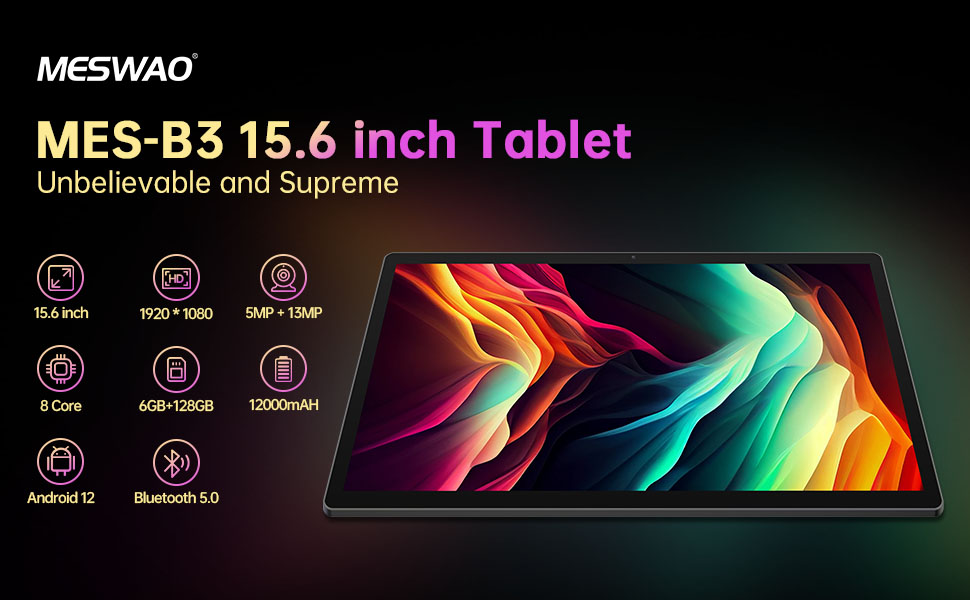
그림 4: Android 13 인터페이스
6.2 Wi-Fi 연결
- 이동하다 설정 > 네트워크 및 인터넷 > 인터넷.
- Wi-Fi를 켜세요.
- 목록에서 원하는 네트워크를 선택하고 메시지가 표시되면 비밀번호를 입력하세요.
6.3 블루투스 페어링
The tablet supports Bluetooth 5.0 for connecting wireless accessories.
- 이동하다 설정 > 연결된 장치 > 연결 환경 설정 > 블루투스.
- 블루투스를 켜세요.
- Bluetooth 장치가 페어링 모드인지 확인하세요.
- Select your device from the 'Available devices' list and follow on-screen prompts to pair.
6.4 앱 관리
- 앱 설치: Google Play 스토어 앱을 열고 원하는 앱을 검색한 후 '설치'를 탭합니다.
- 앱 제거: 홈 화면이나 앱 서랍에서 앱 아이콘을 길게 누른 다음 '제거'로 드래그하거나 '앱 정보'를 선택하고 '제거'를 선택하세요.
- 앱 관리: 이동하다 설정 > 앱 에게 view, force stop, or clear data for installed applications.
6.5 디스플레이 설정
사용자 정의 view경험:
- 이동하다 설정 > 표시하다.
- 조정하다 밝기 레벨.
- 세트 화면 시간 초과 (sleep duration).
- 변화 글꼴 크기 그리고 디스플레이 크기.
- 할 수 있게 하다 다크 테마 for reduced eye strain.
6.6 배터리 관리
The MES-B3 features a 12000mAh battery for extended use.

그림 5: 배터리 수명 연장
- 이동하다 설정 > 배터리 에게 view usage and optimize settings.
- 할 수 있게 하다 배터리 세이버 필요할 때 배터리 수명을 연장하는 모드입니다.
- 백그라운드에서 실행 중인 사용하지 않는 앱을 닫습니다.
- 화면 밝기를 낮추세요.
7. 유지관리
7.1 청소
- 부드럽고 보풀 없는 천으로 화면과 본체를 살살 닦아주세요.
- 완고한 얼룩의 경우 약간 damp천에 물을 묻히거나 전자제품용으로 특별히 고안된 화면 세정제를 묻힙니다.
- Avoid using abrasive materials, alcohol, or chemical solvents.
7.2 보관
- 정제는 직사광선과 극한의 온도를 피해 서늘하고 건조한 곳에 보관하세요.
- If storing for an extended period, ensure the battery is charged to about 50% to prolong its lifespan.
7.3 소프트웨어 업데이트
최적의 성능과 보안을 보장하려면 소프트웨어 업데이트를 정기적으로 확인하세요.
- 이동하다 설정 > 체계 > 시스템 업데이트.
- 태블릿이 사용 가능한 업데이트를 확인합니다. 화면의 지시에 따라 업데이트를 다운로드하고 설치하세요.
8. 문제 해결
일반적으로 발생할 수 있는 문제에 대한 해결책은 다음과 같습니다.
| 문제 | 해결책 |
|---|---|
| 태블릿이 켜지지 않습니다 | Ensure the tablet is charged. Connect it to the charger for at least 30 minutes, then try powering it on again. |
| Wi-Fi 연결 문제 | Restart your Wi-Fi router and the tablet. Go to Settings > Network & internet > Internet, forget the network, and reconnect. |
| 느린 성능 | Close unused apps. Clear cache for frequently used apps (Settings > Apps > [App Name] > Storage & cache > Clear cache). Restart the tablet. |
| 배터리가 빨리 소모됩니다 | Reduce screen brightness. Disable Wi-Fi/Bluetooth when not in use. Close background apps. Check battery usage in Settings > Battery to identify power-hungry apps. |
| 앱이 충돌하거나 정지됨 | Force stop the app (Settings > Apps > [App Name] > Force stop). Clear the app's cache. If the problem persists, uninstall and reinstall the app. |
9. 사양
Detailed technical specifications for the MESWAO MES-B3 tablet:

그림 6: 주요 기능 및 사양
| 특징 | 사양 |
|---|---|
| 상표 | 메스와오 |
| 모델 번호 | MES-B3 |
| 운영 체제 | 안드로이드 13 |
| 프로세서 | MediaTek Octa-Core (MTK6789) |
| 숫양 | 6GB (XNUMX기가바이트) |
| 내부 저장소 | 128GB (XNUMX기가바이트) |
| 확장 가능한 스토리지 | Up to 256 GB (via TF/MicroSD card) |
| 화면 크기 | 15.6 인치 |
| 화면 해상도 | 1920 x 1080 픽셀 (IPS HD) |
| 전면 카메라 | 5 MP |
| 후방 카메라 | 13 MP |
| 배터리 용량 | 12000mAh |
| 배터리 수명 | 약 10시간(사용량에 따라 다름) |
| 연결성 | Bluetooth 5.0, Wi-Fi (802.11ac, 2.4G/5G) |
| 포트 | USB Type-C, TF Card Slot |
| 색상 | 회색 |
| 치수(길이 x 너비 x 높이) | 36.85 x 22.25 x 0.93cm |
| 무게 | 1.1 킬로그램 |
10. 보증 및 지원
Your MESWAO MES-B3 tablet is covered by a standard manufacturer's warranty. Please refer to the warranty card included in your package for specific terms and conditions, including warranty duration and coverage details.
For technical support, troubleshooting assistance beyond this manual, or warranty claims, please contact MESWAO customer service through the retailer where you purchased the product or visit the official MESWAO web연락처 정보 사이트.


