소개
Thank you for choosing the TECNO TRUE 1 TWS Earbuds. This manual provides essential information on setting up, operating, maintaining, and troubleshooting your new earbuds. Please read it carefully before use to ensure optimal performance and longevity of your device.
The TECNO TRUE 1 TWS Earbuds are designed to deliver a superior audio experience with advanced features such as 42 dB Active Noise Cancellation, deep bass from 10mm drivers, and a long-lasting battery life of up to 45 hours with the charging case. They are also IPX5 rated for sweat, water, and dust resistance, making them suitable for various activities.
상자 안에 무엇이 들어있나요?
- TECNO TRUE 1 TWS Earbuds (Left and Right)
- 충전 케이스
- 사용자 설명서
- Ear Tip Pairs (various sizes)
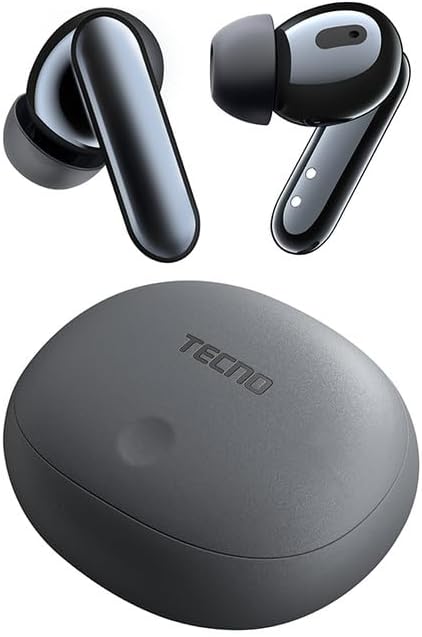
Image: The TECNO TRUE 1 TWS Earbuds and their charging case, showcasin세련된 디자인.
설정
1. 이어버드와 케이스 충전
처음 사용하기 전에 이어버드와 충전 케이스를 완전히 충전하십시오. 호환되는 USB 케이블을 사용하여 충전 케이스를 전원에 연결하십시오. 케이스의 표시등이 충전 상태를 보여줍니다.

Image: The TECNO TRUE 1 TWS charging case connected to a charging cable, illustrating the charging process.
Place the earbuds into the charging case. They will begin charging automatically. A full charge provides up to 6 hours of playback for the earbuds, and the case extends total playtime to 45 hours.
2. 기기와 페어링
- 이어버드가 충전 케이스에 들어 있고 케이스 뚜껑이 열려 있는지 확인하세요.
- 기기(스마트폰, 태블릿 등)에서 Bluetooth를 활성화하세요.
- 검색 new Bluetooth devices. The earbuds should appear as "TECNO TRUE 1" or similar.
- Select the earbuds to pair. A voice prompt will confirm successful connection.
The earbuds support pop-up connection for compatible devices, simplifying the pairing process.
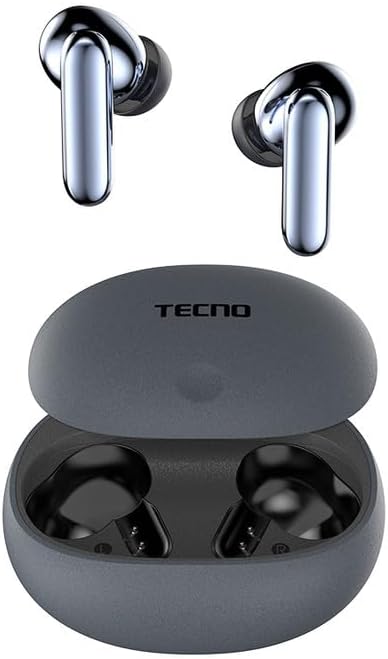
Image: The TECNO TRUE 1 TWS Earbuds resting inside their open charging case, ready for pairing.
3. 이어버드 착용
Gently insert the earbuds into your ear canals. Rotate them slightly to find a comfortable and secure fit. Choose the appropriate ear tip size from the included pairs for optimal sound quality and noise cancellation.
작동 지침
터치 컨트롤
The TECNO TRUE 1 TWS Earbuds feature intuitive touch controls on each earbud. The specific functions may vary slightly based on your device and app, but common controls include:
- 단일 탭 : 음악 재생/일시 정지, 전화 받기/끊기.
- 두 번 탭하기(왼쪽/오른쪽): Next/Previous track (may vary).
- 트리플 탭 : 음성 지원을 활성화합니다.
- 길게 누르기 : 능동 소음 제거(ANC)와 투명 모드 사이를 전환합니다.
능동 소음 제거(ANC) 및 투명 모드
The earbuds offer 42 dB Active Noise Cancellation to minimize ambient sounds, providing a more immersive listening experience. Transparency Mode allows you to hear your surroundings without removing the earbuds, which is useful for awareness in busy environments.
To switch between ANC and Transparency Mode, perform a long press on either earbud's touch sensor.
유지
청소
정기적인 청소는 음질과 위생을 유지하는 데 도움이 됩니다.
- 부드럽고 마른 보푸라기 없는 천으로 이어폰과 충전 케이스를 닦으세요.
- 이어팁의 경우 이어버드에서 분리하여 ad로 세척하세요.amp cloth and mild soap if necessary. Rinse thoroughly and dry completely before reattaching.
- 작고 부드러운 브러시나 면봉을 사용하여 이어버드 망에 묻은 귀지나 이물질을 살살 제거하십시오.
저장
사용하지 않을 때는 항상 충전 케이스에 넣어 보관하여 먼지와 손상으로부터 보호하고 충전 상태를 유지하세요.
방수 기능(IPX5)
The earbuds are IPX5 rated, meaning they are resistant to sweat and splashes of water. They are not designed for submersion in water. Avoid exposing them to heavy rain or showering with them. Ensure the earbuds and charging port are dry before charging to prevent damage.
문제 해결
| 문제 | 가능한 원인 | 해결책 |
|---|---|---|
| 이어폰이 페어링되지 않음 | 배터리 부족, 연결 범위 이탈, 페어링 모드 아님, 이전에 다른 기기와 페어링됨. | Charge earbuds and case. Ensure Bluetooth is on and within range. Place earbuds in case, close and reopen lid to re-enter pairing mode. Disconnect from other devices. |
| 소리가 나지 않거나 볼륨이 작음 | Volume too low, earbuds not properly seated, debris in earbud mesh, connection issue. | Increase volume on device and earbuds. Adjust earbud fit. Clean earbud mesh. Re-pair earbuds. |
| 충전 문제 | Cable or adapter fault, dirty charging contacts, case battery empty. | Try a different cable/adapter. Clean charging contacts on earbuds and case. Charge the charging case. |
| ANC가 효과적으로 작동하지 않음 | Improper fit, ear tips not sealed, very high-frequency noise. | Adjust earbud fit and try different ear tip sizes for a better seal. ANC is most effective on low-frequency sounds. |
명세서
| 특징 | 세부 사항 |
|---|---|
| 상표 | 테크노 |
| 모델명 | 10309821 |
| 색상 | 회색 |
| 재료 | 플라스틱 |
| 귀 위치 | 인이어 |
| 폼 팩터 | 인이어 |
| 소음 차단 | Active Noise Cancellation (42 dB) |
| 연결 기술 | 무선 전화 |
| 무선 통신 기술 | 블루투스 |
| 호환 장치 | Smartphones, Tablets, Laptops, Desktop Computers, Smart Speakers |
| 특정 제품 용도 | Travel, Sport |
| 방수 레벨 | IPX5(방수) |
| 주파수 범위 | 20~20,000Hz |
| 재생 시간 | 최대 6시간(이어버드), 최대 45시간(충전 케이스 사용 시) |
| 포함된 구성 요소 | Charging Case, User Manual, Ear Tip Pairs |
보증 및 지원
For warranty information and customer support, please refer to the official TECNO web사이트를 방문하거나 가까운 판매점에 문의하세요. 보증 청구를 위해 구매 증빙 자료를 보관하세요.
추가 지원이 필요하면 다음을 방문하세요. Amazon.com.be의 제품 페이지 or contact TECNO customer service directly.


