소개
This user manual provides essential information for the proper installation, operation, and maintenance of your CPVAN 3-in-1 Carbon Monoxide Detector. This device is designed to detect carbon monoxide (CO) gas, and also displays ambient temperature and humidity. It features a 10-year electrochemical sensor and is powered by a 4-year replaceable battery, certified to EU standard EN50291. Please read this manual thoroughly before using the product to ensure safe and effective operation.

그림 1: 앞쪽 view of the CPVAN 3-in-1 Carbon Monoxide Detector, showing the display and indicator light.
안전 정보
중요한: This device is a carbon monoxide (CO) detector, not a smoke detector or a carbon dioxide (CO2) detector. It is designed to detect carbon monoxide gas from sources such as faulty combustion appliances.
- Do not paint the detector. Paint may clog the openings and interfere with the sensor's ability to detect CO.
- Do not block the ventilation openings on the detector.
- 이 설명서에 따라 정기적으로 감지기를 테스트하세요.
- Do not install the detector in areas with high humidity, extreme temperatures, or excessive dust.
- In case of an alarm, evacuate the premises immediately and call emergency services. Do not re-enter until the area has been declared safe.
- The device cannot replace a smoke or gas alarm.
패키지 내용
포장을 개봉하신 후, 모든 구성품이 있는지, 손상되지 않았는지 확인해 주십시오.
- 1 × CPVAN Carbon Monoxide Detector (Model: COS-X3 plus)
- 2 × 1.5V AA Alkaline Batteries
- 벽면 플러그 2개
- 2 × 나사
- 1 × 사용자 설명서
제품 끝view
The CPVAN 3-in-1 Carbon Monoxide Detector integrates CO detection with temperature and humidity monitoring.

그림 2: The detector's display indicates Carbon Monoxide (CO) levels, relative humidity (%RH), and temperature (°C). When CO concentration is below 25 ppm, only temperature and humidity are displayed.
주요 구성 요소:
- LCD 디스플레이: Shows CO concentration (PPM), relative humidity (%RH), and temperature (°C).
- 테스트/리셋 버튼: Used to test the alarm function and reset the device.
- 표시등: Displays device status (Green for normal, Yellow for fault, Red for alarm).
- 알람 부저: 일산화탄소 경보가 울리면 큰 소리가 납니다.
- 배터리 칸: AA 배터리용 소켓이 뒷면에 있습니다.

그림 3: Visual representation of the indicator light states: Green for normal operation, Yellow for fault, and Red for CO alarm.
설정
1. 배터리 설치
The detector requires two 1.5V AA alkaline batteries (included).
- 탐지기 뒷면의 배터리함 덮개를 여세요.
- Remove the plastic insulating strip from the pre-installed batteries.
- AA 배터리 두 개를 올바른 극성(+ 및 -)에 맞춰 삽입합니다.
- Close the battery compartment cover securely. The device will automatically power on.

그림 4: Illustration of the battery compartment on the back of the detector, showing where to insert the two AA alkaline batteries.
2. 장착 및 배치
Proper placement is crucial for effective CO detection. Install the detector in locations where CO may be produced. The closer it is to a potential CO source, the sooner the alarm will activate.
- 추천 위치: Near combustion appliances (furnaces, water heaters, fireplaces), in living areas, and bedrooms.
- 피하다: Directly above heat sources, in direct sunlight, near windows or vents, in dusty or humid areas, or behind curtains/furniture that could obstruct the sensor.
- 설치 높이: For optimal detection, install the detector at a height between your waist and head level, or as per local regulations.
- 적합한 벽 위치를 선택하세요.
- Mark the positions for the two screws using the detector's mounting holes as a guide.
- Drill two holes and insert the wall plugs.
- Insert the screws, leaving a small gap from the wall.
- Align the detector's mounting slots with the screws and slide it down to secure it.
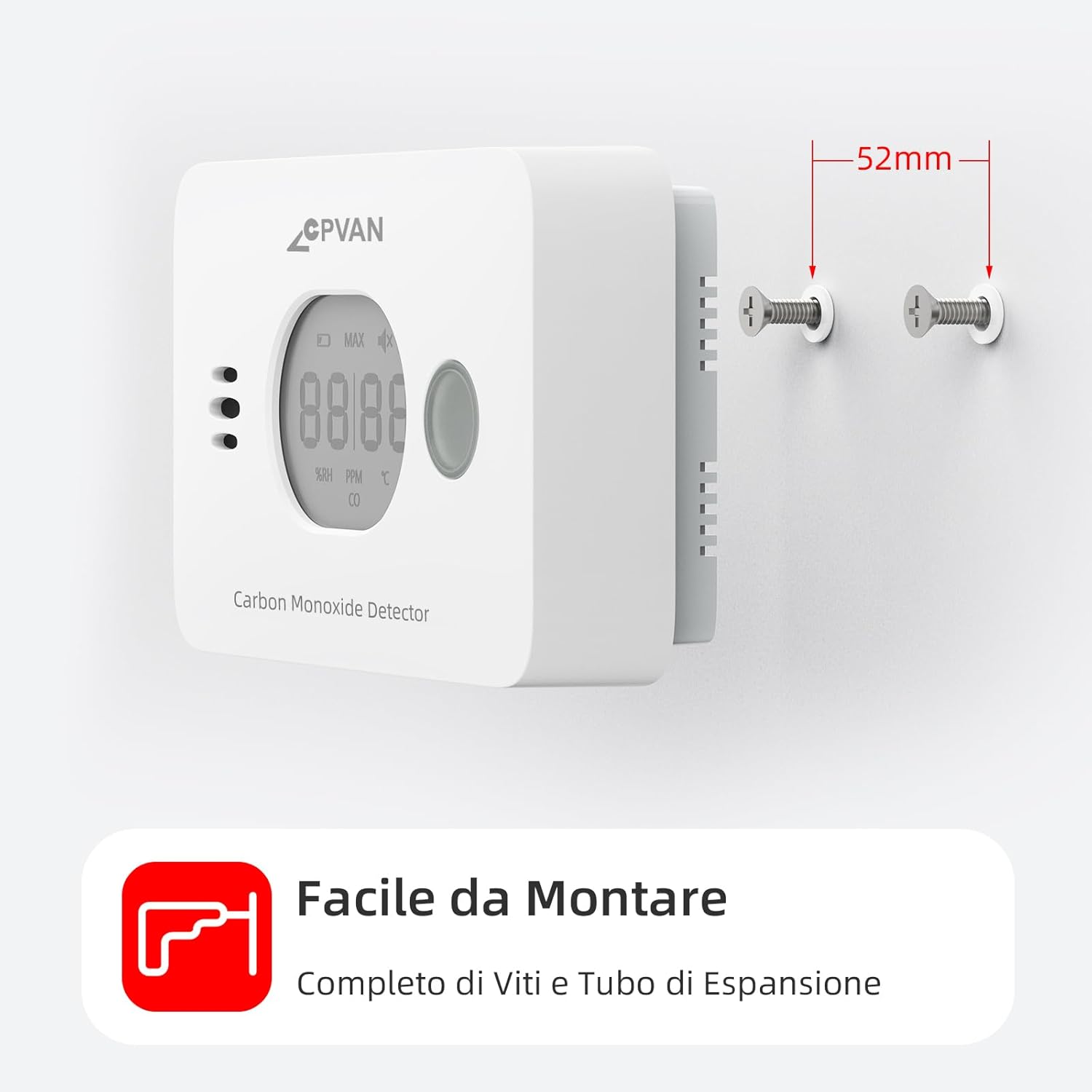
그림 5: The detector can be easily mounted on a wall using the provided screws and wall plugs.

그림 6: Example of optimal placement for CO detectors (red squares), heat alarms (green triangles), and smoke alarms (blue circles) within a typical home layout.
작업
1. 초기 전원 켜기
After battery installation, the device will perform a self-test. The display will show a brief sequence, and the green indicator light will flash. Once initialized, it will display temperature and humidity. The green light will flash approximately every 60 seconds in standby mode.
2. 디스플레이 정보
LCD 디스플레이는 실시간 정보를 제공합니다.
- 온도: 섭씨(°C)로 표시됩니다.
- 습기: Shown as relative humidity (%RH).
- CO 농도: Displayed in parts per million (PPM). If CO concentration is below 25 ppm, only temperature and humidity are shown. CO concentration is updated every 4 seconds.

그림 7: The real-time display shows current humidity and temperature. CO concentration is displayed when it exceeds 25 PPM, with different alarm cycles based on CO levels.
3. 알람 테스트
It is recommended to test the detector weekly to ensure proper function.
- Press and hold the Test/Reset button on the front of the detector.
- The alarm will sound loudly, and the red indicator light will flash. The display will show a high CO reading (e.g., "MAX 58 PPM CO").
- 버튼을 놓으면 테스트가 중지됩니다.
Alternatively, you can test by holding the detector near burning materials like paper or cigarettes for 5-10 seconds. Incomplete combustion typically produces carbon monoxide. If the detector functions correctly, it will display CO concentration and sound an audible alarm.

그림 8: When CO is detected above the alarm threshold, the red light flashes and the alarm sounds.
4. Alarm Conditions and Behavior
The detector is certified to EN-50291 standards. Alarm thresholds are as follows:
| CO Concentration (PPM) | 알람 시간 |
|---|---|
| 50ppm(XNUMXppm) | 60-90분 |
| 100ppm(XNUMXppm) | 10-40분 |
| 300ppm(XNUMXppm) | 0-3분 |
When an alarm occurs, the red indicator light will flash rapidly, and the buzzer will emit a loud, continuous alarm sound. The display will show the detected CO concentration.
What to do if the alarm sounds:
- 즉시 신선한 공기를 마실 수 있는 야외로 이동하거나 모든 문과 창문을 열어 해당 구역을 환기시키세요.
- 모든 사람이 확인되었는지 확인하기 위해 인원을 세어보세요.
- 경보가 꺼지고 해당 구역이 완전히 환기될 때까지 건물에 다시 들어가지 마십시오.
- 응급 서비스나 자격을 갖춘 기술자에게 연락하여 일산화탄소 발생 원인을 조사하도록 하십시오.
유지
1. 배터리 교체
The detector is designed with a 4-year replaceable battery life. When the batteries are low, the device will indicate this with a specific warning (e.g., a chirp or a low battery icon on the display). Replace both AA alkaline batteries promptly when this occurs. Refer to the "Battery Installation" section for replacement steps.
2. 청소
Clean the detector regularly to prevent dust buildup from affecting its performance.
- 부드러운 d를 사용하세요amp cloth to wipe the exterior of the detector.
- Do not use cleaning sprays, solvents, or abrasive cleaners.
- 감지기를 칠하지 마십시오.
3. 정기 테스트
Test the detector weekly using the Test/Reset button to ensure the alarm and sensor are functioning correctly.
문제 해결
| 문제 | 가능한 원인 | 해결책 |
|---|---|---|
| Detector not powering on after battery installation. | Batteries incorrectly inserted or dead. Plastic insulating strip not removed. | Ensure batteries are inserted with correct polarity. Remove the plastic insulating strip. Try new batteries. |
| 일산화탄소 발생 원인이 명확하지 않은데도 경보가 자주 울립니다. | False alarm due to strong fumes (e.g., cleaning products, paint). Detector placed too close to a combustion source. | Ventilate the area. Relocate the detector if it's too close to a potential source or in an area with frequent fumes. |
| Detector chirps or shows low battery indicator. | 배터리가 부족합니다. | AA 알칼리 건전지 두 개를 즉시 교체하십시오. |
| Green light not flashing every 60 seconds. | Device fault or low battery. | Check battery level. Perform a test. If issue persists, contact customer support. |
| Display shows only temperature and humidity, not CO. | CO concentration is below 25 ppm, which is normal. | This is normal operation. The CO reading will appear if the concentration exceeds 25 ppm. |
명세서
| 특징 | 세부 사항 |
|---|---|
| 모델 번호 | COS-X3 plus |
| 센서 유형 | 전기 화학 |
| CO 감지 범위 | 0 ~ 999 PPM |
| 온도 범위 | -9°C ~ 99°C(±1°C) |
| 습도 범위 | 1% ~ 99% RH (±3% RH) |
| 전원 | 1.5V AA 알칼리 배터리 2개 (포함) |
| 배터리 수명 | 최대 4년(교체 가능) |
| 센서 수명 | 10년 |
| 알람 볼륨 | 들리는 |
| 인증 | 영어: 50291 영어 XNUMX |
| 치수 | 11 x 6 x 3cm |
| 무게 | 200g |
| 재료 | ABS |
| 한국어: | 765142658068 |
보증 및 지원
For warranty information and customer support, please refer to the documentation provided with your purchase or contact CPVAN customer service directly.
Manufacturer: SafeBay
Contact information may be available on the product packaging or the official CPVAN web대지.
공식 제품 영상
No official product videos with "Seller" as creator type were found in the provided data.


