소개
The Astrum KT210 is a versatile wireless keyboard featuring a multi-mode connection, integrated touchpad, and RGB backlighting. It is designed for seamless use across multiple devices such as laptops, PCs, tablets, and smartphones, supporting both Bluetooth and 2.4GHz wireless connections. This manual provides detailed instructions for setting up, operating, and maintaining your keyboard.
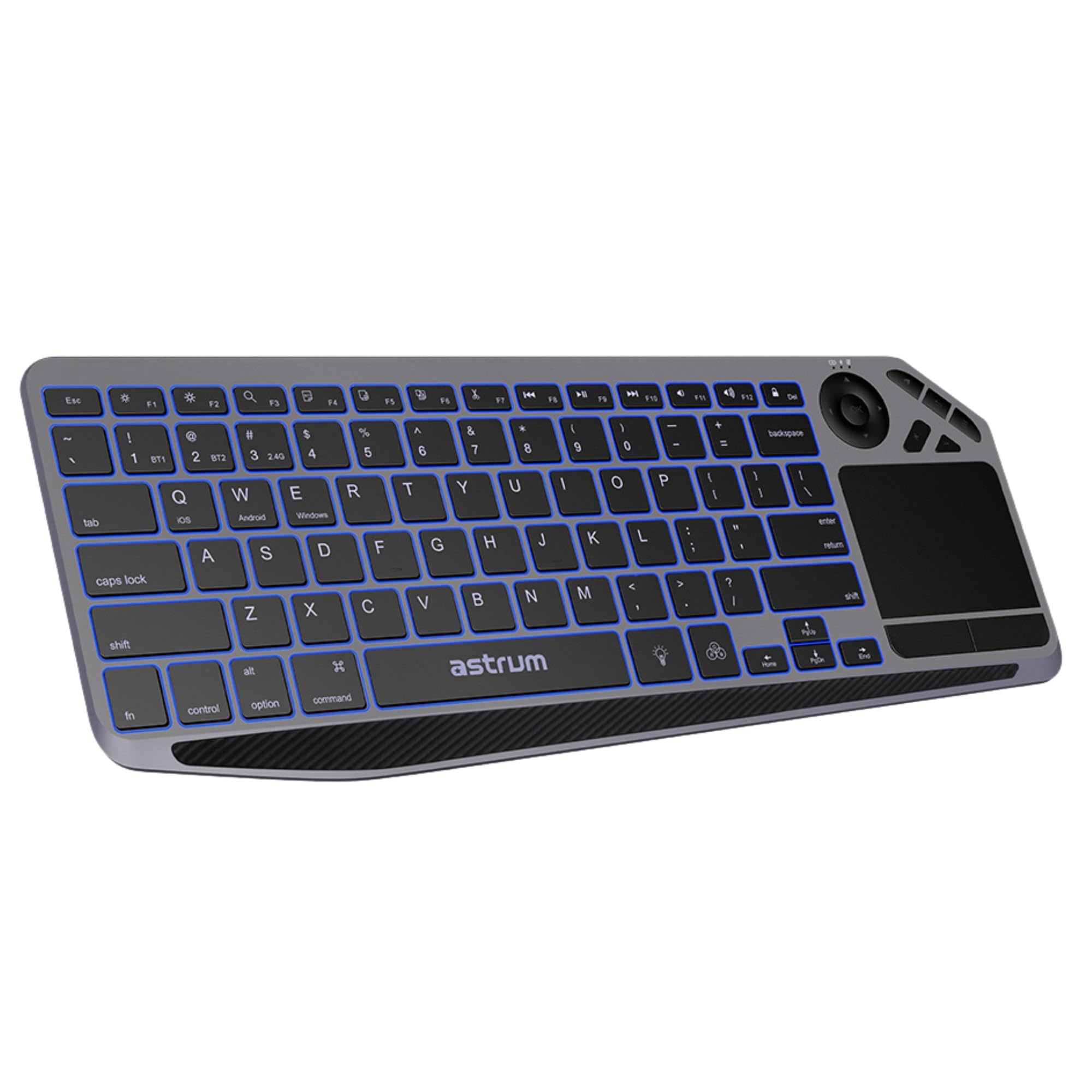
이미지: 상단 view of the Astrum KT210 Wireless Touch Multi-mode Keyboard, showcasing its full layout including the integrated touchpad and multimedia keys.
설치 지침
패키지 내용
- Astrum KT210 Wireless Touch Multi-mode Keyboard
- USB 충전 케이블
- 사용자 설명서
키보드 충전하기
Before first use, fully charge the keyboard. Connect the provided USB charging cable to the keyboard's charging port and to a USB power source (e.g., computer USB port, USB wall adapter). The charging indicator light will show the charging status and turn off when fully charged. A full charge provides up to 160 hours of working time.

Image: Close-up of the Astrum KT210 keyboard showing the USB charging port with a cable connected, indicating the charging process.
전원 켜기/끄기
Locate the power switch on the keyboard. Slide the switch to the "ON" position to power on the keyboard. Slide it to "OFF" when not in use to conserve battery life.

Image: Illustration showing the location of the On/Off switch on the Astrum KT210 keyboard, emphasizing battery saving.
Connecting to Devices (Multi-mode Pairing)
The keyboard supports connecting up to three devices via Bluetooth. Use the dedicated function keys to switch between paired devices.
- 블루투스 페어링 :
- 누르고 있으세요 FN + BT1 (또는 BT2, BT3)을 3~5초 동안 누르고 있으면 해당 표시등이 빠르게 깜박입니다. 이는 키보드가 페어링 모드에 있음을 나타냅니다.
- 사용하시는 기기(노트북, 태블릿, 스마트폰)에서 블루투스를 활성화하고 사용 가능한 기기를 검색하세요.
- Select "Astrum KT210" from the list of found devices.
- 화면에 나타나는 안내에 따라 페어링 과정을 완료하세요. 연결되면 표시등이 깜빡임을 멈춥니다.
- 장치 간 전환:
- Once paired, simply press FN + BT1, FN + BT2, 또는 FN + BT3 to switch between your connected devices. The indicator light will illuminate steadily for the active connection.
작동 지침
터치패드 기능
The integrated multipoint touchpad allows for precise navigation and gesture control. Refer to your operating system's settings for specific multi-touch gesture configurations.
- 단일 손가락 탭: 왼쪽 클릭.
- 두 손가락 탭: 마우스 오른쪽 버튼으로 클릭.
- 두 손가락 스크롤: 위/아래 또는 왼쪽/오른쪽으로 스크롤하세요.
- 확대/축소하려면 핀치하세요: Zoom in/out (if supported by application).

Image: The Astrum KT210 keyboard highlighting the multipoint touchpad and dedicated multimedia hotkeys for seamless control.
RGB 백라이트 제어
The keyboard features multi-color LED backlighting with adjustable brightness levels.
- 를 누르세요 전구 아이콘 키 (usually near the spacebar) to cycle through different backlight colors or turn the backlight on/off.
- 누르다 Fn + Light Brightness Up/Down keys (often F11/F12 or dedicated keys) to adjust the backlight brightness through 3 levels.

Image: The Astrum KT210 keyboard displaying its multi-color LED backlighting feature with different color options.
멀티미디어 단축키
The keyboard includes dedicated multimedia hotkeys for quick access to media controls. These are typically located in the function key row (F1-F12) and may require pressing the Fn 키를 동시에 누르세요.
- Fn + F1-F12: Control media playback, volume, and other system functions. Refer to the key legends for specific functions.
운영 체제 호환성
The Astrum KT210 keyboard is compatible with a wide range of operating systems:
- 윈도우
- 맥 OS
- 크롬 OS
- 리눅스
- 기계적 인조 인간
Some keys may have dual legends (e.g., Windows/Android, iOS/Mac). The keyboard automatically adapts to the connected operating system or can be manually switched using Fn + Q (iOS), Fn + W (Android), Fn + E (Windows).
유지
청소
키보드를 청소하려면 전원을 끄고 모든 케이블을 분리하세요. 부드럽고 보풀이 없는 천을 살짝 적셔 사용하세요.ampened with water or a mild cleaning solution. Avoid excessive moisture and harsh chemicals. Do not immerse the keyboard in liquid.
유출 방지
The keyboard features a spill-resistant design, offering protection against accidental liquid spills. In case of a spill, immediately power off the keyboard, disconnect it, and gently wipe away the liquid. Allow it to dry completely before powering on again. While spill-resistant, it is not waterproof; avoid intentional exposure to liquids.
문제 해결
| 문제 | 해결책 |
|---|---|
| 키보드 전원이 켜지지 않습니다. | Ensure the power switch is in the "ON" position. Charge the keyboard fully using the provided USB cable. |
| 블루투스로 페어링할 수 없습니다. |
|
| 키가 응답하지 않거나 올바르게 입력되지 않습니다. |
|
| 백라이트가 작동하지 않거나 너무 어둡습니다. |
|
| 터치패드가 작동하지 않습니다. |
|
명세서
| 상표 | ASTRUM |
| 모델 번호 | A51021-B (KT210) |
| 연결 기술 | Bluetooth (Multi-mode) |
| 호환 장치 | 노트북, PC, 태블릿, 스마트폰 |
| 운영 체제 호환성 | Windows, Mac OS, Chrome OS, Linux, Android |
| 특별 기능 | Multi-Device Pairing and Switching, RGB Backlight (3 levels), Integrated Multipoint Touchpad, Spill-Resistant Design, Rechargeable Battery |
| 배터리 유형 | 리튬 이온 |
| 배터리 수명 | Up to 160 hours (working time) |
| 색상 | 검은색 |
| 재료 | 플라스틱 |
보증 정보
The Astrum KT210 Wireless Touch Multi-mode Keyboard comes with a 12개월 제한 보증 from the manufacturer. This warranty covers defects in materials and workmanship under normal use. It does not cover damage caused by misuse, accident, unauthorized modification, or external causes such as spills (beyond spill resistance), drops, or extreme temperatures.
Please retain your proof of purchase for warranty claims. For detailed warranty terms and conditions, refer to the warranty card included with your product or visit the official Astrum web대지.
고객 지원
For technical assistance, troubleshooting, or warranty inquiries, please contact Astrum customer support through their official web사이트 또는 제품 포장에 제공된 연락처 정보를 참조하세요.
공식적인 Web대지: www.astrum.com
Please have your product model number (A51021-B) and proof of purchase ready when contacting support.


