1. 서론
Thank you for choosing the DAITSU ADD-20XB Dehumidifier. This manual provides essential information for the safe and efficient operation, installation, and maintenance of your appliance. Please read this manual thoroughly before using the dehumidifier and retain it for future reference.
The DAITSU ADD-20XB is designed to reduce excess humidity in your indoor environment, contributing to a more comfortable and healthier living space. It features a compact design, an integrated display, and various functions for optimal humidity control.
2. 안전 정보
부상이나 기기 손상을 방지하기 위해 다음 안전 수칙을 준수해 주십시오.
- 제습기는 항상 적절한 용량의 접지형 콘센트에 연결하십시오.tage.
- 손상된 전원 코드나 플러그를 사용하여 장치를 작동하지 마십시오.
- Keep the appliance away from water and other liquids. Do not immerse it.
- 기기 주변에 적절한 환기가 이루어지도록 하십시오. 공기 흡입구와 배출구를 막지 마십시오.
- 통풍구에 물건을 넣지 마세요.
- 청소, 유지 보수 또는 장기간 사용하지 않을 때는 제품의 전원을 뽑으십시오.
- 본 기기는 신체적, 감각적 또는 정신적 능력이 저하된 사람(어린이 포함)이나 경험 및 지식이 부족한 사람이 사용하도록 의도된 것이 아니며, 안전을 책임질 사람으로부터 기기 사용에 관한 감독이나 지시를 받은 경우에만 사용할 수 있습니다.
- 어린이가 이 제품을 가지고 놀지 않도록 감독해야 합니다.
3. 제품 오버view
The DAITSU ADD-20XB Dehumidifier is a white, compact, floor-standing unit designed for efficient moisture removal. It features an intuitive control panel on the top surface and a large capacity water tank.

그림 3.1: 전면 view of the DAITSU ADD-20XB Dehumidifier. This image shows the sleek white design and the DAITSU brand logo prominently displayed on the front panel.
3.1. 주요 구성품
- 제어판: Located on the top surface, with an integrated digital display and touch buttons.
- 공기 흡입구/배출구: 습한 공기를 흡입하고 건조한 공기를 배출하는 통풍구.
- 수조: 응축수를 모으는 탈착식 탱크.
- 연속 배수 포트: For connecting a hose for continuous water drainage.
- 핸들: Integrated handle for easy mobility.

그림 3.2: 클로즈업 view of the control panel. This image highlights the digital display and various control buttons for operating the dehumidifier.
3.2. 제어판 기능
- 전원 버튼: 장치를 켜거나 끕니다.
- 모드 버튼: Selects operating modes (e.g., Dehumidification, Laundry Mode).
- Humidity Adjustment Buttons: 원하는 습도 수준을 높이거나 낮춥니다.
- 타이머 버튼: 자동 켜짐 또는 자동 꺼짐 타이머를 설정합니다.
- 팬 속도 버튼: 팬 속도를 조정합니다.
- 통합 디스플레이: 현재 습도, 설정 습도, 타이머 설정 및 오류 코드를 표시합니다.
4. 설정
4.1. 풀기
- 제습기를 포장에서 조심스럽게 꺼내세요.
- 보호 필름이나 테이프를 포함한 모든 포장재를 제거하세요.
- 장치에 손상 흔적이 있는지 검사하세요. 손상된 경우, 작동하지 말고 고객 지원 센터에 문의하세요.
4.2. 배치
- Place the dehumidifier on a firm, level surface capable of supporting its weight.
- 원활한 공기 흐름을 위해 공기 흡입구와 배출구 주변에 최소 20cm(8인치)의 여유 공간을 확보하십시오.
- 제품을 열원 근처, 직사광선이 비치는 곳 또는 먼지가 많은 곳에 두지 마십시오.
- 최적의 성능을 위해 제습기가 작동하는 방의 모든 문과 창문을 닫으세요.
4.3. 전원 연결
전원 코드를 적절한 접지형 콘센트에 꽂으십시오. 볼륨이 정상인지 확인하십시오.tage는 해당 장치의 사양과 일치합니다.
5. 사용 설명서
5.1. 기본 동작
- 를 누르세요 전원 버튼 to turn on the dehumidifier. The display will show the current room humidity.
- 사용하세요 Humidity Adjustment Buttons (Up/Down arrows) to set your desired humidity level. The recommended range is typically between 40% and 60% relative humidity.
- The unit will automatically start dehumidifying until the set humidity level is reached, then it will cycle on and off to maintain it.
5.2. 모드 선택
를 누르세요 모드 버튼 to cycle through available operating modes:
- 제습 모드: Standard operation to reduce room humidity.
- Laundry Mode (Dry Clothes): Designed to quickly dry clothes by continuously running the dehumidifier at a high fan speed.
5.3. 타이머 기능
를 누르세요 타이머 버튼 to set an auto-on or auto-off time. Use the humidity adjustment buttons to set the desired hours (1-24). The timer indicator will illuminate when active.
5.4. 팬 속도 조절
를 누르세요 팬 속도 버튼 to select between different fan speeds (e.g., Low, High). Higher fan speed results in faster dehumidification but may produce more noise.
5.5. Water Tank and Continuous Drainage
- 수조: When the water tank is full, the unit will automatically shut off, and a 가득 참 탱크 경고 will activate. Carefully remove the tank, empty the collected water, and reinsert it securely.
- 연속 배수: For extended operation without emptying the tank, connect a suitable drainage hose (not included) to the continuous drainage port at the back of the unit. Ensure the hose is sloped downwards to allow gravity drainage into a floor drain or larger container.
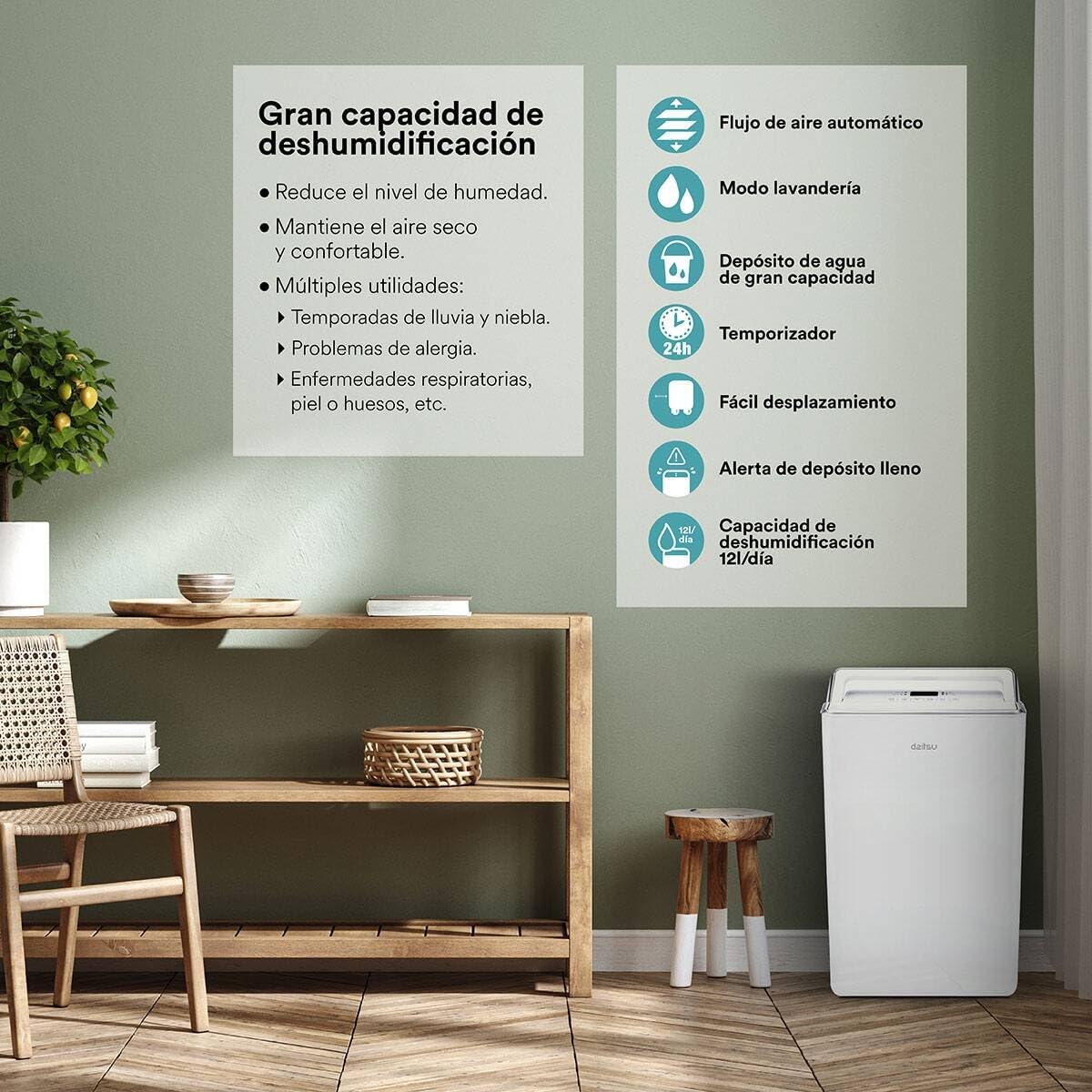
그림 5.1: 이상view of key features including high dehumidification capacity (20L/day), automatic airflow, laundry mode, large capacity water tank, timer, easy mobility, and full tank alert.
6. 유지관리
정기적인 유지관리를 통해 최적의 성능을 보장하고 제습기의 수명을 연장할 수 있습니다.
6.1. 공기 필터 청소
공기 필터는 사용량과 공기 질에 따라 2주에 한 번 또는 그 이상 자주 청소해야 합니다.
- 제습기를 끄고 플러그를 뽑으세요.
- 공기 필터를 찾아 제거하십시오(일반적으로 기기 뒷면이나 측면에 있습니다).
- 필터를 따뜻한 비눗물로 씻으세요. 깨끗이 헹군 후 완전히 자연 건조시킨 후 다시 장착하세요.
- Do not use a dishwasher or expose the filter to direct sunlight for drying.
6.2. 물탱크 청소
곰팡이와 녹이 생기는 것을 예방하려면 물탱크를 정기적으로 청소하세요.
- 장치에서 물탱크를 제거하세요.
- 탱크를 순한 세제와 따뜻한 물로 씻으세요.
- 제습기에 다시 넣기 전에 깨끗이 헹구고 말리세요.
6.3. 외부 청소
부드러운 천으로 기기 외부를 닦아주세요.amp 천을 사용하십시오. 독한 화학 약품, 연마성 세척제 또는 용제를 사용하지 마십시오.
6.4. 보관
장기간 장치를 보관하는 경우:
- 물 탱크를 비우고 청소하십시오.
- 공기 필터를 청소하세요.
- 전원코드를 깔끔하게 감아주세요.
- 본 제품을 직사광선과 극한의 온도를 피해 서늘하고 건조한 곳에 세워서 보관하세요.
7. 문제 해결
고객 지원팀에 문의하기 전에 일반적인 문제에 대한 다음 문제 해결 가이드를 참조하세요.
| 문제 | 가능한 원인 | 해결책 |
|---|---|---|
| 장치가 켜지지 않습니다 | 전원 공급이 없습니다 전원 코드가 제대로 연결되지 않았습니다. | Check power outlet and plug connection Ensure the outlet is functional |
| 물이 수집되지 않았습니다 | Room humidity is too low 공기 필터가 막힘 온도가 너무 낮습니다 물탱크가 제대로 설치되지 않았습니다. | Increase desired humidity setting 에어 필터를 청소하세요 Operate in a warmer environment (above 5°C) 물탱크가 올바르게 설치되었는지 확인하십시오. |
| 장치가 시끄럽다 | 수평면에 장치가 없습니다 공기 필터가 막힘 내부 구성 요소 진동 | 평평하고 안정된 표면에 놓으십시오. 에어 필터를 청소하세요 This may be normal during operation; if excessive, contact support |
| Water tank full indicator on, but tank is not full | 플로트 스위치 오작동 탱크가 제대로 장착되지 않았습니다 | 물탱크를 분리했다가 다시 단단히 끼워 넣으세요. 문제가 지속되면 고객 지원팀에 문의하십시오. |
| Automatic defrost function active | Coils are freezing due to low temperature | This is normal operation. The unit will pause dehumidification and run the fan to melt frost. Dehumidification will resume automatically. |
8. 사양
| 특징 | 사양 |
|---|---|
| 모델 번호 | ADD-20XB (3NDA0044) |
| 상표 | 다이츠 |
| 제습 능력 | 20리터/일 |
| 색상 | 하얀색 |
| 재료 | 합금강 |
| 무게 | 13 킬로그램 |
| 특별 기능 | Adjustable Humidity Control, Automatic Defrost, Water Level Indicator, Continuous Drainage |
| 에너지 클래스 | A++에서 E로 |
9. 보증 및 지원
보증 관련 정보는 구매 시 제공된 문서를 참조하십시오. 보증 청구를 위해서는 구매 증빙 서류를 보관해 주십시오.
If you encounter issues not covered in this manual or require further assistance, please contact DAITSU customer support. Contact details can typically be found on the manufacturer's web사이트 또는 구매 영수증.