1. 서론
The DonosHome DH300 is an innovative, multi-function OBD2 code reader designed to be one of the most accurate and economical vehicle diagnostic tools available. It helps users easily determine the cause of the Check Engine Light (MIL) and provides comprehensive information on vehicle health and performance. This manual provides detailed instructions for the proper use and maintenance of your DH300 scanner.

Figure 1.1: DonosHome DH300 OBD2 Scanner and its retail packaging, highlighting key features.
2. 안전수칙
Please read this user manual carefully and follow the warnings and precautions below before use, to avoid the possibility of personal injury or damage to the vehicle and/or the device:
- Do not smoke, light matches, or cause sparks near the vehicle during operation.
- Do not come into contact with hot engine parts to avoid severe burns, especially when the engine is running.
- Do not use this tool while driving.
- Always wear appropriate eye protection when working on vehicles.
- Ensure the vehicle is in a well-ventilated area when running the engine.
3. 패키지 내용
포장을 개봉하시면 아래 나열된 모든 품목이 포함되어 있고 양호한 상태인지 확인해 주십시오.
- 1 x DonosHome DH300 OBD2 Scanner
- 1 x 사용자 매뉴얼(이 문서)
- 1 x 패키지 상자

Figure 3.1: The package includes the OBD2 scanner, user manual, and package box.
4. 제품 특징
The DonosHome DH300 OBD2 scanner is equipped with a variety of features designed for comprehensive vehicle diagnostics:
- Check Engine Light (MIL) Management: Easily determine the cause, turn off the light, clear codes, and reset monitors.
- DTC 정의: Displays Diagnostic Trouble Code definitions directly on the screen.
- 프레임 데이터 고정: View a snapshot of vehicle conditions when a fault code was set.
- I/M 준비 상태: Check monitor and I/M readiness status for emissions testing.
- Pending Codes: Identify codes that have not yet triggered the MIL.
- Real-time PCM Data Stream: Read live data from the Powertrain Control Module.
- O2 Sensor Test Data: Display real-time O2 sensor test results.
- Data Graphing: Visualize live data for easier analysis.
- 데이터 재생: Read, store, and playback real-time sensor data, DTC data, and freeze frame data.
- Test Modules: Perform present test modules.
- 차량 정보 검색: Retrieve VIN (Vehicle Identification Number), CIN (Calibration Identification Number), and CVN (Calibration Verification Number).
- 프로토콜 지원 : Supports CAN (Controller Area Network) and all other current OBD2 protocols.
- 내장 DTC 라이브러리: Integrated OBD2 DTC lookup library for quick reference.
- Voltmeter Function: 테스트 배터리 볼륨tag전기 및 충전 시스템.
- Waveform Graphing: Starting waveform graph and real-time waveform graph.
- 다국어 지원: 10 built-in languages (English, German, Spanish, French, Italian, Dutch, Finnish, Polish, Portuguese, Russian).
- 인체공학적 디자인: Color screen, plug-and-play operation, powered directly by the vehicle.
- 오류 표시기: Red, yellow, and green LED indicators for quick fault status.

Figure 4.1: Key diagnostic functions of the DonosHome DH300.

Figure 4.2: Innovative design with LED indicators and multilingual support.

Figure 4.3: Multilingual interface and broad vehicle compatibility.
5. 설정 및 연결
The DH300 scanner is designed for simple plug-and-play operation. Follow these steps to connect the device to your vehicle:
- OBD2 포트를 찾으세요: The OBD2 port is typically located under the dashboard on the driver's side, often near the steering column. Refer to your vehicle's owner's manual if you cannot find it.
- Connect the OBD2 Plug: Firmly insert the DH300's OBD2 connector into the vehicle's OBD2 port. The device will power on automatically.
- 엔진을 시동하세요: Turn the vehicle's ignition to the "ON" position or start the engine. The scanner will establish communication with the vehicle's ECU.
- 진단 시작: Once connected and powered, the scanner is ready for use.
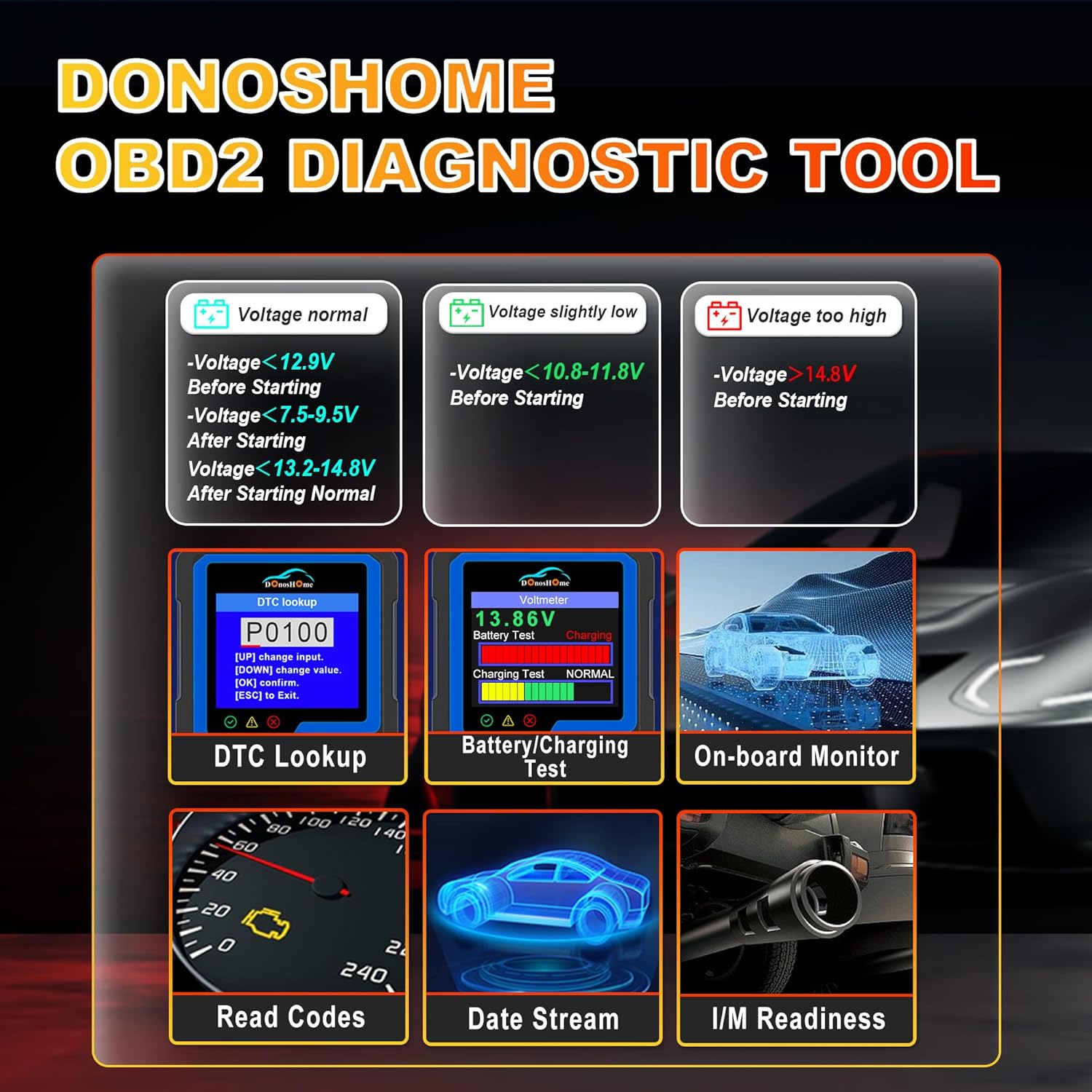
Figure 5.1: Simple plug-and-play connection process.
6. 사용 설명서
The DH300 features a user-friendly interface with a color screen and five buttons: Up, Down, OK, ESC, and I/M. Navigate through menus using the Up/Down buttons, confirm selections with OK, and go back with ESC. The I/M button provides quick access to readiness status.
6.1. Reading and Clearing Trouble Codes (DTCs)
To read and clear Diagnostic Trouble Codes:
- From the main menu, select "Diagnose" and press OK.
- Navigate to "Read Codes" and press OK. The scanner will display any stored, pending, or permanent codes.
- To clear codes, select "Erase Codes" from the diagnostic menu and press OK. Confirm the action when prompted. This will turn off the Check Engine Light.

Figure 6.1: DTC Lookup function and examples of error codes.
6.2. I/M Readiness Quick Start
The I/M Readiness function allows you to quickly check the status of emission-related monitors, which is crucial for smog tests.
- 전용 버튼을 누르세요 나는 스캐너의 버튼을 눌러 빠르게 확인하세요.
- Alternatively, navigate to "I/M Readiness" from the main menu.
- The screen will display the status of various monitors (e.g., MIL, MIS, FUE, CCM, CAT, HCAT, O2S, EVAP, AIR, HRT, EGR) indicating whether they are "OK" (completed), "X" (not completed), or "N/A" (not applicable).

Figure 6.2: I/M Readiness Quick Start screen.
6.3. Voltmeter and Battery Test
The DH300 includes a voltmeter function to test your vehicle's battery and charging system.
- From the main menu, select "Voltmeter" and press OK.
- The screen will display the current battery voltage and charging status (e.g., Normal, Charging).
- Interpret the results based on the provided guidelines:
- 권tage normal: >12.9V Before Starting, >13.2-14.8V After Starting.
- 권tage slightly low: <12.9V Before Starting, <13.2V After Starting.
- 권tage가 너무 낮습니다: <10.8-11.8V Before Starting.
- 권tage 너무 높음: >14.8V After Starting.

Figure 6.3: Voltmeter and Battery Test interface.
6.4. 라이브 데이터 스트림
View real-time sensor data from your vehicle's engine. This can help diagnose intermittent problems or verify repairs.
- From the main menu, select "Diagnose" and then "Live Data".
- The scanner will display various parameters such as engine RPM, vehicle speed, coolant temperature, O2 sensor readings, etc.
- Use the Up/Down buttons to scroll through the data. Some parameters can be graphed for better visualization.
6.5. 기타 진단 기능
The DH300 offers additional diagnostic capabilities:
- O2 센서 테스트 : Access results of the oxygen sensor monitor tests.
- EVAP 시스템 테스트: 증발가스 배출 제어 시스템 테스트를 시작하십시오.
- 온보드 모니터 테스트: View results of on-board diagnostic monitoring tests for specific components/systems.
- Retrieve VIN: Get vehicle information including VIN, CIN, and CVN.
- Review 역사: Access previously stored diagnostic data.
7. 유지관리
To ensure the longevity and optimal performance of your DonosHome DH300 scanner:
- 청소: 스캐너 외부를 닦을 때는 부드럽고 마른 천을 사용하십시오. 연마성 세척제나 용제를 사용하지 마십시오.
- 저장: 기기를 깨끗하고 건조한 환경에 보관하고, 극한 온도와 직사광선을 피하십시오.
- 케이블 관리: Avoid bending or crimping the OBD2 cable excessively. Always grasp the connector, not the cable, when plugging or unplugging.
- 소프트웨어 업데이트: 제조사 확인해보세요 website periodically for any available software updates to ensure compatibility with newer vehicles and improved functionality.
8. 문제 해결
If you encounter issues while using your DH300 scanner, refer to the following common problems and solutions:
| 문제 | 가능한 원인 | 해결책 |
|---|---|---|
| 스캐너의 전원이 켜지지 않습니다. |
|
|
| "링크 오류" 또는 "통신 오류" 메시지. |
|
|
| 코드를 지울 수 없습니다. |
|
|
9. 사양
| 기인하다 | 세부 사항 |
|---|---|
| 상표 | 도노스홈 |
| 모델 | DH-300 |
| 품목 무게 | 191g |
| 제품 크기(L x W x H) | 8 x 5 x 15cm |
| 전원 | Corded Electric (Vehicle OBD2 port) |
| 화면 크기 | 3.2 인치 |
| 디스플레이 해상도 | 320x240 |
| 지원되는 프로토콜 | CAN and all other current OBD2 protocols |
| 지원 언어 | English, German, Spanish, French, Italian, Dutch, Finnish, Polish, Portuguese, Russian |
| 호환성 | American vehicles after 1996, European vehicles after 2003, Asian vehicles after 2008 |
10. 보증 및 지원
DonosHome provides excellent after-sales service, including a 2년 보증 and professional technical support for the DH300 OBD2 Auto Diagnostic Scanner.
For technical assistance, warranty claims, or any other inquiries, please contact DonosHome customer service. Refer to the contact information provided with your purchase or on the official DonosHome web대지.


