1. 서론
This manual provides comprehensive instructions for the AULCMEET Replacement Remote Control, model CXW-LED-LP24-RM. This remote is designed as a direct replacement for original remote controls of various United, HKC, and I-JOY television models. It requires no programming and is ready for use upon battery installation.
2. 설정: 배터리 설치
The remote control operates on two AAA batteries (not included). Follow these steps to install the batteries:
- 리모콘 뒷면에 있는 배터리함 덮개를 찾으세요.
- 탭을 누르고 덮개를 아래로 밀어 수납 공간을 엽니다.
- 새 AAA 배터리 2개를 넣고 양극(+)과 음극(-) 단자가 배터리 보관함 내부 표시와 올바르게 맞춰졌는지 확인합니다.
- 배터리 덮개를 제자리에 밀어 넣어 딸깍 소리가 날 때까지 밀어 넣습니다.

그림 2.1: 뒤쪽 view of the remote control with the battery compartment. The compartment is located at the bottom of the remote's back, designed for easy access to insert or replace batteries.
3. 사용 설명서
This replacement remote control is designed for immediate use without any programming. Simply point the remote at your television and press the desired button.
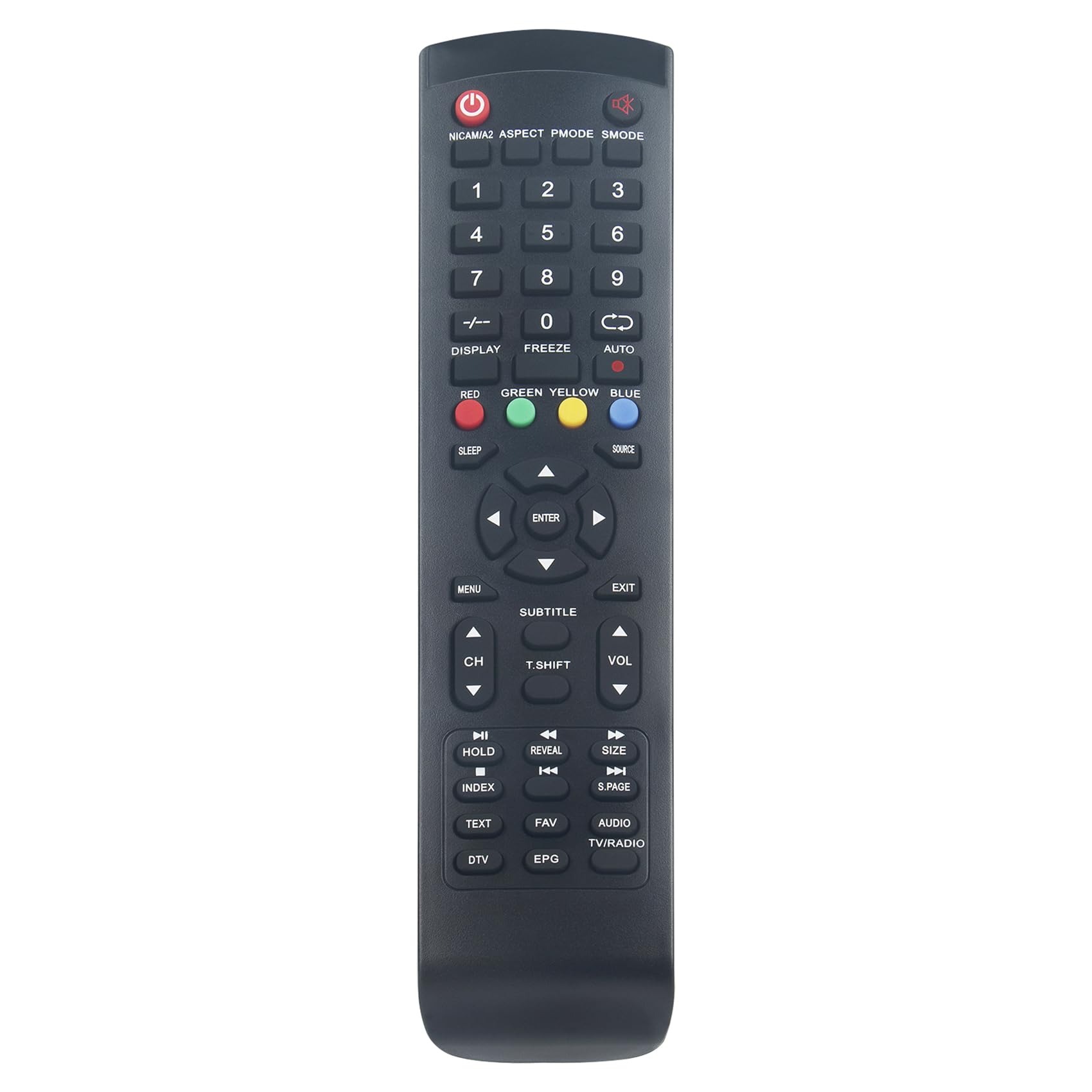
그림 3.1: 앞쪽 view of the AULCMEET replacement remote control. This image displays the full button layout, including power, number keys, navigation, volume, channel, and special function buttons.
주요 기능:
- 전원 버튼 (ⓘ): TV를 켜거나 끕니다.
- 숫자 키(0-9): 채널을 직접 선택하세요.
- CH+/CH-: 채널을 위아래로 변경합니다.
- 볼륨+/볼-: 볼륨을 늘리거나 줄입니다.
- 무음: TV 오디오를 음소거합니다.
- 메뉴: TV의 메인 메뉴에 접속합니다.
- Navigation (Up/Down/Left/Right) & Enter: 메뉴를 탐색하고 선택 사항을 확인합니다.
- 출처/입력: 입력 소스(HDMI, AV 등)를 선택합니다.
- 출구: 현재 메뉴 또는 기능을 종료합니다.
- 부제: 자막을 켜거나 끕니다.
- 텍스트: Accesses teletext functions.
- EPG(전자 프로그램 가이드): 프로그램 가이드를 표시합니다.
- FAV (Favorites): 즐겨찾는 채널 목록에 접속합니다.
- DTV/TV/RADIO: Switches between Digital TV, Analog TV, or Radio modes.
- 색상 버튼(빨간색, 녹색, 노란색, 파란색): TV 화면에 표시된 대로 메뉴 또는 대화형 서비스 내의 특정 기능에 사용됩니다.
4. Compatible Television Models
This AULCMEET replacement remote control is compatible with a wide range of United, HKC, and I-JOY television models. A partial list of compatible models includes:
- LED-LP24
- LEDLP24
- LTW26X96 (V. 2)
- LED32HK62
- LTW32X99
- HT32AT2
- HT19AT2
- HT24AT2
- EH40D4K
- HT4020E32
- HT40AT2
- LED32V1FHD
- EH22F4
- EH24H4
- EH24H4FHD
- 40K7A-A2EU
- 32C1NHD-T2
If your original remote control matches the appearance of this replacement remote, it is likely compatible even if your specific model is not listed above.
5. 유지관리
- 청소: 리모컨은 부드럽고 마른 천으로 닦으세요. 액체 세제나 연마제는 사용하지 마세요.
- 배터리 교체: 리모컨의 반응이 느리거나 작동이 멈추면 배터리를 교체하세요. 항상 두 개의 배터리를 같은 종류(AAA)의 새 배터리로 동시에 교체하세요.
- 저장: 리모컨을 장기간 사용하지 않을 경우, 누액 및 손상을 방지하기 위해 배터리를 제거하십시오.
- 손상을 방지하세요: 리모컨을 떨어뜨리거나, 극한 온도에 노출시키거나, 물에 담그지 마십시오.
6. 문제 해결
| 문제 | 가능한 원인 | 해결책 |
|---|---|---|
| 리모컨이 작동하지 않습니다. |
|
|
| 일부 버튼이 작동하지 않습니다. |
|
|
7. 사양
- 상표: 아울크밋
- 모델 이름: CXW-LED-LP24-RM
- 색상: 검은색
- 연결 기술 : 적외선
- 특징: 인체공학적 디자인
- 호환 장치: United, HKC, I-JOY TVs (e.g., LED-LP24, LEDLP24, LTW26X96 (V. 2), LED32HK62, LTW32X99, HT32AT2, HT19AT2, HT24AT2, EH40D4K, HT4020E32, HT40AT2, LED32V1FHD, EH22F4, EH24H4, 40K7A-A2EU, 32C1NHD-T2)
- 최대 범위: 10 미터
- 컨트롤러 유형 : 적외선 제어
8. 보증 및 지원
As a replacement remote control, specific warranty details may vary. Please refer to your purchase documentation or contact the seller directly for information regarding warranty coverage and technical support. Ensure you retain your proof of purchase for any warranty claims.


