소개
This manual provides instructions for the AVATTO GW16-W Zigbee and Bluetooth Gateway. It covers setup, operation, maintenance, and troubleshooting to ensure optimal performance and safe use of your device. The GW16-W acts as a central hub, enabling communication between various smart home devices using both Zigbee 3.0 and Bluetooth protocols.
안전 정보
- 사용하기 전에 모든 지침을 주의 깊게 읽으세요.
- 장치를 극한의 온도, 습도 또는 직사광선에 노출시키지 마십시오.
- Use only the specified power adapter (5V DC/1A).
- 어린이의 손이 닿지 않는 곳에 보관하세요.
- 장치를 직접 분해하거나 수리하려고 하지 마십시오.
- 과열을 방지하려면 장치 주변을 적절하게 환기시키십시오.
패키지 내용
패키지에 모든 품목이 들어 있는지 확인하세요.
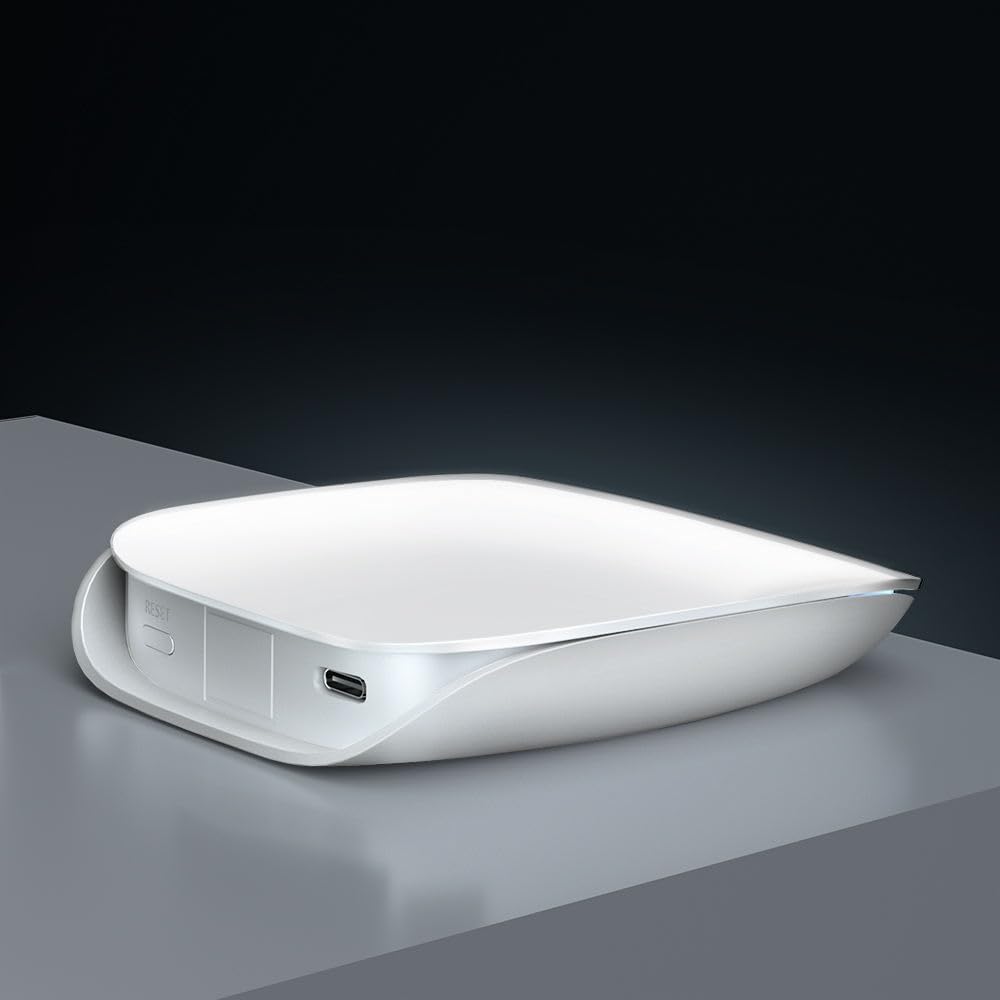
- Smart Gateway (GW16-W) x 1
- USB 데이터 케이블 x 1
- User Manual x 1 (often a QR code or link to digital version)
제품 끝view
The AVATTO GW16-W is a dual-protocol gateway that combines Zigbee and Bluetooth connectivity, allowing it to manage a wide range of smart home devices efficiently.
장치 구성 요소
- 상태 표시기: Displays the current operational status of the gateway.
- 리셋 스위치: 장치를 공장 설정으로 재설정하는 데 사용됩니다.
- C 형 포트 : For power input (5V DC/1A).
명세서
| 특징 | 세부 사항 |
|---|---|
| 제품 이름 | ZigBee/Bluetooth 무선 게이트웨이 |
| 모델 번호 | GW16-W |
| 치수 | 85mm * 100mm * 23mm |
| 전원 입력 | 5V 직류/1A |
| 무선 기술 | Zigbee 3.0/Bluetooth |
| 작업 온도 | -20도 ~ 45도 |
| 보관 온도 | 5℃ ~ 30℃ |
| 작업 습도 | 10% ~ 90% RH(비응축) |
| 보관 습도 | 30% ~ 70% 상대습도 |
설정
1. 전원 켜기
Connect the provided USB data cable to the Type-C port on the gateway and plug the other end into a 5V DC/1A power adapter (not included). The status indicator light will illuminate, indicating the device is powered on.
2. App Installation and Network Connection
- 다운로드 투야 스마트 or 스마트 라이프 app from your mobile device's app store (available on iOS and Android).
- 앱 내에서 계정에 등록하거나 로그인하세요.
- Follow the in-app instructions to add the GW16-W gateway. This typically involves selecting "Gateway" or "Hub" from the device list and following the pairing prompts. Ensure your phone is connected to a 2.4GHz Wi-Fi network during setup, as the gateway does not support 5GHz Wi-Fi.
3. Adding Sub-Devices (Zigbee/Bluetooth Devices)
Once the gateway is successfully connected to the app, you can add compatible Zigbee and Bluetooth sub-devices to expand your smart home system.

- In the Tuya Smart/Smart Life app, navigate to the gateway's control interface and select "Add sub-device" or a similar option.
- Put your Zigbee or Bluetooth device into pairing mode (refer to the sub-device's individual manual for specific instructions).
- The gateway will discover and add the device. Once added, you can rename it and assign it to a room within the app.
작동 지침
앱을 통한 원격 제어
After adding sub-devices, you can control them remotely through the Tuya Smart or Smart Life app from anywhere with an internet connection.

The app allows you to monitor device status, set schedules, create automation routines, and manage all connected smart devices from a single interface.
음성 제어 통합
The AVATTO GW16-W gateway is compatible with popular voice assistants like Amazon Alexa and Google Assistant, providing hands-free control of your smart devices.

- To enable voice control, link your Tuya Smart/Smart Life account to your Alexa or Google Home app.
- Once linked, you can use voice commands such as "Alexa, turn on the light" or "Hey Google, set the thermostat to 22 degrees" to control your connected devices.
유지
- 부드럽고 마른 천으로 닦아 장치를 깨끗하게 유지하십시오.
- Avoid using harsh chemicals or abrasive cleaners, which can damage the device's surface.
- 과열을 방지하려면 장치 주변을 적절하게 환기시키십시오.
- Regularly check for firmware updates through the Tuya Smart/Smart Life app to ensure optimal performance, security, and compatibility with new devices.
문제 해결
게이트웨이가 Wi-Fi에 연결되지 않습니다:
- Ensure your Wi-Fi network is 2.4GHz. The gateway does not support 5GHz Wi-Fi.
- Check if the Wi-Fi password entered in the app is correct.
- 신호 강도를 개선하려면 게이트웨이를 Wi-Fi 라우터에 더 가까이 이동하세요.
- Restart your router and the gateway, then attempt the connection process again.
하위 장치가 페어링되지 않습니다:
- 서브 디바이스가 페어링 모드인지 확인하십시오(해당 제품의 설명서를 참조하십시오).
- Check if the sub-device is compatible with Zigbee 3.0 or Bluetooth standards.
- Move the sub-device closer to the gateway to ensure it's within range.
- Reset the sub-device to factory settings and try pairing again.
음성 제어가 작동하지 않습니다:
- Verify that your Tuya Smart/Smart Life account is correctly linked to your Alexa or Google Home app.
- Ensure your voice assistant device (e.g., Amazon Echo, Google Home speaker) is online and functioning correctly.
- Check the device names in the Tuya app and ensure they are recognized by Alexa/Google. Try re-discovering devices in the voice assistant app.
보증 및 지원
For warranty information and technical support, please refer to the purchase platform or contact AVATTO customer service directly. Keep your purchase receipt or proof of purchase for any warranty claims or support inquiries.


