1. 서론
Thank you for choosing the OREiN 4500LM/30W Hardwired Motion Sensor LED Flood Light. This manual provides essential information for the safe installation, operation, and maintenance of your new flood light. Please read these instructions thoroughly before installation and retain them for future reference.
2. 안전 정보
경고: 감전 위험이 있습니다. 설치 또는 정비 전에 퓨즈나 회로 차단기의 전원을 분리하세요.
- Installation must be performed by a qualified electrician or person familiar with the construction and operation of the product and the hazards involved.
- 공급 볼륨을 확인tage는 맞습니다(120V AC).
- 가연성 물질 근처에 설치하지 마십시오.
- 설치 시에는 안전 안경과 장갑을 착용하세요.
- This fixture is designed for outdoor use and is IP65 waterproof rated.
3. 패키지 내용
설치를 시작하기 전에 모든 구성 요소가 있는지 확인하세요.
- 전등 설비 (1)
- 마운팅 브래킷(1)
- 나사(다양한 크기)
- 와이어 너트 (3)
- 사용 설명서 (1)
4. 제품 오버view
The OREiN Flood Light features three adjustable LED heads and a motion sensor for comprehensive outdoor illumination and security.
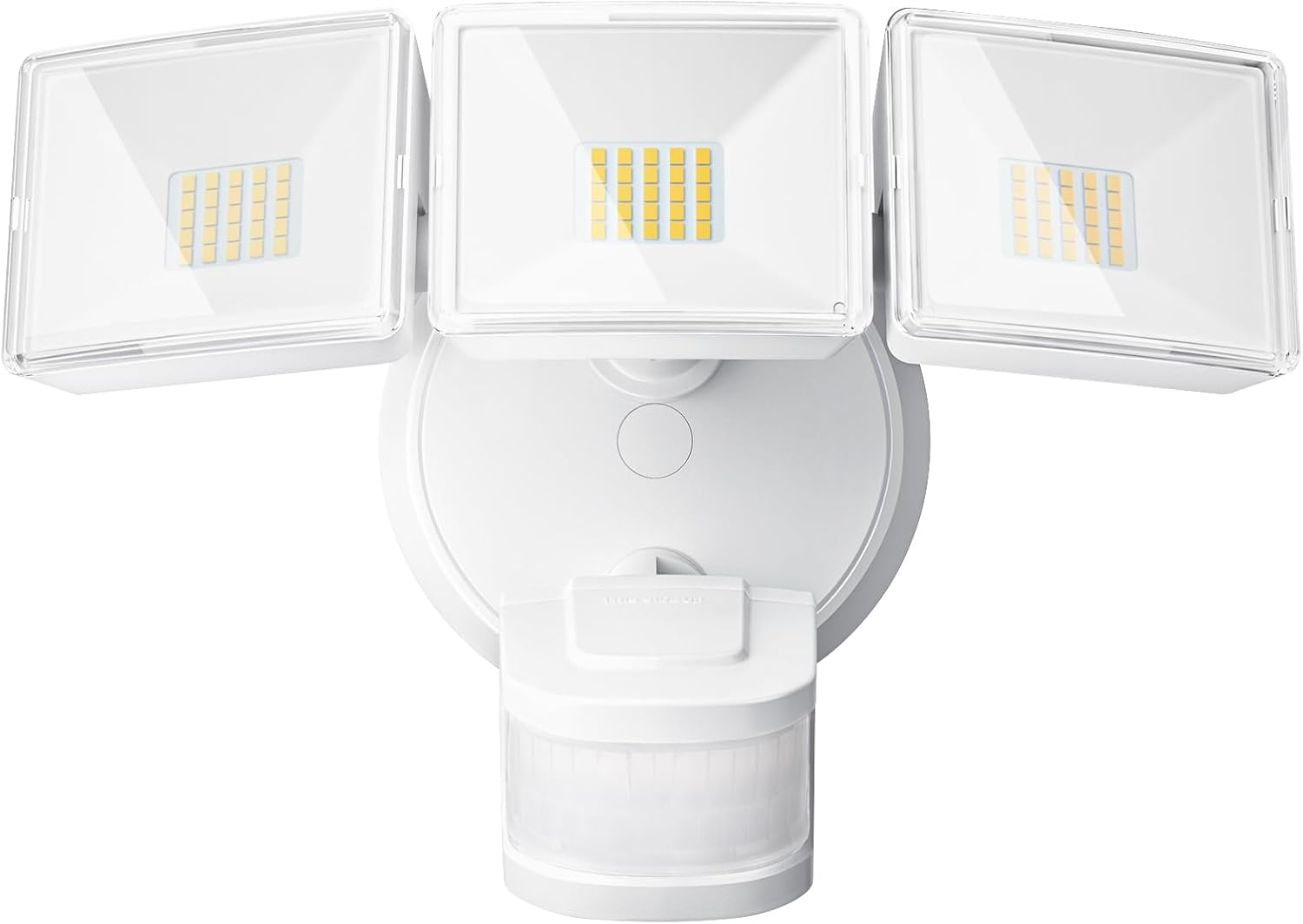
그림 1: 전면 view of the OREiN 4500LM/30W Hardwired Motion Sensor LED Flood Light, showing the three adjustable light heads and the motion sensor below.

Figure 2: Diagram illustrating the flexible adjustment angles of the three light heads (340°) and the motion sensor (270° horizontally, 120° vertically).
5. 설치
This flood light is designed for hardwired installation on a standard junction box (2.75” / 3.5”). It supports both wall and eave mounting.
설치 단계:
- 전원 끄기: Disconnect power at the circuit breaker before starting.
- 안전한 장착 브래킷: Attach the metal mounting bracket to your existing junction box using the provided screws.
- 전선 연결: Connect the household wiring to the fixture wires using the provided wire nuts. Typically, black to black (live), white to white (neutral). This light belongs to secondary luminaires, so no extra ground wire connection is needed.
- 조명기구 고정: Align the light fixture with the mounting bracket and secure it with the appropriate screws.
- Insert Waterproof Plug: Ensure the waterproof plug is properly inserted to prevent moisture ingress.
- 조명 헤드와 센서를 조정하세요: Position the three light heads and the motion sensor to cover the desired areas.
- 복원력 : 회로 차단기를 다시 켜세요.
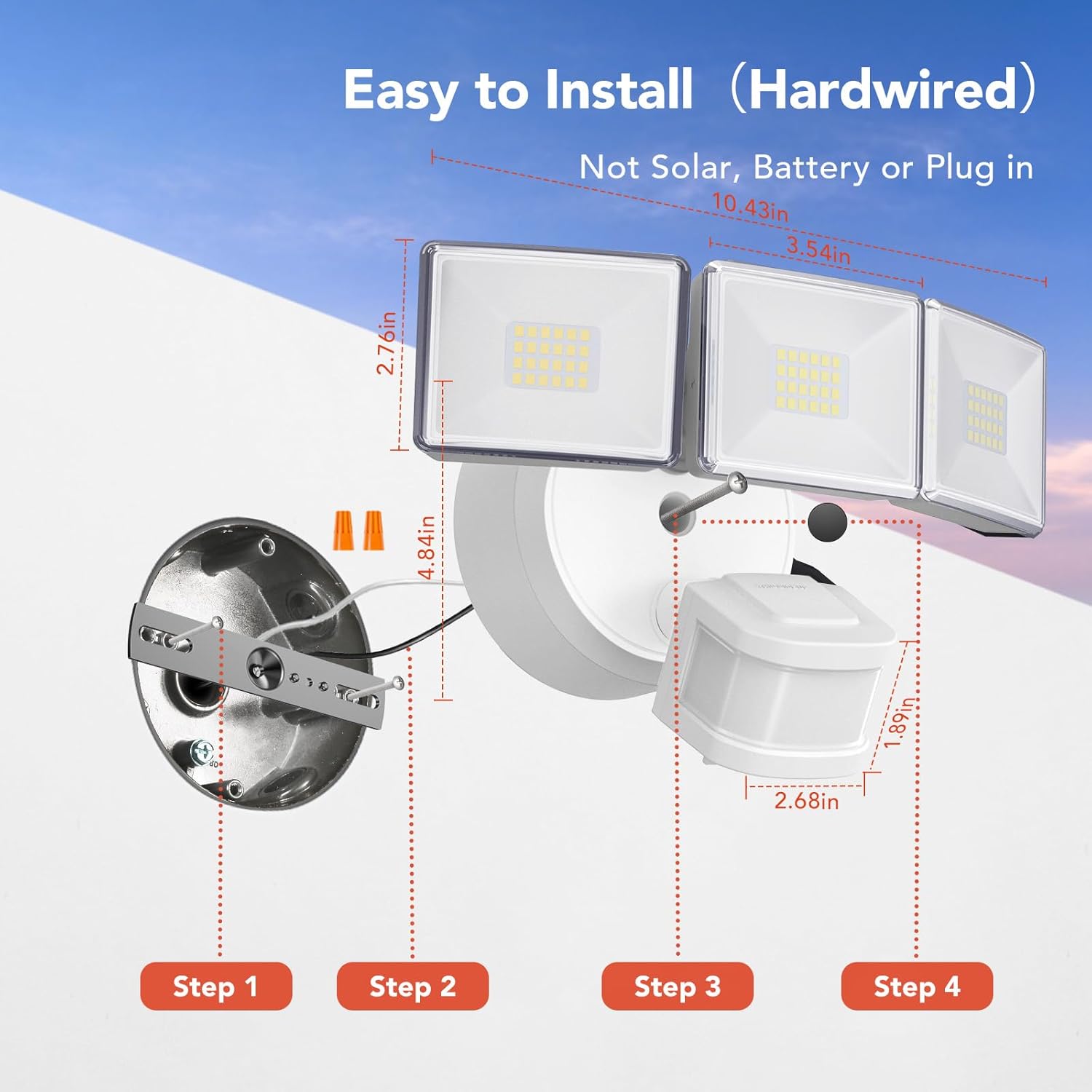
Figure 3: Step-by-step diagram for hardwired installation, showing mounting bracket, wire connections, and securing the fixture.

그림 4: 예amples of wall-mounted and soffit-mounted installations for the flood light.
6. 작동 모드
The OREiN Flood Light offers three operational modes, selectable via a switch on the motion sensor unit:
- 시험 모드: The light turns on for 5 seconds when motion is detected, regardless of ambient light. Useful for testing sensor coverage during installation.
- 황혼에서 새벽까지(D2D) 모드: The light automatically turns on at night and off during the day. In this mode, the motion sensing function is inactive.
- 자동 모드 : The light turns on only at night when motion is detected. The duration the light stays on (1, 5, or 10 minutes) can be adjusted.
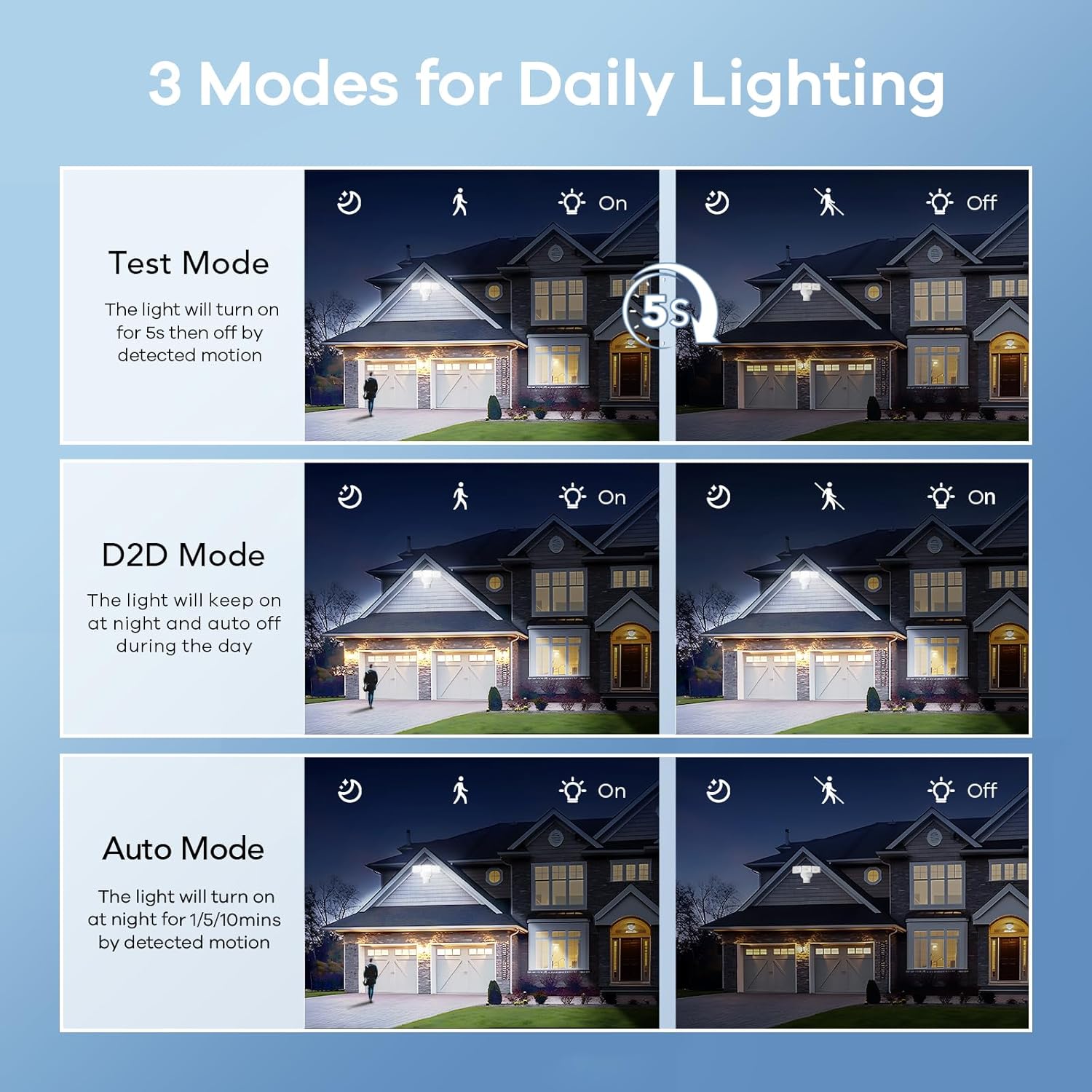
Figure 5: Visual representation of Test, Dusk to Dawn, and Auto modes in operation.

Figure 6: Illustration of the Dusk to Dawn mode, showing the light automatically activating when surroundings are dark and deactivating when bright.
7. 설정 조정
The motion sensor unit includes dials for adjusting the light's duration and sensitivity:
- Time Adjustment (Timer Minutes): Set the duration the light stays on after motion detection in Auto Mode (1, 5, or 10 minutes).
- Sensitivity Adjustment (Sensitivity): Adjust the motion detection range (10ft, 20ft, 30ft, 40ft). Max setting provides up to 40ft detection.

Figure 7: Close-up of the motion sensor with dials for adjusting mode, timer minutes, and sensitivity.
Video 1: Official OREiN video demonstrating the motion sensor outdoor lights, including features like wide detection, adjustable sensing distance, heat dissipation, adjustable time/sensitivity, flexible adjustment, and easy installation.
8. 유지관리
- 청소: 부드러운 천으로 조명기구를 청소하십시오.amp 천. 연마성 세척제나 용매를 사용하지 마십시오.
- 점검: Periodically check for any damage to the wiring or housing.
- 전구 교체: The LED bulbs are integrated and not user-replaceable. The fixture has a lifespan of up to 50,000 hours.

Figure 8: Illustration demonstrating the IP65 waterproof rating, showing the light functioning reliably under rain.

Figure 9: Diagram showing the heat dissipation design of the light heads, contributing to the product's longevity.
9. 문제 해결
| 문제 | 가능한 원인 | 해결책 |
|---|---|---|
| 조명이 켜지지 않습니다. | No power; incorrect wiring; sensor settings. | Check circuit breaker. Verify wiring connections. Adjust sensor mode/sensitivity. |
| 표시등이 계속 켜져 있습니다. | Sensor in D2D mode; continuous motion detected; sensitivity too high. | Switch to Auto mode. Check for constant heat sources or movement in detection zone. Reduce sensitivity. |
| 낮에는 불이 켜집니다. | Sensor in Test mode; ambient light sensor blocked. | Switch to Auto or D2D mode. Ensure the ambient light sensor is not obstructed. |
| Motion detection range is too short/long. | Sensitivity setting incorrect. | Adjust the sensitivity dial on the motion sensor. |
10. 사양
| 특징 | 세부 사항 |
|---|---|
| 모델명 | OL3600354 |
| 상표 | 오레인 |
| 명도 | 4500루멘 |
| 왓tage | 30 와트 |
| 색온도 | 5000 켈빈(주광) |
| 권tage | 120 볼트 |
| 재료 | 아크릴로니트릴 부타디엔 스티렌(ABS) |
| 방수 레벨 | IP65 방수 |
| 움직임 감지 각도 | 240° |
| 모션 감지 거리 | 최대 40피트 |
| 라이트 헤드 조정 | 340° 커버리지 |
| 예상 수명 | 50,000시간 |
| 설치 유형 | Hardwired (Wall Mount, Eave Mount) |
| 제품 치수 | 7.6인치 길이 x 8인치 너비 x 6인치 높이 |
| 품목 무게 | 1.87파운드 |
11. 보증 및 지원
OREiN offers an extended warranty for this product. For specific warranty details, please refer to the product packaging or contact OREiN customer support.
고객 지원:
- For assistance, contact OREiN directly through Amazon or search for the brand name online.
- If you encounter any issues, it is recommended to contact customer support before initiating a return.

Figure 10: Image representing OREiN customer support, available for assistance.


