1. 서론
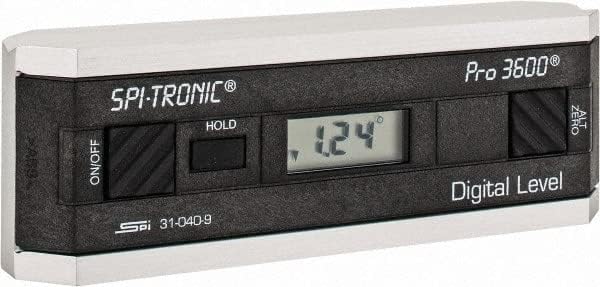
The SPI 31-040-9 Digital Protractor PRO3600 is a revolutionary tool designed to provide immediate digital indications of level, plumb, and angles. It features a light, rigid, and ultra-precise platform, utilizing a state-of-the-art sensor and microprocessor circuit for accurate readings. This instrument is built for durability, precision, and reliability, making it an essential tool for various metalworking and laboratory applications.
주요 특징:
- Floating zero provides zero selection anywhere within its 360° range.
- PRO 3600 features SPC output and excellent accuracy.
- Instant LCD Display with resolution of 0.1° up to +/-10°.
- Deviation from the true plane is measurable through full 360° (4x90°).
- Supplied in a protective plastic case.
- Top plate has a V-groove for accurate registration on curved or cylindrical surfaces.

2. 제품 오버view
Familiarize yourself with the main components and controls of your SPI PRO3600 Digital Protractor.


3. 설정
3.1 배터리 설치
The SPI PRO3600 is battery powered. To install or replace batteries:
- Locate the battery compartment cover, typically on the underside or side of the unit.
- Open the cover using a small screwdriver or coin if necessary.
- Insert the required batteries (refer to the battery type indicated inside the compartment, usually AAA or button cell) ensuring correct polarity (+/-).
- 배터리 덮개를 단단히 닫으세요.
3.2 초기 전원 켜기
배터리 설치 후, 버튼을 누르십시오. 켜짐/꺼짐 button to power on the device. The LCD display should illuminate and show a reading.
4. 사용 설명서
4.1 전원 켜기/끄기
- 장치를 켜려면 ON, 누르세요 켜짐/꺼짐 단추.
- 장치를 켜려면 끄다, 누르세요 켜짐/꺼짐 버튼을 다시 누르세요.
- The unit will automatically shut off after 6 minutes of non-use to conserve battery life.
4.2 Zeroing (ALT ZERO)
The floating zero feature allows you to set a reference point anywhere within the 360° range.
- Place the unit on your chosen reference surface.
- Wait approximately 5 seconds for the reading to stabilize.
- 를 누르세요 ALT ZERO button. The display will reset to 0.0°, establishing this as your new reference.
- To return to the original absolute reference (factory zero), press the ALT ZERO 버튼을 다시 누르세요.
4.3 Holding a Reading
디스플레이에 현재 표시값을 고정하려면:
- 를 누르세요 잡고 있다 button. The displayed reading will be frozen.
- To unfreeze the display and resume live readings, press the 잡고 있다 버튼을 다시 누르세요.
4.4 SPC Output
The PRO3600 features an SPC (Statistical Process Control) output port. This allows for data transfer to external devices for analysis. Refer to the manual for your specific SPC data collection system for connection and usage instructions.
4.5 Measuring Angles
Place the base of the protractor firmly on the surface you wish to measure. The digital display will show the angle relative to the last set zero point. For absolute measurements, ensure the unit is zeroed on a true horizontal surface.
4.6 Using the V-Groove
The top plate of the protractor features a V-groove. This design allows for accurate registration and measurement on curved or cylindrical surfaces, such as pipes or shafts. Simply align the V-groove with the cylindrical object to obtain a stable and accurate reading.
5. 유지관리
5.1 청소
- 부드럽고 마른 천으로 제품을 닦아주세요.
- 완고한 먼지의 경우 약간 damp 순한 비누를 묻힌 천으로 닦은 후 즉시 말려주세요.
- 연마성 세척제, 용제를 사용하거나 제품을 물에 담그지 마십시오.
5.2 보관
- Store the protractor in its supplied plastic case when not in use to protect it from dust, dirt, and physical damage.
- Store in a dry environment, away from extreme temperatures and direct sunlight.
- 장기간 보관할 경우 누액을 방지하기 위해 배터리를 제거하십시오.
6. 문제 해결
- 장치의 전원이 켜지지 않습니다. 배터리 설치를 확인하고 배터리가 완전히 방전되지 않았는지 확인하세요. 필요하면 교체하세요.
- 부정확한 판독값: Ensure the measurement surface is clean and stable. Perform an ALT ZERO calibration on a known true reference surface.
- 장치가 예기치 않게 꺼짐: The unit has an automatic shut-off feature after 6 minutes of non-use. This is normal operation. If it shuts off during active use, check battery levels.
- 디스플레이가 어둡거나 깜빡거립니다: 배터리가 부족할 수 있습니다. 교체하세요.
7. 사양
| 기인하다 | 값 |
|---|---|
| 제조업체 | MSC Industrial |
| 부품 번호 | 03883782 |
| 품목 무게 | 6.5파운드 |
| 제품 치수 | 6 x 1.2 x 2.3 인치 |
| 품목 모델 번호 | 31-040-9 |
| 크기 | 원 사이즈 |
| 색상 | 검은색 |
| 재료 | 합성물 |
| 전원 | 배터리 구동 |
| 품목 패키지 수량 | 1 |
| 포함된 구성 요소 | 맞춤형 케이스 |
8. 보증 및 지원
8.1 보증 정보
SPI measuring instruments are backed by an industry-leading 2-Year warranty, ensuring their durability, precision, and reliability. Please retain your proof of purchase for warranty claims.
8.2 고객 지원
For technical assistance, warranty service, or inquiries regarding your SPI PRO3600 Digital Protractor, please contact SPI customer support through their official web제품을 구매한 사이트 또는 소매업체.