소개
Thank you for choosing the UNIWEIGH Digital Kitchen Scale. This precision instrument is designed to provide accurate measurements for various items, including food, jewelry, and other small objects. Please read this manual thoroughly before use to ensure proper operation and to maximize the lifespan of your scale.
안전 정보
- Do not overload the scale beyond its maximum capacity of 3000 grams (6.61 lbs).
- 저울을 극한의 온도, 습도 또는 직사광선에 노출시키지 마십시오.
- 저울을 강한 전자기장 근처에 두지 마세요.
- 부드러운 d로 스케일을 청소하십시오.amp 옷감. 물에 담그거나 연마성 세제를 사용하지 마십시오.
- Handle with care to prevent damage from drops or impacts.
패키지 내용
- UNIWEIGH Digital Kitchen Scale
- Two weighing trays (different sizes)
- AAA 배터리 2개 (포함)
- 사용 설명서
제품 특징
- 높은 정밀도: Weighs from 0.5g up to 3000g (6.61 lbs) with an accuracy of 0.1g.
- 다중 측정 단위: Easily switch between grams (g), ounces (oz), grains (gn), carats (ct), pennyweights (dwt), and troy ounces (ozt).
- 용기 기능: Allows you to subtract the weight of a container for net weight measurement.
- 계수 함수(PCS): Provides an accurate count for multiple small items.
- Clear Back-lit LCD Screen: 다양한 조명 조건에서도 쉽게 읽을 수 있도록 설계되었습니다.
- 자동 꺼짐 기능: 배터리 수명 절약을 위해 180초 동안 사용하지 않으면 자동으로 꺼집니다.
- 컴팩트한 디자인: Portable and easy to store with dimensions of 5" x 4.2" x 0.6".
- 내구성 있는 소재: Constructed with a stainless steel platform and ABS plastic frame for easy cleaning and longevity.

이미지: 이상view of the UNIWEIGH Digital Kitchen Scale highlighting its key features including 3kg max capacity, 0.1g accuracy, low battery alarm, tare function, and overload alarm.
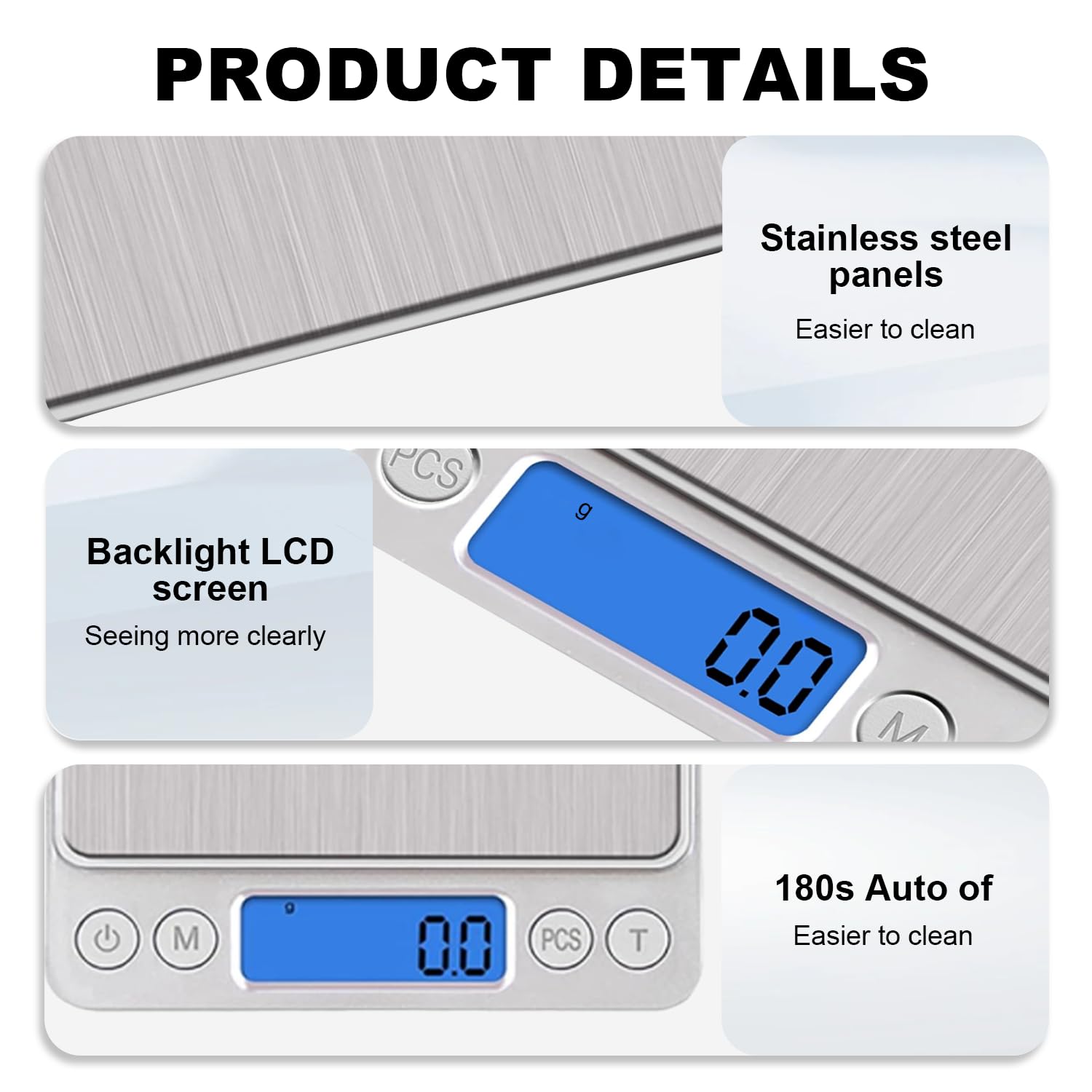
이미지: 상세 view of the scale's stainless steel weighing surface, the clear blue backlit LCD display, and the 180-second auto-off feature for energy saving.
설정
- 저울 풀기: 저울과 모든 부속품을 포장에서 조심스럽게 꺼내세요.
- 배터리 설치: Open the battery compartment on the underside of the scale. Insert the two AAA batteries, ensuring correct polarity (+/-). Close the compartment securely.
- 놓기: 정확한 측정을 위해 저울을 평평하고 안정적이며 수평인 표면에 놓으십시오. 부드럽거나 고르지 않은 표면에는 놓지 마십시오.
작동 지침
- 전원 켜기/끄기: 를 누르세요 전원 버튼 (
 ) to turn the scale on. The LCD display will show '88888' then '0.0' or '0.00'. Press and hold the Power button to turn the scale off.
 - 단위 전환: 를 누르세요 모드 버튼 ('M') to cycle through the available weighing units: grams (g), ounces (oz), grains (gn), carats (ct), pennyweights (dwt), and troy ounces (ozt).
- 계량 품목: Place the item directly onto the center of the weighing platform. The weight will be displayed on the LCD screen.
- 용기 기능: To weigh items in a container, first place the empty container on the scale. Press the 용기 버튼 ('T'). The display will reset to '0.0'. Now, add the items to the container, and the scale will display only the net weight of the items.
- 계수 함수(PCS):
- With the scale on and showing '0.0', press and hold the PCS 버튼 until a sample size (e.g., '25', '50', '75', '100') appears.
- Place the corresponding number of sample items on the scale.
- Press the PCS button again to confirm the samp크기. 이제 저울이 계산을 위해 조정되었습니다.
- Add the items you wish to count, and the display will show the quantity.
Video: Demonstrates the boot display, weight measurement, unit switching, and tare function of the UNIWEIGH Digital Kitchen Scale.
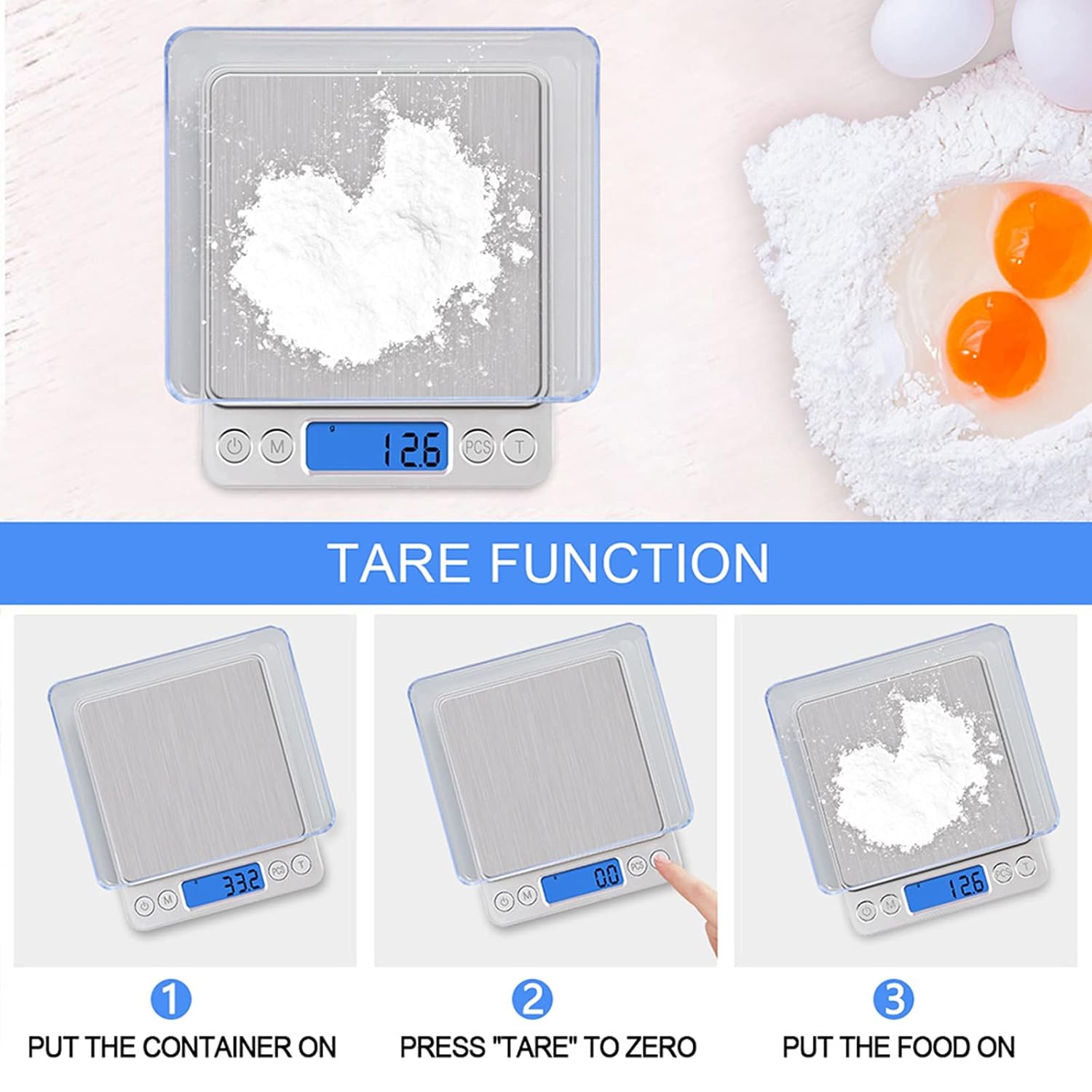
Image: Step-by-step guide on how to use the tare function to weigh ingredients accurately in a container.
유지
- 청소: 저울 표면을 가볍게 닦으세요.amp cloth. For stubborn stains, use a mild detergent. Ensure no liquid enters the internal components.
- 저장: Store the scale in a cool, dry place. If not used for an extended period, remove the batteries to prevent leakage.
- 구경 측정: The scale is factory calibrated. If you suspect inaccuracies, refer to the troubleshooting section or contact customer support for calibration instructions.
문제 해결
| 문제 | 가능한 원인 | 해결책 |
|---|---|---|
| 디스플레이에 'Lo'가 표시됩니다. | 배터리 전원이 부족합니다. | 배터리를 교체하세요. |
| 디스플레이에 'O-Ld'가 표시됩니다. | 초과 적재. | Remove the item immediately. Do not exceed 3000g. |
| 부정확한 판독 | Unstable surface, external interference, or needs calibration. | Place on a flat, stable surface. Avoid vibrations. Ensure no strong electromagnetic fields. If issues persist, contact customer support for calibration guidance. |
| 스케일이 켜지지 않음 | 배터리가 잘못 설치되었거나 방전되었습니다. | 배터리 극성을 확인하거나 배터리를 교체하세요. |
명세서
- 상표: 유니웨이트
- 모델 번호: 609378971129
- 색상: 은
- 중량 제한: 3000g(6.61파운드)
- 판독 정확도: 0.1g
- 디스플레이 유형: 백라이트 LCD
- 단위: g, oz, gn, ct, ozt, dwt
- 재료: Stainless Steel (platform), Acrylonitrile Butadiene Styrene (ABS) (frame)
- 제품 크기: 5 x 4.2 x 0.6 인치
- 품목 무게: 9.2온스(0.26킬로그램)
- 전원: AAA 배터리 2개 (포함)
- 특별 기능: Auto Shut Off, Backlit Display, High Weight Capacity, Lightweight, Tare Function, Counting Function
보증 및 지원
UNIWEIGH products are rigorously tested and calibrated before shipment. For any questions, technical support, or warranty claims, please contact UNIWEIGH customer service through the retailer where the product was purchased. Please retain your proof of purchase for warranty validation.

