1. 제품 오버view
The MONOKEI Standard Keyboard is a mechanical keyboard designed for a versatile typing experience. It features a durable construction, hot-swappable switches, and multiple connectivity options.
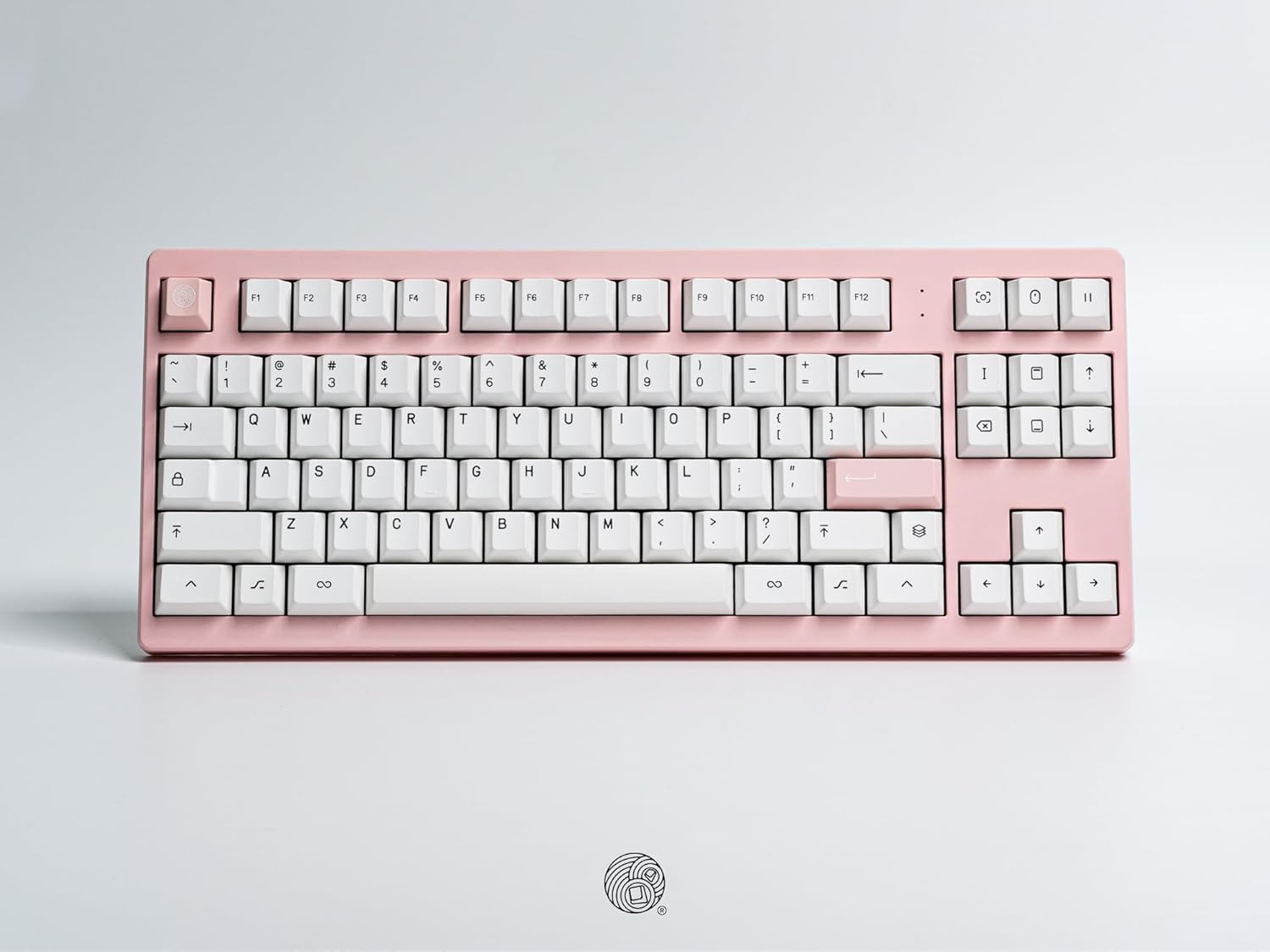
오버헤드 view of the MONOKEI Standard Keyboard, showcasing its full layout in a blush pink casing with white PBT keycaps. The keyboard features a standard 87-key layout, including function keys, arrow keys, and a navigation cluster.
2. 설정
2.1 언박싱 및 내용
Carefully remove the keyboard and accessories from the packaging. The box should contain:
- MONOKEI Standard Keyboard
- USB-C 케이블
- 키캡 풀러
2.2 초기 연결
The MONOKEI Standard Keyboard supports both wired and wireless (Bluetooth) connectivity.
유선 연결:
- 제공된 USB-C 케이블을 키보드의 포트에 연결하십시오.
- USB-C 케이블의 다른 쪽 끝을 컴퓨터의 사용 가능한 USB 포트에 연결합니다.
- 키보드는 운영 체제에서 자동으로 인식됩니다.
무선(블루투스) 연결:
- 초기 설정 시 키보드가 충전되어 있거나 USB-C 케이블로 연결되어 있는지 확인하십시오.
- Turn on the keyboard's Bluetooth mode (refer to the Operating section for specific key combinations).
- On your device (PC, laptop, smartphone, tablet), navigate to Bluetooth settings.
- 검색 available devices and select 'MONOKEI Standard' to pair.
- 화면의 지시에 따라 페어링 과정을 완료하세요.
2.3 충전 중
Connect the USB-C cable to the keyboard and a power source (e.g., computer USB port, wall adapter). The keyboard can operate for up to 30 days on a full charge in wireless mode.
3. 사용 설명서
3.1 기본 키 기능
The MONOKEI Standard Keyboard features a standard 87-key layout. All alphanumeric keys, symbols, and basic modifiers (Shift, Ctrl, Alt, Fn) function as expected.
3.2 특수 기능 키
The F1-F12 keys may have secondary functions when pressed in combination with the 'Fn' key. Refer to the keycap legends for specific media controls or system functions.
3.3 운영 체제 모드 전환
The keyboard may default to a specific operating system layout (e.g., Mac). To switch between operating system modes (e.g., Windows/Mac), use the designated hotkey combination. Consult the included quick start guide for the specific key sequence.
3.4 페어링된 장치 간 전환
If multiple devices are paired via Bluetooth, use the designated function keys (often Fn + 1, 2, or 3) to switch between them quickly.
4. 유지관리
4.1 키보드 청소
To clean the keyboard, power it off and disconnect it from your device. Use a soft, lint-free cloth lightly damp물이나 순한 세척액으로 닦아주세요. 액체를 키보드에 직접 뿌리지 마세요. 키캡 사이를 청소할 때는 압축 공기나 작은 브러시를 사용하세요.
4.2 키캡 및 스위치 교체
The MONOKEI Standard Keyboard features hot-swappable sockets, allowing for easy replacement of switches without soldering. To replace keycaps or switches:
- 제공된 키캡 풀러를 사용하여 키캡을 조심스럽게 제거하세요.
- Once the keycap is removed, use a switch puller (not included, but often bundled with replacement switches) to carefully extract the switch from its socket.
- Align the pins of the new switch with the holes in the PCB and press firmly until it clicks into place.
- 원하는 키캡을 새로운 스위치 스템에 끼웁니다.
메모: Opening the keyboard casing may void the warranty. Exercise caution if considering internal modifications.
5. 문제 해결
5.1 연결 문제
- 키보드가 Bluetooth를 통해 연결되지 않음: Ensure Bluetooth is enabled on both the keyboard and your device. Try unpairing and re-pairing the keyboard. Ensure the keyboard is sufficiently charged.
- 유선 연결이 인식되지 않습니다: Try a different USB port or cable. Ensure the cable is fully inserted into both the keyboard and the computer.
5.2 키가 응답하지 않음
- Individual keys: If a single key is not responding, the switch may be faulty or improperly seated. Try removing the keycap and switch, then re-inserting the switch firmly. If the issue persists, consider replacing the switch.
- 여러 개의 키: Ensure the keyboard is properly connected (wired or wireless). Restart your computer or device. If using wireless, check battery level.
5.3 충전 문제
- Ensure the USB-C cable is securely connected to both the keyboard and a working power source.
- 다른 USB-C 케이블이나 전원 어댑터를 사용해 보세요.
6. 사양
| 특징 | 세부 사항 |
|---|---|
| 제품 치수 | 14.3 x 5.9 x 1.5인치(14.3인치 길이 x 5.9인치 너비 x 1.5인치 높이) |
| 품목 무게 | 2.1파운드 |
| 재료 | 폴리부틸렌 테레프탈레이트(PBT 키캡) |
| 연결 기술 | 블루투스, USB-C |
| 특별 기능 | Hot-Swappable, Long-lasting PBT keycaps, Wired, Wireless |
| 포함된 구성 요소 | Keycap Puller, USB Cable |
| 호환 장치 | 노트북, PC, 스마트폰, 태블릿 |
7. 보증 및 지원
7.1 보증 정보
MONOKEI products are manufactured to high-quality standards. For specific warranty terms and conditions, please refer to the warranty card included with your product or visit the official MONOKEI web사이트. 보증 청구를 위해 구매 증빙 자료를 보관하세요.
7.2 고객 지원
If you encounter any issues or have questions not covered in this manual, please contact MONOKEI customer support. You can find more information and contact details on the official MONOKEI store page:

