1. 서론
This manual provides detailed instructions for the safe and effective operation of your Owon OWM5500 Digital Smart Anemometer. This device is a versatile handheld instrument designed for precise measurement of various environmental parameters, including wind speed, air volume, temperature, and humidity. Please read this manual thoroughly before using the device to ensure optimal performance and longevity.

Figure 1: Owon OWM5500 Digital Smart Anemometer (Front View)
This image displays the front of the Owon OWM5500 anemometer, highlighting its digital screen which shows wind speed, maximum, average, and minimum readings, along with battery status. Below the screen are navigation and function buttons, and the wind impeller is visible at the top.
2. 안전 정보
To ensure safe operation and to prevent damage to the device, please observe the following safety precautions:
- 장치를 열려고 시도하지 마십시오.asing or replace the battery without first powering off the unit.
- 기기를 물과 과도한 습기로부터 멀리하세요.
- 장치를 극한의 온도나 직사광선에 장기간 노출시키지 마십시오.
- Handle the wind impeller carefully to prevent damage.
- 지정된 충전 케이블과 전원만 사용하세요.
- 사용하지 않을 때는 기기를 깨끗하고 건조한 곳에 보관하십시오.

Figure 2: Owon OWM5500 Digital Smart Anemometer (Back View)
This image shows the back of the Owon OWM5500 anemometer. A warning label is visible, advising to power off the device before replacing the battery or opening the case. The battery compartment and regulatory marks (UKCA, CE) are also displayed.
3. 패키지 내용
포장을 풀 때 아래 나열된 모든 품목이 들어 있고 상태가 양호한지 확인하세요.
- Owon OWM5500 Anemometer
- 사용자 설명서
- USB Type-C 충전 케이블
- 매는 밧줄
- 포장 상자
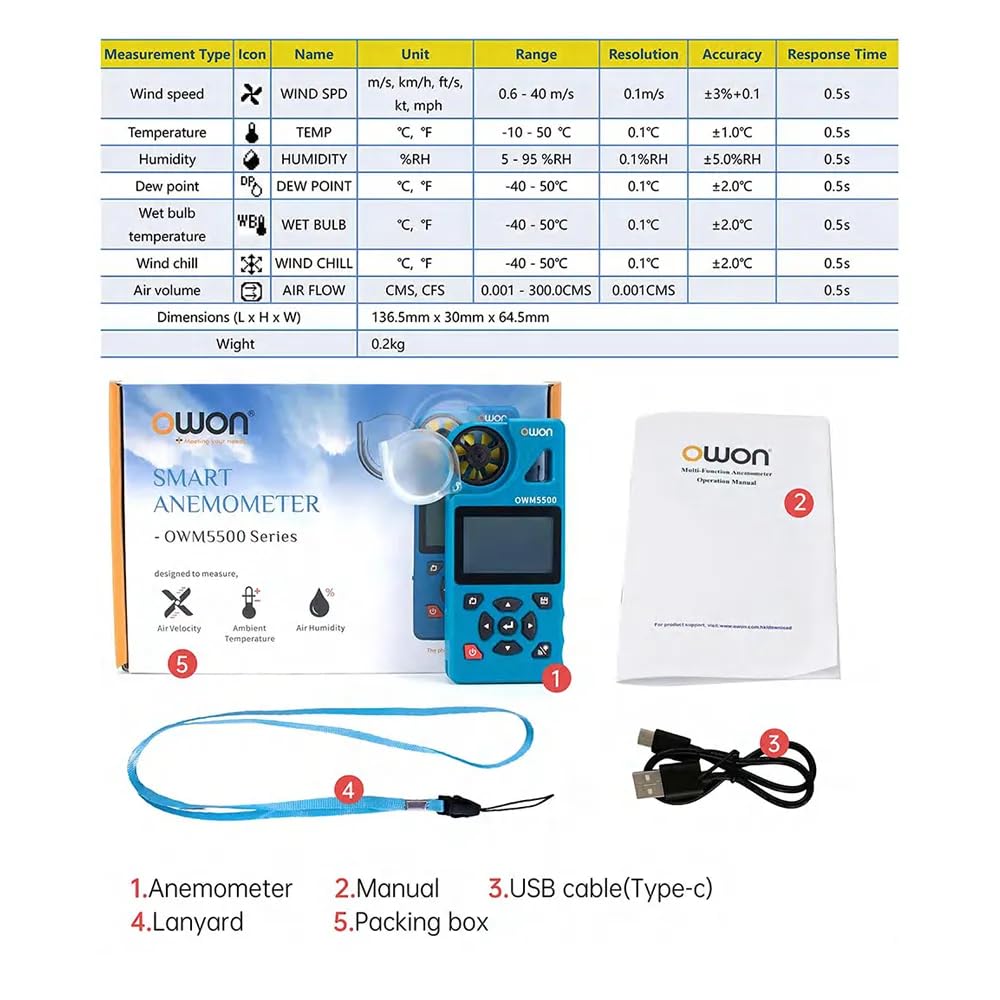
그림 3: 패키지 내용물
This image illustrates the items included in the Owon OWM5500 package. It shows the anemometer itself, a printed user manual, a USB Type-C charging cable, and a lanyard, all laid out next to the product's packaging.
4. 제품 오버view 및 기능
The Owon OWM5500 is designed for comprehensive environmental monitoring with a range of advanced features:
- Multi-Measurement Capability: Measures 7 types of parameters: wind speed, air volume, temperature, humidity, dew point, wet bulb temperature, and wind chill. Supports Beaufort scale wind rating.
- 데이터 시각화: Features a charts display mode for analyzing trends and performing statistical analysis on collected data.
- 방대한 데이터 저장 용량: Built-in memory for 8000 sets of data, supporting both automatic and manual storage, with a one-click data clearing function.
- 전원 관리 : Multi-gear setting for automatic power-off to conserve energy.
- 충전식 배터리: Integrated lithium battery, rechargeable via USB Type-C interface for extended use.
- 스마트 연결성: Supports remote control via a dedicated mobile application (APP).
- PC 소프트웨어 지원: Data graph mode allows for exporting data for further analysis using PC software.
- High Precision Design: Features a 7-blade airfoil fan for accurate data collection and a replaceable airfoil wheel for long-term accuracy.
- 사용자 친화적인 디스플레이: Allows for simultaneous display of up to three measurement values on one screen for quick data interpretation.
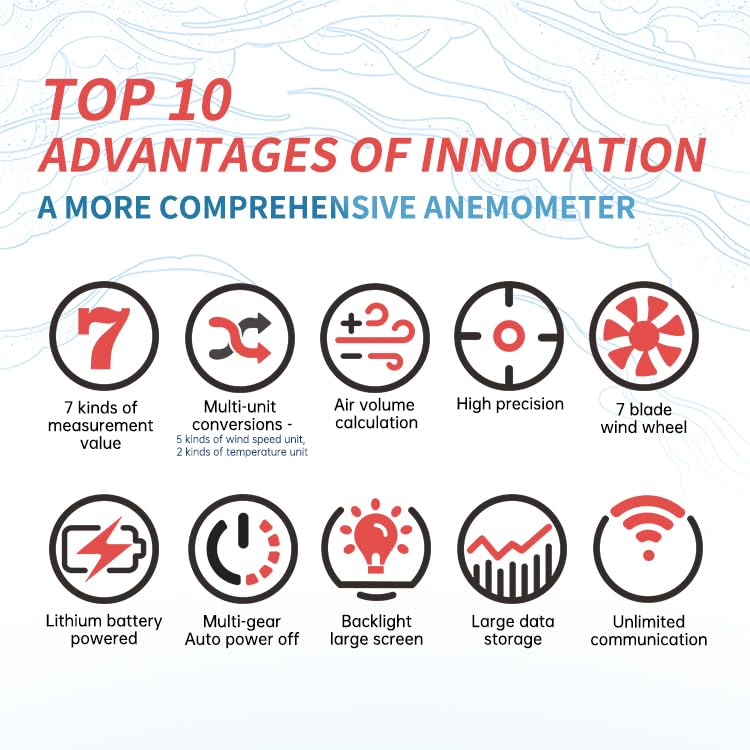
그림 4: 주요 기능view
This infographic visually summarizes the key advantages of the Owon OWM5500 anemometer. Icons represent features such as 7 measurement types, multi-unit conversions, air volume calculation, high precision, a 7-blade wind wheel, lithium battery power, multi-gear auto power off, a backlit large screen, large data storage, and unlimited communication capabilities.
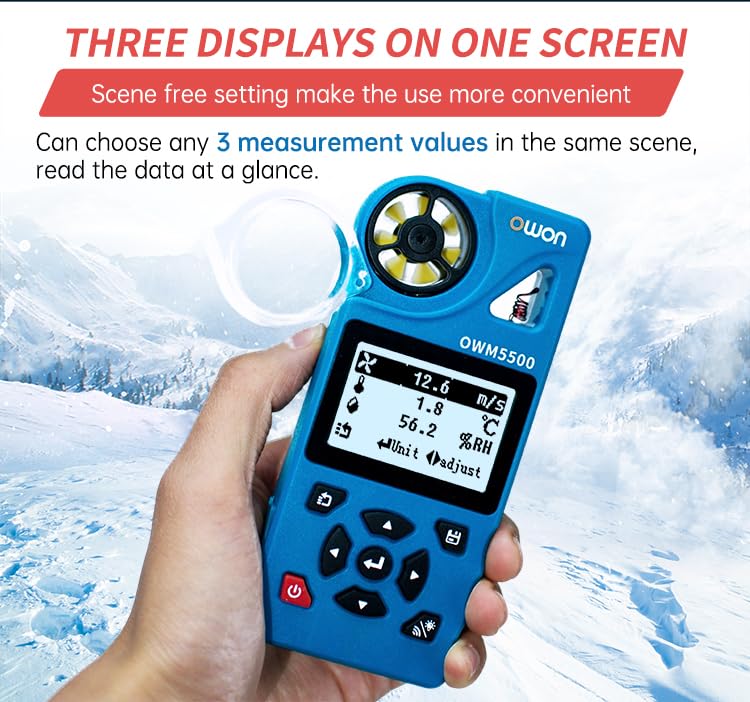
Figure 5: Three Displays on One Screen
This image shows the Owon OWM5500 anemometer held in a hand, with its screen displaying three different measurement values concurrently: wind speed (12.6 m/s), temperature (1.8 °C), and relative humidity (56.2 %RH). This illustrates the device's ability to present multiple data points at a glance.

Figure 6: 7-Blade Airfoil Fan Design
이 이미지는 자세한 내용을 제공합니다. view of the Owon OWM5500's 7-blade airfoil fan, designed for accurate data collection. It also shows a separate, replaceable fan wheel, emphasizing the device's maintainability and long-term measurement accuracy.
5. 설정
5.1 배터리 충전
The OWM5500 comes with a built-in rechargeable lithium battery. Before first use, or when the battery indicator shows low power, charge the device using the provided USB Type-C cable.
- USB Type-C 케이블을 기기의 충전 포트에 연결하세요.
- USB 케이블의 다른 쪽 끝을 표준 USB 전원 어댑터(별도 구매) 또는 컴퓨터의 USB 포트에 연결하십시오.
- 기기의 충전 표시등이 충전 상태를 보여줍니다. 완전히 충전되면 케이블을 분리하세요.
5.2 랜야드 부착하기
For secure handling and to prevent accidental drops, attach the provided lanyard to the designated loop on the anemometer.
6. 사용 설명서
6.1 전원 켜기/끄기
- 전원 켜기: 전원 버튼을 길게 누르세요.⑂) for a few seconds until the screen illuminates.
- 전원 끄기 : 전원 버튼을 길게 누르세요.⑂) again until the screen turns off. The device also features an automatic power-off function, which can be configured in the settings.
6.2 측정 모드
The OWM5500 supports various measurement types. Use the navigation buttons to cycle through and select the desired measurement mode.

Figure 7: Full Functional Measurement Displays
This image presents a collage of screenshots from the Owon OWM5500's display, showcasing its full range of measurement capabilities. It includes readings for Wind Speed (with Beaufort scale), Wind Volume (Air Flow), Temperature, Humidity, Wet Bulb Temperature, Dew Point, Wind Chill Temperature, and the Date/Time setting interface. Each display shows the unit of measurement and current value.
- 풍속: Measures current wind velocity. Units include m/s, km/h, ft/s, kt, mph.
- Air Volume (Air Flow): Measures the volume of air passing through. Units include CMS, CFS. Requires input of area.
- 온도: Measures ambient temperature. Units include °C, °F.
- 습기: Measures relative humidity. Unit: %RH.
- 이슬점: Calculates the dew point temperature. Units include °C, °F.
- 습구 온도: Calculates the wet bulb temperature. Units include °C, °F.
- Wind Chill Temperature: Calculates the wind chill factor. Units include °C, °F.
To change units within a measurement mode, refer to the on-screen prompts or the detailed instructions in the full user manual.
6.3 데이터 로깅 및 저장
The OWM5500 can store up to 8000 sets of measurement data.
- 자동 저장: Configure the logging rate (e.g., every 2 seconds to 12 hours) in the settings menu to enable automatic data recording.
- 수동 저장: Press the designated button (refer to device interface) to manually save the current measurement data.
- 데이터 재view: Access stored data through the device's menu.
- 데이터 내보내기: Connect the device to a PC via the USB Type-C cable and use the dedicated PC software to export data for further analysis and charting.
- 데이터 지우기: The device supports one-click data zero clearing. Exercise caution when using this function as it will permanently delete all stored data.

Figure 8: Built-in Mass Data Storage
This image illustrates the data storage capabilities of the Owon OWM5500. The device's screen shows settings for data logging, including 'Log Num' (log number), 'Log Rate' (logging interval), and 'Auto Log On/Off'. Below, a graphical representation of historical data trends is displayed, demonstrating the device's ability to store and visualize extensive measurement data.
6.4 APP 원격 제어
The OWM5500 supports remote control via a mobile application. Download the official Owon APP from your smartphone's app store. Follow the in-app instructions to pair your device and access remote monitoring and control features.
7. 유지관리
7.1 청소
Wipe the device with a soft, dry cloth. Do not use abrasive cleaners or solvents. Ensure the wind impeller is free from dust and debris for accurate readings.
7.2 배터리 관리
배터리 수명을 연장하려면 배터리를 자주 완전히 방전시키지 마십시오. 특히 장기간 보관할 경우 기기를 정기적으로 충전하십시오.
7.3 임펠러 교체
If the wind impeller becomes damaged or its accuracy degrades over time, it can be replaced. Refer to Figure 6 for an illustration of the replaceable impeller. Contact Owon customer support for replacement parts and detailed instructions.
7.4 보관
Store the anemometer in a cool, dry place, away from direct sunlight and extreme temperatures. Use the original packing box or a protective case for storage.
8. 문제 해결
If you encounter issues with your OWM5500, refer to the following common problems and solutions:
| 문제 | 가능한 원인 | 해결책 |
|---|---|---|
| 장치의 전원이 켜지지 않습니다. | 배터리가 부족합니다. 기기가 고장났습니다. | 배터리를 완전히 충전하십시오. 문제가 지속되면 고객 지원팀에 문의하십시오. |
| 부정확한 판독값. | Blocked impeller; sensor dirty; incorrect unit setting. | Ensure impeller is clear and spinning freely. Clean sensors. Verify unit settings. |
| 앱에 연결할 수 없습니다. | Bluetooth/wireless off; APP not updated; device not in pairing mode. | Ensure device and phone Bluetooth are on. Update APP. Refer to APP instructions for pairing. |
| Data not saving. | Storage full; auto-log off; manual save not performed. | Clear old data. Check auto-log settings. Ensure manual save button is pressed correctly. |
9. 사양
| 매개변수 | 값 |
|---|---|
| 모델 번호 | OWM5500 |
| 상표 | Owon |
| 배터리 | 1개의 리튬 이온 배터리(포함) |
| 제품 크기(L x W x H) | 22 x 15 x 12cm(8.66 x 5.91 x 4.72인치) |
| 품목 무게 | 0.5킬로그램(1.1파운드) |
| 원산지 | 중국 |
| 데이터 저장 | 8000 세트 |
| 연결성 | USB Type-C, APP Remote Control |
| EU 예비 부품 가용성 기간 | 1년 |
참고: 사양은 사전 통지 없이 변경될 수 있습니다.
10. 보증 및 지원
Owon products are manufactured to high-quality standards. For warranty information and technical support, please refer to the warranty card included with your product or visit the official Owon web사이트. 보증 청구를 위해 구매 증빙 자료로 구매 영수증을 보관하세요.
For assistance, please contact Owon customer service through their official channels.