1. 서론
The OWON Wi-Fi Bi-directional Home Energy Monitor (Model: 80A-1clamp) is designed to provide real-time monitoring of your home's electricity consumption and generation. This device supports single-phase electricity systems and includes one 80A current clamp for measurement. It is compatible with the Tuya Smart Life application, allowing for remote monitoring and integration with other smart home devices.
주요 특징은 다음과 같습니다.
- Bi-directional Measurement: Monitors both energy consumption (from grid) and energy production (to grid), supporting daily, weekly, and monthly trend tracking.
- 실시간 모니터링: 표시량tage, current, power factor, active power, and frequency with an accuracy of ±2%.
- 앱 제어: Connects via 2.4 GHz Wi-Fi for monitoring and automation through the Tuya Smart Life app.
- 간편한 설치: Lightweight design with a current clamp (PC311-TY) for straightforward connection to power cables.

Image 1.1: OWON Wi-Fi Bi-directional Home Energy Monitor (80A-1clamp) and its mobile application interface.
2. 안전 정보
경고: Electrical installation and maintenance should only be performed by a qualified professional. Failure to follow these instructions may result in electric shock, fire, or other serious injury.
- Always turn off all power supplies at the main circuit breaker before attempting any installation or wiring to ensure safety.
- Do not touch terminals or live wires during testing or operation.
- 장치가 습기와 극한 온도를 피해 건조한 환경에 설치되었는지 확인하세요.
- 볼륨을 확인하세요tage and current ratings of your electrical system are within the device's specifications (90-250VAC, 80A).
3. 제품 구성품
The OWON Energy Monitor package typically includes:
- OWON Wi-Fi Bi-directional Home Energy Monitor unit (PC311-TY)
- One 80A Current Clamp Transformer (CT)
- 사용 설명서 (본 문서)

Image 3.1: Detail of the 80A Current Clamp Transformer (CT) with P1-P2 direction marking.
4. 설정 및 설치
Follow these steps for safe and correct installation of your energy monitor.
4.1 설치 전 체크리스트
- Ensure you have basic electrical knowledge or consult a qualified electrician.
- Confirm your electrical system is single-phase.
- Have necessary tools: screwdriver, wire strippers, multimeter (optional).
- Ensure a stable 2.4 GHz Wi-Fi network is available at the installation location.
4.2 물리적 설치
- 전원 끄기 : Locate your main circuit breaker and turn off the power to the circuit where you intend to install the monitor. Verify power is off using a voltag전자 테스터.
- 모니터를 장착하세요: The OWON Energy Monitor is designed to fit on standard 35mm DIN rails. Securely attach the monitor unit to the DIN rail within your electrical panel.
- 전원 공급 장치 연결: Connect the Live (L) and Neutral (N) wires from your circuit breaker to the corresponding L and N terminals on the energy monitor. Input voltag전자 범위는 90-250VAC입니다.
- Install the Current Clamp (CT):
- The CT must only be clamped around the 활선 of the circuit you wish to monitor. Do not clamp it around both live and neutral wires, or only the neutral wire.
- Connect the CT's output wires to the 'Circuit 1' terminals (1- and 1+) on the energy monitor.
- Direction of Current Flow: The arrow on the CT clamp indicates the direction of current flow. For measuring energy consumption, the arrow should point in the direction of the current flow (e.g., from grid to load). For measuring energy generation, the arrow should point opposite to the current flow (e.g., from inverter to grid).

Image 4.2: Correct CT clamp placement on the live wire only.
- 배선도: Refer to the following diagrams for specific wiring scenarios. Ensure the circuit measured by the CT is in the same phase as the circuit powering the PC311 monitor.

Image 4.1: The energy monitor unit designed for 35mm DIN rail mounting.
Wiring for Energy Consumption Measurement
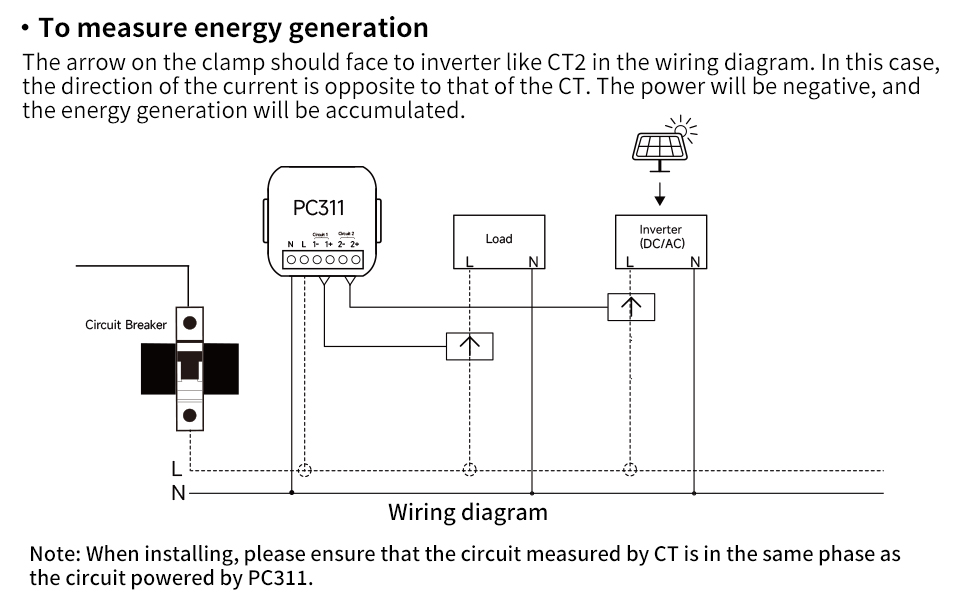
Image 4.3: Wiring diagram for monitoring energy consumption. The CT arrow should follow the current direction (P1→P2).
Wiring for Energy Generation Measurement
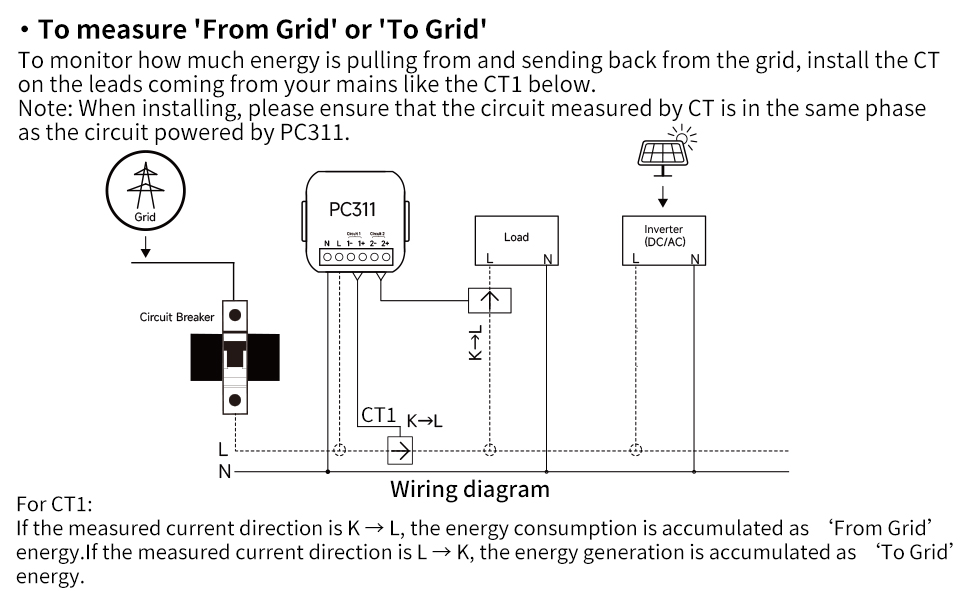
Image 4.4: Wiring diagram for monitoring energy generation. The CT arrow should face the inverter (P2→P1).
Wiring for 'From Grid' or 'To Grid' Measurement (Bi-directional)
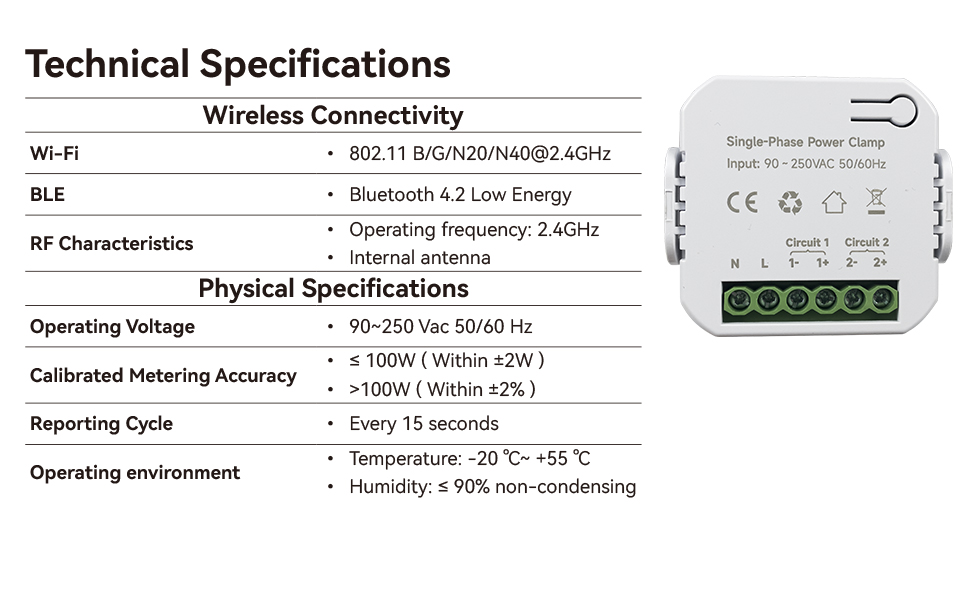
Image 4.5: Wiring diagram for bi-directional energy monitoring (from/to grid). The CT is installed on the main incoming leads.
4.3 App Setup (Tuya Smart Life)
- 앱 다운로드 : 모바일 기기의 앱 스토어에서 'Tuya Smart' 또는 'Smart Life' 앱을 다운로드하세요.
- 등록/로그인: 계정을 만들거나 기존 계정에 로그인하세요.
- 장치 추가: Restore power to the circuit. The monitor should enter pairing mode (usually indicated by a blinking LED). In the app, tap '+' to add a new device. Select 'Electrical' > 'Power Clamp' or 'Energy Monitor'.
- Wi-Fi에 연결: Follow the in-app instructions to connect the monitor to your 2.4 GHz Wi-Fi network. You will need to enter your Wi-Fi password.
- 구성: Once connected, you can name the device and assign it to a room. The app will then display real-time energy data.
5. 사용 설명서
Once installed and configured with the Tuya Smart Life app, your OWON Energy Monitor will begin collecting data.
5.1 실시간 모니터링
Open the Tuya Smart Life app and select your OWON Energy Monitor device. You will see a dashboard displaying:
- Total Forward Energy (consumption)
- Total Generation (production)
- 실시간 Voltage
- 실시간 전류
- 유효 전력
- 역률
- 빈도

Image 5.1: App interface displaying real-time electrical parameters.
5.2 Historical Data and Trends
The app provides historical data views, allowing you to analyze energy consumption and production trends over different periods (day, week, month, year). This helps in identifying usage patterns and optimizing energy efficiency.

Image 5.2: App graphs illustrating energy consumption and production trends over time.
5.3 자동화 및 스마트 장면
Leverage the Tuya Smart Life app's automation features to create smart scenes based on your energy data. For example, you can set up notifications for unusual power consumption or integrate with other Tuya-compatible devices.
6. 유지관리
The OWON Energy Monitor is designed for minimal maintenance. However, periodic checks are recommended:
- 시각적 검사: Periodically inspect the device and wiring for any signs of damage, loose connections, or overheating.
- 펌웨어 업데이트: Check the Tuya Smart Life app for any available firmware updates for the device. Install updates to ensure optimal performance and security.
- 청소: If necessary, gently wipe the exterior of the device with a dry, soft cloth. Do not use liquid cleaners or solvents.
- 전문가 확인: For any concerns regarding electrical connections or device functionality, consult a qualified electrician.
7. 문제 해결
If you encounter issues with your OWON Energy Monitor, refer to the following common problems and solutions:
| 문제 | 가능한 원인 | 해결책 |
|---|---|---|
| 장치 전원이 켜지지 않음 | No power to L/N terminals; incorrect wiring. | Check circuit breaker. Verify L/N wiring connections. Ensure power is restored. |
| Wi-Fi / 앱에 연결할 수 없습니다 | Incorrect Wi-Fi password; 5GHz Wi-Fi network; weak Wi-Fi signal; device not in pairing mode. | Ensure correct 2.4 GHz Wi-Fi password. Move device closer to router. Reset device to enter pairing mode (refer to app instructions for reset method). |
| No energy data displayed | CT CLamp not installed correctly; CT wires loose; no current flowing through monitored wire. | Verify CT clamp is securely attached to the live wire only. Check CT wire connections to the monitor. Ensure there is active power consumption/generation in the monitored circuit. |
| 부정확한 판독 | CT CLamp direction incorrect; CT clamp not fully closed; interference. | Check the CT arrow direction relative to current flow. Ensure the CT clamp is fully closed. Relocate if possible to avoid strong electromagnetic interference. |
If the problem persists after attempting these solutions, please contact OWON customer support.
8. 사양
| 특징 | 세부 사항 |
|---|---|
| 모델 번호 | 80A-1clamp |
| 제조업체 | 오원 |
| 제품 치수 | 6 x 9 x 12cm; 200그램 |
| 무선 연결 | Wi-Fi 802.11 B/G/N/N40@2.4GHz, Bluetooth 4.2 Low Energy |
| RF 특성 | Operating frequency: 2.4GHz, Internal antenna |
| 운영 볼륨tage | 90-250VAC 50/60Hz |
| Max Current (with clamp) | 80A |
| 보정된 계량 정확도 | ≤ 100W (Within ±2W), >100W (Within ±2%) |
| 보고 주기 | 15초마다 |
| 운영 환경 | Temperature: -20°C ~ +55°C, Humidity: ≤ 90% non-condensing |
| 원산지 | 중국 |
9. 보증 및 지원
OWON products are manufactured to high-quality standards. For warranty information, please refer to the documentation included with your purchase or visit the official OWON web일반적으로 보증은 정상적인 사용 조건에서 발생하는 재료 및 제조상의 결함에 적용됩니다.
For technical support, troubleshooting assistance, or warranty claims, please contact OWON customer service through their official website or the contact information provided in your product packaging. When contacting support, please have your product model number (80A-1clamp) and purchase details ready.
OWON 공식 계정 Web대지: www.owon.com


