소개
This manual provides detailed instructions for the installation, operation, and maintenance of your Daytech Freezer Door Alarm, Model USR-1. This device is designed to alert you when a refrigerator or freezer door is left open, helping to preserve food and save energy. Please read this manual thoroughly before using the product to ensure proper function and safety.
제품 끝view
The Daytech Freezer Door Alarm consists of a main unit and a magnetic sensor. When the magnetic sensor is separated from the main unit (indicating an open door), the alarm will activate after a set delay. The device features adjustable volume and multiple delay modes.

Figure 1: Main Unit Components and Dimensions
- 부저 : Emits the alarm or chime sound.
- LED 표시등: Provides visual feedback for status and mode selection.
- Chime/Alarm/OFF Switch: Selects between chime mode, alarm mode, or turns the device off.
- 볼륨 조절: 사운드 레벨을 조정합니다.
- Work Mode Set Key: Selects the delay duration before the alarm activates.
패키지 내용
패키지에 모든 품목이 들어 있는지 확인하세요.
- 제품 포장 상자
- Refrigerator Door Alarm (Main Unit and Magnet)
- 사용자 설명서
- AAA batteries (quantity depends on the set purchased)
- Screws (quantity depends on the set purchased)
Video 1: Product Unboxing and Package Contents. This video demonstrates the items included in the package, such as the alarm units, user manual, and batteries.
설치
The alarm can be installed on various types of refrigerators and freezers. Ensure the installation surface is clean and dry.
설치 단계:
- Clean the desired installation area on your refrigerator or freezer door frame.
- Peel off the protective film from the double-sided adhesive tape on the back of the main unit and the magnet.
- Attach the main unit to the door frame and the magnet to the door, ensuring the triangular markings on both parts are aligned. The gap between the main unit and the magnet should be less than 0.98 inches (2.5 cm) when the door is closed.
- Press firmly for a few seconds to secure.

그림 2: 설치 과정
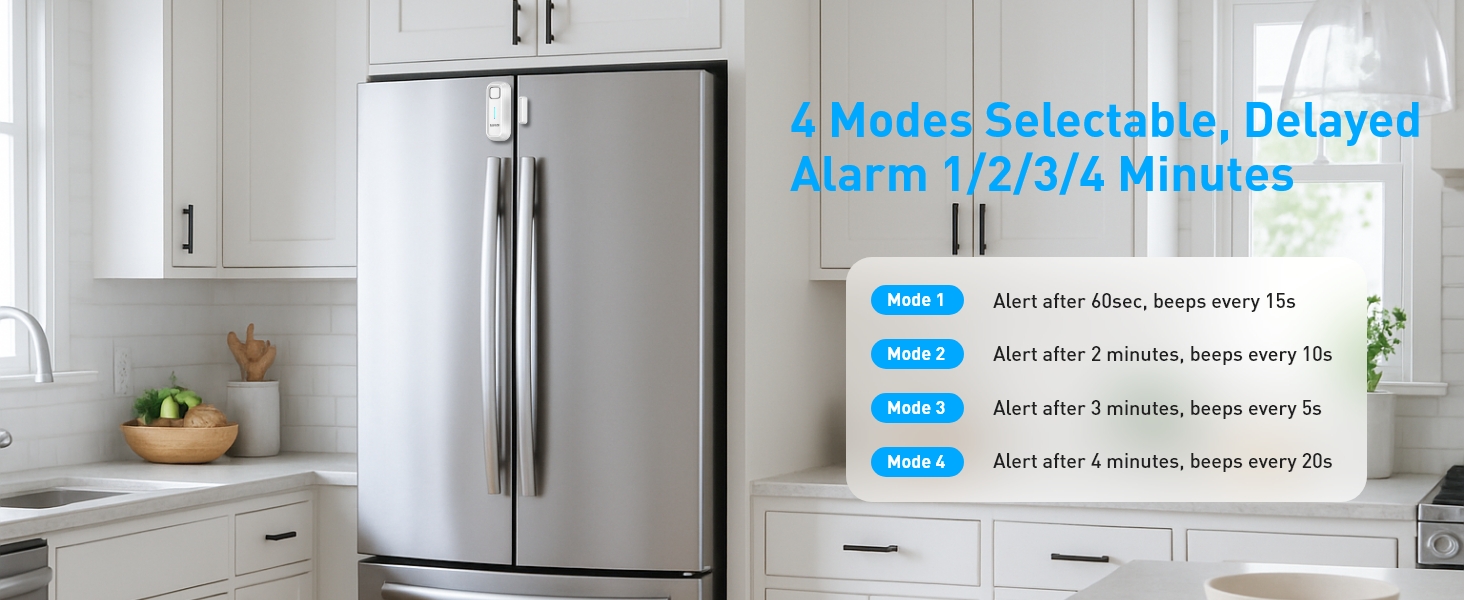
Figure 3: Recommended Installation Positions and Gap Requirements
작동 지침
1. Ringtone and Mode Selection:
Use the 'Chime/Alarm/OFF' switch on the side of the main unit to select the desired sound mode:
- 차임 모드: A gentle reminder sound.
- 알람 모드 : A loud alert sound.
- OFF : Turns the device off, no sound will be made.
2. 볼륨 조정:
The alarm features 5 adjustable volume levels (0-120dB). Use the 'Volume' button on the side to cycle through the volume settings until you reach your preferred level.

Figure 4: Adjustable Volume Levels
3. Delay Mode Selection:
The alarm offers four delay modes, allowing you to choose how long the door can remain open before the alert sounds. Press the 'SET Key' button to cycle through the modes.
Video 2: Functional Adjustment Demonstration. This video illustrates how to switch between chime and alarm modes, adjust volume, and select different delay modes.
작업 모드
The Daytech Freezer Door Alarm offers four distinct working modes, each with a different delay duration and alert pattern:
| 방법 | 지연 시간 | 경고 패턴 |
|---|---|---|
| 모드 1 | 1 minute (60 seconds) | Alarm/Chime sounds for 5 seconds every 15 seconds. |
| 모드 2 | 2분(120초) | Alarm/Chime sounds for 10 seconds every 10 seconds. |
| 모드 3 | 3분(180초) | Alarm/Chime sounds for 15 seconds every 5 seconds. |
| 모드 4 | 4분(240초) | Alarm/Chime sounds for 20 seconds every 15 seconds. |

그림 5: 이상view of Working Modes
배터리 교체
The Daytech Freezer Door Alarm requires 2 AAA batteries. When the batteries are low, the alarm's performance may be affected. Replace batteries as follows:
- Slide the battery cover on the back of the main unit downwards to open.
- 오래된 AAA 배터리를 제거하세요.
- 올바른 극성(+/-)을 확인하여 새 AAA 배터리 2개를 삽입합니다.
- 딸깍 소리가 날 때까지 배터리 덮개를 다시 제자리에 밀어 넣습니다.

그림 6: 배터리 교체 단계
문제 해결
If you encounter issues with your Daytech Freezer Door Alarm, refer to the following troubleshooting guide:
| 문제 | 가능한 원인 | 해결책 |
|---|---|---|
| Alarm does not sound when door is open. | 1. Device is OFF. 2. 배터리 잔량이 부족하거나 잘못 설치되었습니다. 3. Magnet and main unit are too far apart. | 1. Ensure the 'Chime/Alarm/OFF' switch is set to Chime or Alarm mode. 2. 배터리를 교체하고 극성을 확인하십시오. 3. Re-position the main unit and magnet to ensure the gap is less than 0.98 inches (2.5 cm) when the door is closed. |
| Alarm sounds too frequently or falsely triggers. | 1. Magnet and main unit are too close or misaligned. 2. Delay mode is set too short. | 1. Adjust the position of the magnet and main unit to ensure proper alignment and a slight gap when the door is closed. 2. Select a longer delay mode using the 'SET Key'. |
| 볼륨이 너무 낮거나 너무 높습니다. | 음량 설정이 최적화되지 않았습니다. | Adjust the volume using the 'Volume' button on the side of the main unit. |
명세서
| 특징 | 세부 사항 |
|---|---|
| 모델 번호 | USR-1 |
| 치수 | 3.9 x 1.6 x 0.86인치(100 x 40 x 22mm) |
| 품목 무게 | 3.34 온스 |
| 전원 | 배터리 구동 |
| 필요한 배터리 | AAA 배터리 2개 (포함) |
| 배터리 유형 | 알칼리성 |
| 소음 수준 | 최대 120데시벨 |
| 장착 유형 | 도어 마운트 |
| 센서 기술 | 접촉 센서 |
| 호환 장치 | Home Security System (general) |
| 색상 | 하얀색 |
보증 및 지원
Daytech products are manufactured to high-quality standards. For warranty information or technical support, please refer to the contact details provided with your purchase or visit the official Daytech web사이트. 구매 증빙 자료로 구매 영수증을 보관하세요.


