1. 서론
This manual provides comprehensive instructions for the installation, operation, and maintenance of your CORN 1300Mbps USB Wifi Adapter. This device offers high-speed dual-band wireless connectivity for your computer, supporting both 2.4GHz and 5.8GHz frequencies.

Image: The CORN 1300Mbps USB Wifi Adapter featuring its rotatable 5dBi antenna, capable of 90 and 360-degree adjustments for optimal signal reception.
2. 패키지 내용
아래 나열된 모든 품목이 패키지에 포함되어 있는지 확인하세요.
- 1300Mbps USB WiFi 어댑터
- One Detachable 5dBi Antenna
- 사용자 설명서
- CD 드라이버
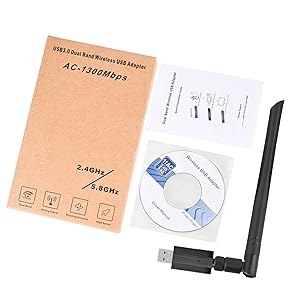
Image: Contents of the product package, showing the USB WiFi adapter, detachable antenna, user manual, and driver CD.
3. 주요 특징
- Dual Band 802.11ac: Supports up to 1300Mbps Wi-Fi speeds (867Mbps on 5GHz and 400Mbps on 2.4GHz) for reduced latency during streaming and gaming.
- Detachable 5dBi Antenna with Beamforming+ Technology: High-gain, long-range antenna designed to improve connectivity even in areas with weak signals.
- 초고속 USB 3.0: Offers data transfer rates up to 5.8Gbps, which is 10 times faster than USB 2.0, ensuring maximum throughput and a stable internet connection. It is also backward compatible with USB 2.0 and 1.1 devices.
- 폭넓은 호환성: Compatible with Windows 11/10/8/8.1/7/Vista/XP/2000 and Mac OS 10.9-10.15. (Note: Not compatible with Mac OS 11.1 or newer versions, Linux, or TV operating systems).
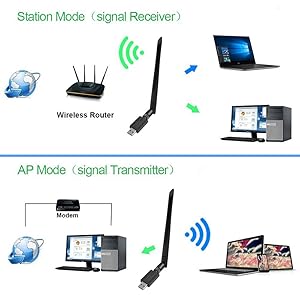
Image: Illustration of the 5dBi high gain antenna's enhanced signal penetration and coverage, demonstrating its ability to transmit through obstacles.

Image: Details on the secure technology, highlighting the 5dBi oxygen-free copper antenna for stable signal and WPS (Wi-Fi Protected Setup) for one-key encryption.

Image: A visual comparison demonstrating the superior speed of USB 3.0 (5120Mbps) compared to USB 2.0 (480Mbps).
4. 설정 가이드
4.1 하드웨어 설치
- Gently attach the 5dBi antenna to the USB Wifi Adapter by screwing it into the connector.
- Plug the USB Wifi Adapter into an available USB 3.0 port on your computer. For optimal performance, use a USB 3.0 port if available.

Image: The USB Wifi Adapter connected to a laptop, illustrating its compact design and antenna.
4.2 드라이버 설치
The installation process varies depending on your operating system:
- Windows 11/10의 경우: No drivers are required. The adapter is plug-and-play. Your system should automatically detect and install the necessary drivers.
- For Windows 8/8.1/7/Vista/XP/2000 and Mac OS 10.9-10.15:
- 제공된 CD 드라이버를 컴퓨터의 CD-ROM 드라이브에 넣으십시오.
- 화면의 지시에 따라 드라이버를 설치하십시오.
- If your computer does not have a CD-ROM drive, please visit the CORN support website (if available) to download the latest drivers.
- 설치 후 메시지가 나타나면 컴퓨터를 다시 시작하십시오.
5. 사용 설명서
5.1 Wi-Fi 네트워크에 연결하기
- Once the adapter is installed and drivers are recognized, open your computer's network settings.
- Locate the list of available wireless networks.
- Select your desired Wi-Fi network (SSID) and click 'Connect'.
- 메시지가 나타나면 네트워크 보안 키(비밀번호)를 입력하세요.
- The adapter will connect to the network, and you should have internet access.
5.2 듀얼 밴드 작동
The adapter supports both 2.4GHz and 5.8GHz (often displayed as 5GHz) frequency bands. You can choose the band that best suits your needs:
- 2.4GHz 대역: Offers wider coverage and better penetration through walls, suitable for general browsing and devices further from the router.
- 5.8GHz 대역: Provides faster speeds and less interference, ideal for high-bandwidth activities like online gaming and HD video streaming, especially when closer to the router.
5.3 Operating Modes (Station Mode & AP Mode)
The adapter can function in two primary modes:
- Station Mode (Signal Receiver): The adapter acts as a client, connecting your computer to an existing wireless router to access the internet. This is the most common use case.
- AP Mode (Signal Transmitter): The adapter can create a Wi-Fi hotspot, allowing other devices to connect to your computer's internet connection. This requires specific software configuration on your computer.
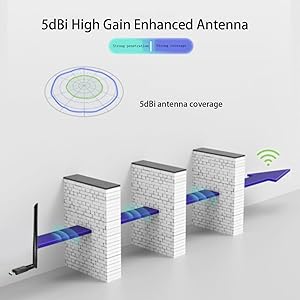
Image: A diagram illustrating the two operational modes: Station Mode, where the adapter receives Wi-Fi from a router, and AP Mode, where it transmits Wi-Fi from a modem-connected computer.
6. 유지관리
To ensure the longevity and optimal performance of your CORN USB Wifi Adapter, follow these maintenance guidelines:
- 어댑터를 깨끗하고 먼지가 없는 상태로 유지하세요. 청소 시에는 부드럽고 마른 천을 사용하세요.
- 어댑터를 극한의 온도, 습도 또는 직사광선에 노출시키지 마세요.
- 어댑터를 떨어뜨리거나 물리적 충격을 가하지 마십시오.
- 안테나가 단단히 고정되었는지 확인하되 너무 세게 조이지 마십시오.
- When not in use for extended periods, consider unplugging the adapter.
7. 문제 해결
If you encounter issues with your CORN USB Wifi Adapter, please refer to the following common solutions:
- Wi-Fi 연결 없음:
- 어댑터가 USB 포트에 안전하게 꽂혀 있는지 확인하세요.
- Verify that the drivers are correctly installed (refer to Section 4.2).
- 컴퓨터의 Wi-Fi가 켜져 있는지 확인하세요.
- 컴퓨터와 무선 라우터를 다시 시작하세요.
- 인터넷 속도가 느립니다:
- Ensure you are connected to the appropriate Wi-Fi band (5GHz for faster speeds, if available).
- 무선 라우터에 더 가까이 이동하면 신호 강도가 향상됩니다.
- 다른 전자 장치의 간섭을 확인하십시오.
- 라우터의 펌웨어를 업데이트하세요.
- Adapter Not Recognized / Driver Issues:
- Try plugging the adapter into a different USB port, preferably a USB 3.0 port.
- Reinstall the drivers from the provided CD or the manufacturer's web대지.
- Ensure your operating system is supported (Mac OS 11.1+ and Linux are not supported).
- Check Device Manager (Windows) or System Information (Mac) to see if the adapter is listed without errors.
- 간헐적인 연결:
- Adjust the antenna's position for better signal reception.
- Ensure there are no physical obstructions between the adapter and the router.
- Check for conflicting network adapters or software.
8. 사양
| 모델 번호 | 5Bdi-1200Mbps USB wifi adapter |
| 하드웨어 인터페이스 | USB 3.0 |
| 데이터 전송 속도 | 초당 1300메가비트(Mbps) |
| 데이터 링크 프로토콜 | IEEE 802.11ac |
| 주파수 대역 | 2.4GHz, 5.8GHz |
| 안테나 이득 | 5dBi |
| 호환 장치 | Laptop, Desktop, PC |
| 지원되는 OS | Windows 11/10/8/8.1/7/Vista/XP/2000, Mac OS 10.9-10.15 |
| 제품 치수 | 0.75 x 0.49 x 0.06 inches (Adapter body) |
| 품목 무게 | 2.4 온스 |
| 색상 | 검은색 |
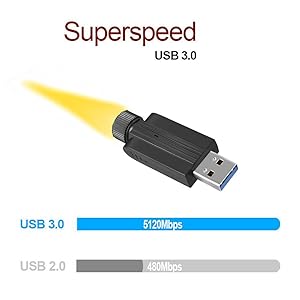
Image: Detailed dimensions of the USB Wifi Adapter, including the USB connector width, adapter body length, and total length with the antenna.
9. 보증 정보
Specific warranty details for this product may vary by region and retailer. Please refer to the warranty card included in your package or contact your point of purchase for detailed warranty terms and conditions.
10. 고객 지원
For further assistance, technical support, or inquiries regarding your CORN 1300Mbps USB Wifi Adapter, please contact the retailer or manufacturer directly. Refer to the product packaging or the manufacturer's official web연락처 정보 사이트.


