소개
This manual provides essential information for setting up, operating, and maintaining your HP Essential 17t Laptop TPN-I139. Please read these instructions carefully to ensure proper use and to maximize the lifespan of your device.
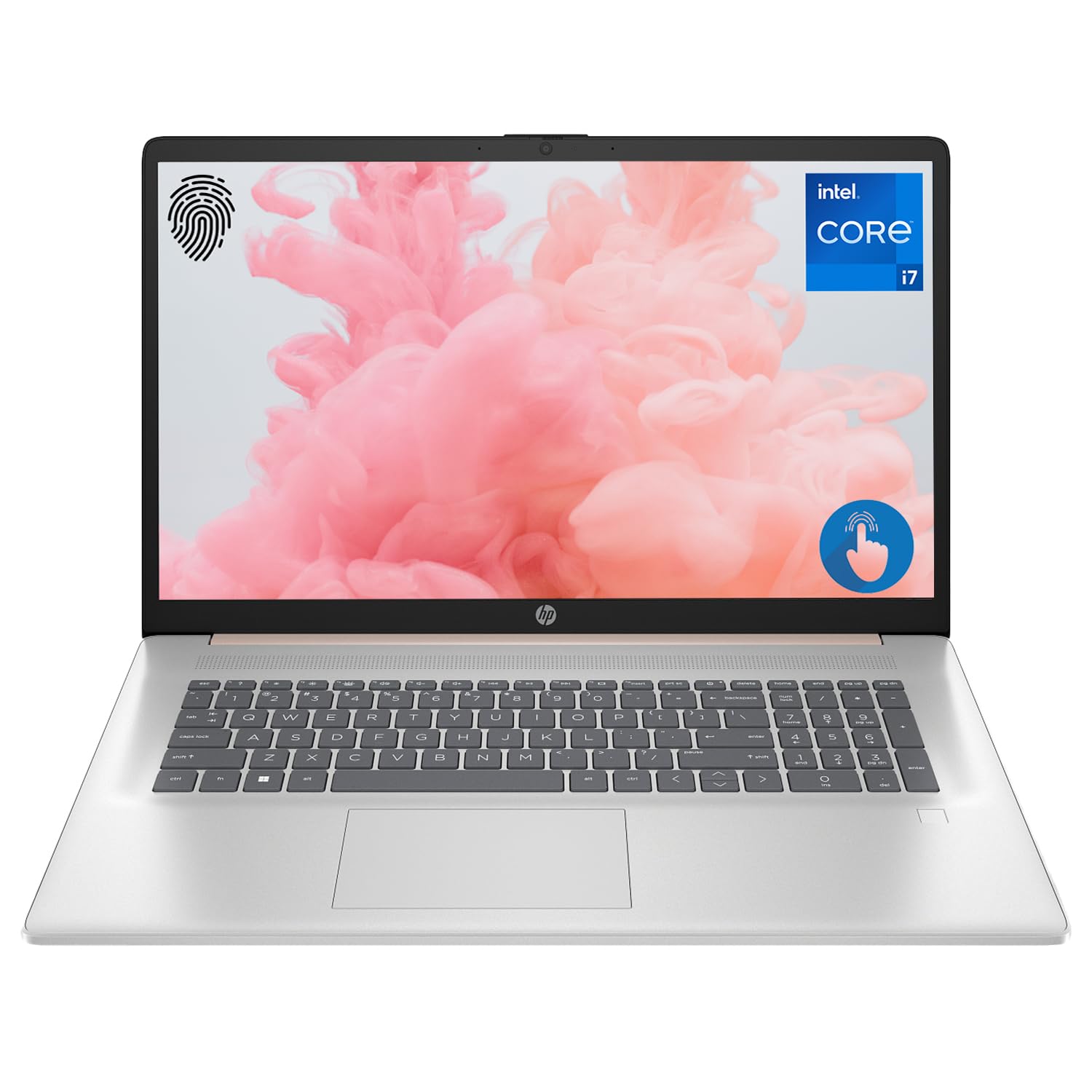
Figure 1: HP Essential 17t Laptop
The HP Essential 17t Laptop is designed for productivity and everyday use, featuring a 17.3-inch HD+ touchscreen, an Intel Core i7-1355U processor, 64GB of RAM, and a 2TB SSD. It comes pre-installed with Windows 11 Home.
시작하기
1. 상자 안에 무엇이 들어있나요?
- HP Essential Touchscreen Laptop
- AC 전원 어댑터
- 빠른 시작 가이드(포함된 경우)
2. 초기 전원 켜기 및 설정
- AC 전원 어댑터를 노트북과 전원 콘센트에 연결하세요.
- 노트북 덮개를 열고 일반적으로 키보드 데크에 있는 전원 버튼을 누릅니다.
- 화면의 지시에 따라 Windows 11 Home 설치를 완료하세요. 여기에는 지역 선택, Wi-Fi 네트워크 연결, 사용자 계정 생성 및 사용권 계약 동의가 포함됩니다.

Figure 2: Windows 11 Home Interface
하드웨어 오버view
포트 및 커넥터
Familiarize yourself with the various ports on your laptop for connecting external devices.

그림 3: 노트북 포트 및 커넥터
- 슈퍼스피드 USB 타입 A (5Gbps 신호 전송 속도): 마우스, 키보드, 외장 드라이브 등 USB 장치를 연결하는 데 사용됩니다.
- HDMI 1.4b: 외부 디스플레이나 프로젝터에 연결합니다.
- 슈퍼스피드 USB 타입 C(5Gbps 신호 전송 속도): 데이터 전송 및 호환 장치 연결을 위한 다용도 포트입니다.
- 헤드폰/마이크 콤보 잭(3.5mm): 헤드폰, 외장 스피커 또는 마이크가 내장된 헤드셋을 연결하는 데 사용합니다.
키보드 및 터치패드
The laptop features a full-size backlit keyboard for comfortable typing in various lighting conditions and a responsive touchpad for navigation.
표시하다
Your HP Essential 17t Laptop is equipped with a 17.3-inch HD+ (1600 x 900) touchscreen display, offering intuitive interaction with Windows 11.

Figure 4: 17.3" HD+ Touchscreen Display
노트북 작동하기
전원 관리
- 전원 켜기/끄기: 노트북을 켜려면 전원 버튼을 누르세요. 종료하려면 시작 버튼을 클릭한 다음 전원 > 종료를 클릭하세요.
- 수면 모드 : Close the lid or click the Start button, then Power > Sleep to put the laptop into a low-power state.
- 배터리 관리 : The laptop supports battery fast charge, reaching approximately 50% charge in 45 minutes. For optimal battery health, avoid consistently draining the battery to 0% or keeping it at 100% for extended periods.
터치스크린 사용
Interact with your laptop directly on the screen using touch gestures. Common gestures include tapping to select, pinching to zoom, and swiping to scroll.
지문 판독기 사용
The integrated fingerprint reader allows for secure and quick login. Set up your fingerprints through Windows Hello in the Windows Settings app (Accounts > Sign-in options).
Wi-Fi에 연결
To connect to a wireless network, click the Wi-Fi icon in the taskbar, select your desired network, and enter the password if prompted. The laptop supports Wi-Fi 6 for fast and reliable wireless connectivity.
생산성 기능
This laptop integrates Copilot + AI capabilities to enhance productivity. These features can assist with scheduling, drafting emails, summarizing documents, and more, streamlining your workflow.

Figure 5: Copilot + AI for Enhanced Productivity
유지 보수 및 관리
노트북 청소
- 부드럽고 털이 없는 천을 살짝 사용하세요.amp물이나 화면 세척제를 사용하여 디스플레이를 청소합니다.
- 키보드와 본체는 부드럽고 마른 천으로 닦으십시오. 강한 화학 약품이나 연마재는 사용하지 마십시오.
- 청소하기 전에 노트북의 전원이 꺼져 있고 플러그가 뽑혀 있는지 확인하세요.
소프트웨어 업데이트
시스템에 최신 보안 패치와 성능 향상이 적용되도록 정기적으로 Windows 업데이트를 확인하고 설치하세요. 설정 > Windows 업데이트로 이동하세요.
문제 해결
노트북에 문제가 발생하면 다음의 기본 문제 해결 단계를 시도해 보세요.
- 전원 없음: AC 어댑터가 노트북과 작동하는 콘센트에 제대로 연결되어 있는지 확인하십시오. 다른 콘센트에 연결해 보세요.
- 디스플레이 문제: 화면이 나오지 않으면 외부 모니터를 연결하여 노트북 디스플레이에 문제가 있는지 확인해 보세요.
- Wi-Fi 연결: Restart your router and modem. Ensure Wi-Fi is enabled on your laptop.
- 느린 성능: Close unnecessary applications. Check for available Windows updates.
더 복잡한 문제는 HP 지원을 참조하세요. web사이트를 방문하거나 HP 고객 서비스에 문의하세요.
명세서
Below are the key technical specifications for the HP Essential 17t Laptop TPN-I139:

Figure 6: Intel Core i7-1355U Processor
| 특징 | 사양 |
|---|---|
| 모델명 | 티피엔-I139 |
| 프로세서 | 13세대 Intel Core i7-1355U(10코어, 12스레드, 최대 5.0GHz) |
| 숫양 | 64GB DDR4 SDRAM(3200MHz) |
| 저장 | 2TB PCIe NVMe M.2 SSD |
| 표시하다 | 17.3" HD+ (1600 x 900) Touchscreen, BrightView, 250니트 |
| 제도법 | 인텔 아이리스 Xe 그래픽 |
| 운영 체제 | 윈도우 11 홈 |
| 무선 연결 | 와이파이 6(802.11ax) |
| 포트 | 1x SuperSpeed USB Type-C (5Gbps), 2x SuperSpeed USB Type-A (5Gbps), 1x HDMI 1.4b, 1x Headphone/Microphone Combo |
| 특별 기능 | 백라이트 키보드, 지문 판독기 |
| 치수(길이x너비x높이) | 15.78 x 10.15 x 0.78 인치 |
| 무게 | 5.25파운드 |

Figure 7: Intel Iris Xe Graphics
보증 및 지원
Your HP Essential 17t Laptop comes with a standard manufacturer's warranty. For detailed warranty terms and conditions, please refer to the documentation included with your product or visit the official HP support website. For technical assistance, driver downloads, or service requests, please contact HP customer support directly.
제품 끝view 동영상
이 영상을 시청하여 시각적으로 살펴보세요.view of the HP Essential 17t Laptop's features and capabilities.
Video 1: HP Essential 17 Touchscreen 13th Gen i7 Laptop Overview by PCOnline US. This video highlights key features and design aspects of the laptop.