1. 서론
This manual provides detailed instructions for the setup, operation, and maintenance of your boAt Aavante Bar 490 Bluetooth Soundbar. Please read this manual thoroughly before using the product to ensure proper functionality and to maximize your audio experience.

Image 1.1: The boAt Aavante Bar 490 Bluetooth Soundbar in Classic Black.
2. 패키지 내용
아래 나열된 모든 품목이 패키지에 포함되어 있는지 확인하세요.
- boAt Aavante Bar 490 사운드바
- 충전 케이블
- 사용 설명서 (본 문서)
- 보증 카드
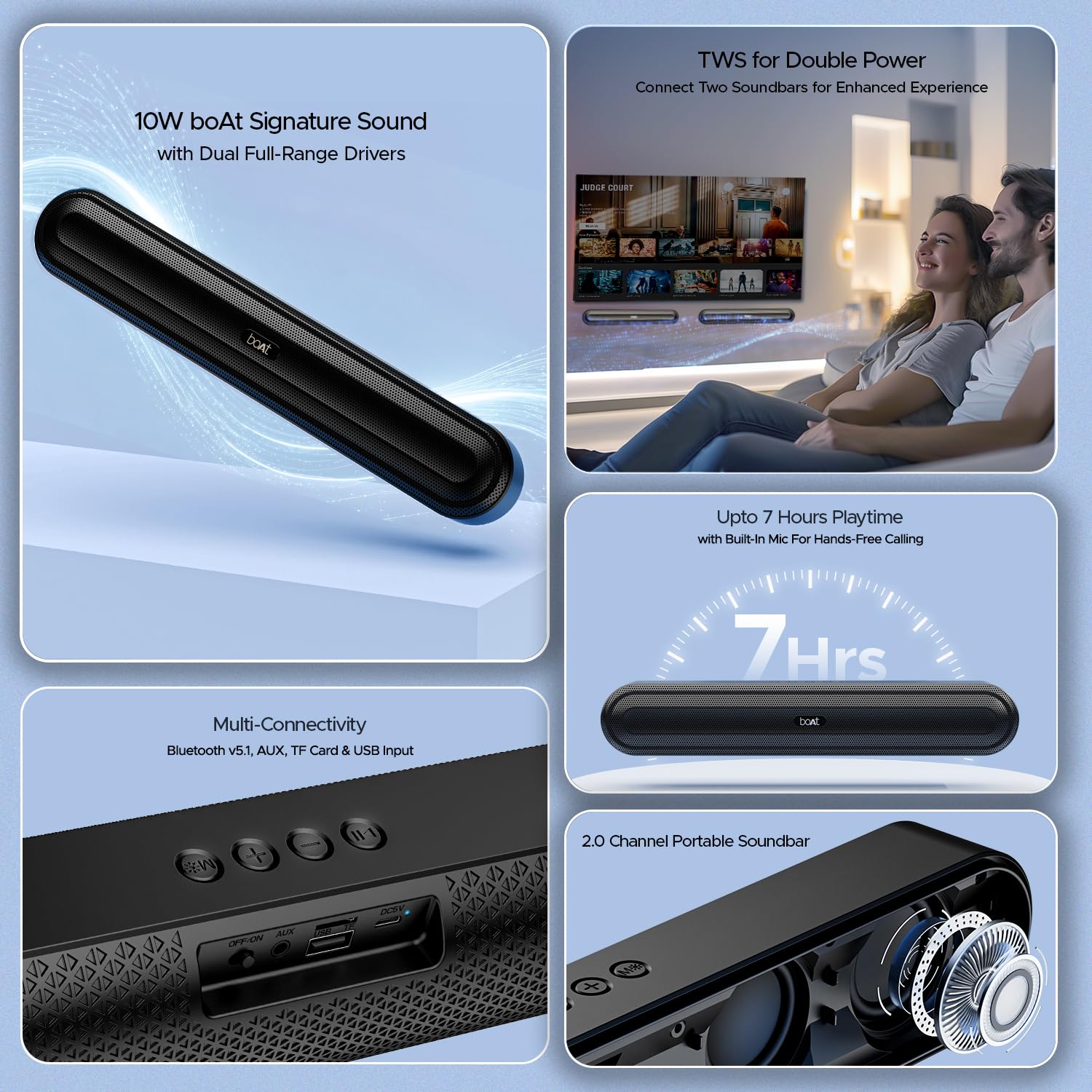
이미지 2.1: 이상view of the boAt Aavante Bar 490 and its key features, including package contents.
3. 제품 오버view
3.1. 제어 및 포트
Familiarize yourself with the control buttons and connectivity ports on your Aavante Bar 490.

이미지 3.1: 클로즈업 view of the control buttons and multi-connectivity ports (Bluetooth v5.1, AUX, TF Card, USB Input) on the soundbar.
- 전원 버튼: 길게 눌러 전원을 켜거나 끕니다. 짧게 눌러 모드를 전환하세요.
- 볼륨 낮추기(-): 볼륨을 낮추세요.
- 볼륨 높이기(+): 볼륨을 높이세요.
- 재생/일시 정지 버튼: 음악 재생/일시정지. 전화 수신/종료.
- 모드 버튼(M): Switch between input modes (Bluetooth, AUX, USB, TF Card).
- 끄기/켜기 스위치: 주 전원 스위치.
- AUX 포트 : 유선 오디오 연결용.
- USB 포트: USB 드라이브 재생용입니다.
- TF 카드 슬롯 : TF 카드 재생용입니다.
- DC5V 포트: 장치를 충전합니다.
4. 설정
4.1. 사운드바 충전하기
Before first use, fully charge the soundbar. Connect the provided charging cable to the DC5V port on the soundbar and the other end to a compatible USB power adapter (not included). The LED indicator will show charging status and turn off when fully charged. A full charge provides up to 7 hours of playback.

Image 4.1: The boAt Aavante Bar 490 highlighting its up to 7 hours of playtime on a single charge.
4.2. 전원 켜기/끄기
- Ensure the OFF/ON switch at the back is in the "ON" position.
- Press and hold the Power button on the top panel for 3 seconds to power on the soundbar.
- 전원을 끄려면 전원 버튼을 3초 동안 다시 길게 누르세요.
4.3. 블루투스 페어링
- Power on the soundbar. It will automatically enter Bluetooth pairing mode (indicated by a flashing LED).
- 기기(스마트폰, 태블릿 등)에서 Bluetooth를 활성화하고 사용 가능한 기기를 검색하세요.
- Select "Aavante Bar 490" from the list.
- 페어링이 완료되면 LED 표시등이 파란색으로 켜지고 확인음이 들립니다.
The soundbar supports Bluetooth v5.1 for stable and efficient wireless connection up to 10 meters.
4.4. TWS(True Wireless Stereo) 페어링
For an enhanced stereo experience, you can pair two Aavante Bar 490 soundbars together.
- Ensure both Aavante Bar 490 units are powered on and in Bluetooth pairing mode (not yet connected to any device).
- On one of the soundbars, double-press the Mode button (M). It will search for the other unit.
- Once successfully paired, you will hear a confirmation tone, and the LED indicators on both units will synchronize.
- Now, connect your device to one of the paired soundbars via Bluetooth as described in Section 4.3. Both soundbars will play audio in stereo.

Image 4.2: Illustration of two boAt Aavante Bar 490 soundbars connected via TWS for an enhanced audio experience.
4.5. Other Connectivity Modes
Press the Mode button (M) to cycle through the following input options:
- AUX 모드 : 3.5mm AUX 케이블을 사용하여 오디오 장치를 AUX 포트에 연결하십시오.
- USB 모드 : Insert a USB flash drive into the USB port. The soundbar will automatically play audio files.
- TF 카드 모드 : Insert a TF (microSD) card into the TF card slot. The soundbar will automatically play audio files.
5. 사용 설명서
5.1. 음악 재생
- 재생/일시 중지: 재생/일시 정지 버튼을 짧게 누릅니다.
- 볼륨 조절: 볼륨 높이기(+) 또는 볼륨 낮추기(-) 버튼을 짧게 누릅니다.
- 다음 트랙: 볼륨 높이기(+) 버튼을 길게 누릅니다.
- 이전 트랙 : 볼륨 낮추기(-) 버튼을 길게 누릅니다.
5.2. 핸즈프리 통화
블루투스로 연결하면 내장 마이크를 통해 핸즈프리 통화가 가능합니다.
- 전화 받기: 재생/일시 정지 버튼을 짧게 누릅니다.
- 통화 종료: 통화 중에 재생/일시 정지 버튼을 짧게 누르세요.
- 전화 거부: 재생/일시정지 버튼을 길게 누르세요.
6. 유지관리
- Keep the soundbar away from water, moisture, and extreme temperatures.
- 부드럽고 마른 천으로 기기를 닦으세요. 연마성 세제나 용제는 사용하지 마세요.
- 사운드바를 떨어뜨리거나 강한 충격을 가하지 마십시오.
- 장기간 사용하지 않을 때에는 시원하고 건조한 곳에 보관하세요.
7. 문제 해결
| 문제 | 가능한 원인 | 해결책 |
|---|---|---|
| 사운드바 전원이 켜지지 않습니다. | Low battery; OFF/ON switch is off. | Charge the soundbar; ensure OFF/ON switch is in the "ON" position. |
| 블루투스로 페어링할 수 없습니다. | Soundbar not in pairing mode; device Bluetooth is off; too far from device. | Ensure soundbar is in pairing mode; enable Bluetooth on your device; move closer to the soundbar (within 10m). |
| 소리가 나지 않습니다. | 볼륨이 너무 낮음; 입력 모드가 올바르지 않음; 케이블이 제대로 연결되지 않음. | Increase volume; switch to correct input mode (Bluetooth, AUX, USB, TF); check cable connections. |
| TWS 페어링이 실패합니다. | One or both units already connected to a device; units too far apart. | Disconnect both units from any Bluetooth devices; ensure they are close to each other during TWS pairing. |
8. 사양
- 모델 이름: 아반떼 바 490
- 스피커 유형: 사운드바
- 오디오 출력: 2.0채널
- 출력 전력: 10W RMS
- 운전자: Dual Full-Range Drivers
- 블루투스 버전: v5.1
- 블루투스 범위 : 최대 10미터
- 연결성: 블루투스, AUX, USB, TF 카드
- 배터리 수명: 최대 7시간
- 배터리 유형: 리튬 폴리머(1 x 12V 포함)
- 내장 마이크: 예 (핸즈프리 통화용)
- 제어 방법: 터치 버튼
- 제품 크기: 38.7D x 6.5W x 5.5H 센티미터
- 품목 무게: 650그램

Image 8.1: Dimensions of the boAt Aavante Bar 490 soundbar.
9. 보증 및 지원
The boAt Aavante Bar 490 comes with a standard 1년 한정 보증 구매일로부터. 자세한 약관은 동봉된 보증서를 참조하세요.
For technical support, service, or warranty claims, please contact boAt customer service:
- 이메일: info@imaginemarketingindia.com
- 제조업체: 이매진 마케팅 리미티드
- 주소: 단위 번호 204 & 205, 2층, D-wing & E-wing, Corporate Avenue, Andheri Ghatkopar Link Road, Mumbai, Maharashtra-400093, India
You can also download the boAt Hearables App for additional features and user guides. Scan the QR code below:

Image 9.1: QR code to download the boAt Hearables App for additional features and support.
10. 제품 비디오
비디오 10.1: 짧은 사전view 쇼씨asing the boAt Aavante Bar 490 Bluetooth Soundbar's features, including 10W RMS sound, dual full-range drivers, 7 hours playback, multi-connectivity, and hands-free calling. This video is provided by the seller.
비디오 10.2: 간략한 설명view of the boAt Aavante Bar 490, highlighting its 10W RMS Signature Sound, dual drivers, and Bluetooth 5.1 connectivity. This video is provided by the seller.


