1. 서론
This manual provides detailed instructions for the setup, operation, maintenance, and troubleshooting of your CUPEISI YQ10S MAX Android 15 Tablet. Please read this manual thoroughly before using your device to ensure proper functionality and to maximize your user experience. Keep this manual for future reference.

Image 1.1: CUPEISI YQ10S MAX Android 15 Tablet with included accessories (keyboard, mouse, stylus, and protective case).
2. 패키지 내용
아래 나열된 모든 품목이 제품 패키지에 들어 있는지 확인하세요.
- CUPEISI YQ10S MAX Android 15 Tablet
- 무선 키보드
- 블루투스 마우스
- Foldable Protective Cover
- 첨필
- C타입 케이블
- 충전기
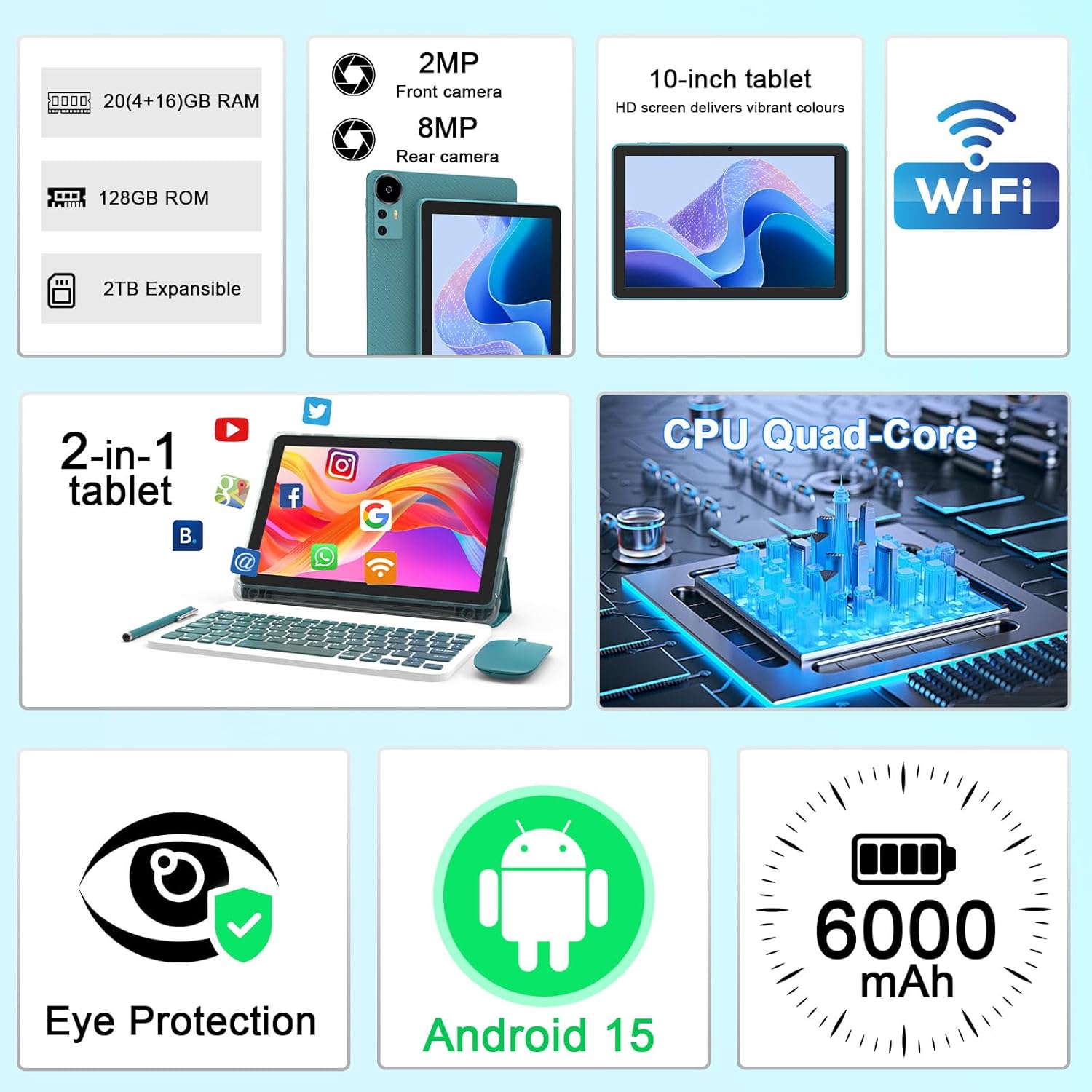
이미지 2.1: 이상view of key features and included components.
3. 초기 설정
3.1 전원 켜기/끄기
- 전원을 켜려면: 태블릿 측면에 있는 전원 버튼을 화면이 켜질 때까지 길게 누르세요.
- 전원을 끄려면: 전원 버튼을 길게 누른 다음, 화면에 나타나는 옵션에서 '전원 끄기'를 선택하세요.
- 재시작하기 위해: 전원 버튼을 길게 누른 다음 옵션에서 '다시 시작'을 선택하세요.
3.2 태블릿 충전
처음 사용하기 전에 태블릿을 완전히 충전하십시오. 제공된 Type-C 케이블과 충전기를 사용하십시오.
- Type-C 케이블을 태블릿의 충전 포트에 연결합니다.
- 케이블의 다른 쪽 끝을 전원 어댑터에 연결합니다.
- 전원 어댑터를 벽면 콘센트에 꽂으세요.
- 화면의 배터리 아이콘은 충전 상태를 나타냅니다. 완전 충전에는 일반적으로 몇 시간이 소요됩니다.

Image 3.1: Battery and charging information.
3.3 액세서리 연결 (키보드, 마우스, 스타일러스)
The tablet supports Bluetooth connectivity for the included keyboard and mouse.
- 블루투스 활성화: 이동하다 설정 > 연결된 장치 > 블루투스 그리고 켜세요.
- 키보드/마우스 페어링: Put the keyboard or mouse into pairing mode (refer to their individual instructions if needed). Select the device name from the list of available Bluetooth devices on your tablet to pair.
- 첨필: 함께 제공되는 스타일러스는 일반적으로 페어링이 필요 없는 패시브 방식입니다. 화면에서 직접 탐색하거나 그림을 그리는 데 사용할 수 있습니다.
3.4 Wi-Fi 연결
Connect your tablet to a Wi-Fi network for internet access.
- 이동하다 설정 > 네트워크 및 인터넷 > 와이파이.
- Wi-Fi를 켜세요. 태블릿이 사용 가능한 네트워크를 검색합니다.
- 목록에서 원하는 네트워크를 선택하세요.
- 메시지가 표시되면 네트워크 비밀번호를 입력하고 탭합니다. 연결하다.
4. 기본 동작
4.1 Android 15 탐색
Your tablet runs on Android 15, offering an intuitive user interface. Swipe gestures, tap actions, and the navigation bar (Back, Home, Recents) are standard for interaction. The Google Mobile Services (GMS) certification ensures access to the Google Play Store and other Google applications.

이미지 4.1: 안드로이드 15 운영체제의 주요 기능.
4.2 디스플레이 설정
The 10.1-inch IPS display with 1280x800 resolution provides clear visuals. You can adjust display settings to suit your preferences:
- 명도: Adjust screen brightness from the quick settings panel or in 설정 > 표시하다.
- 읽기 모드: Enable 'Reading Mode' in display settings to reduce blue light emission, which can enhance comfort during extended reading sessions.
- 글자 크기 : Customize text size for better readability.

Image 4.2: Details of the 10.1-inch HD screen display.
4.3 스토리지 관리
The tablet features 128GB of internal storage and 20GB RAM (4GB physical + 16GB virtual expansion). Storage can be expanded up to 2TB using a microSD card (not included).
- 저장 공간 확인: 이동하다 설정 > 저장 에게 view 내부 및 외부 저장소 사용량.
- MicroSD 카드 삽입: Locate the microSD card slot on the tablet, insert the card gently until it clicks into place.

이미지 4.3: 저장 장치 및 RAM 구성.
4.4 카메라 사용
태블릿에는 8MP 후면 카메라와 2MP 전면 카메라가 장착되어 있습니다.
- 카메라 앱을 엽니다. 홈 화면이나 앱 서랍에서 카메라 아이콘을 탭하세요.
- 카메라 전환: 카메라 전환 아이콘을 사용하여 전면 카메라와 후면 카메라를 전환할 수 있습니다.
- 사진/동영상 촬영: 셔터 버튼을 탭하여 사진을 찍거나 비디오 녹화를 시작/중지하세요.

Image 4.4: Camera specifications and modes.
4.5 멀티미디어 재생
The tablet supports Widevine L1, enabling high-definition streaming from platforms like Netflix, Hulu, YouTube, and Prime Video.
- Ensure a stable internet connection for optimal streaming quality.
- Download streaming apps from the Google Play Store.

Image 4.5: Widevine L1 support for multimedia streaming.
4.6 멀티태스킹
Android 15 enhances multitasking capabilities. Use the 'Recents' button to switch between open applications or utilize split-screen mode for running two apps simultaneously.
- 분할 화면: From the 'Recents' view, tap the app icon at the top of an app's card and select 'Split screen'. Choose a second app to open alongside it.
- The included keyboard and mouse facilitate a laptop-like experience for productivity tasks.

Image 4.6: Tablet used in 2-in-1 mode with keyboard and mouse.
5. 관리 및 유지 보수
5.1 청소
- 부드럽고 보푸라기가 없는 천을 사용하여 태블릿의 화면과 본체를 닦으세요.
- 강한 화학 물질, 연마 세척제 또는 에어로졸 스프레이는 사용하지 마세요.
- 청소하기 전에 태블릿의 전원이 꺼져 있고 전원 플러그가 뽑혀 있는지 확인하십시오.
5.2 배터리 관리
- 태블릿을 극한의 온도(더위나 추위)에 노출시키지 마세요.
- 장시간 태블릿을 완전히 방전된 상태로 두지 마세요.
- 배터리 손상을 방지하기 위해 제공된 충전기와 케이블만 사용하십시오.
5.3 소프트웨어 업데이트
- 최적의 성능, 보안, 새로운 기능에 대한 액세스를 보장하려면 소프트웨어 업데이트를 정기적으로 확인하고 설치하세요.
- 이동하다 설정 > 체계 > 시스템 업데이트 사용 가능한 업데이트를 확인하세요.
6. 문제 해결
태블릿 사용 중 문제가 발생하면 다음의 일반적인 문제 및 해결 방법을 참조하십시오.
6.1 전원 문제
- 태블릿이 켜지지 않습니다: 배터리가 충전되었는지 확인하세요. 충전기를 연결하고 몇 분 정도 기다린 후 다시 전원을 켜보세요.
- Tablet freezes: 전원 버튼을 약 10~15초간 길게 눌러 강제로 다시 시작하세요.
6.2 연결 문제
- Wi-Fi가 연결되지 않음: Check if Wi-Fi is enabled in settings. Restart your router and the tablet. Ensure you are entering the correct password.
- Bluetooth 장치가 페어링되지 않음: Ensure the Bluetooth accessory is in pairing mode and within range. Restart Bluetooth on the tablet and try pairing again.
6.3 성능 지연
- 느린 성능: Close unused applications running in the background. Clear cache data for frequently used apps. Consider adding a microSD card for additional storage if internal storage is nearly full.
- 앱 충돌: Ensure apps are updated to their latest versions. Clear the app's cache and data (설정 > 앱 > [앱 이름] > 저장).
7. 제품 사양
| 특징 | 사양 |
|---|---|
| 상표 | 쿠페이시 |
| 모델명 | CP31M (Item model number: YQ10S MAX) |
| 운영 체제 | 안드로이드 15 |
| 화면 크기 | 10.1 인치 |
| 화면 해상도 | 1280 x 800 픽셀(HD) |
| 프로세서 | 2.0GHz 쿼드코어 |
| 숫양 | 20GB (실물 4GB + 확장 16GB) |
| 내부 저장소 | 128GB (XNUMX기가바이트) |
| 확장 가능한 스토리지 | Up to 2TB with microSD card (not included) |
| 무선형 | 802.11ax (Wi-Fi 6.0, 2.4G/5G) |
| 블루투스 | 비티 5.0 |
| 후방 카메라 | 8 MP |
| 전면 카메라 | 2 MP |
| 배터리 용량 | 6000mAh |
| 평균 배터리 수명 | 6~8시간 (사용량에 따라 다름) |
| 치수(길이x너비x높이) | 9.7 x 6.5 x 0.3 인치 |
| 품목 무게 | 0.176 온스 |
| 색상 | NavyBlue |
8. 보증 및 지원
For warranty information, please refer to the warranty card included in your product packaging or contact CUPEISI customer support directly. If you require technical assistance or have questions not covered in this manual, please reach out to our support team through the contact information provided with your purchase.


