1. 서론
This manual provides essential information for the safe and efficient operation of your ALLPOWERS R2500 Portable Power Station. Please read this guide thoroughly before using the product and retain it for future reference. The ALLPOWERS R2500 is a high-capacity portable power station designed to provide reliable power for various applications, including home backup, outdoor activities, camping, 그리고 RV 사용.
2. 안전 지침
- 장치를 분해, 수리 또는 개조하지 마십시오.
- 제품을 열원 근처나 장시간 직사광선에 노출시키지 마십시오.
- 비나 습기에 노출되지 않도록 하세요.
- 장치를 어린이와 애완동물의 손이 닿지 않는 곳에 두십시오.
- 사용 및 충전 시에는 적절한 환기를 유지하세요.
- 정품 또는 인증된 충전 케이블과 액세서리만 사용하세요.
- 화재 발생 시에는 분말소화기를 사용하세요. 물을 사용하지 마세요.
3. 패키지 내용
패키지에 모든 품목이 포함되어 있는지 확인하세요.
- ALLPOWERS R2500 휴대용 파워 스테이션 1개
- 1 x AC 충전 케이블
- 1 x Solar to XT60 Charging Cable
- 1 x 사용자 설명서
4. 제품 오버view
Familiarize yourself with the ALLPOWERS R2500's components and ports.

이미지: 앞면 view of the ALLPOWERS R2500 Portable Power Station, showcasing its robust design and various output ports.

Image: Diagram illustrating the various output ports of the ALLPOWERS R2500, including 4x 2500W AC outputs, 2x USB-A 12W, 2x USB-A 36W, 2x USB-C 200W, 2x 5525 120W, and 1x Car 120W output.
제어판 및 디스플레이
The front panel features a display screen that shows real-time information such as battery level, input/output wattage, and remaining run/charge time. Buttons are provided for power on/off, AC output, DC output, and other functions.
5. 발전소 충전
The ALLPOWERS R2500 offers multiple charging options:
빠른 충전 기능
The R2500 can be charged from 0% to 100% in approximately 1 hour using a combination of solar panels and wall outlets, thanks to its AP-Power technology.

Image: Illustration of various charging methods. Top: Combined wall outlet + solar charging (1 hour to 100% at 2000W max input). Bottom left: Wall outlet charging (1.3 hours at 1500W max input). Bottom center: Solar charging (2 hours at 1000W max input). Bottom right: Car charging (12V/24V input).
AC 벽 충전
Connect the provided AC charging cable to the power station's AC input port and then to a standard wall outlet. The display will indicate charging status.
태양열 충전
Connect compatible solar panels (not included) to the XT60 input port using the provided solar to XT60 charging cable. Ensure the solar panels are placed in direct sunlight for optimal charging efficiency.
자동차 충전
The R2500 can be charged via a 12V/24V car cigarette lighter socket. Use the appropriate car charging cable (not included) to connect the power station to your vehicle's power outlet.
6. Using the Power Station
The ALLPOWERS R2500 can power up to 13 devices simultaneously.
교류 출력
Press the AC power button to activate the AC outlets. Plug your devices into the 230V AC ports. The R2500 provides a pure sine wave output of 2500W (surge 4000W).

Image: A family using the ALLPOWERS R2500 to power kitchen appliances like an air fryer (1500W for 1.2 hours), coffee machine (1000W for 1.7 hours), electric drill (1080W for 1.5 hours), microwave (1300W for 1.3 hours), electric frying pan (1500W for 1.1 hours), hairdryer (1600W for 1 hour), water heater (1500W for 1.1 hours), and electric heater (2200W for 0.7 hours).
DC 출력
Press the DC power button to activate the DC ports, including USB-A, USB-C, DC5525, and the car cigarette lighter port. Connect your USB-powered devices or 12V DC appliances.

Image: The ALLPOWERS R2500 powering various home appliances, such as a refrigerator (800W for 2 hours), air conditioner (8000BTU for 2-4 hours), desktop computer (200W for 8.5 hours), heating blanket (120W for 14 hours), television (80W for 21 hours), and coffee machine (1000W for 1.7 hours), demonstrating its use during power outag에스.

Image: The ALLPOWERS R2500 powering outdoor appliances in a camping setting, including an electric frying pan (1500W for 1.1 hours), portable refrigerator (60W for 28 hours), hairdryer (800W for 2 hours), electric grill (1200W for 1.4 hours), projector (100W for 17 hours), and charging a phone 160 times.

Image: The ALLPOWERS R2500 powering various outdoor tools, such as a hammer drill (1500W for 1.1 hours), grinder (1400W for 1.2 hours), lawnmower (1300W for 1.3 hours), and welding machine (1800W for 50 minutes), illustrating its utility for outdoor work.
7. Smart Control Function
The ALLPOWERS R2500 can be controlled and monitored via the ALLPOWERS APP using Wi-Fi or Bluetooth connectivity.

Image: A smartphone displaying the ALLPOWERS app interface, showing power monitoring, function settings, and remote control capabilities for the R2500, with Bluetooth and Wi-Fi icons indicating connectivity.
에코 모드
The app allows you to activate Eco Mode, which extends standby time and minimizes battery degradation, helping to save energy costs.

Image: A smartphone screen showing the ALLPOWERS app's Eco Mode settings, allowing users to configure standby time to save energy and optimize battery life.
8. UPS Function (Uninterruptible Power Supply)
The R2500 features a UPS function with a switching time of less than 15 milliseconds, ensuring continuous power for sensitive devices during sudden power outag에스.

Image: A family watching TV, with the ALLPOWERS R2500 connected, illustrating its Uninterruptible Power Supply (UPS) function providing continuous power with a switchover time of less than 15ms.

Image: The ALLPOWERS R2500 acting as a UPS backup for a desktop computer setup, ensuring uninterrupted power supply for critical electronics.
9. 유지관리
배터리 관리
The R2500 uses a LiFePO4 battery, known for its long lifespan. It maintains over 80% capacity after 3500 charge cycles and over 50% after 6500 cycles, ensuring more than 10 years of use.
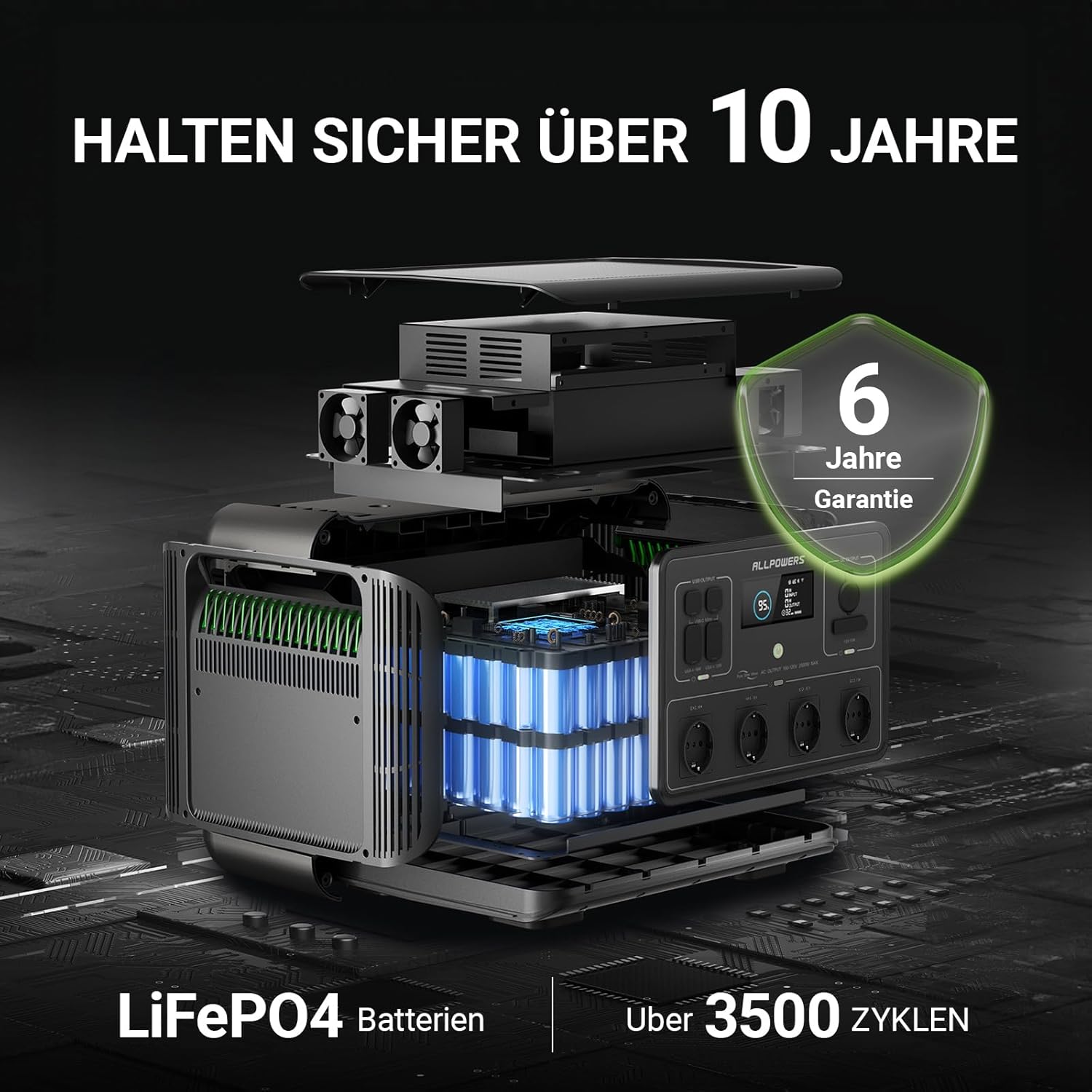
이미지: 폭발된 view of the ALLPOWERS R2500 highlighting its internal LiFePO4 battery, emphasizing its lifespan of over 10 years and more than 3500 charge cycles, along with a '6 Jahre Garantie' (6-year warranty) badge.

Image: An internal diagram of the ALLPOWERS R2500, showcasing the LiFePO4 battery cells and the Battery Management System (BMS), indicating a lifespan of over 10 years and more than 3500 safe cycles.
The integrated Battery Management System (BMS) protects against over-voltage, over-current, and over-temperature, ensuring safe operation.
저장
발전기는 서늘하고 건조한 곳에 직사광선과 극한 온도 변화를 피해 보관하십시오. 장기간 보관할 경우, 배터리 수명 유지를 위해 3~6개월마다 50~80%까지 충전하십시오.
청소
Wipe the exterior with a dry, soft cloth. Do not use abrasive cleaners or immerse the unit in water.
10. 문제 해결
- 장치가 켜지지 않음: Ensure the power button is pressed firmly. Check if the battery is completely depleted and try charging it.
- 포트에서 출력이 없습니다. Verify that the specific output (AC/DC/USB) is activated. Check the device you are trying to power for proper function.
- 느린 충전: Ensure all charging cables are securely connected. For solar charging, confirm panels are in direct sunlight and clean. Check the input wattag디스플레이에 e.
- 과부하 경고: If an overload warning appears, disconnect some devices to reduce the total power draw. The unit will automatically shut down to prevent damage.
- 앱 연결 문제: Ensure Wi-Fi or Bluetooth is enabled on your device and the power station. Try restarting both the app and the power station.
11. 사양
| 특징 | 사양 |
|---|---|
| 모델 | R2500-EU |
| 배터리 유형 | 인산철(LiFePO4) |
| 용량 | 2016Wh |
| 교류 출력 | 4 x 230V, 2500W (순수 정현파, 최대 4000W) |
| USB-C 출력 | 2 x 100W |
| USB-A 출력 | 4 x (various wattages, e.g., 12W, 36W) |
| DC5525 출력 | 2 개 |
| 자동차 시가 라이터 출력 | 1 x 12V/10A |
| 충전 입력 | AC, Solar, Car |
| 빠른 충전 시간 | 1 hour (0-100% with combined input) |
| 배터리 사이클 수명 | 3500+ cycles to >80% capacity, 6500+ cycles to >50% capacity |
| 치수 | 45.6 x 36 x 34.6cm |
| 무게 | 29kg |
| 특별 기능 | UPS Function (<15ms), Smart App Control (Wi-Fi/Bluetooth) |

Image: Diagram showing the dimensions of the ALLPOWERS R2500 Portable Power Station: 45.6 cm (length), 36 cm (width), and 34.6 cm (height).
12. 보증 및 지원
ALLPOWERS R2500 휴대용 파워 스테이션에는 다음과 같은 구성품이 포함되어 있습니다. 6년 보증. For technical support, warranty claims, or any product-related inquiries, please contact ALLPOWERS customer service through their official website or the retailer where the product was purchased. Please have your purchase receipt and product model number (R2500) ready when contacting support.


