1. 제품 오버view
The Vorago BSP-500-V2 is a portable Bluetooth speaker designed for robust performance and durability. It features IPX5 water resistance, making it suitable for various environments, including outdoor adventures and parties. This manual provides detailed instructions for setting up, operating, and maintaining your speaker.
주요 특징:
- True Wireless Stereo (TWS) Connectivity: Connect two BSP-500-V2 speakers for an immersive stereo sound experience.
- 배터리 수명 연장: Enjoy up to 7 hours of music playback at 70% volume, thanks to its 2000 mAh battery.
- USB Type-C 충전: Convenient and modern USB-C port for charging.
- 다양한 연결성: Supports Bluetooth for wireless streaming and a 3.5mm auxiliary input for wired connections.
- IPX5 방수 : 모든 방향에서 분사되는 저압의 물로부터 보호됩니다.
패키지 내용:
- Vorago BSP-500-V2 블루투스 스피커
- USB Type-C 충전 케이블
- 3.5mm 오디오 케이블
- 사용 설명서 (본 문서)
제품 다이어그램:

그림 1.1: 전면 view of the Vorago BSP-500-V2 Bluetooth speaker, showcasing its mesh grille and central Vorago logo.

그림 1.2: 각도 view of the speaker, highlighting its robust, rectangular design and integrated carrying strap.

그림 1.3: 상단 view showing the control panel with power, volume down, play/pause, and volume up buttons.
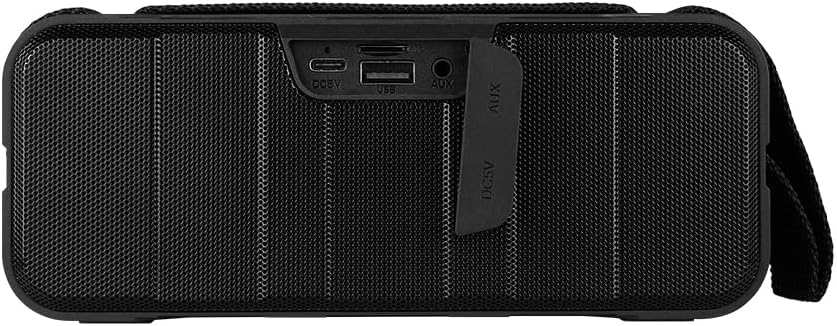
그림 1.4: 후면 view of the speaker, showing the protective flap covering the input ports.

Figure 1.5: Close-up of the input ports, including DC 5V (USB-C), USB-A, and AUX (3.5mm) inputs, protected by a rubber cover.
2. 안전 정보
- 스피커를 극한의 온도(더위나 추위)에 노출시키지 마세요.
- 스피커를 떨어뜨리거나 강한 충격을 주지 마십시오.
- Keep the speaker away from direct sunlight and heat sources.
- 스피커를 직접 분해, 수리 또는 개조하지 마십시오. 그렇게 할 경우 보증이 무효화됩니다.
- Ensure the port cover is securely closed when using the speaker near water to maintain IPX5 water resistance.
- Do not immerse the speaker in water. IPX5 rating protects against splashes and light rain, not submersion.
- 충전 시에는 제공된 충전 케이블 또는 인증된 USB Type-C 케이블만 사용하십시오.
- 부드럽고 마른 천으로 스피커를 닦으세요. 연마성 세제나 용제를 사용하지 마세요.
3. 설정
3.1 스피커 충전
- Open the protective rubber cover on the rear of the speaker to access the charging port.
- Connect the USB Type-C end of the charging cable to the speaker's DC 5V port.
- USB 케이블의 다른 쪽 끝을 USB 전원 어댑터(포함되지 않음) 또는 컴퓨터의 USB 포트에 연결합니다.
- 충전 중에는 충전 표시등이 켜지고, 완전히 충전되면 꺼집니다.
- Once charging is complete, securely close the protective rubber cover to maintain water resistance.
3.2 전원 켜기/끄기
- 전원을 켜려면: 를 누르고 계세요 전원 버튼 on the top panel for approximately 3 seconds until you hear an audible prompt.
- 전원을 끄려면: 를 누르고 계세요 전원 버튼 약 3초 동안 기다리면 음성 안내가 나옵니다.
3.3 블루투스 페어링
- 스피커 전원이 켜져 있는지 확인하십시오. LED 표시등이 깜빡이면서 자동으로 블루투스 페어링 모드로 전환됩니다.
- 기기(스마트폰, 태블릿, 노트북)에서 Bluetooth를 활성화하고 사용 가능한 기기를 검색하세요.
- Select "BSP-500-V2" from the list of found devices.
- Once successfully paired, the speaker will emit an audible confirmation, and the LED light will stop flashing and remain solid.
- 스피커의 전원을 켜면 해당 기기가 범위 내에 있고 Bluetooth가 활성화되어 있는 경우 마지막으로 페어링된 기기에 자동으로 다시 연결됩니다.
3.4 True Wireless Stereo(TWS) 페어링
TWS allows you to connect two BSP-500-V2 speakers together for a true stereo sound experience.
- Ensure both BSP-500-V2 speakers are powered on and not connected to any other Bluetooth device.
- 스피커 중 하나(기본 스피커)에서 버튼을 두 번 누르세요. 재생/일시정지 버튼스피커가 TWS 페어링 모드로 들어갑니다.
- The two speakers will automatically search for and connect to each other. You will hear an audible confirmation once they are successfully paired.
- TWS가 설정되면 섹션 3.3에 설명된 대로 Bluetooth를 통해 기기를 기본 스피커에 연결합니다.
- TWS 연결을 해제하려면 버튼을 두 번 누르세요. 재생/일시정지 버튼 양쪽 스피커에서.
3.5 보조(AUX) 연결
For devices without Bluetooth, you can use the 3.5mm audio cable.
- Open the protective rubber cover on the rear of the speaker.
- Connect one end of the 3.5mm audio cable to the speaker's AUX port.
- 케이블의 다른 쪽 끝을 기기의 오디오 출력 단자에 연결하십시오.
- 스피커가 자동으로 AUX 모드로 전환됩니다.
- Once disconnected, securely close the protective rubber cover.
4. 사용 설명서
4.1개 버튼 기능:
| 단추 | 기능(짧게 누르기) | 기능(길게 누름) |
|---|---|---|
| 전원 버튼 | 없음 | 전원 켜기/끄기 |
| 볼륨 낮추기 버튼 | 볼륨 감소 | 이전 트랙 |
| 재생/일시정지 버튼 | 음악 재생/일시 정지, 전화 받기/종료 | Reject Call, Double-press for TWS Pairing |
| 볼륨 높이기 버튼 | 볼륨을 높이다 | 다음 트랙 |
5. 유지관리
- 청소: Use a soft, dry, lint-free cloth to clean the speaker's surface. For stubborn dirt, slightly damp물에 적신 천을 사용하세요. 독한 화학 약품, 세척 용제 또는 강한 세제를 사용하지 마세요.
- 방수 관리: Always ensure the rubber port cover on the back of the speaker is fully and securely sealed when using the speaker outdoors or near water. This maintains its IPX5 water resistance. After exposure to water, wipe the speaker dry before opening the port cover for charging or auxiliary connections.
- 저장: When not in use for extended periods, store the speaker in a cool, dry place, away from direct sunlight and extreme temperatures. It is recommended to charge the speaker fully before storing and to recharge it every few months to maintain battery health.
- 배터리 관리 : To prolong battery life, avoid fully discharging the battery frequently. Charge the speaker when the low battery indicator is active.
6. 문제 해결
| 문제 | 가능한 원인 | 해결책 |
|---|---|---|
| 스피커의 전원이 켜지지 않습니다. | 배터리가 부족합니다. | Charge the speaker fully using the provided USB Type-C cable. |
| 블루투스로 페어링할 수 없습니다. | Speaker is not in pairing mode; Device's Bluetooth is off; Speaker is already connected to another device; Device is too far from speaker. | Ensure speaker is powered on and flashing (pairing mode). Turn on Bluetooth on your device. Disconnect from other devices. Move device closer to speaker (within 10 meters). |
| 소리가 나지 않거나 볼륨이 작습니다. | 스피커 또는 장치의 볼륨이 너무 낮음; 입력 모드가 올바르지 않음; 스피커가 연결되지 않음. | Increase volume on both speaker and connected device. Ensure correct mode (Bluetooth or AUX) is active. Verify successful Bluetooth pairing or AUX cable connection. |
| 사운드 왜곡. | 볼륨이 너무 높음; 장치가 스피커에서 너무 멀리 떨어져 있음; 간섭. | Reduce volume on speaker and/or device. Move device closer to speaker. Avoid obstacles between speaker and device. |
| TWS 페어링이 실패합니다. | Speakers are already paired to a device; Speakers are too far apart. | Ensure both speakers are disconnected from any Bluetooth devices. Place speakers close to each other during TWS pairing. |
7. 사양
| 특징 | 세부 사항 |
|---|---|
| 모델명 | BSP-500-V2 |
| 스피커 유형 | 멀티미디어 |
| 특징 | 블루투스 |
| 권장 사용 | 음악 플레이어용 |
| 호환 장치 | 노트북, MP3 플레이어, 스마트폰, 태블릿 |
| 컨트롤러 유형 | 단추 |
| 서라운드 사운드 채널 구성 | 5.0 |
| 배터리 수명 | 7시간 |
| 포함된 구성 요소 | 스피커 |
| 제품 치수 | 5D x 15W x 18H 센티미터 |
| 제품 무게 | 1킬로그램 |
| 방수복 | 예 (IPX5) |
| 배터리 용량 | 2000mAh |
| Amp정수기 유형 | 활동적인 |
| 전원 | 배터리 |
| 주파수 응답 | 180Hz |
| 연결 기술 | 블루투스 |
| 오디오 출력 모드 | 스테레오 재생 |
| 장착 유형 | 탁상 마운트 |
8. 보증 및 지원
The Vorago BSP-500-V2 Bluetooth Speaker comes with a limited warranty. Please refer to the warranty card included with your product for specific terms and conditions, or visit the official Vorago web자세한 내용은 사이트를 참조하세요.
For technical support, troubleshooting assistance, or warranty claims, please contact Vorago customer service through their official channels. You can find more information and contact details on the Vorago Brand Store on Amazon 아니면 그들의 공식 web대지.
보증을 위해 구매 증빙서류를 보관하세요.


