소개
Thank you for choosing the Coby Pro Fitness True Wireless Earbuds. These earbuds are designed to provide a superior audio experience with features tailored for an active lifestyle, including sweat resistance, secure fit, and high-definition audio. This manual will guide you through the setup, operation, and maintenance of your new earbuds.
상자 안에 무엇이 들어있나요?
상자를 풀 때 모든 품목이 있는지 확인하세요.
- Coby Pro Fitness True Wireless Earbuds (Left and Right)
- 충전 케이스
- 이어팁(최적의 착용감을 위해 다양한 크기 제공)
- USB 충전 케이블
- 사용 설명서 (본 문서)
제품 끝view
Familiarize yourself with the components of your Coby Pro Fitness True Wireless Earbuds.

Image: The Coby Pro Fitness True Wireless Earbuds, showing both earbuds and the open charging case with charging contacts visible.

Image: A visual representation of the earbuds and charging case, emphasizing key features such as 15 hours playtime, noise isolating design, sweat-resistance, non-slip fit, auto pairing, voice assistant compatibility, and wide compatibility.
설정
1. 이어버드와 케이스 충전
처음 사용하기 전에 이어버드와 충전 케이스를 모두 완전히 충전하세요.
- 이어버드를 충전 케이스에 넣으세요. 이어버드가 제대로 장착되었는지, 충전 표시등이 켜지는지 확인하세요.
- 제공된 USB 케이블을 사용하여 충전 케이스를 USB 전원에 연결하세요.
- The charging case provides up to 20 hours of additional battery life, while the earbuds offer 15 hours of playtime on a full charge.
2. 기기와 페어링
The Coby Pro Fitness Earbuds feature auto-pairing for seamless connectivity.
- 충전 케이스를 여세요. 이어버드가 자동으로 페어링 모드로 진입합니다.
- 기기(스마트폰, 태블릿, 노트북)에서 Bluetooth 설정으로 이동합니다.
- Select "COBY-CETW553" from the list of available devices.
- 연결되면 확인음이 들리고 이어버드를 사용할 준비가 됩니다.
- Thanks to Bluetooth version 5.3, you can expect lightning-fast pairing and uninterrupted audio streaming within a 10-meter range.
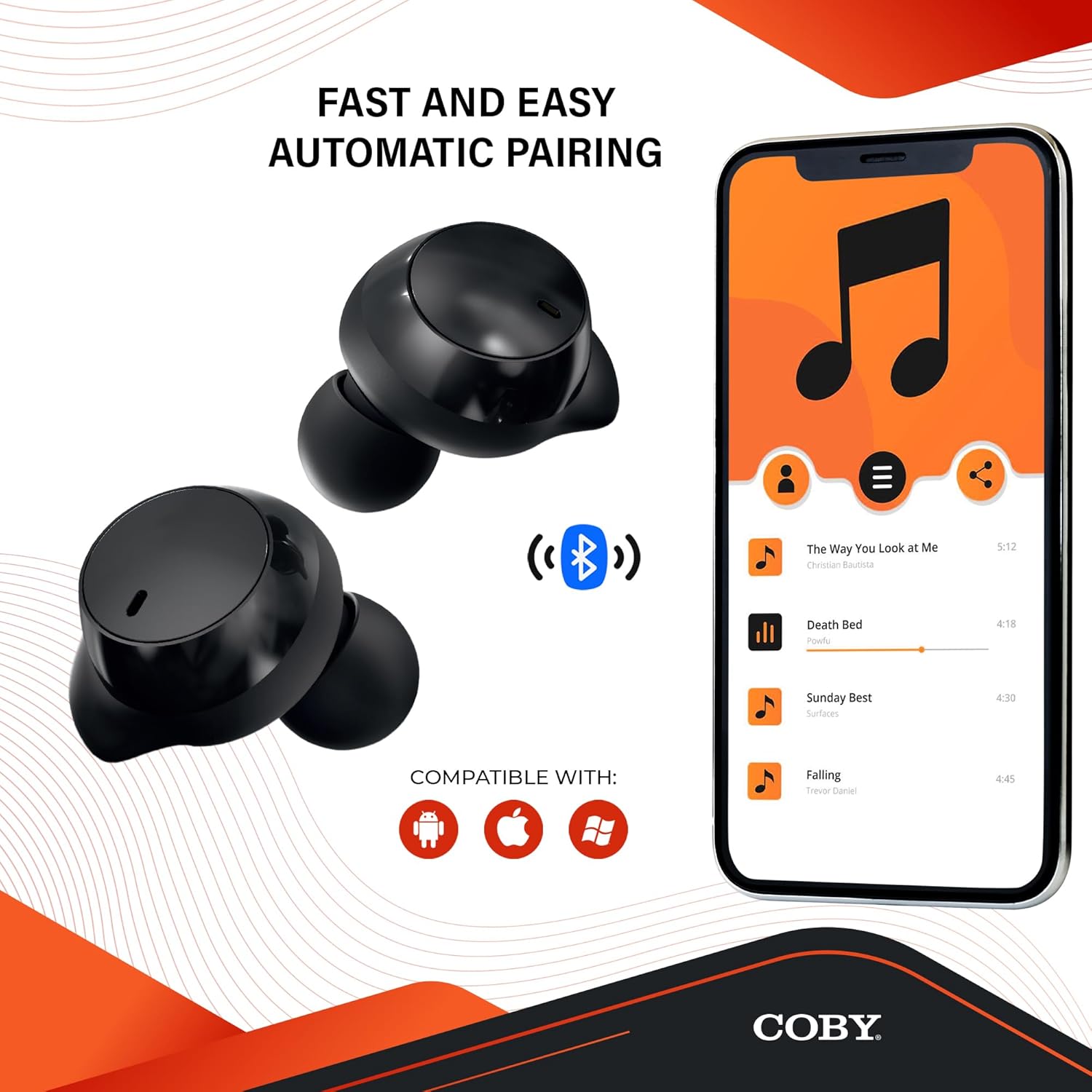
Image: The earbuds next to a smartphone displaying a music playlist, illustrating the fast and easy automatic pairing process and compatibility with Android, Apple, and Windows devices.
작동 지침
오디오 재생
Enjoy high-fidelity sound quality with dynamic audio and crystal-clear clarity for your music, podcasts, and audiobooks.
핸즈프리 통화
The earbuds support hands-free calling, allowing you to take calls directly through the earbuds.
음성 지원
Activate your preferred voice assistant (Siri or Google Assistant) with a quick voice command. This allows you to make calls, send texts, check notifications, and more without needing to access your phone.

Image: The earbuds with accompanying text emphasizing high-fidelity sound quality, sweat-resistant design, comfortable and secure fit, and compatibility with Siri and Google Assistant.

Image: The Coby Pro Fitness Earbuds displayed with logos indicating compatibility with Google Assistant and Siri.
유지 보수 및 관리
이어버드의 수명과 최적의 성능을 보장하려면:
- Sweat Resistant Design: The earbuds are thoughtfully crafted to divert sweat and moisture, making them ideal for workouts. However, they are not fully waterproof; avoid submerging them in water.
- 청소: Regularly clean the earbuds and charging case with a soft, dry, lint-free cloth. Gently remove any earwax or debris from the eartips and speaker mesh using a small, soft brush or cotton swab.
- 저장: 사용하지 않을 때는 이어버드를 충전 케이스에 보관하여 보호하고 충전 상태를 유지하세요.
- 온도: 이어버드를 극한의 온도(더위나 추위) 또는 직사광선에 장시간 노출시키지 마세요.

Image: A person in athletic wear preparing to run, wearing the earbuds, illustrating the sweat-resistant design suitable for active use.

Image: Two individuals engaged in a workout, both wearing the earbuds, demonstrating their suitability for fitness activities.
문제 해결
If you encounter any issues with your Coby Pro Fitness Earbuds, try the following steps:
- 소리 없음:
- 이어폰이 충전되어 있는지 확인하세요.
- 기기의 Bluetooth 연결을 확인하세요.
- 이어폰과 기기의 볼륨을 모두 높이세요.
- 이어버드가 페어링되지 않음:
- 기기에서 Bluetooth가 활성화되어 있는지 확인하세요.
- 이어버드가 페어링 모드(케이스 열기)인지 확인하세요.
- 휴대폰의 Bluetooth 목록에서 해당 기기를 삭제하고 다시 페어링을 시도해 보세요.
- 이어폰이 기기로부터 10m 이내에 있는지 확인하세요.
- 충전 문제:
- 충전 케이블과 전원이 제대로 작동하는지 확인하십시오.
- 이어폰이 충전 케이스에 올바르게 끼워져 있는지 확인하세요.
- 이어폰과 케이스의 충전 접점을 모두 청소하세요.
명세서
| 특징 | 세부 사항 |
|---|---|
| 모델명 | CETW553 |
| 품목 모델 번호 | COBY-CETW553 |
| 연결 기술 | 무선(블루투스) |
| 블루투스 버전 | 5.3 |
| 블루투스 범위 | 10 미터 |
| 배터리 수명(이어버드) | 15시간 |
| 휴대용 케이스 배터리 수명 | 20시간(추가) |
| 방수 레벨 | 방수 (땀 방지) |
| 소음 제어 | 소리 차단 |
| 제어 유형 | Voice (Google Assistant, Siri Compatible) |
| 주파수 범위 | 20Hz - 20,000Hz |
| 품목 무게 | 1.4 온스 |
| 제품 치수 | 0.96 x 0.7 x 0.94 인치 |
| 재료 | 실리콘(귀끝) |
| 한국어: | 643620020401 |
| 제조업체 | 서밋 전자 LLC |
| 원산지 | 중국 |
보증 및 지원
For warranty information and customer support, please refer to the warranty card included with your product or visit the official Coby web대지.
You can also visit the Coby Store on Amazon for more information: 코비 아마존 스토어.


