1. 서론
This manual provides instructions for the setup, operation, and maintenance of your Ceybo 06-519W37-TY01X Remote Control. This remote is designed for seamless compatibility with various JVC HD LED Smart TV models, offering intuitive control over your television's functions and quick access to popular streaming services.

이미지 1: 앞면과 뒷면 view of the Ceybo 06-519W37-TY01X Remote Control, showcasing its ergonomic design and battery compartment.
2. 설정
2.1 배터리 설치
- 리모콘 뒷면에서 배터리함을 찾으세요.
- 배터리 덮개를 아래로 밀어서 엽니다.
- AAA 배터리 2개(별도 구매)를 넣을 때, 양극(+)과 음극(-) 단자가 배터리함 안쪽의 표시와 정확히 일치하는지 확인하십시오.
- 배터리 덮개를 위로 밀어서 딸깍 소리가 날 때까지 제자리에 고정합니다.

Image 2: The back of the remote control with the battery compartment open, illustrating the correct placement for two AAA batteries.
2.2 초기 사용
The Ceybo 06-519W37-TY01X Remote Control is designed for immediate use with compatible JVC Smart TVs. 프로그래밍이나 페어링이 필요하지 않습니다. Once batteries are installed, the remote is ready to operate your television.

Image 3: The remote control, emphasizing that no programming is needed for operation.
3. 사용 설명서
The remote control features a standard layout for easy navigation and control of your JVC Smart TV.
3.1 기본 기능
- 전원 버튼 (⬤): TV를 켜거나 끕니다.
- 숫자 버튼(0-9)채널을 직접 선택하세요.
- 볼륨 높이기/낮추기(VOL +/-): 사운드 레벨을 조정합니다.
- 채널 위/아래(CH +/-): TV 채널을 바꿉니다.
- 음소거 버튼(🔇): TV 소리를 음소거하거나 음소거 해제합니다.
- 탐색 패드(위, 아래, 왼쪽, 오른쪽, 확인): 메뉴를 탐색하고 선택 사항을 확인합니다.
- 소스 버튼: 입력 소스(HDMI, AV 등)를 선택합니다.
- 종료 버튼: 현재 메뉴나 애플리케이션을 종료합니다.
- 정보 버튼: 현재 프로그램이나 입력에 대한 정보를 표시합니다.
3.2 바로가기 버튼
리모컨에는 인기 스트리밍 애플리케이션에 빠르게 접근할 수 있는 전용 버튼이 포함되어 있습니다.
- 넷플릭스 버튼: Launches the Netflix application directly.
- 유튜브 버튼: Launches the YouTube application directly.

이미지 4: 자세한 view of the remote control, showing the dedicated Netflix and YouTube shortcut buttons for quick access.
4. 호환성
This Ceybo 06-519W37-TY01X Remote Control is compatible with the following JVC HD LED Smart TV models:
- S139H
- S140FS
- SI49FSC
- SI50US
- SI55FS
- SI65FS
- Sl32HS
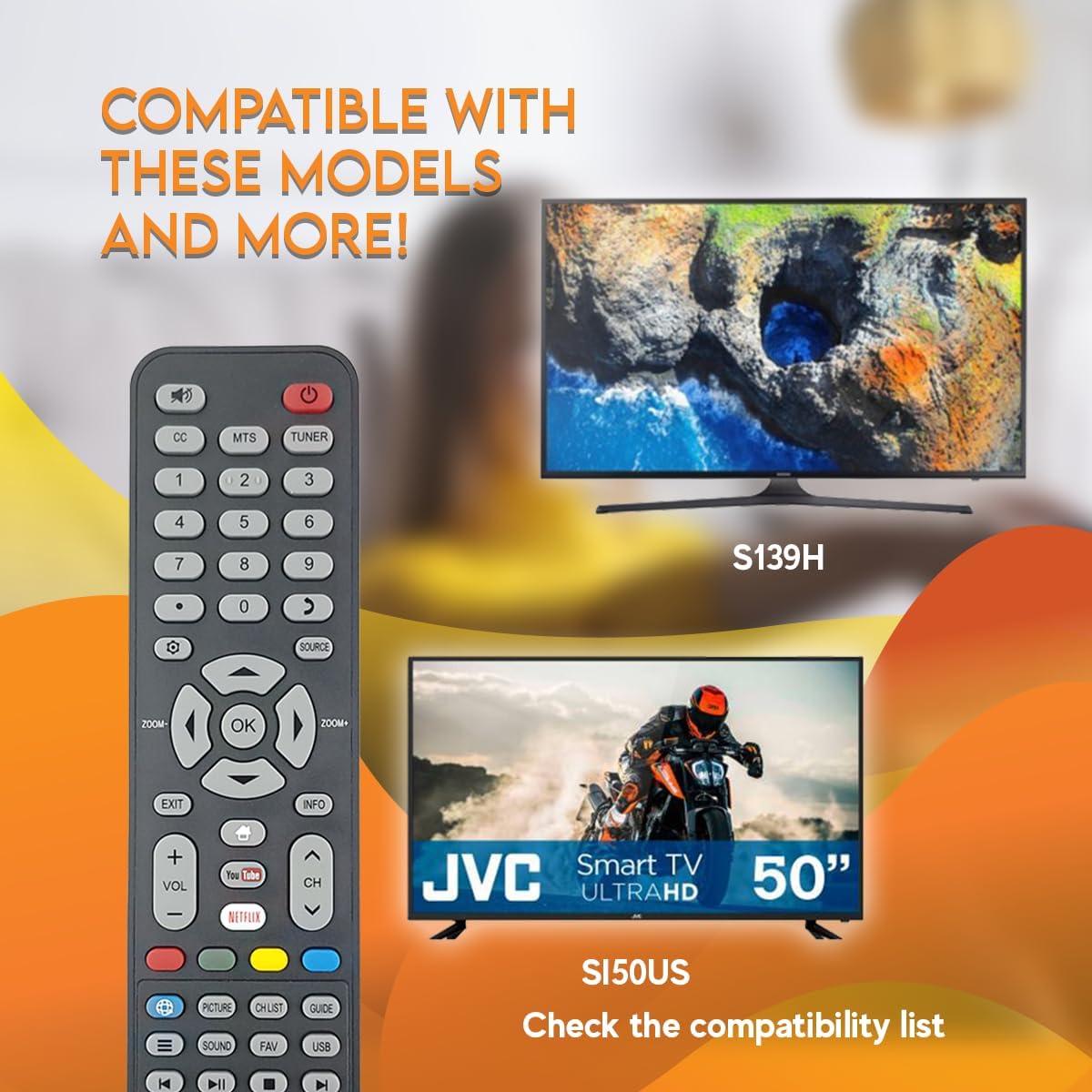
Image 5: The remote control displayed with examples of compatible JVC TV models, such as S139H and SI50US.
5. 유지관리
5.1 청소
리모컨을 청소하려면 부드럽고 마른 천을 사용하세요. 찌든 때는 가볍게 두드려 닦아주세요.amp천에 물이나 순한 비연마성 세제를 묻혀 닦으십시오. 강한 화학 물질이나 연마성 물질은 리모컨 표면이나 내부 부품을 손상시킬 수 있으므로 사용하지 마십시오.
5.2 배터리 교체
리모컨의 반응이 느리거나 작동이 멈추면 배터리를 교체하세요. AAA 배터리는 항상 새 배터리로 동시에 교체하세요. 오래된 배터리와 새 배터리, 또는 종류가 다른 배터리를 함께 사용하지 마세요.
6. 문제 해결
- 리모컨이 응답하지 않음:
- 배터리가 올바른 극성에 맞게 올바르게 삽입되었는지 확인하세요.
- 오래된 배터리를 새 배터리로 교체하십시오.
- 리모컨과 TV의 적외선 센서 사이에 시야가 확보되어 있는지 확인하십시오. 장애물이 있으면 신호가 차단될 수 있습니다.
- 리모컨이 TV를 똑바로 향하도록 하세요.
- 작동하지 않는 특정 버튼:
- Clean the remote control, especially around the unresponsive buttons, to remove any dirt or debris that might be causing interference.
- If only certain buttons are not working after checking batteries and line of sight, the remote may be faulty and require replacement.
7. 사양
| 특징 | 세부 사항 |
|---|---|
| 모델 번호 | 06-519W37-TY01X |
| 상표 | 사이보 |
| 호환 장치 | JVC HD LED Smart Televisions |
| 연결 기술 | 적외선 (IR) |
| 전원 | AAA 배터리 2개(포함되지 않음) |
| 특징 | Ergonomic Design, Quick Access Buttons (Netflix, YouTube) |
8. 보증 및 지원
보증 정보 또는 기술 지원에 대한 문의는 구매 시 제공된 설명서를 참조하시거나 판매자에게 직접 문의해 주세요. 보증 청구를 위해 구매 증빙 자료를 보관해 주세요.


