소개
The Phrozen Cure Mega S is an advanced resin curing station designed for post-processing 3D printed models. It features both drying and UV curing functions, a 360-degree transparent turntable, and dual high-speed fans to ensure efficient and uniform curing of large and small models. This manual provides essential information for the safe and effective operation, setup, and maintenance of your Phrozen Cure Mega S.
안전 정보
Please read all safety instructions carefully before operating the device to prevent injury or damage.
- Always wear appropriate personal protective equipment (PPE), such as gloves and eye protection, when handling uncured resin or models that have not been fully cured.
- Ensure the device is placed on a stable, level surface away from direct sunlight and flammable materials.
- Do not look directly at the UV light source during operation.
- 감전 사고를 방지하기 위해 기기를 물이나 기타 액체로부터 멀리하십시오.
- 청소나 유지관리를 하기 전에는 반드시 장치의 플러그를 전원 콘센트에서 뽑아주세요.
- 어린이와 애완동물의 손이 닿지 않는 곳에 보관하세요.
제품 끝view
The Phrozen Cure Mega S is a robust curing station designed for large-scale and high-volume post-processing. Its intuitive design allows for easy access and efficient operation.

이미지: 앞면 view of the Phrozen Cure Mega S curing station, showcasing its compact, black enclosure with a transparent orange-tinted door.
주요 구성 요소
- Main Curing Chamber: The enclosed space where models are dried and cured.
- Transparent Turntable: Rotates models 360 degrees for even curing.
- 자외선 광원: Emits 405nm UV light for resin solidification.
- High-Speed Fans: Two fans for efficient drying of models.
- 터치 패널: User interface for controlling drying and curing settings.
- 탈착식 랙: Allows for flexible curing of various model sizes.
- Side-Swing Door: Provides easy access to the curing chamber.
- Built-In Interior Light: Illuminates the chamber for monitoring progress.

Image: Visual representation of the Phrozen Cure Mega S's smart design, highlighting the side-swing door, interior lighting, and the touch panel interface.
설정
Follow these steps for the initial setup of your Phrozen Cure Mega S.
- 장치 포장 풀기: Carefully remove the Phrozen Cure Mega S from its packaging. Retain all packaging materials for future transport or storage.
- 위치를 선택하세요: Place the curing station on a flat, stable, and heat-resistant surface in a well-ventilated area. Ensure there is sufficient space around the unit for air circulation.
- 전원 연결: Plug the power cord into the power input port on the back of the unit, then plug the other end into a grounded electrical outlet.
- Install Turntable: Place the transparent turntable securely onto the rotating mechanism inside the curing chamber.
- Optional Rack Installation: If curing smaller or multiple models, install the removable rack at the desired height within the chamber.
- 전원 켜기: 터치 패널의 전원 버튼을 눌러 기기를 켜세요.
작업
The Phrozen Cure Mega S offers versatile drying and curing options for your 3D printed models.
Drying and Curing Functions
The device allows you to select between drying, curing, or a combined dry and cure cycle.
- 건조 모드: Utilizes dual high-speed fans (1700 RPM) to quickly dry models, removing residual alcohol or moisture after washing.
- Curing Mode: Activates the 405nm UV light source to solidify resin models, enhancing their hardness and durability. The 360-degree light source and rotating turntable ensure uniform exposure.
- Dry & Cure Mode: Performs a drying cycle followed by a curing cycle automatically, streamlining the post-processing workflow.

Image: Depicts the Phrozen Cure Mega S in operation, highlighting its dual-action drying (1700 RPM) and 360-degree curing capabilities.
터치 패널 사용
The touch panel provides intuitive control over the device's functions.
- 모드 선택: On the main screen, tap the desired mode: Fan + Cure (Dry & Cure), UV Cure, 또는 팬 (Drying).
- 시간 설정: Use the '+' and '-' buttons to adjust the duration for the selected mode. Recommended curing times vary based on resin type and model size.
- 시작 주기: Press the 'Start' button to begin the process. The interior light will activate, and the turntable will begin to rotate.
- 진행 상황 모니터링: Use the built-in interior light to observe the drying or curing state of your models through the transparent door.
- End Cycle: The device will automatically stop once the set time has elapsed. You can also manually stop the cycle by pressing the 'Stop' button.
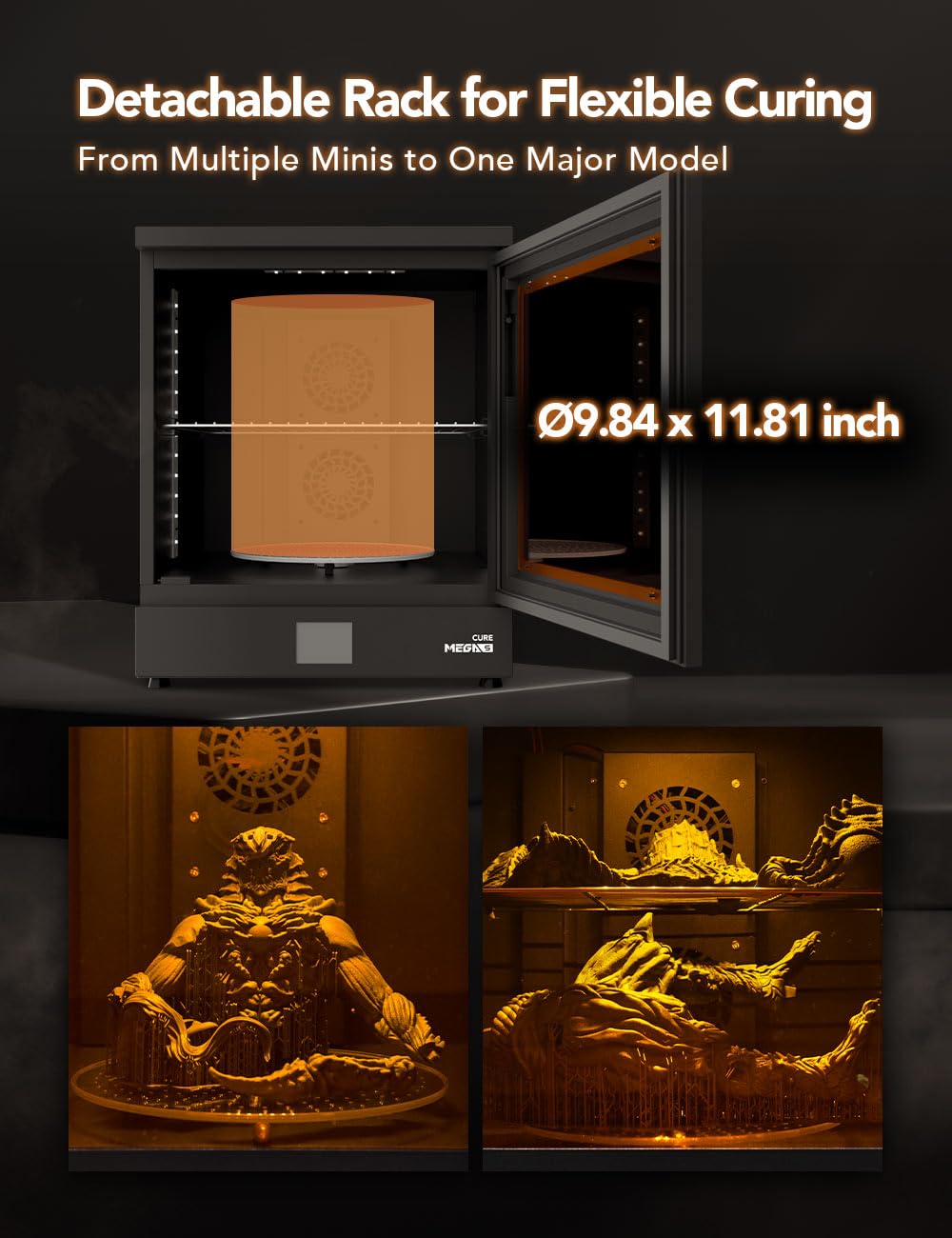
Image: Illustrates the detachable rack feature, showing how it accommodates both large single models and multiple smaller models for flexible curing.
유지
Regular maintenance ensures optimal performance and longevity of your Phrozen Cure Mega S.
- 챔버 청소: After each use, especially if resin spills occur, wipe down the interior of the curing chamber with a soft cloth dampened with isopropyl alcohol (IPA). Ensure the device is unplugged.
- 턴테이블 청소하기: Remove the turntable and clean it with IPA. Ensure it is completely dry before placing it back into the unit.
- 외부 청소: 외부 표면은 부드럽고 마른 천으로 닦으십시오. 연마성 세제나 용제 사용은 피하십시오.
- 자외선 광원: Periodically check the UV LEDs for any dust or residue and gently clean them with a soft, dry cloth if necessary.
- 저장: 장시간 사용하지 않을 경우, 직사광선을 피해 시원하고 건조한 곳에 보관하세요.
문제 해결
This section addresses common issues you might encounter with your Phrozen Cure Mega S.
| 문제 | 가능한 원인 | 해결책 |
|---|---|---|
| 장치의 전원이 켜지지 않습니다. | 전원 코드가 제대로 연결되지 않았습니다. 콘센트에 전원이 공급되지 않습니다. | 전원 코드 연결을 확인하세요. 다른 기기로 콘센트를 테스트해 보세요. |
| UV light not activating. | Curing mode not selected; door not fully closed. | Ensure 'UV Cure' or 'Fan + Cure' mode is selected. Close the door securely. |
| 턴테이블이 회전하지 않습니다. | Turntable not properly seated; obstruction. | Re-seat the turntable. Check for any debris obstructing rotation. |
| Models not curing evenly. | Insufficient curing time; models too close together. | Increase curing time. Ensure models are spaced adequately on the turntable. |
| Models not drying effectively. | Drying mode not selected; fans obstructed. | Ensure 'Fan' or 'Fan + Cure' mode is selected. Check for obstructions near fan vents. |
명세서
Technical specifications for the Phrozen Cure Mega S.
| 특징 | 세부 사항 |
|---|---|
| 모델 번호 | 큐어메가스00US |
| 제품 치수 | 15.6"D x 18.7"W x 19.1"H (39.5cm W x 47.5cm D x 48.6cm H) |
| 품목 무게 | 15킬로그램(33.07파운드) |
| 재료 | 금속 |
| 경화파장 | 405nm UV Light |
| 팬 속도 | 1700 RPM (듀얼 팬) |
| Turntable Rotation | 360도 |
| 제조업체 | 프로젠 테크 주식회사 |
| 첫 번째 가능한 날짜 | 9년 2023월 XNUMX일 |

Image: Diagram showing the physical dimensions of the Phrozen Cure Mega S: 47.5cm depth, 39.5cm width, and 48.6cm height.
보증 및 지원
For warranty information, technical support, or service inquiries, please contact Phrozen customer support through their official web제품을 구매한 사이트 또는 소매업체.
온라인 리소스: Visit the official Phrozen webFAQ, 업데이트된 드라이버 및 추가 지원 자료를 제공하는 사이트입니다.
연락처 정보: Refer to your purchase documentation or the Phrozen web구체적인 연락처 정보는 해당 사이트를 참조하세요.


