소개
This manual provides comprehensive instructions for the installation, operation, and maintenance of the Tridonic Linear Essence Series 43 Watts Constant Current LED Driver. This driver is designed for high-performance constant current output and 0-10V dimming control, making it suitable for energy-efficient commercial lighting systems in the U.S. Please read this manual thoroughly before installation and use to ensure safe and optimal performance.
안전 정보
경고: 감전 위험이 있습니다. 설치는 모든 관련 국가 및 지역 전기 규정을 준수하여 자격을 갖춘 전기 기술자가 수행해야 합니다.
- 설치 또는 수리하기 전에 전원을 차단하십시오.
- 전기 위험을 방지하기 위해 적절한 접지를 확인하십시오.
- 지정된 입력 볼륨을 초과하지 마십시오tage or output power ratings.
- This device is designed for dry and damp locations only. Do not expose to water or excessive moisture.
- 운전석 주변의 환기를 충분히 하여 과열을 방지하십시오.
- The driver is equipped with overload, short-circuit, no-load, and overtemperature protection. However, proper installation is crucial for safe operation.
패키지 내용
설치를 시작하기 전에 모든 구성 요소가 있는지 확인하세요.
- 1 x Tridonic Linear Essence Series 43W Constant Current LED Driver (Model: TLD-CC43W-UNV-LE2)
설정 및 설치
Follow these steps for proper installation of your Tridonic LED Driver. Ensure power is disconnected before proceeding.
1. 드라이버 장착
Mount the LED driver securely in a suitable enclosure or fixture. Ensure the mounting surface is stable and can support the weight of the driver. Allow for adequate space around the driver for air circulation to prevent overheating.
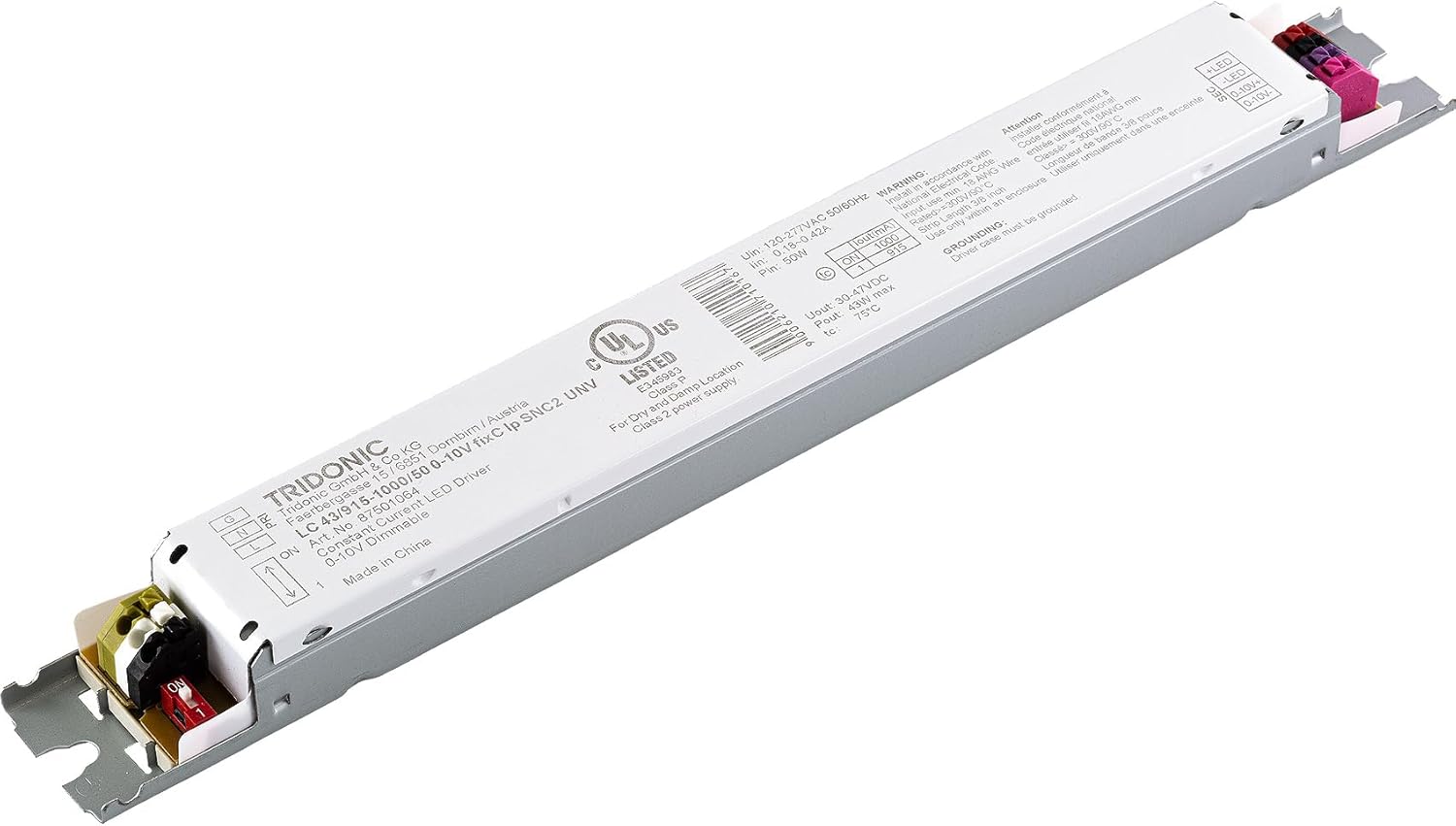
Figure 1: Tridonic Linear Essence Series 43W LED Driver. This image shows the overall design of the driver, highlighting its compact form factor and the terminal blocks for electrical connections.
2. 배선 연결
Refer to the wiring diagram on the driver label and the instructions below for correct electrical connections. Use appropriate wire gauges for all connections.

그림 2: 상세 view of the Tridonic LED driver's wiring terminals. This image provides a close-up of the input (AC Line, Neutral, Ground) and output (LED positive/negative, 0-10V dimming control) connections, which are clearly labeled on the driver's casing.
- 입력 전원(AC): Connect the AC line (L), neutral (N), and ground (G) wires from your power source to the corresponding terminals on the driver. The driver supports a rated supply voltag120-277V AC의 전원입니다.
- LED Output (DC): Connect the LED positive (LED+) and LED negative (LED-) wires from your LED module to the corresponding output terminals on the driver. Ensure correct polarity.
- 0-10V 디밍 제어: Connect the 0-10V dimming control wires (0-10V+ and 0-10V-) from your dimming system to the dedicated dimming terminals. This allows for dimming from 10% to 100%.
- 접지: Ensure the driver casing is properly grounded.
3. Output Current Adjustment (DIP Switches)
The driver features adjustable output current settings (915mA or 1,000mA) via DIP switches. Refer to the driver's label for the specific DIP switch configuration to select your desired output current. Adjust these settings before applying power.
설치 비디오 가이드
For a visual guide on wiring and installation, please refer to the official Tridonic Switch Series LED Drivers video below. This video demonstrates the connection process for similar Tridonic drivers, providing helpful visual cues for proper wiring.
Video: Tridonic Switch Series LED Drivers. This video illustrates the wiring process for Tridonic LED drivers, including connecting input power, LED output, and dimming control wires. It provides a practical demonstration of the steps involved in setting up the driver.
작동 지침
Once installed and wired correctly, the Tridonic LED driver operates automatically. The primary control is through the 0-10V dimming interface.
- 전원 켜기/끄기: The LED driver will power on when AC input voltage가 제공됩니다.
- 디밍 : Use a compatible 0-10V dimmer connected to the dimming terminals to adjust the light output from 10% to 100%. A 0V signal typically corresponds to the minimum dimming level (10%), and a 10V signal corresponds to 100% light output.
유지
The Tridonic LED driver is designed for long-term, maintenance-free operation. However, periodic checks can help ensure continued performance.
- 청소: Ensure the driver's exterior is free from dust and debris to maintain proper heat dissipation. Clean with a dry, soft cloth. Do not use liquid cleaners.
- 사이: Periodically inspect all wiring connections to ensure they remain secure. Loose connections can lead to intermittent operation or electrical hazards.
- 환경: Verify that the operating environment remains within the specified temperature and humidity ranges (Dry and Damp Location, IP20).
문제 해결
LED 드라이버에 문제가 발생하면 다음의 일반적인 문제 및 해결 방법을 참조하십시오.
| 문제 | 가능한 원인 | 해결책 |
|---|---|---|
| LED가 켜지지 않음 | No input power; Incorrect wiring; Faulty LED module; Driver protection activated. | Check power supply; Verify all wiring connections (L, N, G, LED+, LED-); Test LED module; Cycle power to reset driver protection. |
| LEDs flickering or unstable dimming | Loose connections; Incompatible dimmer; Dimming wires incorrectly connected. | Check all wiring connections; Ensure 0-10V dimmer is compatible; Verify 0-10V+ and 0-10V- connections. |
| Driver is hot to the touch | 환기 부족; 과부하. | Ensure adequate airflow around the driver; Verify total LED load does not exceed 43W. |
| Dimming range not 10-100% | Dimmer incompatibility; Dimmer settings. | Confirm dimmer is fully compatible with 0-10V standard; Check dimmer's minimum/maximum settings. |
명세서
| 특징 | 세부 사항 |
|---|---|
| 모델 번호 | 87501064 (LC 43/915–1000/50 0-10V fixC lp SNC2 UNV) |
| 유형 | 정전류 LED 드라이버 |
| 출력 전력 | 43W(최대) |
| 정격 공급량tage | 120–277V AC |
| AC 볼륨tag및 범위 | 108–305V AC |
| 주전원 주파수 | 50/60Hz |
| 최대 출력 볼륨tage (U-OUT) | 60V 직류 |
| 디밍 인터페이스 | 0-10V |
| 디밍 범위 | 10~100% |
| 조정 가능한 출력 전류 | 915 mA or 1,000 mA (via DIP switches) |
| IP 등급 | IP20 |
| 하우징 소재 | Metal, White |
| 보호 기능 | Overload, Short-circuit, No-load, Overtemperature |
| 공칭 수명 | 최대 50,000시간 |
| 제품 크기(L x W x H) | 11.00" x 1.10" x 0.90" in. |
| 제품 무게 | 7.0 온스 |
| 인증 | UL Listed Class P, Meets DesignLights Consortium 4.3 |
보증
The Tridonic Linear Essence Series LED Driver is backed by a 5년 보증 from the date of purchase. This warranty covers defects in materials and workmanship under normal use and service conditions. Please retain your proof of purchase for warranty claims. The warranty does not cover damage resulting from improper installation, misuse, abuse, or unauthorized modifications.
지원하다
For technical assistance, troubleshooting beyond this manual, or warranty inquiries, please contact Tridonic customer support or your authorized dealer. Provide your product model number (87501064) and a detailed description of the issue when seeking support.
You can also visit the official Tridonic web추가 리소스 및 연락처 정보는 사이트를 참조하십시오.


