1. 서론
This manual provides essential information for the safe and efficient operation of your HYUNDAI Smart TV 42-inch Full HD. Please read this manual thoroughly before using the television and retain it for future reference. This television features a 42-inch Full HD (1920x1080p) display, VIDAA operating system, and integrated smart applications such as Netflix, YouTube, and Prime Video. It also supports Screencast functionality for content sharing from mobile devices.
2. 안전 정보
Always follow basic safety precautions when using this television to reduce the risk of fire, electric shock, and injury. Ensure the television is placed on a stable surface. Do not block ventilation openings. Avoid exposing the television to rain or moisture. Disconnect the power cord during lightning storms or when unused for long periods. Refer to the full safety guidelines in the included safety sheet.
3. 설정
3.1 포장 해제 및 스탠드 설치
Carefully remove the television from its packaging. Attach the included stands to the bottom of the television using the provided screws. Ensure the stands are securely fastened before placing the TV upright.

앞쪽 view of the HYUNDAI 42-inch Smart TV with its stand, displaying the VIDAA smart interface.
3.2 외부 장치 연결
Your television is equipped with multiple ports for connecting various devices:
- HDMI 포트(3개): 블루레이 플레이어, 게임 콘솔, 셋톱박스를 연결합니다.
- USB 포트(2개): 미디어 재생을 위해 USB 저장 장치를 연결하세요.
- CI+ 슬롯: 암호화된 디지털 채널용 CI+ 모듈을 삽입하세요.
- RJ45(이더넷): 인터넷에 접속하려면 홈 네트워크에 연결하세요.
- 광 출력: 외부 오디오 시스템에 연결하세요.
- 헤드폰 출력: 개인 청취를 위해 헤드폰을 연결하십시오.

옆 view of the HYUNDAI 42-inch Smart TV, showing various input and output ports including HDMI and USB.
3.3 초기 설정 마법사
Upon first power-on, the TV will guide you through an initial setup process. This includes selecting your language, connecting to a Wi-Fi network, and scanning for available channels.
4. 운영
4.1 기본 TV 기능
- 힘: 리모컨의 전원 버튼을 눌러 TV를 켜거나 끕니다.
- 용량: VOL +/- 버튼을 사용하여 사운드 레벨을 조절하세요.
- 채널: Use the CH +/- buttons to change channels or the number buttons for direct channel selection.
- 입력 소스: Press the SOURCE button to select between HDMI, USB, TV, and other inputs.
4.2 스마트 TV 기능(VIDAA OS)
Your HYUNDAI Smart TV runs on the VIDAA operating system, providing access to a variety of applications and features.

The HYUNDAI Smart TV displaying the VIDAA smart interface with various streaming app icons like Netflix, YouTube, Prime Video, and Disney+.
- 사전 설치된 앱: 홈 화면에서 넷플릭스, 유튜브, 프라임 비디오와 같은 인기 스트리밍 서비스를 바로 이용할 수 있습니다.
- 앱 스토어: VIDAA 앱 스토어에서 더 많은 애플리케이션을 찾아보고 다운로드하세요.
- 스크린 캐스트 : Use the Screencast feature to mirror content from your compatible smartphone or tablet to the TV screen.

A smartphone displaying a city skyline next to the HYUNDAI Smart TV, which is mirroring the same image, illustrating the Screencast feature.
5. 유지관리
5.1 텔레비전 청소
청소하기 전에 벽면 콘센트에서 전원 코드를 뽑으세요. 부드럽고 마른 천으로 화면과 캐비닛을 닦으세요. 잘 지워지지 않는 얼룩은 가볍게 닦아주세요.ampen the cloth with water or a mild, non-abrasive cleaner specifically designed for electronics. Never spray liquid directly onto the screen or cabinet.
5.2 소프트웨어 업데이트
The television may receive software updates to improve performance and add new features. Ensure your TV is connected to the internet to receive automatic updates. You can also check for updates manually through the TV's settings menu.
6. 문제 해결
텔레비전에 문제가 발생하면 다음의 일반적인 해결 방법을 참조하십시오.
- 전원 없음: TV와 벽면 콘센트에 전원 코드가 제대로 꽂혀 있는지 확인하십시오. 콘센트가 정상적으로 작동하는지 확인하십시오.
- 화면/소리 없음: Verify the correct input source is selected. Check all cable connections (HDMI, antenna). Try another channel or input device.
- 인터넷에 연결되지 않음: Ensure your Wi-Fi router is on and functioning. Reconnect to the Wi-Fi network in the TV settings. For wired connections, check the Ethernet cable.
- 원격 제어가 작동하지 않음: 리모컨의 배터리를 교체하세요. 리모컨과 TV IR 센서 사이에 장애물이 없는지 확인하세요.
- 화질 문제: TV 메뉴에서 화면 설정(밝기, 명암, 선명도)을 조정하십시오. 입력 소스에서 고품질 신호가 나오는지 확인하십시오.
If problems persist, consider performing a factory reset through the TV's settings menu (note: this will erase all personalized settings and data). For further assistance, contact customer support.
7. 사양
| 특징 | 사양 |
|---|---|
| 모델 번호 | HY-TV42SFHD-001 |
| 화면 크기 | 42인치(105cm) |
| 해결 | 풀 HD (1920 x 1080p) |
| 운영 체제 | 비다 |
| HDMI 포트 | 3 (version 1.4, 1x ARC) |
| USB 포트 | 2 (version 2.0) |
| 연결성 | Wi-Fi, RJ45 (Ethernet) |
| 특별 기능 | Smart TV, Netflix, YouTube, Prime Video, Screencast, CI+ |
| 권tage | 230볼트 |
| 제품 치수(W x D x H) | 96.8 x 23.1 x 62.2cm (스탠드 포함) |
| 무게 | 6.15kg |
| 에너지 효율 등급 | E |
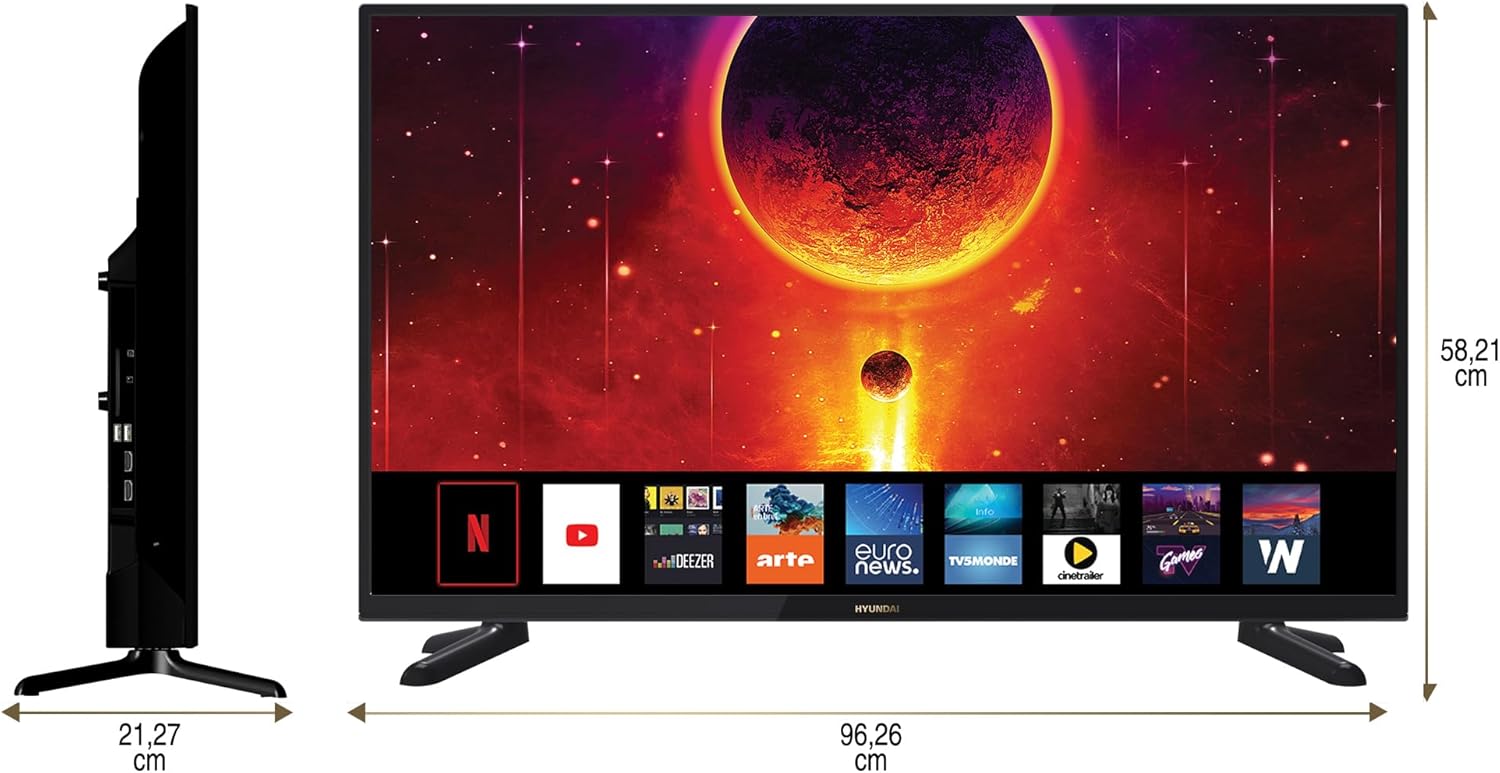
Diagram showing the dimensions of the HYUNDAI 42-inch Smart TV, with a width of 96.26 cm and a height of 58.21 cm.
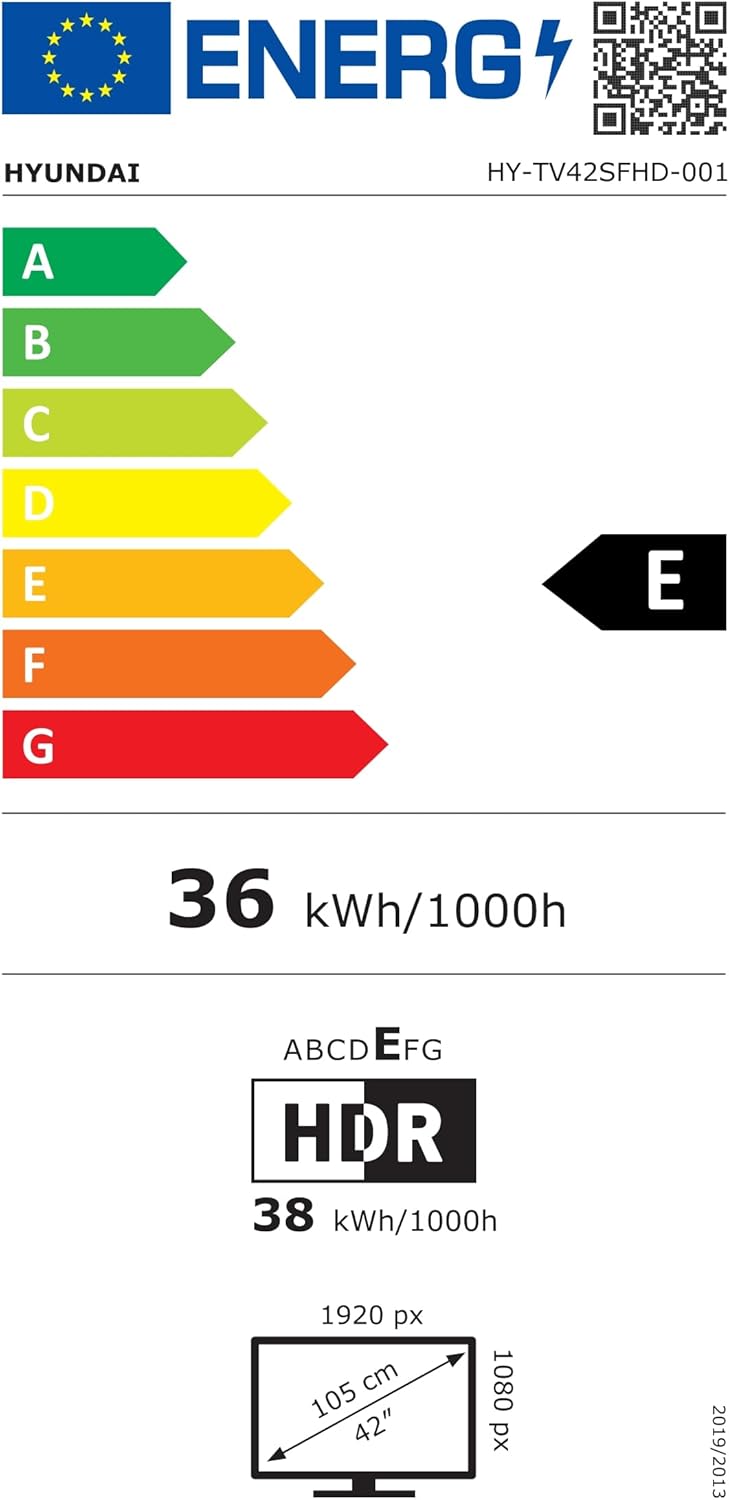
EU Energy Label for the HYUNDAI HY-TV42SFHD-001 television, showing an energy efficiency class of E and energy consumption of 36 kWh/1000h. For more details, visit eprel.ec.europa.eu/qr/1598831.
8. 보증 및 지원
8.1 보증 정보
Your HYUNDAI Smart TV is covered by a manufacturer's warranty. The specific terms and duration of the warranty may vary by region. Please refer to the warranty card included with your product or visit the official HYUNDAI web자세한 보증 정보는 사이트를 참조하십시오.
8.2 고객 지원
For technical assistance, troubleshooting not covered in this manual, or warranty claims, please contact HYUNDAI customer support. Contact details can typically be found on the official HYUNDAI web해당 웹사이트 또는 텔레비전과 함께 제공된 설명서를 참조하십시오.


